
Neject 在MVC框架中使用
Neject 开始是用3.3.0.0,不能自动生成NinjectWebCommon文件,测试了很久发现,是版本的问题 ,后来用Nuget卸载后,重新下了Ninject,Ninject.Web.Common,Ninject.Web.Mvc这三个程序集,都是选择3.2.0.0版本的,然后进行测试,加一个类库,里面放接口,实现类,以及实体类
1.创建接口
using ADT.Entities;

using System;

using System.Collections.Generic;

using System.Linq;

using System.Text;

using System.Threading.Tasks;

namespace ADT.Abstract

{

    public interface IProduct

    {

        /// <summary>

        /// 根据主键id获取一个实体

        /// </summary>

        /// <param name="id"></param>

        /// <returns></returns>

        ProductBean GetModelById(int id);

        /// <summary>

        /// 获取所有数据,返回List集合

        /// </summary>

        /// <returns></returns>

        List<ProductBean> GetAllList();

        bool AddOrEdit(ProductBean model);

        /// <summary>

        /// 根据主键id改变ValID值

        /// </summary>

        bool UpdateValIDById(long id, bool valid);

    }

}
2.创建实现类
using ADT.Abstract;

using ADT.Entities;

using CYQ.Data;

using System;

using System.Collections.Generic;

using System.Linq;

using System.Text;

using System.Threading.Tasks;

namespace ADT.Concrete

{

    public class Product : IProduct

    {

        /// <summary>

        /// 对商品的添加和编辑

        /// </summary>

        /// <param name="model"></param>

        /// <returns></returns>

        public bool AddOrEdit(ProductBean model)

        {

            bool result = false;

            using (MAction act = new MAction("Product"))

            {

                act.Set("ProductName", model.ProductName);

                act.Set("ProdutPrice", model.ProdutPrice);

                act.Set("ValidTime", model.ValidTime);

                act.Set("Valid", model.Valid);

                act.Set("Coin", model.Coin);

                if (model.Id > )

                {

                    result = act.Update("Id=" + model.Id);

                }

                else

                {

                    result = act.Insert();

                }

            }

            return result;

        }

        /// <summary>

        /// 获取全部产品信息

        /// </summary>

        /// <returns></returns>

        public List<ProductBean> GetAllList()

        {

            List<ProductBean> list = new List<ProductBean>();

            using (MAction act = new MAction("Product"))

            {

                list = act.Select().ToList<ProductBean>();

            }

            return list;

        }

        /// <summary>

        /// 根据主键id获取一个实体信息

        /// </summary>

        /// <param name="id"></param>

        /// <returns></returns>

        public ProductBean GetModelById(int id)

        {

            ProductBean model = null;

            using (MAction act = new MAction("Product"))

            {

                if (act.Fill(id))

                {

                    model = act.Data.ToEntity<ProductBean>();

                }

            }

            return model;

        }

        /// <summary>

        /// 根据主键id改变ValID值

        /// </summary>

        /// <param name="id"></param>

        /// <returns></returns>

        public bool UpdateValIDById(long id, bool valid)

        {

            bool result = false;

            using (MProc proc = new MProc("update Product set Valid=@valid where ID=@id"))

            {

                proc.Set("valid", valid);

                proc.Set("id", id);

                int num = proc.ExeNonQuery();

                if (num > )

                {

                    result = true;

                }

            }

            return result;

        }

    }

}
3.创建实体
using System;

using System.Collections.Generic;

using System.Linq;

using System.Text;

using System.Threading.Tasks;

namespace ADT.Entities

{

    public class ProductBean

    {

        /// <summary>

        /// 主键

        /// </summary>

        public Int64 Id { get; set; }

        /// <summary>

        /// 产品名称

        /// </summary>

        public string ProductName { get; set; }

        /// <summary>

        /// 产品价格

        /// </summary>

        public Decimal ProdutPrice { get; set; }

        /// <summary>

        /// 无期限的为0, 3个月为3,6个月为6, 12个月为12

        /// </summary>

        public int ValidTime { get; set; }

        /// <summary>

        /// 是否有效

        /// </summary>

        public bool Valid { get; set; }

        /// <summary>

        /// 产品虚拟币

        /// </summary>

        public Int64 Coin { get; set; }

    }

}
4.在web.config配置下连接字符串
<add name="conn" connectionString="server=.;database=xx;uid=sa;pwd=xxxx;Max Pool Size=512;Min Pool Size=5;Connect Timeout=600;" />
5.我用的是ORM框架是CYQ,Data,这边需要引用一个CYQ.Data的程序集,用作和数据库交互的
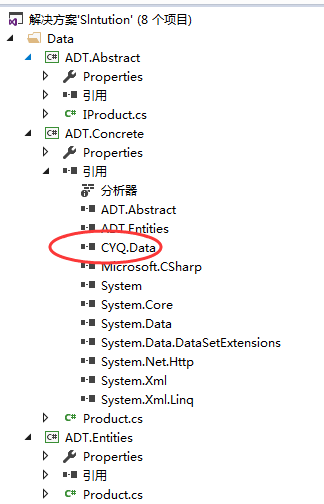
新增一个NinjectDependencyResolver.cs的文件,实现IDependencyResolver,贴上代码如下:
using ADT.Abstract;

using ADT.Concrete;

using Ninject;

using System;

using System.Collections.Generic;

using System.Linq;

using System.Web;

using System.Web.Mvc;

namespace WebApplication4

{

    public class NinjectDependencyResolver : IDependencyResolver

    {

        private IKernel kernel;

        public NinjectDependencyResolver(IKernel kernelParam)

        {

            kernel = kernelParam;

            AddBindings();

        }

        public object GetService(Type serviceType)

        {

            return kernel.TryGet(serviceType);

        }

        public IEnumerable<object> GetServices(Type serviceType)

        {

            return kernel.GetAll(serviceType);

        }

        private void AddBindings()

        {

            kernel.Bind<IProduct>().To<Product>();

        }

    }

}
接下来新键一个控制器,测试下依赖注入有没有成功
using ADT.Abstract;

using ADT.Entities;

using System;

using System.Collections.Generic;

using System.Linq;

using System.Web;

using System.Web.Mvc;

namespace WebApplication4.Controllers

{

    public class DefaultController : Controller

    {

        private IProduct productRepository;

        public DefaultController(IProduct productRepository)

        {

            this.productRepository = productRepository;

        }

        // GET: Default

        public ActionResult Index()

        {

            List<ProductBean> list = productRepository.GetAllList();

             ViewBag.count = list;

            return View();

        }

    }

}
这样下来,Neject在MVC5中的使用已经介绍完毕了。
Neject 在MVC框架中使用的更多相关文章
- 找到MVC框架中前端URL与后端同步的解决方案
基本思路: 先用URL标签生成完整的URL字符,前端动态参数的部分以适配符先填充,最后动态参数利用正则匹配进行替换. 这种方式,可以在各种MVC框架中适用,妙. 不废话,上码. var url = & ...
- [原]命令模式在MVC框架中的应用
其实在项目开发中,我们使用了大量的设计模式,只是这些设计模式都封装在框架中了,如果你想要不仅仅局限于简单的使用,就应该深入了解框架的设计思路. 在MVC框架中,模式之一就是命令模式,先来看看模式是如何 ...
- 命令模式在MVC框架中的应用
事实上在项目开发中,我们使用了大量的设计模式,不过这些设计模式都封装在框架中了,假设你想要不只局限于简单的使用,就应该深入了解框架的设计思路. 在MVC框架中,模式之中的一个就是命令模式,先来看看模式 ...
- asp.net MVC 框架中控制器里使用Newtonsoft.Json对前端传过来的字符串进行解析
下面我用一个实例来和大家分享一下我的经验,asp.net MVC 框架中控制器里使用Newtonsoft.Json对前端传过来的字符串进行解析. using Newtonsoft.Json; usin ...
- 在ASP.NET MVC 框架中调用 html文件及解析get请求中的参数值
在ASP.NET MVC 框架中调用 html文件: public ActionResult Index() { using (StreamReader sr = new StreamReader(P ...
- MVC框架中的值提供机制(三)
在MVC框架中NameValueCollectionValueProvider采用一个NameValueCollection作为数据源,DictionnaryValueProvider的数据源类型自然 ...
- MVC框架中的值提供机制(二)
在MVC框架中存在一些默认的值提供程序模板,这些值提供程序都是通过工厂模式类创建;在MVC框架中存在需要已Factory结尾的工厂类,在值提供程序中也存在ValueProviderFactories工 ...
- MVC框架中的值提供机制(一)
在MVC框架中action方法中的Model数据的绑定的来源有很多个,可能是http请求中的get参数或是post提交的表单数据,会是json字符串或是路径中的相关数据;MVC框架中针对这些不同的数据 ...
- MVC 框架中的缓存
在程序中加入缓存的目的很多是为了提高程序的性能,提高数据的查找效率,在MVC框架中也引入了非常多的缓存,比如Controller的匹配查找,Controller,ControllerDescripto ...
随机推荐
- autofac使用总结
转摘自:http://niuyi.github.io/blog/2012/04/06/autofac-by-unit-test/ 注册部分: AutoFac是.net平台下的IOC容器产品,它可以管理 ...
- c#图片裁剪
c#文件裁剪 Bitmap newbm = new Bitmap(nowWidth, nowHeight); Graphics g = Graphics.FromImage(newbm); g.Int ...
- vue day5 分页控件
<!DOCTYPE html> <html> <head> <meta http-equiv="Content-Type" content ...
- 使用docker构建简约高效的镜像
背景介绍 最近在思考一个问题,我的golang运行到docker环境上的时候,需要安装很大依赖.思考发现我需要就是一个运行二进制的环境而已并不需要golang的编译器等等其他任何多余的. 当前的doc ...
- 关于pycharm中缩进、粘贴复制等文本编辑功能部分失效的解决办法
有可能是同时安装了vim,冲突导致: 在seetings中点击Plugins,搜索vim卸载后功能恢复
- Vue2.5
1.1 创建第一个Vue实例
- CAFFE在win10+VS2017下的安装笔记
老版的caffe在BVLC的github上已经找不到,如果要想下载老版caffe可以下载微软的caffe版本:https://github.com/Microsoft/caffe 网上的大多安装caf ...
- VS2015 加快编译速度
在使用VS2015 编译的时候,每次修改工程中的某一个文件,启动调试时,往往都是整个工程都需要重新编译一遍.由于这个工程代码量太大,每次编译完成都需要将近10分钟左右的时间编译.最烦人的时候是当编译完 ...
- flutter mac 下安装
- Routemanage类方法详解
using System; using System.Collections.Generic; using System.IO; using System.Linq; using System.Ref ...