
在Spring Boot中动态实现定时任务配置
原文路径:https://zhuanlan.zhihu.com/p/79644891
在日常的项目开发中,往往会涉及到一些需要做到定时执行的代码,例如自动将超过24小时的未付款的单改为取消状态,自动将超过14天客户未签收的订单改为已签收状态等等,那么为了在Spring Boot中实现此类需求,我们要怎么做呢?
Spring Boot早已考虑到了这类情况,先来看看要怎么做。第一种方式是比较简单的,先搭建好Spring Boot微服务,加上这个注解 @EnableScheduling :
/**

 * @author yudong

 * @date 2019/8/24

 */

@EnableScheduling // 开启定时任务功能

@ComponentScan(basePackages = "org.javamaster.b2c")

@EnableTransactionManagement

@SpringBootApplication

public class ScheduledApplication {

    static Logger logger = LoggerFactory.getLogger(ScheduledApplication.class);

    public static void main(String[] args) {

        SpringApplication.run(ScheduledApplication.class, args);

        logger.info("定时任务页面管理地址:{}", "http://localhost:8089/scheduled/task/taskList");

    }

}
然后编写定时任务类:
/**

 * @author yudong

 * @date 2019/8/24

 */

@Component

public class FixedPrintTask {

    Logger logger = LoggerFactory.getLogger(getClass());

    private int i;

    @Scheduled(cron = "*/15 * * * * ?")

    public void execute() {

        logger.info("FixedPrintTask execute times:{}", ++i);

    }

}
@Scheduled(cron ="*/15 * * * * ?")注解表明这是一个需要定时执行的方法,里面的cron属性接收的是一个cron表达式,这里我给的是 */15 * * * * ? ,这个的意思是每隔15秒执行一次方法,对cron表达式不熟悉的同学可以百度一下用法。项目跑起来后可以看到方法被定时执行了:

这种方式有个缺点,那就是执行周期写死在代码里了,没有办法动态改变,要想改变只能修改代码在重新部署启动微服务。其实Spring也考虑到了这个,所以给出了另外的解决方案,就是我下面说的第二种方式。
第二种方式需要用到数据库,先来建立一个定时任务表并插入三条定时任务记录:
drop table if exists `spring_scheduled_cron`;

create table `spring_scheduled_cron` (

  `cron_id`         int primary key           auto_increment

  comment '主键id',

  `cron_key`        varchar(128) not null unique

  comment '定时任务完整类名',

  `cron_expression` varchar(20)  not null

  comment 'cron表达式',

  `task_explain`    varchar(50)  not null     default ''

  comment '任务描述',

  `status`          tinyint      not null     default 1

  comment '状态,1:正常;2:停用',

  unique index cron_key_unique_idx(`cron_key`)

)

  ENGINE = InnoDB

  DEFAULT CHARSET = utf8mb4

  COMMENT = '定时任务表';

insert into `spring_scheduled_cron`

values (1, 'org.javamaster.b2c.scheduled.task.DynamicPrintTask', '*/5 * * * * ?', '定时任务描述', 1);

insert into `spring_scheduled_cron`

values (2, 'org.javamaster.b2c.scheduled.task.DynamicPrintTask1', '*/5 * * * * ?', '定时任务描述1', 1);

insert into `spring_scheduled_cron`

values (3, 'org.javamaster.b2c.scheduled.task.DynamicPrintTask2', '*/5 * * * * ?', '定时任务描述2', 1);
编写一个配置类:
@Configuration

public class ScheduledConfig implements SchedulingConfigurer {

    @Autowired

    private ApplicationContext context;

    @Autowired

    private SpringScheduledCronRepository cronRepository;

    @Override

    public void configureTasks(ScheduledTaskRegistrar taskRegistrar) {

        for (SpringScheduledCron springScheduledCron : cronRepository.findAll()) {

            Class<?> clazz;

            Object task;

            try {

                clazz = Class.forName(springScheduledCron.getCronKey());

                task = context.getBean(clazz);

            } catch (ClassNotFoundException e) {

                throw new IllegalArgumentException("spring_scheduled_cron表数据" + springScheduledCron.getCronKey() + "有误", e);

            } catch (BeansException e) {

                throw new IllegalArgumentException(springScheduledCron.getCronKey() + "未纳入到spring管理", e);

            }

            Assert.isAssignable(ScheduledOfTask.class, task.getClass(), "定时任务类必须实现ScheduledOfTask接口");

            // 可以通过改变数据库数据进而实现动态改变执行周期

            taskRegistrar.addTriggerTask(((Runnable) task),

                    triggerContext -> {

                        String cronExpression = cronRepository.findByCronId(springScheduledCron.getCronId()).getCronExpression();

                        return new CronTrigger(cronExpression).nextExecutionTime(triggerContext);

                    }

            );

        }

    }

    @Bean

    public Executor taskExecutor() {

        return Executors.newScheduledThreadPool(10);

    }

}
这里我为了做到可以灵活处理,自定义了一个接口ScheduledOfTask:
/**

 * @author yudong

 * @date 2019/5/11

 */

public interface ScheduledOfTask extends Runnable {

    /**

     * 定时任务方法

     */

    void execute();

    /**

     * 实现控制定时任务启用或禁用的功能

     */

    @Override

    default void run() {

        SpringScheduledCronRepository repository = SpringUtils.getBean(SpringScheduledCronRepository.class);

        SpringScheduledCron scheduledCron = repository.findByCronKey(this.getClass().getName());

        if (StatusEnum.DISABLED.getCode().equals(scheduledCron.getStatus())) {

            return;

        }

        execute();

    }

}
所有定时任务类只需要实现这个接口并相应的在数据库插入一条记录,那么在微服务启动的时候,就会被自动注册到Spring的定时任务里,也就是这行代码所起的作用:
            // 可以通过改变数据库数据进而实现动态改变执行周期

            taskRegistrar.addTriggerTask(((Runnable) task),

                    triggerContext -> {

                        String cronExpression = cronRepository.findByCronId(springScheduledCron.getCronId()).getCronExpression();

                        return new CronTrigger(cronExpression).nextExecutionTime(triggerContext);

                    }

            );
具体的定时任务类(一共有三个,这里我只列出一个):
/**

 * @author yudong

 * @date 2019/5/10

 */

@Component

public class DynamicPrintTask implements ScheduledOfTask {

    Logger logger = LoggerFactory.getLogger(getClass());

    private int i;

    @Override

    public void execute() {

        logger.info("DynamicPrintTask execute times:{}", ++i);

    }

}
项目跑起来后,可以看到类被定时执行了:
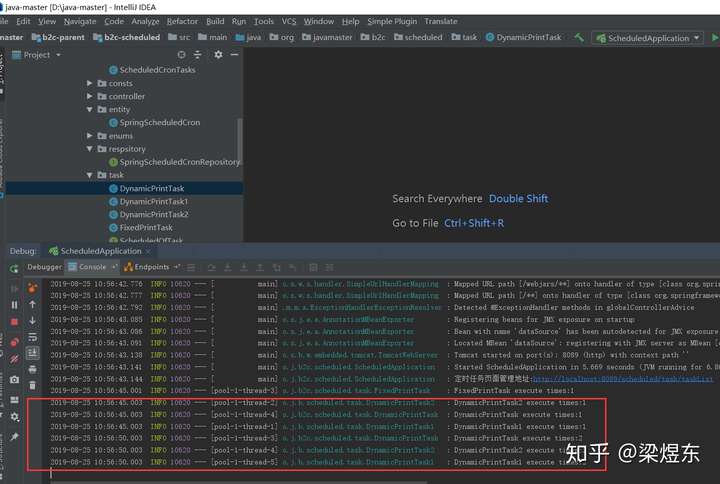
那么,要如何动态改变执行周期呢,没有理由去手工改动数据库吧?开发测试环境可以这么搞,生产环境就不可以了,所以为了做到动态改变数据库数据,很简单,提供一个Controller类供调用:
/**

 * 管理定时任务(需要做权限控制),具体的业务逻辑应

 * 该写在Service里,良好的设计是Controller本身

 * 只处理很少甚至不处理工作,业务逻辑均委托给

 * Service进行处理,这里我偷一下懒,都写在Controller

 * @author yudong

 * @date 2019/5/10

 */

@Controller

@RequestMapping("/scheduled/task")

public class TaskController {

    @Autowired

    private ApplicationContext context;

    @Autowired

    private SpringScheduledCronRepository cronRepository;

    /**

     * 查看任务列表

     */

    @RequestMapping("/taskList")

    public String taskList(Model model) {

        model.addAttribute("cronList", cronRepository.findAll());

        return "task-list";

    }

    /**

     * 编辑任务cron表达式

     */

    @ResponseBody

    @RequestMapping("/editTaskCron")

    public Integer editTaskCron(String cronKey, String newCron) {

        if (!CronUtils.isValidExpression(newCron)) {

            throw new IllegalArgumentException("失败,非法表达式:" + newCron);

        }

        cronRepository.updateCronExpressionByCronKey(newCron, cronKey);

        return AppConsts.SUCCESS;

    }

    /**

     * 执行定时任务

     */

    @ResponseBody

    @RequestMapping("/runTaskCron")

    public Integer runTaskCron(String cronKey) throws Exception {

        ((ScheduledOfTask) context.getBean(Class.forName(cronKey))).execute();

        return AppConsts.SUCCESS;

    }

    /**

     * 启用或禁用定时任务

     */

    @ResponseBody

    @RequestMapping("/changeStatusTaskCron")

    public Integer changeStatusTaskCron(Integer status, String cronKey) {

        cronRepository.updateStatusByCronKey(status, cronKey);

        return AppConsts.SUCCESS;

    }

}
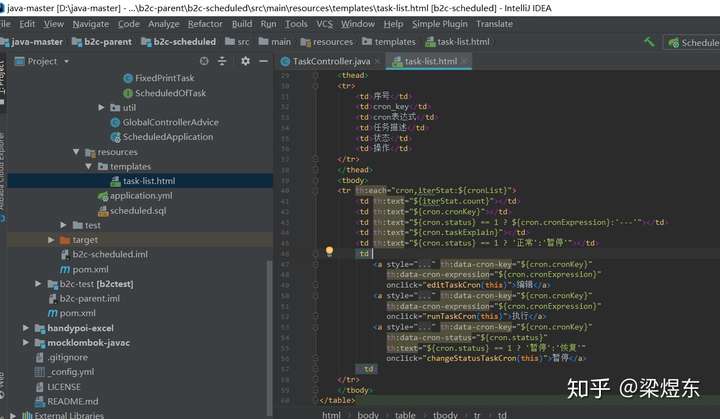
这里我为了方便调用Controller接口,使用thymeleaf技术写了一个简易的html管理页面:
网页效果是这样的:
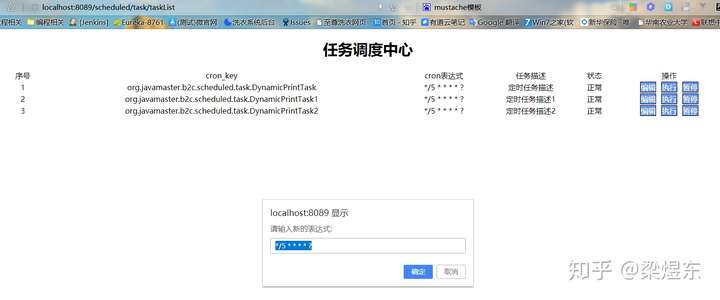
可以做到查看任务列表,修改任务cron表达式(也就实现了动态改变定时任务执行周期),暂停定时任务,以及直接执行定时任务。
最后如果对定时任务有更多其它要求,可以考虑使用xxljob这个开源的分布式任务调度平台,有兴趣的同学可以去了解,这里我就不展开了。
源码github地址:https://github.com/jufeng98/java-master
在Spring Boot中动态实现定时任务配置的更多相关文章
- 如何在Spring Boot 中动态设定与执行定时任务
本篇文章的目的是记录并实现在Spring Boot中,动态设定与执行定时任务. 我的开发项目是 Maven 项目,所以首先需要在 pom.xml 文件中加入相关的依赖.依赖代码如下所示: <de ...
- Spring Boot中使用MyBatis注解配置详解(1)
之前在Spring Boot中整合MyBatis时,采用了注解的配置方式,相信很多人还是比较喜欢这种优雅的方式的,也收到不少读者朋友的反馈和问题,主要集中于针对各种场景下注解如何使用,下面就对几种常见 ...
- spring boot中的约定优于配置
Spring Boot并不是一个全新的框架,而是将已有的Spring组件整合起来. Spring Boot可以说是遵循约定优于配置这个理念产生的.它的特点是简单.快速和便捷. 既然遵循约定优于配置,则 ...
- spring boot 中logback多环境配置
spring boot 配置logback spring boot自带了log打印功能,使用的是Commons logging 具体可以参考spring boot log 因此,我们只需要在resou ...
- Spring Boot 中使用 @Transactional 注解配置事务管理
事务管理是应用系统开发中必不可少的一部分.Spring 为事务管理提供了丰富的功能支持.Spring 事务管理分为编程式和声明式的两种方式.编程式事务指的是通过编码方式实现事务:声明式事务基于 AOP ...
- Spring Boot中使用@Transactional注解配置事务管理
事务管理是应用系统开发中必不可少的一部分.Spring 为事务管理提供了丰富的功能支持.Spring 事务管理分为编程式和声明式的两种方式.编程式事务指的是通过编码方式实现事务:声明式事务基于 AOP ...
- Spring Boot中以代码方式配置Tomcat
在Spring Boot2.0以上配置嵌入式Servlet容器时EmbeddedServletContainerCustomizer类不存在,经网络查询发现被WebServerFactoryCusto ...
- Spring Boot中使用MyBatis注解配置详解
传参方式 下面通过几种不同传参方式来实现前文中实现的插入操作. 使用@Param 在之前的整合示例中我们已经使用了这种最简单的传参方式,如下: @Insert("INSERT INTO US ...
- Spring Boot 中实现定时任务的两种方式
在 Spring + SpringMVC 环境中,一般来说,要实现定时任务,我们有两中方案,一种是使用 Spring 自带的定时任务处理器 @Scheduled 注解,另一种就是使用第三方框架 Qua ...
随机推荐
- 题解:2018级算法第六次上机 C6-危机合约
题目描述 样例: 实现解释: 没想到你也是个刀客塔之二维DP 知识点: 动态规划,多条流水线调度?可以看做一种流水线调度 坑点: 输入内容的调整(*的特殊判定),开头结尾的调整策略 从题意可知,要做的 ...
- Python 图像处理 OpenCV (13): Scharr 算子和 LOG 算子边缘检测技术
前文传送门: 「Python 图像处理 OpenCV (1):入门」 「Python 图像处理 OpenCV (2):像素处理与 Numpy 操作以及 Matplotlib 显示图像」 「Python ...
- shell专题(十一):企业真实面试题(重点)
11.1 京东 问题1:使用Linux命令查询file1中空行所在的行号 答案: [atguigu@hadoop102 datas]$ awk '/^$/{print NR}' sed.txt 问题2 ...
- MYSQL 之 JDBC(十二): 处理Blob
LOB,即Large Objects(大对象),是用来存储大量的二进制和文本数据的一种数据类型 LOB分为两种内省:内部LOB和外部LOB 内部LOB将数据以字节流的形式存储在数据库的内部.因而内部L ...
- pip install scrapy报错:error: Unable to find vcvarsall.bat解决方法
今天在使用pip install scrapy 命令安装Scrapy爬虫框架时,出现了很让人头疼的错误,错误截图如下: 在网上查找解决方法时,大致知道了问题的原因.是因为缺少C语言的编译环境,其中一种 ...
- 数据分析06 /pandas高级操作相关案例:人口案例分析、2012美国大选献金项目数据分析
数据分析06 /pandas高级操作相关案例:人口案例分析.2012美国大选献金项目数据分析 目录 数据分析06 /pandas高级操作相关案例:人口案例分析.2012美国大选献金项目数据分析 1. ...
- How to use the function of bind
The usage of bind is to define a specified scope for called function. Because the key this is easy ...
- bzoj3375[Usaco2004 Mar]Paranoid Cows 发疯的奶牛*
bzoj3375[Usaco2004 Mar]Paranoid Cows 发疯的奶牛 题意: 依次给出n只奶牛的产奶时间段,求最大的k使得前k只奶牛不存在一个时间段被另一个时间段完全覆盖的情况.n≤1 ...
- 【RPA Starter第二课】Introduction to the UiPath Enterprise Platform UiPath企业平台简介
Introduction to the UiPath Enterprise Platform UiPath 企业平台简介 课程目标: 了解UiPath实现RPA的步骤 描述每个UiPath解决方案的关 ...
- 什么是A站、B站、C站、D站、E站、F站、G站、HIJKLM站N站?
A站AcFun弹幕视频网,简称“A站”,成立于2007年6月,取意于Anime Comic Fun,是中国大陆第一家弹幕视频网站.A站以视频为载体,逐步发展出基于原生内容二次创作的完整生态,拥有高质量 ...