
精讲RestTemplate第3篇-GET请求使用方法详解
本文是精讲RestTemplate第3篇,前篇的blog访问地址如下:
RestTemplate可以发送HTTP GET请求,经常使用到的方法有两个:
- getForObject()
- getForEntity()
二者的主要区别在于,getForObject()返回值是HTTP协议的响应体。getForEntity()返回的是ResponseEntity,ResponseEntity是对HTTP响应的封装,除了包含响应体,还包含HTTP状态码、contentType、contentLength、Header等信息。
为了方便后续开发测试,首先介绍一个网站给大家。JSONPlaceholder是一个提供免费的在线REST API的网站,我们在开发时可以使用它提供的url地址测试下网络请求以及请求参数。或者当我们程序需要获取一些模拟数据、模拟图片时也可以使用它。
一、 getForObject() 方法
1.1.以String的方式接受请求结果数据
在Spring Boot环境下写一个单元测试用例,以String类型接收响应结果信息
@SpringBootTest

class ResttemplateWithSpringApplicationTests {

   @Resource

   private RestTemplate restTemplate;

   @Test

   void testSimple()  {

      String url = "http://jsonplaceholder.typicode.com/posts/1";

      String str = restTemplate.getForObject(url, String.class);

      System.out.println(str);

   }

}
getForObject第二个参数为返回值的类型,String.class以字符串的形式接受getForObject响应结果,

1.2.以POJO对象的方式接受结果数据
在Spring Boot环境下写一个单元测试用例,以java POJO对象接收响应结果信息
@Test

public void testPoJO() {

   String url = "http://jsonplaceholder.typicode.com/posts/1";

   PostDTO postDTO = restTemplate.getForObject(url, PostDTO.class);

   System.out.println(postDTO.toString());

}
输出打印结果如下:

POJO的定义如下,根据JSON String的数据格式定义。
@Data

public class PostDTO {

    private int userId;

    private int id;

    private String title;

    private String body;

}
1.3.以数组的方式接收请求结果
访问http://jsonplaceholder.typicode.com/posts 可以获得JSON数组方式的请求结果

下一步就是我们该如何接收,使用方法也很简单。在Spring Boot环境下写一个单元测试用例,以数组的方式接收请求结果。
@Test

public void testArrays() {

   String url = "http://jsonplaceholder.typicode.com/posts";

   PostDTO[] postDTOs = restTemplate.getForObject(url, PostDTO[].class);

   System.out.println("数组长度:" + postDTOs.length);

}
请求的结果被以数组的方式正确接收,输出如下:
数组长度:100
1.4.使用占位符号传参的几种方式
以下的几个请求都是在访问"http://jsonplaceholder.typicode.com/posts/1",只是使用了占位符语法,这样在业务使用上更加灵活。
- 使用占位符的形式传递参数:
String url = "http://jsonplaceholder.typicode.com/{1}/{2}";

PostDTO postDTO = restTemplate.getForObject(url, PostDTO.class, "posts", 1);
- 另一种使用占位符的形式:
String url = "http://jsonplaceholder.typicode.com/{type}/{id}";

String type = "posts";

int id = 1;

PostDTO postDTO = restTemplate.getForObject(url, PostDTO.class, type, id);
- 我们也可以使用 map 装载参数:
String url = "http://jsonplaceholder.typicode.com/{type}/{id}";

Map<String,Object> map = new HashMap<>();

map.put("type", "posts");

map.put("id", 1);

PostDTO  postDTO = restTemplate.getForObject(url, PostDTO.class, map);
二、getForEntity()方法
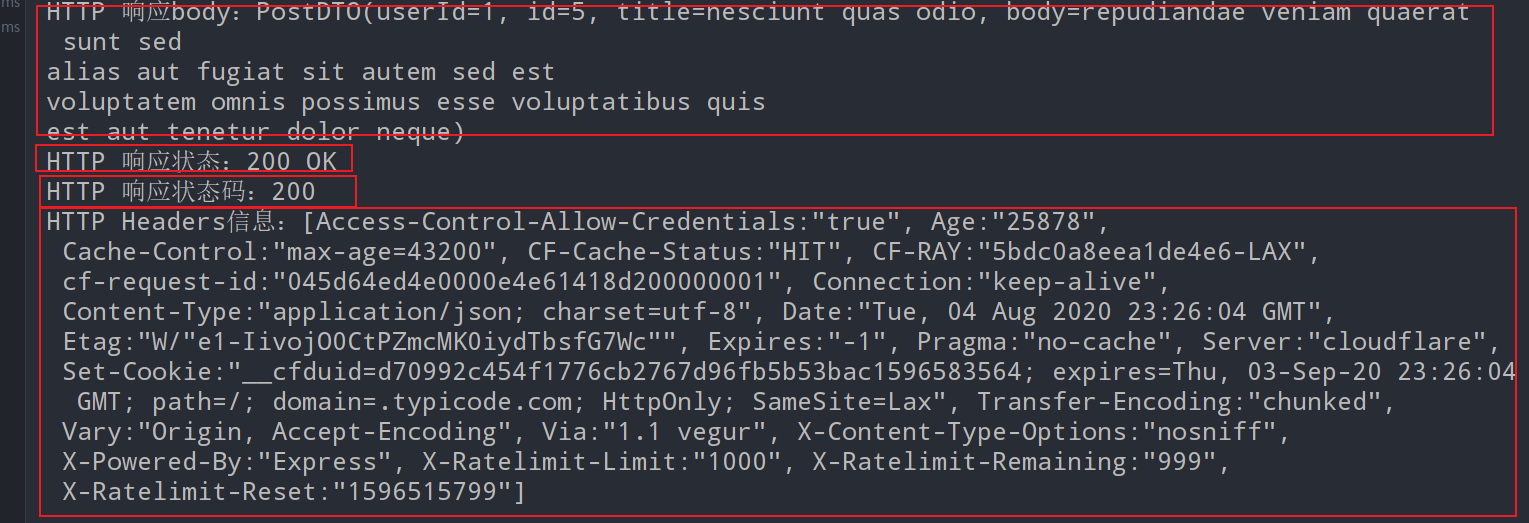
上面的所有的getForObject请求传参方法,getForEntity都可以使用,使用方法上也几乎是一致的,只是在返回结果接收的时候略有差别。使用ResponseEntity<T> responseEntity来接收响应结果。用responseEntity.getBody()获取响应体。响应体内容同getForObject方法返回结果一致。剩下的这些响应信息就是getForEntity比getForObject多出来的内容。
HttpStatus statusCode = responseEntity.getStatusCode();获取整体的响应状态信息int statusCodeValue = responseEntity.getStatusCodeValue();获取响应码值HttpHeaders headers = responseEntity.getHeaders();获取响应头- 等
@Test

public void testEntityPoJo() {

   String url = "http://jsonplaceholder.typicode.com/posts/5";

   ResponseEntity<PostDTO> responseEntity

               = restTemplate.getForEntity(url, PostDTO.class);

   PostDTO postDTO = responseEntity.getBody(); // 获取响应体

   System.out.println("HTTP 响应body:" + postDTO.toString());

   //以下是getForEntity比getForObject多出来的内容

   HttpStatus statusCode = responseEntity.getStatusCode(); // 获取响应码

   int statusCodeValue = responseEntity.getStatusCodeValue(); // 获取响应码值

   HttpHeaders headers = responseEntity.getHeaders(); // 获取响应头

   System.out.println("HTTP 响应状态:" + statusCode);

   System.out.println("HTTP 响应状态码:" + statusCodeValue);

   System.out.println("HTTP Headers信息:" + headers);

}
输出打印结果
欢迎关注我的博客,里面有很多精品合集
- 本文转载注明出处(必须带连接,不能只转文字):字母哥博客。
觉得对您有帮助的话,帮我点赞、分享!您的支持是我不竭的创作动力! 。另外,笔者最近一段时间输出了如下的精品内容,期待您的关注。
- 《手摸手教你学Spring Boot2.0》
- 《Spring Security-JWT-OAuth2一本通》
- 《实战前后端分离RBAC权限管理系统》
- 《实战SpringCloud微服务从青铜到王者》
- 《VUE深入浅出系列》
精讲RestTemplate第3篇-GET请求使用方法详解的更多相关文章
- 精讲RestTemplate第4篇-POST请求方法使用详解
本文是精讲RestTemplate第4篇,前篇的blog访问地址如下: 精讲RestTemplate第1篇-在Spring或非Spring环境下如何使用 精讲RestTemplate第2篇-多种底层H ...
- 精讲RestTemplate第7篇-自定义请求失败异常处理
本文是精讲RestTemplate第7篇,前篇的blog访问地址如下: 精讲RestTemplate第1篇-在Spring或非Spring环境下如何使用 精讲RestTemplate第2篇-多种底层H ...
- 精讲RestTemplate第4篇-DELETE、PUT等请求方法使用详解
本文是精讲RestTemplate第5篇,前篇的blog访问地址如下: 精讲RestTemplate第1篇-在Spring或非Spring环境下如何使用 精讲RestTemplate第2篇-多种底层H ...
- 精讲RestTemplate第8篇-请求失败自动重试机制
本文是精讲RestTemplate第8篇,前篇的blog访问地址如下: 精讲RestTemplate第1篇-在Spring或非Spring环境下如何使用 精讲RestTemplate第2篇-多种底层H ...
- 精讲RestTemplate第10篇-使用代理作为跳板发送请求
本文是精讲RestTemplate第10篇,前篇的blog访问地址如下: 精讲RestTemplate第1篇-在Spring或非Spring环境下如何使用 精讲RestTemplate第2篇-多种底层 ...
- 精讲RestTemplate第6篇-文件上传下载与大文件流式下载
本文是精讲RestTemplate第6篇,前篇的blog访问地址如下: 精讲RestTemplate第1篇-在Spring或非Spring环境下如何使用 精讲RestTemplate第2篇-多种底层H ...
- 精讲RestTemplate第9篇-如何通过HTTP Basic Auth认证
本文是精讲RestTemplate第9篇,前篇的blog访问地址如下: 精讲RestTemplate第1篇-在Spring或非Spring环境下如何使用 精讲RestTemplate第2篇-多种底层H ...
- 精讲RestTemplate第2篇-多种底层HTTP客户端类库的切换
本文是精讲RestTemplate第2篇,前篇的blog访问地址如下: 精讲RestTemplate第1篇-在Spring或非Spring环境下如何使用 RestTemplate只是对其他的HTTP客 ...
- 精讲RestTemplate第1篇-在Spring或非Spring环境下如何使用
一.什么是 RestTemplate? RestTemplate是执行HTTP请求的同步阻塞式的客户端,它在HTTP客户端库(例如JDK HttpURLConnection,Apache HttpCo ...
随机推荐
- Ant-Design-Vue中关于Table组件的使用
1. 如何自定义表格列头: <a-table :columns="columns" :dataSource="dataSource"> <sp ...
- OSCP Learning Notes - WebApp Exploitation(3)
SQL Injection[SQLi] Refrence: SQL Injection Authentication Bypass Cheat Sheet https://pentestlab.blo ...
- Web Scraping using Python Scrapy_BS4 - using Scrapy and Python(2)
Scrapy Architecture Creating a Spider. Spiders are classes that you define that Scrapy uses to scrap ...
- 紧急处理RAC环境有一个监听down 的情况
初步处理 1. grid 登录查看是监听是否down掉 srvctl status listener -n node1 或者oracle登录 lsnrctl status 查看 如果掉了 grid 用 ...
- python pytest接口自动化框架搭建(一)
1.首先安装pytest pip install pytest 2.编写单测用例 在pytest框架中,有如下约束: 所有的单测文件名都需要满足test_*.py格式或*_test.py格式. 在单测 ...
- abp vnext 开发快速入门 4 跨域设置
由于项目采用的微服务框架,前端与后端交互难免有跨域的问题.abp vnext实现跨域也很简单,只需要设置几处就可以了,这里只讲全局的跨域,至于局部的Action如何跨域请自行搜索.netcore 跨域 ...
- 一个有趣的问题, 你知道SqlDataAdapter中的Fill是怎么实现的吗
一:背景 1. 讲故事 最近因为各方面原因换了一份工作,去了一家主营物联柜的公司,有意思的是物联柜上的终端是用 wpf 写的,代码也算是年久失修,感觉技术债还是蛮重的,前几天在调试一个bug的时候,看 ...
- Python编程入门(第3版)|百度网盘免费下载|零基础入门学习资料
百度网盘免费下载:Python编程入门(第3版) 提取码:rsd7 目录 · · · · · · 第1章 编程简介 11.1 Python语言 21.2 Python适合用于做什么 31.3 程序员 ...
- BUUCTF-web web1 (无列名注入)
注册并登录后发现,sql注入,注入点在广告申请的界面.加单引号发现报错 先通过insert插入数据,然后再通过id查询相应的数据,所以是二次注入. 常见报错函数updatexml,floor以及ext ...
- myBatis源码解析-日志篇(1)
上半年在进行知识储备,下半年争取写一点好的博客来记录自己源码之路.在学习源码的路上也掌握了一些设计模式,可所谓一举两得.本次打算写Mybatis的源码解读. 准备工作 1. 下载mybatis源码 下 ...