
GRPC快速入门
转载请注明来自ChenJiehua的《GRPC快速入门》
GRPC是一个高性能、通用的开源RPC框架,基于HTTP/2协议标准和Protobuf序列化协议开发,支持众多的开发语言。
概述
在GRPC框架中,客户端可以像调用本地对象一样直接调用位于不同机器的服务端方法,如此我们就可以非常方便的创建一些分布式的应用服务。
在服务端,我们实现了所定义的服务和可供远程调用的方法,运行一个gRPC server来处理客户端的请求;在客户端,gRPC实现了一个stub(可以简单理解为一个client),其提供跟服务端相同的方法。
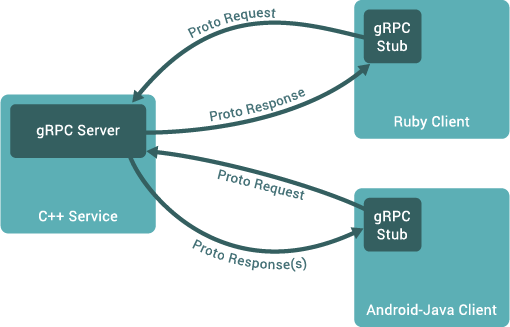
gRPC使用protocol buffers作为接口描述语言(IDL)以及底层的信息交换格式,一般情况下推荐使用 proto3因为其能够支持更多的语言,并减少一些兼容性的问题。
简单示例如下:
// 定义了一个服务 Greeter

service Greeter {

  // 定义方法 SayHello

  rpc SayHello (HelloRequest) returns (HelloReply) {}

}

// request

message HelloRequest {

  string name = 1;

}

// response

message HelloReply {

  string message = 1;

}
gRPC使用 protoc 和一个插件来将proto定义的内容生成客户端/服务端的代码。
Proto定义
helloworld.proto
syntax = "proto3";

option java_multiple_files = true;

option java_package = "io.grpc.examples.helloworld";

option java_outer_classname = "HelloWorldProto";

package helloworld;

// The greeting service definition.

service Greeter {

  // Sends a greeting

  rpc SayHello (HelloRequest) returns (HelloReply) {}

}

// The request message containing the user's name.

message HelloRequest {

  string name = 1;

}

// The response message containing the greetings

message HelloReply {

  string message = 1;

}
Go示例
安装grpc和protobuf
1、gRPC要求 Go 版本 >= 1.6
2、安装 gRPC:
$ go get -u -v google.golang.org/grpc
3、安装 Protocol Buffers v3:
从github下载预编译的protoc,然后安装 protoc-gen-go:
$ go get -v -u github.com/golang/protobuf/protoc-gen-go
生成 gRPC代码
$ protoc -I. --go_out=plugins=grpc:. helloworld.proto
Server 代码
server.go
package main

import (

    "log"

    "net"

    "golang.org/x/net/context"

    "google.golang.org/grpc"

    pb "google.golang.org/grpc/examples/helloworld/helloworld"

    "google.golang.org/grpc/reflection"

)

const (

    port = ":50051"

)

// server is used to implement helloworld.GreeterServer.

type server struct{}

// SayHello implements helloworld.GreeterServer

func (s *server) SayHello(ctx context.Context, in *pb.HelloRequest) (*pb.HelloReply, error) {

    return &pb.HelloReply{Message: "Hello " + in.Name}, nil

}

func main() {

    lis, err := net.Listen("tcp", port)

    if err != nil {

        log.Fatalf("failed to listen: %v", err)

    }

    s := grpc.NewServer()

    pb.RegisterGreeterServer(s, &server{})

    // Register reflection service on gRPC server.

    reflection.Register(s)

    if err := s.Serve(lis); err != nil {

        log.Fatalf("failed to serve: %v", err)

    }

}
Client 代码
client.go
package main

import (

    "log"

    "os"

    "time"

    "golang.org/x/net/context"

    "google.golang.org/grpc"

    pb "google.golang.org/grpc/examples/helloworld/helloworld"

)

const (

    address     = "localhost:50051"

    defaultName = "world"

)

func main() {

    // Set up a connection to the server.

    conn, err := grpc.Dial(address, grpc.WithInsecure())

    if err != nil {

        log.Fatalf("did not connect: %v", err)

    }

    defer conn.Close()

    c := pb.NewGreeterClient(conn)

    // Contact the server and print out its response.

    name := defaultName

    if len(os.Args) > 1 {

        name = os.Args[1]

    }

    ctx, cancel := context.WithTimeout(context.Background(), time.Second)

    defer cancel()

    r, err := c.SayHello(ctx, &pb.HelloRequest{Name: name})

    if err != nil {

        log.Fatalf("could not greet: %v", err)

    }

    log.Printf("Greeting: %s", r.Message)

}
Python示例
安装grpc和protobuf
1、新建个虚拟环境:
$ pip install virtualenv

$ virtualenv venv

$ source venv/bin/activate

$ pip install -U pip
2、在虚拟环境中安装grpc和protobuf:
$ pip install grpcio
3、安装 grpc tools:
python的grpc tools包含了protoc及其插件,用来生成客户端和服务端代码
$ pip install grpcio-tools
4、安装 grpc reflection:
grpc reflection 使得服务端支持 grpc_cli 进行调试
$ pip install grpcio-reflection
生成 gRPC 代码
$ python -m grpc_tools.protoc -I. --python_out=. --grpc_python_out=. helloworld.proto
Server 代码
server.py
"""The Python implementation of the GRPC helloworld.Greeter server."""

from concurrent import futures

import time

import grpc

from grpc.reflection.v1alpha import reflection<br>

import helloworld_pb2

import helloworld_pb2_grpc

_ONE_DAY_IN_SECONDS = 60 * 60 * 24

class Greeter(helloworld_pb2_grpc.GreeterServicer):

    def SayHello(self, request, context):

        return helloworld_pb2.HelloReply(message='Hello, %s!' % request.name)

def serve():

    server = grpc.server(futures.ThreadPoolExecutor(max_workers=10))

    helloworld_pb2_grpc.add_GreeterServicer_to_server(Greeter(), server)

    reflection.enable_server_reflection([h.service_name() for h in server._state.generic_handlers], server)

    server.add_insecure_port('[::]:50051')

    server.start()

    try:

        while True:

            time.sleep(_ONE_DAY_IN_SECONDS)

    except KeyboardInterrupt:

        server.stop(0)

if __name__ == '__main__':

    serve()
Client 代码
client.py
"""The Python implementation of the GRPC helloworld.Greeter client."""

from __future__ import print_function

import grpc

import helloworld_pb2

import helloworld_pb2_grpc

def run():

    channel = grpc.insecure_channel('localhost:50051')

    stub = helloworld_pb2_grpc.GreeterStub(channel)

    response = stub.SayHello(helloworld_pb2.HelloRequest(name='you'))

    print("Greeter client received: " + response.message)

if __name__ == '__main__':

    run()
grpc_cli命令行工具
为了使用 grpc_cli ,我们需要从源码进行安装。
1、从github获取源码:
 $ git clone -b $(curl -L https://grpc.io/release) https://github.com/grpc/grpc

 $ cd grpc

 $ git submodule update --init
2、编译 grpc_cli:
# Linux下需要 gflags

$ sudo apt-get install libgflags-dev

$ make grpc_cli
3、使用 grpc_cli:
# 查看所有的服务

$ grpc_cli ls localhost:50051

# 查看 Greeter 服务的详细信息

$ grpc_cli ls localhost:50051 helloworld.Greeter -l

# 查看 Greeter.SayHello 方法的详细信息

$ grpc_cli ls localhost:50051 helloworld.Greeter.SayHello -l

# 远程调用

$ grpc_cli call localhost:50051 SayHello "name: 'gRPC CLI'"
参考:
- https://grpc.io/docs/guides/index.html
- https://github.com/grpc/grpc/blob/master/doc/command_line_tool.md
- 转载请注明来自ChenJiehua的《GRPC快速入门》
GRPC快速入门的更多相关文章
- gRPC快速入门记录
为什么使用grpc 1.protocl buffer一种高效的序列化结构. 2.支持http 2.0标准化协议. http/2 1.http/2对每个源只需创建一个持久连接,在这一个连接内,可以并行的 ...
- Golang Module快速入门
前言: 在Golang1.11之前的版本中,官方没有提供依赖和包管理工具.开发者通常会使用vendor或者glide的方式来管理依赖(也有直接使用GOPATH多环境方式),而在Golang1.11之后 ...
- Web Api 入门实战 (快速入门+工具使用+不依赖IIS)
平台之大势何人能挡? 带着你的Net飞奔吧!:http://www.cnblogs.com/dunitian/p/4822808.html 屁话我也就不多说了,什么简介的也省了,直接简单概括+demo ...
- SignalR快速入门 ~ 仿QQ即时聊天,消息推送,单聊,群聊,多群公聊(基础=》提升)
SignalR快速入门 ~ 仿QQ即时聊天,消息推送,单聊,群聊,多群公聊(基础=>提升,5个Demo贯彻全篇,感兴趣的玩才是真的学) 官方demo:http://www.asp.net/si ...
- 前端开发小白必学技能—非关系数据库又像关系数据库的MongoDB快速入门命令(2)
今天给大家道个歉,没有及时更新MongoDB快速入门的下篇,最近有点小忙,在此向博友们致歉.下面我将简单地说一下mongdb的一些基本命令以及我们日常开发过程中的一些问题.mongodb可以为我们提供 ...
- 【第三篇】ASP.NET MVC快速入门之安全策略(MVC5+EF6)
目录 [第一篇]ASP.NET MVC快速入门之数据库操作(MVC5+EF6) [第二篇]ASP.NET MVC快速入门之数据注解(MVC5+EF6) [第三篇]ASP.NET MVC快速入门之安全策 ...
- 【番外篇】ASP.NET MVC快速入门之免费jQuery控件库(MVC5+EF6)
目录 [第一篇]ASP.NET MVC快速入门之数据库操作(MVC5+EF6) [第二篇]ASP.NET MVC快速入门之数据注解(MVC5+EF6) [第三篇]ASP.NET MVC快速入门之安全策 ...
- Mybatis框架 的快速入门
MyBatis 简介 什么是 MyBatis? MyBatis 是支持普通 SQL 查询,存储过程和高级映射的优秀持久层框架.MyBatis 消除 了几乎所有的 JDBC 代码和参数的手工设置以及结果 ...
- grunt快速入门
快速入门 Grunt和 Grunt 插件是通过 npm 安装并管理的,npm是 Node.js 的包管理器. Grunt 0.4.x 必须配合Node.js >= 0.8.0版本使用.:奇数版本 ...
随机推荐
- VirtualBox下安装Linux系统
Linux 开源的类Unix操作系统,拥有图形界面文字界面,旗下发行版不胜其数(Ubuntu.Deepin.CentOS...)在互联网公司中Linux服务器大多是用的CentOS系统,其他Linux ...
- Eclipse中Cannot nest src folder解决方法
错误示例: : Java Model Status [Cannot nest output folder 'xxx/bin/main' inside output folder 'xxx/bin'] ...
- WMI_COM_API
Win32_Processor // CPU 处理器 Win32_PhysicalMemory // 物理内存 Win32_Keyboard // 键盘 Win32_PointingDevice // ...
- C#2.0新增功能07 getter/setter 单独可访问性
连载目录 [已更新最新开发文章,点击查看详细] 属性是一种成员,它提供灵活的机制来读取.写入或计算私有字段的值. 属性可用作公共数据成员,但它们实际上是称为访问器的特殊方法. 这使得可以轻松访问 ...
- 2019年7月16日 abp(net core)+easyui+efcore实现仓储管理系统——多语言(十)
abp(net core)+easyui+efcore实现仓储管理系统目录 abp(net core)+easyui+efcore实现仓储管理系统——ABP总体介绍(一) abp(net core)+ ...
- bugku安卓First_Mobile wp
1 打开题目,下载apk 2 将下载好的apk拖进android killer中,提示文件名过长,随便更改一下文件名即可 3 查看入口文件源码(点击android killer工具栏咖啡杯图标) 4 ...
- Webpack打包效率优化篇
Webpack基础配置: 语法解析:babel-loader 样式解析:style-loader css解析:css-loader less解析:less-loader 文件解析:url-loader ...
- 我造了个好大的"轮子",居然还不是"圆"的!
我造的这个"轮子"指的是集低代码开发与运维为一体的平台,为什么说它不是"圆"的,因为它有些与众不同,甚至可以说是有些另类.至于为什么造这个"轮子& ...
- myeclipse中更改默认jdk版本出错( Target is not a JDK root. System library was not found)
原因是我的本地jdk版本是9.0,将jdk版本更改至8.0即可导入成功. jdk9.0导入myeclipse中去会有此类问题的发生,因此没有必要使用最新的jdk版本.
- handlerAdapter与方法调用(参数的解析)
前提:当找到handler以后,那么就要让handler发挥作用,这个时候handlerAdapter就派上用场了 这里面比较复杂就是requestMappingHandlerAdapter了,其他的 ...