
spring 5.x 系列第13篇 —— 整合RabbitMQ (xml配置方式)
一、说明
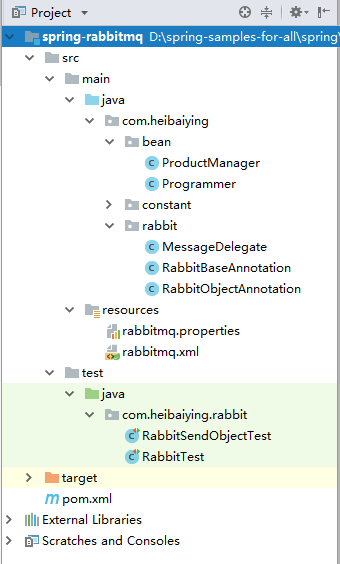
1.1 项目结构说明
本用例关于rabbitmq的整合提供简单消息发送和对象消费发送两种情况下的sample。
rabbitBaseAnnotation.java中声明了topic类型的交换机、持久化队列、及其绑定关系,用于测试说明topic交换机路由键的绑定规则。
rabbitObjectAnnotation.java中声明了direct类型的交换机,持久化队列,及其绑定关系,用于示例对象消息的传输。
注:关于rabbitmq安装、交换机、队列、死信队列等基本概念可以参考我的手记《RabbitMQ实战指南》读书笔记,里面有详细的配图说明。
1.2 依赖说明
除了spring的基本依赖外,需要导入spring rabbitmq 整合依赖
 <!--spring rabbitmq 整合依赖-->
<dependency>
    <groupId>org.springframework.amqp</groupId>
    <artifactId>spring-rabbit</artifactId>
    <version>2.1.2.RELEASE</version>
</dependency>
<!--rabbitmq 传输对象序列化依赖了这个包-->
<dependency>
    <groupId>com.fasterxml.jackson.core</groupId>
    <artifactId>jackson-databind</artifactId>
    <version>2.9.8</version>
</dependency>
二、spring rabbit 基本配置
rabbitmq.addresses=localhost:5672
rabbitmq.username=guest
rabbitmq.password=guest
# 虚拟主机,可以类比为命名空间 默认为/  必须先用图形界面或者管控台添加 程序不会自动创建且会抛出异常
rabbitmq.virtualhost=/
<?xml version="1.0" encoding="UTF-8"?>
<beans xmlns="http://www.springframework.org/schema/beans"
       xmlns:xsi="http://www.w3.org/2001/XMLSchema-instance"
       xmlns:context="http://www.springframework.org/schema/context"
       xmlns:rabbit="http://www.springframework.org/schema/rabbit"
       xsi:schemaLocation=
               "http://www.springframework.org/schema/context
          http://www.springframework.org/schema/context/spring-context.xsd
          http://www.springframework.org/schema/beans
          http://www.springframework.org/schema/beans/spring-beans.xsd
          http://www.springframework.org/schema/rabbit
          http://www.springframework.org/schema/rabbit/spring-rabbit.xsd">

    <context:property-placeholder location="rabbitmq.properties"/>

    <!--声明连接工厂-->
    <rabbit:connection-factory id="connectionFactory"
                               addresses="${rabbitmq.addresses}"
                               username="${rabbitmq.username}"
                               password="${rabbitmq.password}"
                               virtual-host="${rabbitmq.virtualhost}"/>

    <!--创建一个管理器(org.springframework.amqp.rabbit.core.RabbitAdmin),用于管理交换,队列和绑定。
    auto-startup 指定是否自动声明上下文中的队列,交换和绑定, 默认值为true。-->
    <rabbit:admin connection-factory="connectionFactory" auto-startup="true"/>

    <!--声明 template 的时候需要声明id 不然会抛出异常-->
    <rabbit:template id="rabbitTemplate" connection-factory="connectionFactory"/>

    <!--可以在xml采用如下方式声明交换机、队列、绑定管理 但是建议使用代码方式声明 方法更加灵活且可以采用链调用-->
    <rabbit:queue name="remoting.queue"/>

    <rabbit:direct-exchange name="remoting.exchange">
        <rabbit:bindings>
            <rabbit:binding queue="remoting.queue" key="remoting.binding"/>
        </rabbit:bindings>
    </rabbit:direct-exchange>

    <!--扫描rabbit包 自动声明交换器、队列、绑定关系-->
    <context:component-scan base-package="com.heibaiying.rabbit"/>

</beans>
三、简单消费的发送
3.1 声明交换机、队列、绑定关系和消费者监听器
import com.rabbitmq.client.Channel;
import org.springframework.amqp.core.*;
import org.springframework.amqp.rabbit.connection.ConnectionFactory;
import org.springframework.amqp.rabbit.listener.SimpleMessageListenerContainer;
import org.springframework.amqp.rabbit.listener.api.ChannelAwareMessageListener;
import org.springframework.context.annotation.Bean;
import org.springframework.context.annotation.Configuration;

/**
 * @author : heibaiying
 * @description : 声明队列、交换机、绑定关系、和队列消息监听
 */

@Configuration
public class RabbitBaseAnnotation {

    @Bean
    public TopicExchange exchange() {
        // 创建一个持久化的交换机
        return new TopicExchange("topic01", true, false);
    }

    @Bean
    public Queue firstQueue() {
        // 创建一个持久化的队列1
        return new Queue("FirstQueue", true);
    }

    @Bean
    public Queue secondQueue() {
        // 创建一个持久化的队列2
        return new Queue("SecondQueue", true);
    }

    /**
     * BindingKey 中可以存在两种特殊的字符串“#”和“*”,其中“*”用于匹配一个单词,“#”用于匹配零个或者多个单词
     * 这里我们声明三个绑定关系用于测试topic这种类型交换器
     */
    @Bean
    public Binding orange() {
        return BindingBuilder.bind(firstQueue()).to(exchange()).with("*.orange.*");
    }

    @Bean
    public Binding rabbit() {
        return BindingBuilder.bind(secondQueue()).to(exchange()).with("*.*.rabbit");
    }

    @Bean
    public Binding lazy() {
        return BindingBuilder.bind(secondQueue()).to(exchange()).with("lazy.#");
    }

    /*创建队列1消费者监听*/
    @Bean
    public SimpleMessageListenerContainer firstQueueLister(ConnectionFactory connectionFactory) {

        SimpleMessageListenerContainer container = new SimpleMessageListenerContainer(connectionFactory);
        // 设置监听的队列
        container.setQueues(firstQueue());
        // 指定要创建的并发使用者数。
        container.setConcurrentConsumers(1);
        // 设置消费者数量的上限
        container.setMaxConcurrentConsumers(5);
        // 设置是否自动签收消费 为保证消费被成功消费,建议手工签收
        container.setAcknowledgeMode(AcknowledgeMode.MANUAL);
        container.setMessageListener(new ChannelAwareMessageListener() {
            @Override
            public void onMessage(Message message, Channel channel) throws Exception {
                // 可以在这个地方得到消息额外属性
                MessageProperties properties = message.getMessageProperties();
                //得到消息体内容
                byte[] body = message.getBody();
                System.out.println(firstQueue().getName() + "收到消息:" + new String(body));
                /*
                 * DeliveryTag 是一个单调递增的整数
                 * 第二个参数 代表是否一次签收多条,如果设置为true,则所有DeliveryTag小于该DeliveryTag的消息都会被签收
                 */
                channel.basicAck(properties.getDeliveryTag(), false);
            }
        });
        return container;
    }

    /*创建队列2消费者监听*/
    @Bean
    public SimpleMessageListenerContainer secondQueueLister(ConnectionFactory connectionFactory) {

        SimpleMessageListenerContainer container = new SimpleMessageListenerContainer(connectionFactory);
        container.setQueues(secondQueue());
        container.setMessageListener(new ChannelAwareMessageListener() {
            @Override
            public void onMessage(Message message, Channel channel) throws Exception {
                byte[] body = message.getBody();
                System.out.println(secondQueue().getName() + "收到消息:" + new String(body));
            }
        });
        return container;
    }

}
3.2 测试简单消息的发送
/**
 * @author : heibaiying
 * @description : 传输简单字符串
 */

@RunWith(SpringRunner.class)
@ContextConfiguration(locations = "classpath:rabbitmq.xml")
public class RabbitTest {

    @Autowired
    private RabbitTemplate rabbitTemplate;

    @Test
    public void sendMessage() {
        MessageProperties properties = new MessageProperties();

        String allReceived = "我的路由键 quick.orange.rabbit 符合queue1 和 queue2 的要求,我应该被两个监听器接收到";
        Message message1 = new Message(allReceived.getBytes(), properties);
        rabbitTemplate.send("topic01", "quick.orange.rabbit", message1);

        String firstReceived = "我的路由键 quick.orange.fox 只符合queue1 的要求,只能被queue 1 接收到";
        Message message2 = new Message(firstReceived.getBytes(), properties);
        rabbitTemplate.send("topic01", "quick.orange.fox", message2);

        String secondReceived = "我的路由键 lazy.brown.fox 只符合queue2 的要求,只能被queue 2 接收到";
        Message message3 = new Message(secondReceived.getBytes(), properties);
        rabbitTemplate.send("topic01", "lazy.brown.fox", message3);

        String notReceived = "我的路由键 quick.brown.fox 不符合 topic1 任何绑定队列的要求,你将看不到我";
        Message message4 = new Message(notReceived.getBytes(), properties);
        rabbitTemplate.send("topic01", "quick.brown.fox", message4);
    }
}
结果:
  SecondQueue收到消息:我的路由键 quick.orange.rabbit 符合queue1 和 queue2 的要求,我应该被两个监听器接收到
  FirstQueue收到消息:我的路由键 quick.orange.rabbit 符合queue1 和 queue2 的要求,我应该被两个监听器接收到
  FirstQueue收到消息:我的路由键 quick.orange.fox 只符合queue1 的要求,只能被queue 1 接收到
  SecondQueue收到消息:我的路由键 lazy.brown.fox 只符合queue2 的要求,只能被queue 2 接收到
四、传输对象
4.1 创建消息的委托处理器
这里为了增强用例的实用性,我们创建的处理器的handleMessage方法是一个重载方法,对于同一个队列的监听,不仅可以传输对象消息,同时针对不同的对象类型调用不同的处理方法。
/**
 * @author : heibaiying
 * @description :消息委派处理类
 */
public class MessageDelegate {

    public void handleMessage(ProductManager manager) {
        System.out.println("收到一个产品经理" + manager);
    }

    public void handleMessage(Programmer programmer) {
        System.out.println("收到一个程序员" + programmer);
    }

}
4.2 声明交换机、队列、绑定关系和消费者监听器
/**
 * @author : heibaiying
 * @description : 声明队列、交换机、绑定关系、用于测试对象的消息传递
 */

@Configuration
public class RabbitObjectAnnotation {

    @Bean
    public DirectExchange objectTopic() {
        // 创建一个持久化的交换机
        return new DirectExchange("objectTopic", true, false);
    }

    @Bean
    public Queue objectQueue() {
        // 创建一个持久化的队列
        return new Queue("objectQueue", true);
    }

    @Bean
    public Binding binding() {
        return BindingBuilder.bind(objectQueue()).to(objectTopic()).with("object");
    }

    /*创建队列消费者监听*/
    @Bean
    public SimpleMessageListenerContainer objectQueueLister(ConnectionFactory connectionFactory) {

        SimpleMessageListenerContainer container = new SimpleMessageListenerContainer(connectionFactory);
        // 设置监听的队列
        container.setQueues(objectQueue());
        // 将监听到的消息委派给实际的处理类
        MessageListenerAdapter adapter = new MessageListenerAdapter(new MessageDelegate());
        // 指定由哪个方法来处理消息 默认就是handleMessage
        adapter.setDefaultListenerMethod("handleMessage");

        // 消息转换
        Jackson2JsonMessageConverter jackson2JsonMessageConverter = new Jackson2JsonMessageConverter();
        DefaultJackson2JavaTypeMapper javaTypeMapper = new DefaultJackson2JavaTypeMapper();

        Map<String, Class<?>> idClassMapping = new HashMap<>();
        // 针对不同的消息体调用不同的重载方法
        idClassMapping.put(Type.MANAGER, com.heibaiying.bean.ProductManager.class);
        idClassMapping.put(Type.PROGRAMMER, com.heibaiying.bean.Programmer.class);

        javaTypeMapper.setIdClassMapping(idClassMapping);

        jackson2JsonMessageConverter.setJavaTypeMapper(javaTypeMapper);
        adapter.setMessageConverter(jackson2JsonMessageConverter);
        container.setMessageListener(adapter);
        return container;
    }

}
4.3 测试对象消息的发送
@RunWith(SpringRunner.class)
@ContextConfiguration(locations = "classpath:rabbitmq.xml")
public class RabbitSendObjectTest {

    @Autowired
    private RabbitTemplate rabbitTemplate;

    @Test
    public void sendProgrammer() throws JsonProcessingException {
        MessageProperties messageProperties = new MessageProperties();
        //必须设置 contentType为 application/json
        messageProperties.setContentType("application/json");
        // 必须指定类型
        messageProperties.getHeaders().put("__TypeId__", Type.PROGRAMMER);
        Programmer programmer = new Programmer("xiaoming", 34, 52200.21f, new Date());
        // 序列化与反序列化都使用的Jackson
        ObjectMapper mapper = new ObjectMapper();
        String programmerJson = mapper.writeValueAsString(programmer);
        Message message = new Message(programmerJson.getBytes(), messageProperties);
        rabbitTemplate.send("objectTopic", "object", message);
    }

    @Test
    public void sendProductManager() throws JsonProcessingException {
        MessageProperties messageProperties = new MessageProperties();
        messageProperties.setContentType("application/json");
        messageProperties.getHeaders().put("__TypeId__", Type.MANAGER);
        ProductManager manager = new ProductManager("xiaohong", 21, new Date());
        ObjectMapper mapper = new ObjectMapper();
        String managerJson = mapper.writeValueAsString(manager);
        Message message = new Message(managerJson.getBytes(), messageProperties);
        rabbitTemplate.send("objectTopic", "object", message);
    }
}
附:源码Gitub地址:https://github.com/heibaiying/spring-samples-for-all
spring 5.x 系列第13篇 —— 整合RabbitMQ (xml配置方式)的更多相关文章
- spring 5.x 系列第15篇 —— 整合dubbo (xml配置方式)
文章目录 一. 项目结构说明 二.项目依赖 三.公共模块(dubbo-common) 四. 服务提供者(dubbo-provider) 4.1 productService是服务的提供者( 商品数据用 ...
- spring 5.x 系列第14篇 —— 整合RabbitMQ (代码配置方式)
源码Gitub地址:https://github.com/heibaiying/spring-samples-for-all 一.说明 1.1 项目结构说明 本用例关于rabbitmq的整合提供简单消 ...
- spring 5.x 系列第11篇 —— 整合memcached (xml配置方式)
文章目录 一.说明 1.1 XMemcached客户端说明 1.2 项目结构说明 1.3 依赖说明 二.spring 整合 memcached 2.1 单机配置 2.2 集群配置 2.3 存储基本类型 ...
- spring 5.x 系列第9篇 —— 整合mongodb (xml配置方式)
源码Gitub地址:https://github.com/heibaiying/spring-samples-for-all 一.说明 1.1 项目结构说明 配置文件位于resources下,项目以单 ...
- spring 5.x 系列第17篇 —— 整合websocket (xml配置方式)
源码Gitub地址:https://github.com/heibaiying/spring-samples-for-all 一.说明 1.1 项目结构说明 项目模拟一个简单的群聊功能,为区分不同的聊 ...
- spring 5.x 系列第1篇 —— springmvc基础 (xml配置方式)
文章目录 一.搭建hello spring工程 1.1 项目搭建 1.2 相关配置讲解 二.配置自定义拦截器 三.全局异常处理 四.参数绑定 4.1 参数绑定 4.2 关于日期格式转换的三种方法 五. ...
- spring 5.x 系列第16篇 —— 整合dubbo (代码配置方式)
文章目录 一. 项目结构说明 二.项目依赖 三.公共模块(dubbo-ano-common) 四. 服务提供者(dubbo-ano-provider) 4.1 提供方配置 4.2 使用注解@Servi ...
- spring 5.x 系列第12篇 —— 整合memcached (代码配置方式)
文章目录 一.说明 1.1 XMemcached客户端说明 1.2 项目结构说明 1.3 依赖说明 二.spring 整合 memcached 2.1 单机配置 2.2 集群配置 2.3 存储基本类型 ...
- spring 5.x 系列第10篇 —— 整合mongodb (代码配置方式)
源码Gitub地址:https://github.com/heibaiying/spring-samples-for-all 一.说明 1.1 项目结构说明 配置文件位于com.heibaiying. ...
随机推荐
- 今天用pro安装nginx+php+mysql出现故障的解决方法
今天用pro安装nginx+php+mysql出现故障的解决方法 by 伍雪颖 dyld: Library not loaded: @@HOMEBREW_CELLAR@@/openssl/1.0.1h ...
- go 工具链目前[不支持编译 windows 下的动态链接库][1],不过[支持静态链接库][2]
go 工具链目前[不支持编译 windows 下的动态链接库][1],不过[支持静态链接库][2].想要产生dll,可以这样 workaround ,参考 golang [issuse#11058][ ...
- 【甘道夫】基于Mahout0.9+CDH5.2执行分布式ItemCF推荐算法
环境: hadoop-2.5.0-cdh5.2.0 mahout-0.9-cdh5.2.0 引言 尽管Mahout已经宣布不再继续基于Mapreduce开发,迁移到Spark.可是实际面临的情况是公司 ...
- python代码风格检查工具──pylint
pylint是一个python代码检查工具,可以帮助python程序员方便地检查程序代码的语法和风格,通过这个工具,可以使你的python代码尽量保持完美,哈哈.具体可以检查什么东西呢?比如你写了 f ...
- android该怎么办iphone那种画面抖动的动画效果(含有button和EditText)
首先在效果图: 要做到抖动效果按钮,能够这样做.设定anim房源res以下.创建一个button_shake.xml <? xml version="1.0" encodin ...
- (015)实现一个函数来检查是否平衡树(keep it up)
实现一个函数来检查是否平衡树.这个问题而言. 平衡指的是这棵树随意两个叶子结点到根结点的距离之差不大于1. 这个题我们能够採用暴力搜索,找到叶子节点到根节点的最小值和最大值.然后他们的差假设大于1就不 ...
- html5 页面元素插件
1. 滚动条 jquery.nicescroll 正常引用方式: 设置区域高度 var bodyHeight = $(document.body).height(); $("#XXXXXXX ...
- delphi2009(10,xe)下indy10发送utf8字符串
最近实现一个功能,使用delphi2009以TCP调用Java端的接口,接口要求先发送字符串的长度,然后再发送字符串内容,并且字符串要求是utf8格式的 调试了好长时间,才终于发现解决办法,或者说发现 ...
- miniui autocomplete支持放大镜按钮(data-grid)
<style type="text/css"> html body .searchbox .mini-buttonedit-close { background:url ...
- Java底层知识学习:Bytecode and JMM
最近在跟着耗子哥的程序员练级指南学习Java底层知识,结合<深入理解Java虚拟机>这本书在看,写笔记,看资料,成长中…… 目前看完了第二章JMM和各内存区OOM的情况 一篇图文并茂介绍字 ...