
Struts2工作原理和核心文件
一、Struts2工作原理
如下图:
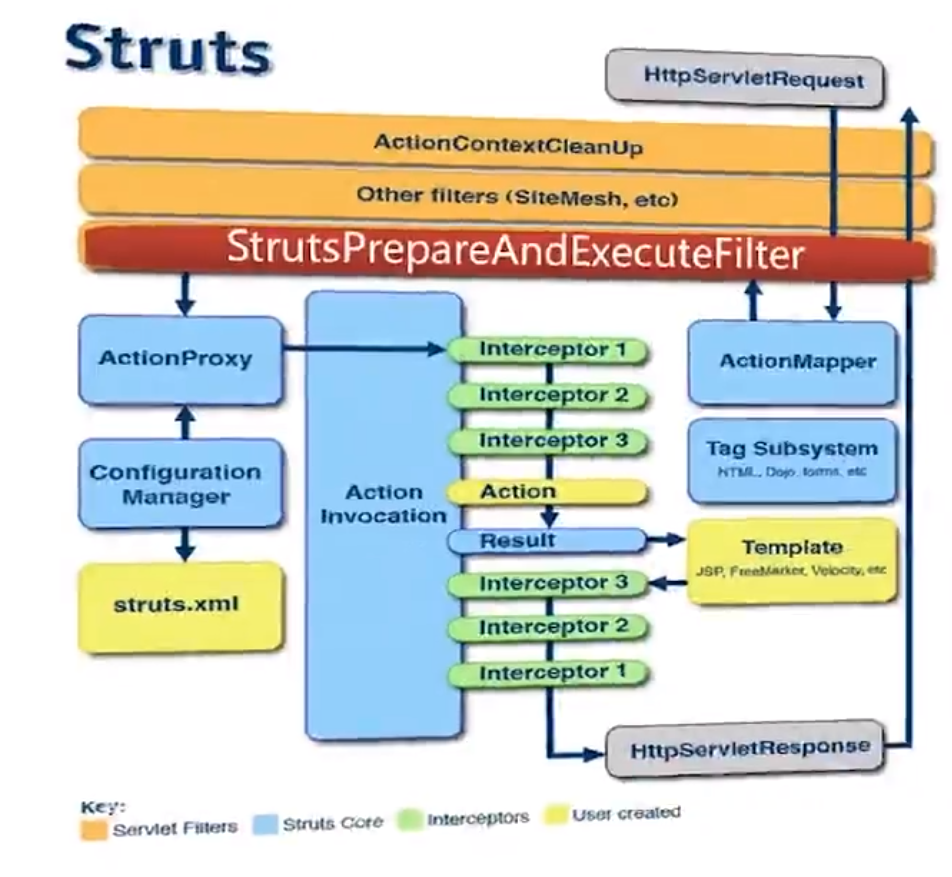
二、Struts2配置文件
1、web.xml
任何MVC框架都需要与Web应用整合,这就不得不借助于web.xml文件,只有配置了web.xml文件的Servlet才会被应用加载
通常,所有的MVC框架都需要Web应用加载一个核心控制器,对于Struts2框架而言,需要加载StrutsPrepareAndExecuteFilter,StrutsPrepareAndExecuteFilter加载Struts框架。
<?xml version="1.0" encoding="UTF-8"?>

<web-app xmlns:xsi="http://www.w3.org/2001/XMLSchema-instance"

xmlns="http://xmlns.jcp.org/xml/ns/javaee"

 xsi:schemaLocation="http://xmlns.jcp.org/xml/ns/javaee http://xmlns.jcp.org/xml/ns/javaee/web-app_3_1.xsd"

 id="WebApp_ID" version="3.1">

  <display-name>MyStruts2</display-name>

  <filter>

  	<filter-name>struts2</filter-name>

  	<filter-class>org.apache.struts2.dispatcher.filter.StrutsPrepareAndExecuteFilter</filter-class>

  </filter>

  <filter-mapping>

  	<filter-name>struts2</filter-name>

  	<url-pattern>/*</url-pattern>

  </filter-mapping>

  <welcome-file-list>

    <welcome-file>index.html</welcome-file>

    <welcome-file>index.htm</welcome-file>

    <welcome-file>index.jsp</welcome-file>

    <welcome-file>default.html</welcome-file>

    <welcome-file>default.htm</welcome-file>

    <welcome-file>default.jsp</welcome-file>

  </welcome-file-list>

</web-app>
2、struts.xml
struts2的核心配置文件,负责管理应用中的Action映射,以及该Action包含的Result定义等。
内容包括:
1) 全局属性
2) 用户请求和响应Action之间的对应关系
3) Action可能用到的参数和返回结果
4) 各种拦截器
<?xml version="1.0" encoding="UTF-8"?>

<!DOCTYPE struts PUBLIC

	"-//Apache Software Foundation//DTD Struts Configuration 2.5//EN"

	"http://struts.apache.org/dtds/struts-2.5.dtd">

<struts>

   <!-- 是否开启动态方法调用 -->

    <constant name="struts.enable.DynamicMethodInvocation" value="false" />

	<package name="default" namespace="/" extends="struts-default">

		 <action name="login" class="com.example.struts2.LoginAction" method="login">

			<result name="success">/success.jsp</result>

			<result name="error">/error.jsp</result>

			<result name="result">/result.jsp</result>

		</action>

	</package>

</struts>
3、struts.properties
struts2框架的全局属性文件,自动加载。该文件包含很多key-value对。
该文件完全可以配置在struts2.xml文件中,使用constant元素
Struts2工作原理和核心文件的更多相关文章
- Struts2工作原理
Struts2工作原理 Struts2请求响应流程: 在struts2的应用中,从用户请求到服务器返回相应响应给用户端的过程中,包含了许多组件如:Controller.ActionProxy.Acti ...
- Hibernate、Spring和Struts2工作原理
Hibernate.Spring和Struts2工作原理 博客分类: Java 基础 工作HibernateSpringMVCStruts Hibernate.Spring和Struts2工作原理 ...
- WordPress工作原理之程序文件执行顺序
在了解WordPress挂载机制时,一直有一个疑惑,到底是WordPress的内核源文件先执行还是主题文件里functions.php文件先执行.为了解决这个问题,想了解WordPress的工作原理, ...
- Struts2工作原理及流程
Struts2是基于MVC设计模式的JavaWeb 框架技术. 基于Struts2开发Java Web项目的主要步骤如下: (1)在web.xml中配置FilterDispatcher. (2)设计和 ...
- Struts2学习笔记一:工作流程与核心文件
转载请注明原文地址:http://www.cnblogs.com/ygj0930/p/6807539.html 1:客户端发出请求到web服务器 2:请求经过一系列filter,最终到达Struts ...
- [转]Struts2工作原理
Struts2请求响应流程: 在struts2的应用中,从用户请求到服务器返回相应响应给用户端的过程中,包含了许多组件如:Controller.ActionProxy.ActionMapping.Co ...
- Struts2工作原理和执行流程图
在struts2的应用中,从用户请求到服务器返回相应响应给用户端的过程中,包含了许多组件如:Controller.ActionProxy.ActionMapping.Configuration Man ...
- 深入研究Struts2(一)---Struts2是什么?它的工作原理是什么?
本文绝对原创, 欢迎转载, 但是转载请记得注明文章出处:http://blog.csdn.net/izard999/article/details/39891281 近4年都在从事Android方 面 ...
- Struts1、Struts2、Hibernate、Spring框架工作原理介绍
Struts1工作原理 Struts1工作原理图 1.初始化:struts框架的总控制器ActionServlet是一个Servlet,它在web.xml中配置成自动启动的Servlet,在启动时总控 ...
随机推荐
- Python数据分析 之时间序列基础
1. 时间序列基础 import numpy as np import pandas as pd np.random.seed(12345) import matplotlib.pyplot as p ...
- Flask的上下文管理
flask上下文管理 1.运用的知识点 val = threading.local() def task(arg): #threading.local() val.xxx=123 #内部,获取当前线程 ...
- VS code key shortcuts for windows
mac上的快捷键,尽量是选择像我用vs studio上靠近. ctrl+K+S: 显示快捷键列 ctrl+shift+p: 系统配置命令行 ctrl+p:项目中文件列表,选择文件 Alt+M:当前文件 ...
- Odoo中的self详解
转载请注明原文地址:https://www.cnblogs.com/ygj0930/p/10826307.html 一:self是什么 目前新版的Odoo中使用到的self,是对 游标cr.用户ID ...
- nmap使用流程
ip为案列 利用ipconfig 测得本地ip为 192.00.00.100 利用-sn探测一批主机内的存活主机 存活主机ip为 192.000.00.1 192.000.00.100 使 ...
- Mac下Mysql配置
安装 http://www.mirrorservice.org/sites/ftp.mysql.com/Downloads/MySQL-5.6/mysql-5.6.41-macos10.13-x86_ ...
- html中对应Word中的字体和字号
原文链接:https://blog.csdn.net/xuexizhe88/article/details/79277587:https://blog.csdn.net/qq_31603575/art ...
- cobbler部署错误总结
web 报错500 Internal Server Error解决方案 在安装使用Cobbler web界面的时候提示HTTP 500错误,也就是服务器内部错误,检查防火墙和selinux都是为关闭状 ...
- 浅谈Flask 中的 线程局部变量 request 原理
2017-11-27 17:25:11 晚橙 阅读数 600更多 分类专栏: Flask python 多线程 版权声明:本文为博主原创文章,遵循CC 4.0 BY-SA版权协议,转载请附上原文出 ...
- MinGW-w64离线安装
1.下载 如果你能从在线 安装,那最好就在线安装吧. 如果你能连上官网,那可以选择从官网去下载,地址:https://osdn.net/projects/mingw/releases/ https:/ ...