
java项目中读取properties文件
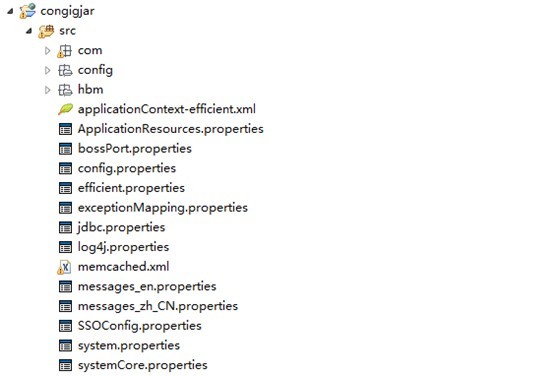
这里的配置文件都放在src下面, System.properties的内容
exceptionMapping=exceptionMapping.properties

config=config.properties

sys.core=systemCore.properties

sys.boss=bossPort.properties
bossPort.properties的内容
#查询机场火车站sim卡剩余次数的服务

NgCallServiceURL=http://*.*.*6.*:5***0/esbWS/services/NgCallService

#用户基本信息

sQUserBaseURL=http://*.*.*6.*:5***0/esbWS/services/sQUserBaseL

#用户积分查询

S3979SrcQryURL=http://*.*.*6.*:5***0/esbWS/services/s3979SrcQry
读取properties配置文件的java类
import java.io.*;

import java.util.*;

import org.apache.commons.logging.Log;

import org.apache.commons.logging.LogFactory;

public class GlobalConfig {

    private static Log log;

    // system.properties是最根的配置文件,并且在src下面

    public static final String SYSTEM_PROPERTIES = "/system.properties";

    private static String propertiesStorePath;

    private static Map propertieMap;

    private static Map propertieFileMap;

    static {

        log = LogFactory.getLog(com.sinovatech.common.config.GlobalConfig.class);

        propertieMap = new HashMap();

        propertieFileMap = new HashMap();

        Properties properties = init("/system.properties");

        Iterator it = properties.keySet().iterator();

        propertiesStorePath = properties.getProperty("path");

        String name;

        Properties p;

        for (; it.hasNext(); propertieMap.put(name, p)) {

            name = (String) it.next();

            String file = properties.getProperty(name);

            file = file.trim();

            System.out.println();

            System.out.println("name     "+name+"     file       "+file);

            System.out.println();

            propertieFileMap.put(name, file);

            p = init("/" + file);

        }

    }

    public GlobalConfig() {

    }

    private static Properties init(String propertyFile) {

        Properties p = new Properties();

        try {

            log.info("Start Loading property file \t" + propertyFile);

            System.out.println("Start Loading property file \t" + propertyFile);

            p.load(com.sinovatech.common.config.GlobalConfig.class

                    .getResourceAsStream(propertyFile));

            log.info("Load property file success!\t" + propertyFile);

            System.out.println("Load property file success!\t" + propertyFile);

        } catch (Exception e) {

            e.printStackTrace();

            log.error("Could not load property file." + propertyFile, e);

        }

        return p;

    }

    public static String getProperty(String cls, String name) {

        Properties p = (Properties) propertieMap.get(cls);

        if (p != null)

            return p.getProperty(name);

        else

            return null;

    }

    public static boolean getBooleanProperty(String cls, String name) {

        String p = getProperty(cls, name);

        return "true".equals(p);

    }

    public static Integer getIntegerProperty(String cls, String name) {

        String p = getProperty(cls, name);

        if (p == null)

            return null;

        else

            return Integer.valueOf(p);

    }

    public static Long getLongProperty(String cls, String name) {

        String p = getProperty(cls, name);

        if (p == null)

            return null;

        else

            return Long.valueOf(p);

    }

    public static Double getDoubleProperty(String cls, String name) {

        String p = getProperty(cls, name);

        if (p == null)

            return null;

        else

            return Double.valueOf(p);

    }

    public static void store() {

    }

    public static void store(String cls) {

        Properties p = (Properties) propertieMap.get(cls);

        try {

            FileOutputStream fi = new FileOutputStream(new File(

                    (String) propertieFileMap.get(cls)));

            p.store(fi, "Modified time: " + Calendar.getInstance().getTime());

        } catch (FileNotFoundException e) {

            e.printStackTrace();

        } catch (IOException e) {

            e.printStackTrace();

        }

    }

}
测试GlobalConfig.java读取配置文件信息
public static void main(String[] args) {

        String requestUrl=GlobalConfig.getProperty("sys.boss","S3979SrcQryURL");

        System.out.println("\n"+requestUrl);

}
测试内容输入:
Start Loading property file     /system.properties

Load property file success!    /system.properties

name     sys.core     file       systemCore.properties

Start Loading property file     /systemCore.properties

Load property file success!    /systemCore.properties

name     exceptionMapping     file       exceptionMapping.properties

Start Loading property file     /exceptionMapping.properties

Load property file success!    /exceptionMapping.properties

name     sys.boss     file       bossPort.properties

Start Loading property file     /bossPort.properties

Load property file success!    /bossPort.properties

name     config     file       config.properties

Start Loading property file     /config.properties

Load property file success!    /config.properties

http://*.*.*6.*:5***0/esbWS/services/s3979SrcQry
java项目中读取properties文件的更多相关文章
- Java项目中读取properties文件,以及六种获取路径的方法
下面1-4的内容是网上收集的相关知识,总结来说,就是如下几个知识点: 最常用读取properties文件的方法 InputStream in = getClass().getResourceAsStr ...
- java web中读取properties文件时的路径问题
在web开发时,难免会有一些固定的参数,我们一般把这些固定的参数存在properties文件中,然后用的时候要读出来.但经常出现一些错误,找不到相应的路径,所以,今天特地讲一些如何正确获得路径. 首先 ...
- Java在Web项目中读取properties文件
import java.io.FileNotFoundException; import java.io.IOException; import java.io.InputStream; import ...
- 五种方式让你在java中读取properties文件内容不再是难题
一.背景 最近,在项目开发的过程中,遇到需要在properties文件中定义一些自定义的变量,以供java程序动态的读取,修改变量,不再需要修改代码的问题.就借此机会把Spring+SpringMVC ...
- 如何在java类中读取Properties配置文件
在com.example包下有一个test.properties文件和测试类PropertyReadTest.java. test.properties 文件内容: author=zeige tea ...
- 分别用Java和JS读取Properties文件内容
项目中经常用到的配置文件,除了XML文件之外,还会用到Properties文件来存储一些信息,例如国际化的设置.jdbc连接信息的配置等.有时候也会把一些路径或者sql语句放到Properties中, ...
- Java/JavaWeb中读取资源文件
1.一般工程中使用I/O类指定文件的绝对路径读取 FileInputStream fis = new FileInputStream("src/main/resources/zsm.prop ...
- java代码如何读取properties文件
我们在开发工程中,有时候需要在Java代码中定义一些在部署生产环境时容易改变的变量,还需要我们单独放在一个外部属性文件中,方便我们将来修改.这里列出了两种比较方便的方式. 一.在Spring配置文件中 ...
- 在JavaScript文件中读取properties文件的方法
假设有JavaScript文件叫做:readproperties.js,这个文件需要读取config.properties这个配置文件,步骤如下: 1. 下载插件jquery.i18n.proper ...
随机推荐
- jsp_Scriptlet
在jsp中,最重要的部分就是Scriptlet(脚本小程序),所有嵌入在HTML代码中的Java程序都必须在使用Scriptlet标记出来.在JSP中总共有3种Scriptlet代码 1.第一种:&l ...
- Spring IoC小结
一. IoC是什么 Ioc—Inversion of Control,即“控制反转”,不是什么技术,而是一种设计思想.在Java开发中,Ioc意味着将你设计好的对象交给容器控制,而不是传统的在你的对象 ...
- 在Openfire中使用自己的数据表之修改系统属性
通过修改Openfire安装目录的conf/openfire目录下是openfire.xml文件可以使用我们自定义的认证集成以及用户数据集成.其实仔细观察之后,在修改完配置文件再次启动openfire ...
- 2014 New Year’s First Blog
新年开篇博客,依旧是流水账. 读到一篇强文,<关于两个世界体系的对话>.common practice 往往是针对某种语言或者特定技术为背景,然而,很多时候,common practice ...
- 修改VNC分辨率大小
实验系统是centos6.5,在被连接的机器上需要安装vncserver. 1.第一种方法:使用geometry参数进行调整使用man命令获得关于geometry参数的描述[root@secdb ~] ...
- SQLSERVER迁移工具 SSMA5.3发布
SQLSERVER迁移工具 SSMA5.3发布 官方论坛/博客: SQL Server Migration Assistant (SSMA) Team's Blog Welcome to SQL Se ...
- [安卓] 7、页面跳转和Intent简单用法
这里有一个layout资源,2个activity.首先在MainActivity.java中实例化按钮和添加按钮监听绑定都是我们知道的,这里要注意的是第22行Intent intent = new I ...
- cookie入门与学习
据我对cookie诞生背景的了解,cookie是由网景公司创建的,目的就是将用户的数据储存在客户端上.伴随的HTML5的出现,现在又有另外一个解决数据离线储存的方案,就是HTML5中的Web stor ...
- centos6.4 64位下安装nfs文件共享系统
不知道谁装的服务器,默认自带,以下内容摘自互联网,配置部分按教程执行成功 一.环境介绍: 服务器:centos 192.168.1.225 客户端:centos 192.168.1.226 二.安装: ...
- 如何给input[file]定义cursor
来源:http://stackoverflow.com/questions/1537223/change-cursor-type-on-input-type-file Simple question. ...