
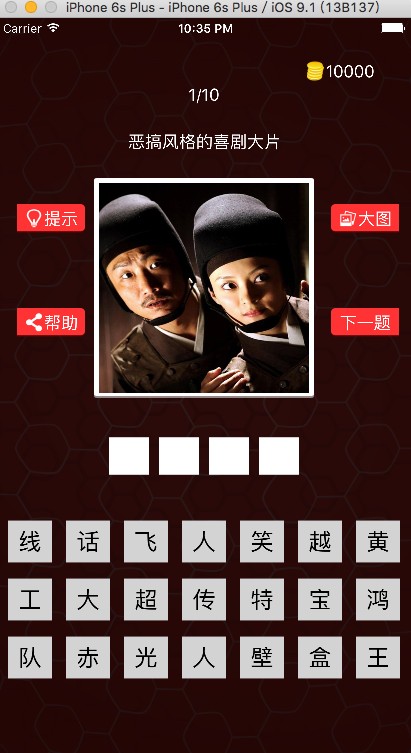
iOS实现(超级猜图)源码
//首先建立模型文件

QLLQuestion.hheQLLQuestion.m文件

#import <Foundation/Foundation.h>

@interface QLLQuestion : NSObject

@property(nonatomic,copy)NSString *answer;

@property(nonatomic,copy)NSString *icon;

@property(nonatomic,copy)NSString *title;

@property(nonatomic,strong)NSArray *options;

-(instancetype)initWithDict:(NSDictionary *)dict;

+(instancetype)QuestionWithDict:(NSDictionary *)dict;

@end

#import "QLLQuestion.h"

@implementation QLLQuestion

- (instancetype)initWithDict:(NSDictionary *)dict

{

    self = [super init];

    if (self) {

        self.answer=dict[@"answer"];

        self.icon=dict[@"icon"];

        self.title=dict[@"title"];

        self.options=dict[@"options"];

    }

    return self;

}

+(instancetype)QuestionWithDict:(NSDictionary *)dict{

    return [[self alloc] initWithDict:dict];

}

@end

//

//  ViewController.m

//  01-超级猜图

//

//

#import "ViewController.h"

#import "QLLQuestion.h"

@interface ViewController ()

- (IBAction)tip;

- (IBAction)help;

- (IBAction)bigImg;

- (IBAction)nextQuestion;

- (IBAction)iconClick;

/**

 *  待选项视图

 */

@property (weak, nonatomic) IBOutlet UIView *opintionView;

/**

 *  答案项视图

 */

@property (weak, nonatomic) IBOutlet UIView *answerView;

/**

 *  模型类

 */

@property(nonatomic,strong)NSArray *question;

/**

 *  初始化序号

 */

@property(nonatomic,assign)int index;

/**

 *  序号label

 */

@property (weak, nonatomic) IBOutlet UILabel *numLabel;

/**

 *  标题

 */

@property (weak, nonatomic) IBOutlet UILabel *titleLabel;

/**

 *  图片按钮

 */

@property (weak, nonatomic) IBOutlet UIButton *imageBtn;

/**

 *  下一题按钮

 */

@property (weak, nonatomic) IBOutlet UIButton *nextBtn;

/**

 *  阴影按钮

 */

@property (weak, nonatomic) IBOutlet UIButton *cover;

/**

 *  分数按钮

 */

@property (weak, nonatomic) IBOutlet UIButton *scoreBtn;

@end

@implementation ViewController

- (void)viewDidLoad {

    [super viewDidLoad];

    //初始化index

    self.index=-;

    [self nextQuestion];

}

/**

 *  延时加载

 */

-(NSArray *)question{

    if (_question==nil) {


        //引入plist文件

        NSArray *dicArray=[NSArray arrayWithContentsOfFile:[[NSBundle mainBundle] pathForResource:@"questions" ofType:@"plist"]];

        NSMutableArray *questonsAray=[NSMutableArray array];

        //取出模型

        for (NSDictionary *dict in dicArray) {

            QLLQuestion *quenstions=[[QLLQuestion alloc]initWithDict:dict];

            [questonsAray addObject:quenstions];

        }

        //赋值

        _question=questonsAray;

    }

    return  _question;

}

-(UIStatusBarStyle)preferredStatusBarStyle{

    return UIStatusBarStyleLightContent;

}

- (void)didReceiveMemoryWarning {

    [super didReceiveMemoryWarning];

    // Dispose of any resources that can be recreated.

}

/**

 *  下一题

 */

- (IBAction)nextQuestion {

    //增加索引

    self.index++;

    //取出模型

    QLLQuestion *quenstion=self.question[self.index];

//    NSLog(@"%d",self.index);

    //设置数据

    [self settingDateWithQuenstion:quenstion];

    //设置答案项

    [self addAnswerBtn:quenstion];

    //设置待选项

    [self addOpinionBtn:quenstion];

}

/**

 *  设置数据

 */

-(void)settingDateWithQuenstion:(QLLQuestion *)quenstion{

    self.numLabel.text=[NSString stringWithFormat:@"%d/%lu",self.index+,self.question.count];

    self.titleLabel.text=quenstion.title;

    [self.imageBtn setImage:[UIImage imageNamed:quenstion.icon] forState:UIControlStateNormal];

    //设置下一个按钮的状态

    self.nextBtn.enabled=(self.index!=self.question.count-);

}

/**

 *  设置答案项

 */

-(void)addAnswerBtn:(QLLQuestion *)quenstion{

    //删除之前的所有按钮

//    for (UIView *subView in self.answerView.subviews) {

//        [subView removeFromSuperview];

//    }

    [self.answerView.subviews makeObjectsPerformSelector:@selector(removeFromSuperview)];

    //设置答案按钮

    NSInteger length=quenstion.answer.length;

    for (int i=; i<length; i++) {

        UIButton *answerBtn=[[UIButton alloc]init];

        [self.answerView addSubview:answerBtn];

        //设置背景

        [answerBtn setBackgroundImage:[UIImage imageNamed:@"btn_answer"] forState:UIControlStateNormal];

        [answerBtn setBackgroundImage:[UIImage imageNamed:@"btn_answer_highlighted"] forState:UIControlStateHighlighted];

        [answerBtn setTitleColor:[UIColor blackColor] forState:UIControlStateNormal];

        //设置frame

        CGFloat margin=;

        CGFloat answerW=;

        CGFloat answerH=;

        CGFloat viewW=self.view.frame.size.width;

        CGFloat leftMargin=(viewW-length*answerW-(length-)*margin)*0.5;

        CGFloat answerX=leftMargin+i*(answerW+margin);

        answerBtn.frame=CGRectMake(answerX, , answerW, answerH);

        //监听答案按钮的点击

        [answerBtn addTarget:self action:@selector(answerClick:) forControlEvents:UIControlEventTouchUpInside];

        [self.answerView addSubview:answerBtn];

    }

}

/**

 *  监听答案按钮的点击

 */

-(void)answerClick:(UIButton *)answerBtn{

    //答案按钮的文字

//    NSString *answerTitle=[answerBtn titleForState:UIControlStateNormal];

    NSString *answerTitle=answerBtn.currentTitle;

    //让答案按钮对应的待选项的文字显示出来

    for (UIButton *optionBtn in self.opintionView.subviews) {

        //待选项的文字

        NSString *optionTitle=[optionBtn titleForState:UIControlStateNormal];

        if ([optionTitle isEqualToString:answerTitle] && optionBtn.hidden==YES) {

            optionBtn.hidden=NO;

            break;

        }

    }

//    NSLog(@"%d",self.index);

    //让被点击的答案按钮文字消失

    [answerBtn setTitle:nil forState:UIControlStateNormal];

    //让所有的答案按钮变为黑色

    for (UIButton *answerBtn in self.answerView.subviews) {

        [answerBtn setTitleColor:[UIColor blackColor] forState:UIControlStateNormal];

    }

}

/**

 *  设置带选项

*/

-(void)addOpinionBtn:(QLLQuestion *)quenstion{

    //设置待选项

    //删除之前的按钮

    //让数组中所有的对象都调用removeFromSuperview

    [self.opintionView.subviews makeObjectsPerformSelector:@selector(removeFromSuperview)];

//    for (UIView *subview in self.opintionView.subviews) {

//        [subview removeFromSuperview];

//    }

    NSInteger count=quenstion.options.count;

    for (int i=; i<count; i++) {

        //设置待选项的背景

        UIButton *optionBtn=[[UIButton alloc]init];

        [optionBtn setBackgroundImage:[UIImage imageNamed:@"btn_option"] forState:UIControlStateNormal];

        [optionBtn setBackgroundImage:[UIImage imageNamed:@"btn_option_highlighted"] forState:UIControlStateHighlighted];

        //设置文字

        [optionBtn setTitle:quenstion.options[i] forState:UIControlStateNormal];

        [optionBtn setTitleColor:[UIColor blackColor] forState:UIControlStateNormal];


        optionBtn.titleLabel.font=[UIFont systemFontOfSize:];


        NSInteger totalColumns=;

        //设置frame

        CGFloat margin=;

        NSInteger row=i/totalColumns;

        NSInteger col=i%totalColumns;

        CGFloat optionW=;

        CGFloat optionH=;

        CGFloat viewW=self.view.frame.size.width;

        CGFloat optionLeftMargin=(viewW-totalColumns*optionW-(totalColumns-)*margin)*0.5;


        CGFloat optionX=optionLeftMargin + col*(optionW+margin);

        CGFloat optionY=row*(optionH+margin);

        optionBtn.frame=CGRectMake(optionX,optionY , optionW, optionH);

        //监听待选按钮的点击

        [optionBtn addTarget:self action:@selector(optionClick:) forControlEvents:UIControlEventTouchUpInside];


        [self.opintionView addSubview:optionBtn];


    }

}

/**

 *  监听待选按钮的点击

 */

-(void)optionClick:(UIButton *)optionBtn{

    //让待选按钮消失

    optionBtn.hidden=YES;


    //显示文字到正确答案上

    for (UIButton *answerBtn in self.answerView.subviews) {

        //判断按钮是否有文字

        NSString *ansTitle= [answerBtn titleForState:UIControlStateNormal];

        if(ansTitle.length==){ //没有文字

            //设置答案按钮的文字为被点击待选按钮的文字

            NSString *optionTitle= [optionBtn titleForState:UIControlStateNormal];

            [answerBtn setTitle:optionTitle forState:UIControlStateNormal];


            break;

        }

    }

    //判断答案是否填满

    BOOL full=YES;

    NSMutableString *tempAnswerTitle=[NSMutableString string];

    for (UIButton *answerBtn in self.answerView.subviews) {

        //判断按钮是否有文字

        NSString *ansTitle= [answerBtn titleForState:UIControlStateNormal];

        if(ansTitle.length==){ //没有文字


            full=NO;

        }

        //拼接文字

        if (ansTitle) {

            [tempAnswerTitle appendString:ansTitle];

        }

    }


    //答案满 了

    if (full) {

        QLLQuestion *quenstion=self.question[self.index];

        if ([tempAnswerTitle isEqualToString:quenstion.answer]) {   //答对了,文字蓝色

            for (UIButton *answerBtn in self.answerView.subviews) {

                [answerBtn setTitleColor:[UIColor blueColor] forState:UIControlStateNormal];

            }

            //加分

            [self scoreDelta:];


            //跳到下一题

            [self performSelector:@selector(nextQuestion) withObject:nil afterDelay:0.25];

        }else{

            for (UIButton *answerBtn in self.answerView.subviews) {

                [answerBtn setTitleColor:[UIColor redColor] forState:UIControlStateNormal];

            }

        }

    }

}

/**

 *  点击图片变大和变小

 */

- (IBAction)iconClick {


    if (self.cover==nil) {//要放大

        [self bigImg];

    }else{

        [self smallImg];

    }

}

/**

 *  提示

 */

- (IBAction)tip {

    //点击所有的答案按钮

    for (UIButton *answerBtn in self.answerView.subviews) {

        [self answerClick:answerBtn];

    }

        //取出答案

        QLLQuestion *quenstions=self.question[self.index];


        //

        NSString *firstAnswer= [quenstions.answer substringToIndex:];


    for (UIButton *optionBtn in self.opintionView.subviews) {

        if ([optionBtn.currentTitle isEqualToString:firstAnswer]) {

            [self optionClick:optionBtn];

            break;

        }

    }

        //  扣分

    [self scoreDelta:-];

}

/**

 *  帮助

 */

- (IBAction)help {

}

-(void)scoreDelta:(int)delta{

    int score=self.scoreBtn.currentTitle.intValue;

    score+=delta;

    [self.scoreBtn setTitle:[NSString stringWithFormat:@"%d",score] forState:UIControlStateNormal];

}

/**

 *  大图

 */

- (IBAction)bigImg {


       //添加阴影

    UIButton *cover=[[UIButton alloc]init];

    cover.frame=self.view.bounds;

    cover.backgroundColor=[UIColor blackColor];

    cover.alpha=0.0;

    [cover addTarget:self action:@selector(smallImg) forControlEvents:UIControlEventTouchUpInside];

    [self.view addSubview:cover];

    self.cover=cover;


    //开始动画

  //更换阴影和头像的位置

//

//    [UIView beginAnimations:nil context:nil];

//    [UIView setAnimationDuration:1.0];

    [UIView animateWithDuration:0.5 animations:^{

        [self.view bringSubviewToFront:self.imageBtn];

        CGFloat iconW=self.view.frame.size.width;

        CGFloat iconH=iconW;

        CGFloat iconX=;

        CGFloat iconY=(self.view.frame.size.height-iconH)*0.5;

        self.imageBtn.frame=CGRectMake(iconX, iconY, iconW, iconH);

        cover.alpha=0.7;

    }];


//    [UIView commitAnimations];

}

/**

 *  小图

 */

-(void)smallImg{

    //动画的block


    [UIView animateWithDuration:0.5 animations:^{

        self.imageBtn.frame=CGRectMake(, , , );

        self.cover.alpha=0.0;

    } completion:^(BOOL finished) {

        [self.cover removeFromSuperview];

        self.cover=nil;

    }];


    //删除阴影

//    [self.cover removeFromSuperview];

//    self.cover=nil;;

    //缩小图片

//    [UIView beginAnimations:nil context:nil];

//    [UIView setAnimationDuration:1.0];

//    [UIView setAnimationDelegate:self];

//    [UIView setAnimationDidStopSelector:@selector(removeCover)];

//    self.imageBtn.frame=CGRectMake(97, 160, 220, 220);

//

//

//    self.cover.alpha=0.0;


//    [UIView commitAnimations];


}

//

//-(void)removeCover{

//    [self.cover removeFromSuperview];

//    self.cover=nil;

//}

@end
iOS实现(超级猜图)源码的更多相关文章
- iOS高仿app源码:纯代码打造高仿优质《内涵段子》
iOS高仿app源码:纯代码打造高仿优质<内涵段子>收藏下来 字数1950 阅读4999 评论173 喜欢133 Github 地址 https://github.com/Charlesy ...
- 比较不错的一个ios找茬游戏源码
找茬游戏源码 ,这个是一款非常不错的ios找茬游戏源码,该游戏的兼容性非常好的,并且还可以支持ipad和iphone,UI界面设计得也很漂亮,游戏源码真的是一款非常完美,而且又很完整的一款休闲类的游戏 ...
- ios水果风暴游戏源码下载
游戏源码是从那个IOS教程网IOS.662p.com分享给大家的. 这是一款ios水果风暴游戏源码下载,介绍给大家一下,喜欢的朋友可以下载学习一下吧.应用介绍:这是一个以获得高分和挑战更高难度为目的的 ...
- ios水果风暴游戏源码项目下载
这是一款ios水果风暴游戏源码下载,介绍给大家一下,喜欢的朋友可以下载学习一下吧.应用介绍:这是一个以获得高分和挑战更高难度为目的的游戏.游戏中有九种不同的卡通水果,您可以交换屏幕中两个相邻水果的位置 ...
- 仿陌陌的ios客户端+服务端源码项目
软件功能:模仿陌陌客户端,功能很相似,注册.登陆.上传照片.浏览照片.浏览查找附近会员.关注.取消关注.聊天.语音和文字聊天,还有拼车和搭车的功能,支持微博分享和查找好友. 后台是php+mysql, ...
- iOS开发之Alamofire源码解析前奏--NSURLSession全家桶
今天博客的主题不是Alamofire, 而是iOS网络编程中经常使用的NSURLSession.如果你想看权威的NSURLSession的东西,那么就得去苹果官方的开发中心去看了,虽然是英文的,但是结 ...
- iOS版打地鼠游戏源码
打地鼠游戏源码,游戏是一款多关卡基于cocos2d的iPad打地鼠游戏源码,这也是一款高质量的打地鼠游戏源码,可以拥有逐步上升的关卡的设置,大家可以在关卡时设置一些商业化的模式来盈利的,非常完美的一款 ...
- 较好的IOS新闻客户端应用源码
兼容性较好的新闻客户端应用源码,这个是一款国外新闻客户端源码,并且这款应用兼容性非常好的,可以很好地兼容iPhone和iPad的使用,而且应用的功能很多,新闻列表,上啦下拉刷新效果,评论列表,在线评论 ...
- ios球体弹跳游戏源码
一款耐玩的ios游戏源码,画面上有很多小星星,球体落下的时候,你需要在画面上画出一条条的线条让球体弹跳起来然后吃掉小星星,如果没借助球体就失败了.游戏有很多关卡.注意: <ignore_js_o ...
随机推荐
- NGUI 修改Shader支持灰色滤镜
之前有人做过,不过效率不高: http://blog.csdn.net/onerain88/article/details/12197277 他的代码: fixed4 frag (v2f i) : ...
- 使用 IntelliJ IDEA 2016和Maven创建Java Web项目的详细步骤及相关问题解决办法
Maven简介 相对于传统的项目,Maven 下管理和构建的项目真的非常好用和简单,所以这里也强调下,尽量使用此类工具进行项目构建, 它可以管理项目的整个生命周期. 可以通过其命令做所有相关的工作,其 ...
- React中的PropTypes详解
propTypes用来规范props必须满足的类型,如果验证不通过将会有warn提示. React PropTypes的种类有: React.PropTypes.array // 队列 React.P ...
- ASP.NET MVC分页实现
ASP.NET MVC中不能使用分页控件,所以我就自己写了一个分页局部视图,配合PageInfo类,即可实现在任何页面任意位置呈现分页,由于采用的是基于POST分页方式,所以唯一的限制就是必须放在FO ...
- 重构第18天 用条件语句来代替异常(Replace exception with conditional)
理解:本文中的“使用条件判断代替异常”是指把没有必要使用异常做判断的条件尽量改为条件判断. 详解: 重构前代码: public class Microwave { private IMicrowave ...
- question about import google file
1. question descibe; once, one css file(app.css) of my web project has sentence like this: @import u ...
- Java中检测字符串的编码格式
public static String getEncoding(String str) { String encode = "GB2312"; try { if (str.equ ...
- CodeBlocks VS2015编译环境设置
1. 菜单 Settings --> Compiler... 2. 设置vs 的安装路径
- Linux命令详解之—pwd命令
Linux的pwd命令也是一个非常常用的命令,本文为大家介绍下Linux中pwd命令的用法. 更多Linux命令详情请看:Linux命令速查手册 Linux pwd命令用于显示工作目录. 执行pwd指 ...
- $(document).ready()即$()方法和window.onload方法的比较
以浏览器装载文档为例,我们都知道在页面完毕后,浏览器会通过JavaScript为DOM元素添加事件.在常规的JavaScript代码中,通常使用window.onload方法,而在jQuery中,使用 ...