
UIImageView(转)
UIImageView,顾名思义,是用来放置图片的。使用Interface Builder设计界面时,当然可以直接将控件拖进去并设置相关属性,这就不说了,这里讲的是用代码。
1、创建一个UIImageView:
创建一个UIImageView对象有五种方法:
UIImageView *imageView1 = [[UIImageView alloc] init]; UIImageView *imageView2 = [[UIImageView alloc] initWithFrame:(CGRect)]; UIImageView *imageView3 = [[UIImageView alloc] initWithImage:(UIImage *)]; UIImageView *imageView4 = [[UIImageView alloc] initWithImage:(UIImage *) highlightedImage:(UIImage *)]; UIImageView *imageView5 = [[UIImageView alloc] initWithCoder:(NSCoder *)];
比较常用的是前边三个。至于第四个,当这个ImageView的highlighted属性是YES时,显示的就是参数highlightedImage,一般情况下显示的是第一个参数UIImage。
2、frame与bounds属性:
上述创建一个UIImageView的方法中,第二个方法是在创建时就设定位置和大小。
当之后想改变位置时,可以重新设定frame属性:
imageView.frame = CGRectMake(CGFloat x, CGFloat y, CGFloat width, CGFloat heigth);
注意到UIImageView还有一个bounds属性
imageView.bounds = CGRectMake(CGFloat x, CGFloat y, CGFloat width, CGFloat heigth);
那么这个属性跟frame有什么区别呢?
我的理解是,frame设置其位置和大小,而bounds只能设置其大小,其参数中的x、y不起作用即便是之前没有设定frame属性,控件最终的位置也不是bounds所设定的参数。bounds实现的是将UIImageView控件以原来的中心为中心进行缩放。例如有如下代码:
imageView.frame = CGRectMake(0, 0, 320, 460); imageView.bounds = CGRectMake(100, 100, 160, 230);
执行之后,这个imageView的位置和大小是(80, 115, 160, 230)。
3、contentMode属性:
这个属性是用来设置图片的显示方式,如居中、居右,是否缩放等,有以下几个常量可供设定:
UIViewContentModeScaleToFill UIViewContentModeScaleAspectFit UIViewContentModeScaleAspectFill UIViewContentModeRedraw UIViewContentModeCenter UIViewContentModeTop UIViewContentModeBottom UIViewContentModeLeft UIViewContentModeRight UIViewContentModeTopLeft UIViewContentModeTopRight UIViewContentModeBottomLeft UIViewContentModeBottomRight
注意以上几个常量,凡是没有带Scale的,当图片尺寸超过 ImageView尺寸时,只有部分显示在ImageView中。UIViewContentModeScaleToFill属性会导致图片变形。UIViewContentModeScaleAspectFit会保证图片比例不变,而且全部显示在ImageView中,这意味着ImageView会有部分空白。UIViewContentModeScaleAspectFill也会证图片比例不变,但是是填充整个ImageView的,可能只有部分图片显示出来。
前三个效果如下图:
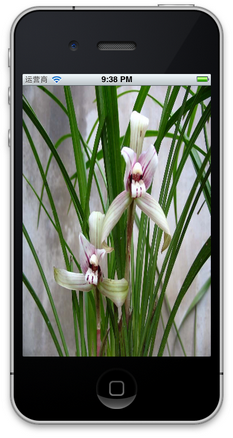
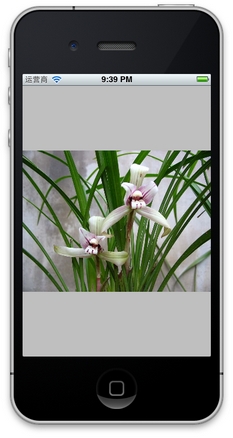

UIViewContentModeScaleToFill UIViewContentModeScaleAspectFit UIViewContentModeScaleAspectFill
4、更改位置
更改一个UIImageView的位置,可以
4.1 直接修改其frame属性
4.2 修改其center属性:
imageView.center = CGPointMake(CGFloat x, CGFloat y);
center属性指的就是这个ImageView的中间点。
4.3 使用transform属性
imageView.transform = CGAffineTransformMakeTranslation(CGFloat dx, CGFloat dy);
其中dx与dy表示想要往x或者y方向移动多少,而不是移动到多少。
5、旋转图像
imageView.transform = CGAffineTransformMakeRotation(CGFloat angle);
要注意它是按照顺时针方向旋转的,而且旋转中心是原始ImageView的中心,也就是center属性表示的位置。
这个方法的参数angle的单位是弧度,而不是我们最常用的度数,所以可以写一个宏定义:
#define degreesToRadians(x) (M_PI*(x)/180.0)
用于将度数转化成弧度。下图是旋转45度的情况:
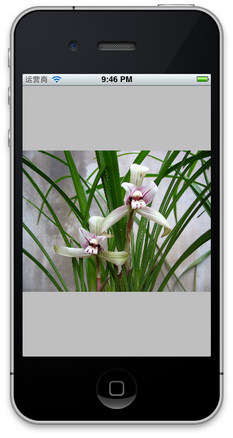
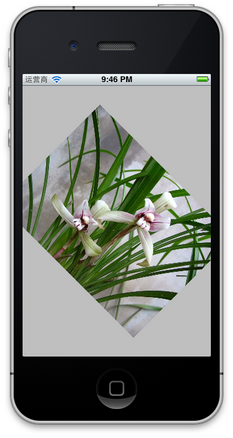
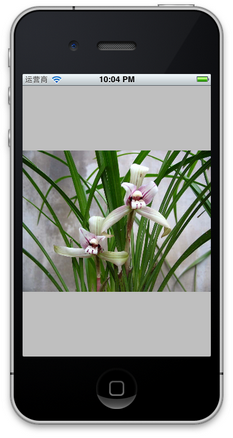
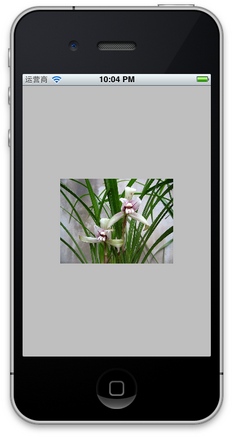
6、缩放图像
还是使用transform属性:
imageView.transform = CGAffineTransformMakeScale(CGFloat scale_w, CGFloat scale_h);
其中,CGFloat scale_w与CGFloat scale_h分别表示将原来的宽度和高度缩放到多少倍,下图是缩放到原来的0.6倍的示意图:
7、播放一系列图片
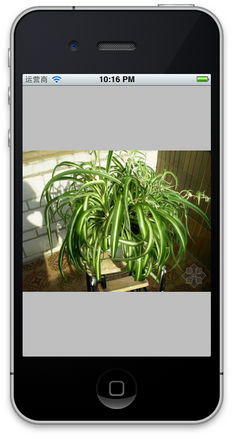
imageView.animationImages = imagesArray; // 设定所有的图片在多少秒内播放完毕 imageView.animationDuration = [imagesArray count]; // 不重复播放多少遍,0表示无数遍 imageView.animationRepeatCount = 0; // 开始播放 [imageView startAnimating];
其中,imagesArray是一些列图片的数组。如下图:


8、为图片添加单击事件:
imageView.userInteractionEnabled = YES; UITapGestureRecognizer *singleTap = [[UITapGestureRecognizer alloc] initWithTarget:self action:@selector(tapImageView:)]; [imageView addGestureRecognizer:singleTap];
一定要先将userInteractionEnabled置为YES,这样才能响应单击事件。
9、其他设置
imageView.hidden = YES或者NO; // 隐藏或者显示图片 imageView.alpha = (CGFloat) al; // 设置透明度 imageView.highlightedImage = (UIImage *)hightlightedImage; // 设置高亮时显示的图片 imageView.image = (UIImage *)image; // 设置正常显示的图片 [imageView sizeToFit]; // 将图片尺寸调整为与内容图片相同
UIImageView(转)的更多相关文章
- AFNetworking 3.0 源码解读(十)之 UIActivityIndicatorView/UIRefreshControl/UIImageView + AFNetworking
我们应该看到过很多类似这样的例子:某个控件拥有加载网络图片的能力.但这究竟是怎么做到的呢?看完这篇文章就明白了. 前言 这篇我们会介绍 AFNetworking 中的3个UIKit中的分类.UIAct ...
- 6. UIImageView 的使用
1. UIImageView 的认识 QQ:853740091 UIImageView 继承UIView,通过他的名字我们也可以看出这个是用来显示图片的 2. 使用方法 UIImageView *im ...
- UI控件(UIImageView)
@implementation ViewController - (void)viewDidLoad { [super viewDidLoad]; image1_ = [UIImage imageNa ...
- iOS--使用UIImageView进行GIF动图播放
大家好,好久没有跟新了.其实也就昨天到今天的时间. 前言:实际上,GIF动图文件中包含了一组图片及其信息数组,这些信息数据记录着这一组图片中各张图片的播放时长等信息,我们可以将图片和这些信息或取出来, ...
- UIImageView 自带动画+N张图片实现很炫的动画
gitHub上又看到个很炫的动画:https://github.com/MartinRGB/GiftCard-iOS 看了看他的代码,发现核心动画(就是把按钮包装成一个礼物盒)其实很简单,就是把一 ...
- UIImageView
- (void)viewDidLoad { [super viewDidLoad]; // Do any additional setup after loading the view. /***** ...
- IOS开发之Bug--关于UIImageView的使用
这里是遇到的一个关于使用UIImageView的小bug,bug就是加载不出来图片. 原因:如果图片资源是jpg文件,如果代码没有加后缀.jpg就会出现不加载出来的情况: 添加上.jpg就能加载出来了 ...
- UIScrollView,UIPageControl,UIImageView 实现图片轮播的效果
上一篇博客介绍了如何将XCode创立的项目提交到Git版本控制,这次就直接做一个图片轮播的展示demo,刚好可以把UIScrollView.UIPageControl.UIImageView这三个控件 ...
- iOS中UIImageView的填充模式
UIImageView的填充模式 属性名称 imageV.contentMode枚举属性: @"UIViewContentModeScaleToFill", // 拉伸自适应填满整 ...
- NSBundle控件和UIImageView和UIButton区别
1.NSBundle 1> 一个NSBundle代表一个文件夹,利用NSBundle能访问对应的文件夹 2> 利用mainBundle就可以访问软件资源包中的任何资源 3> 模拟器应 ...
随机推荐
- JavaScript学习之cookies
使用JavaScript操作cookies 一.什么是cookies? cookies是一种对客户端硬盘的数据进行存取的技术,这种技术能够让网站把少量的数据存储到客户端的硬盘,同时也能够从客户端的硬盘 ...
- iOS NSFileManager
今天,用到了文件的管理,发现自己又忘得差不多了.屋里有个苍蝇,老是在眼前晃来晃去,好是烦人. 用到了两个地方: 1. 创建文件夹: 2. 移动文件 功能还有很多,今天先总结两个! 1. 创建文件夹: ...
- iOS 使用UIView的一种有效方法
在一个典型的MVC结构 中,Model部分负责保存目标数据,View部分主要负责实现数据的界面以及将数据显示出来,二者在Controller的操作下协同工作.在iOS应用中,View的实现主要由UIV ...
- 将一个UIView对象的内容保存为UIImage
+ (UIImage*)imageFromView:(UIView*)view{ UIGraphicsBeginImageContextWithOptions(view.bounds.size, YE ...
- Shell函数的简单应用
Shell函数的简单应用 在脚本内给函数传参: #!/bin/bash . /etc/init.d/functions CheckUrl (){ curl -I -s $ | head - } Che ...
- php命名空间详解
index.php: <?php include 'demo.php'; use A\demo as test; use B\demo as test2; use C\demo; $obj = ...
- 7z usecaes
1. Archive without compressing 7z a -t7z -mx=0 OutputFilename InputFilename Descryption: a: command, ...
- Access数据库创建、使用
1.创建Access数据库表 1)在office中打开Microsoft Access2010,选择空数据库创建数据库StudentInfo. 2)创建新表,在表格第一列选择数据类型,并输入列名. 3 ...
- SQL Server翻译目录
从SQLServerCentral翻译部分Stairways文章,设置目录方便阅读(2015-12更新)SQL Server代理系列第一篇 SQL Server代理概述第二篇 SQL Server代理 ...
- 逻辑卷管理LVM (Logical Volume Manager)
什么是LVM? LVM(Logical Volume Manager)逻辑卷管理,是一种将一个或多个硬盘的分区在逻辑上集合,相当于一个大硬盘来使用,当硬盘的空间不够使用的时候,可以继续将其它的硬盘的 ...