
(一)搭建自己的SpringBoot后台框架整合MyBatis
一:通过idea工具构建基础框架
1. 打开idea,左上角File→New→Project,
2. 点击Next
3. 点击Next,配置如下图,这里我们选择数据库MySQL和持久层框架MyBatis
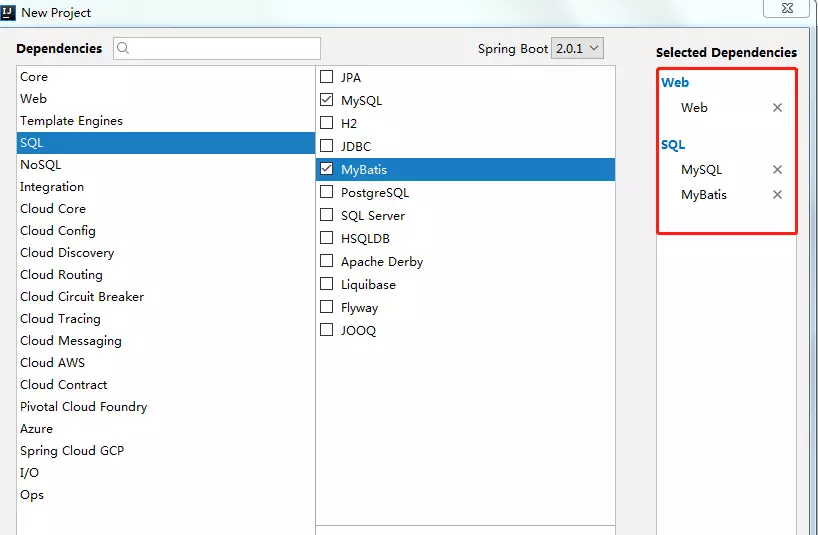
4. 点击Next,选择工作目录,点击Finish,开始构建
5. 创建完成后,项目目录结构如下
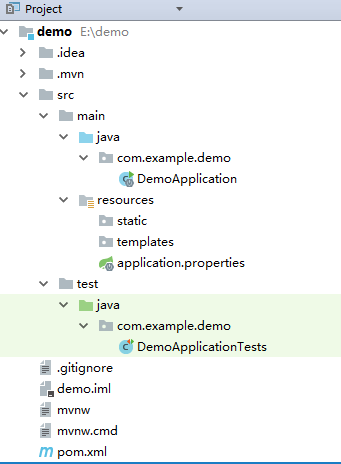
二:配置数据库信息
在application.properties文件中添加如下数据库配置
spring.datasource.url=jdbc:mysql://localhost:3306/demo?useSSL=false&useUnicode=true&characterEncoding=utf-8&zeroDateTimeBehavior=convertToNull&transformedBitIsBoolean=true&autoReconnect=true&failOverReadOnly=false

spring.datasource.username=数据库用户名

spring.datasource.password=数据库密码

spring.datasource.driverClassName=com.mysql.jdbc.Driver
三:创建数据库UserInfo表
CREATE TABLE `user_info` (

  `id` int(32) NOT NULL AUTO_INCREMENT,

  `user_name` varchar(255) DEFAULT NULL,

  PRIMARY KEY (`id`)

) ENGINE=InnoDB AUTO_INCREMENT=2 DEFAULT CHARSET=utf8;
四:创建项目基本目录结构

Model 存放实体类
package com.example.demo.model;

import javax.persistence.Column;

import javax.persistence.Id;

/**

 * @author

 * @Description:

 * @time 2018/4/18 11:55

 */

public class UserInfo {

    /**

     * 主键

     */

    @Id

    private String id;

    /**

     * 用户名

     */

    @Column(name = "user_name")

    private String userName;

    private String password;

    public String getId() {

        return id;

    }

    public void setId(String id) {

        this.id = id;

    }

    public String getUserName() {

        return userName;

    }

    public void setUserName(String userName) {

        this.userName = userName;

    }

    public String getPassword() {

        return password;

    }

    public void setPassword(String password) {

        this.password = password;

    }

}
Mapper
<?xml version="1.0" encoding="UTF-8"?>

<!DOCTYPE mapper PUBLIC "-//mybatis.org//DTD Mapper 3.0//EN" "http://mybatis.org/dtd/mybatis-3-mapper.dtd">

<mapper namespace="com.example.demo.dao.UserInfoMapper">

    <resultMap id="BaseResultMap" type="com.example.demo.model.UserInfo">

        <id column="id" jdbcType="INTEGER" property="id"/>

        <result column="user_name" jdbcType="VARCHAR" property="userName"/>

    </resultMap>

    <sql id="Base_Column_List">

      id,user_name

    </sql>

    <select id="selectById" parameterType="java.lang.Integer" resultMap="BaseResultMap">

        select

        <include refid="Base_Column_List"/>

        from user_info

        where id = #{id,jdbcType=VARCHAR}

    </select>

</mapper>
DAO层
package com.example.demo.dao;

import com.example.demo.model.UserInfo;

import org.apache.ibatis.annotations.Param;

/**

 * @author

 * @Description:

 * @time 2018/4/18 11:54

 */

public interface UserInfoMapper {

    UserInfo selectById(@Param("id") Integer id);

}
Service
package com.example.demo.service;

import com.example.demo.model.UserInfo;

/**

 * @author

 * @Description:

 * @time 2018/4/18 11:56

 */

public interface UserInfoService {

    UserInfo selectById(Integer id);

}
ServiceImpl
package com.example.demo.service.impl;

import com.example.demo.dao.UserInfoMapper;

import com.example.demo.model.UserInfo;

import com.example.demo.service.UserInfoService;

import org.springframework.stereotype.Service;

import javax.annotation.Resource;

/**

 * @author

 * @Description:

 * @time 2018/4/18 11:56

 */

@Service

public class UserInfoServiceImpl implements UserInfoService{

    @Resource

    private UserInfoMapper userInfoMapper;

    public UserInfo selectById(Integer id){

        return userInfoMapper.selectById(id);

    }

}
Controller
package com.example.demo.controller;

import com.example.demo.model.UserInfo;

import com.example.demo.service.UserInfoService;

import org.springframework.web.bind.annotation.PostMapping;

import org.springframework.web.bind.annotation.RequestMapping;

import org.springframework.web.bind.annotation.RestController;

import javax.annotation.Resource;

/**

 * @author

 * @Description:

 * @time 2018/4/18 11:39

 */

@RestController

@RequestMapping("userInfo")

public class UserInfoController {

    @Resource

    private UserInfoService userInfoService;

    @PostMapping("/hello")

    public String hello(){

        return "hello SpringBoot";

    }

    @PostMapping("/selectById")

    public UserInfo selectById(Integer id){

        return userInfoService.selectById(id);

    }

}
MyBatis 的配置Java类
package com.example.demo.core.configurer;

import org.apache.ibatis.session.SqlSessionFactory;

import org.mybatis.spring.SqlSessionFactoryBean;

import org.mybatis.spring.mapper.MapperScannerConfigurer;

import org.springframework.context.annotation.Bean;

import org.springframework.context.annotation.Configuration;

import org.springframework.core.io.support.PathMatchingResourcePatternResolver;

import org.springframework.core.io.support.ResourcePatternResolver;

import javax.sql.DataSource;

/**

 * @ClassName: MybatisConfigurer

 * @Description: Mybatis配置

 * @author

 * @date 2018年1月20日 下午4:03:46

 *

 */

@Configuration

public class MybatisConfigurer {

   @Bean

   public SqlSessionFactory sqlSessionFactoryBean(DataSource dataSource) throws Exception {

      SqlSessionFactoryBean factory = new SqlSessionFactoryBean();

      factory.setDataSource(dataSource);

      factory.setTypeAliasesPackage("com.example.demo.model");

      // 添加XML目录

      ResourcePatternResolver resolver = new PathMatchingResourcePatternResolver();

      factory.setMapperLocations(resolver.getResources("classpath:mapper/*.xml"));

      return factory.getObject();

   }

   @Bean

   public MapperScannerConfigurer mapperScannerConfigurer() {

      MapperScannerConfigurer mapperScannerConfigurer = new MapperScannerConfigurer();

      mapperScannerConfigurer.setSqlSessionFactoryBeanName("sqlSessionFactoryBean");

      mapperScannerConfigurer.setBasePackage("com.example.demo.dao");

      return mapperScannerConfigurer;

   }

}
@Configuration表示该文件是一个配置文件
@Bean表示该方法是一个传统xml配置文件中的<Bean id=""></Bean>
其中factory.setTypeAliasesPackage("com.example.demo.model")表示项目中model的存储路径;
factory.setMapperLocations(resolver.getResources("classpath:mapper/*.xml"));表示mapper.xml存储路径;
mapperScannerConfigurer.setBasePackage("com.example.demo.dao");表示dao层的存储路径
五:运行项目
找到DemoApplication,右键,选择run DemoApplication
以上内容来源网上,如有侵权请联系本人!!!
(一)搭建自己的SpringBoot后台框架整合MyBatis的更多相关文章
- springboot 后台框架平台 mybatis 集成代码生成器 shiro 权限 websocket
1.代码生成器: [正反双向](单表.主表.明细表.树形表,快速开发利器)freemaker模版技术 ,0个代码不用写,生成完整的一个模块,带页面.建表sql脚本.处理类.service等完整模块2. ...
- 【springboot spring mybatis】看我怎么将springboot与spring整合mybatis与druid数据源
目录 概述 1.mybatis 2.druid 壹:spring整合 2.jdbc.properties 3.mybatis-config.xml 二:java代码 1.mapper 2.servic ...
- SpringBoot 2.X整合Mybatis
1.创建工程环境 勾选Web.Mybatis.MySQL,如下 依赖如下 <dependency> <groupId>org.springframework.boot</ ...
- 利用IDEA搭建SpringBoot项目,整合mybatis
一.配置文件.启动项目 生成之后这几个文件可以删掉的 配置application spring.datasource.url=jdbc:mysql://localhost:3306/test?serv ...
- SpringBoot学习之整合Mybatis
本博客使用IDEA开发工具,通过Maven构建SpringBoot项目,初始化项目添加的依赖有:spring-boot-starter-jdbc.spring-boot-starter-web.mys ...
- SpringBoot | 3.2 整合MyBatis
目录 前言 1. 导入MyBatis场景 1.1 初始化导向 1.2 手动导入 2. *MyBatis自动配置原理 3. 全局配置文件 @Mapper @MapperScan 3.1 配置模式 3.2 ...
- SpringBoot当中如何整合mybatis和注入
[学习笔记] 6.整合mybatis和注入: 马克-to-win@马克java社区: 根据第3部分的helloworld例子,用那个项目做底子.pom.xml只需要加入mybatis和mysql的部分 ...
- spring 框架整合mybatis的源码分析
问题:spring 在整合mybatis的时候,我们是看不见sqlSessionFactory,和sqlsession(sqlsessionTemplate 就是sqlsession的具体实现)的,这 ...
- springboot笔记07——整合MyBatis
前言 Springboot 整合 MyBatis 有两种方式,分别是:"全注解版" 和 "注解.xml混合版". 创建项目 创建Springboot项目,选择依 ...
随机推荐
- win10安装Anaconda+TensorFlow+配置PyCharm
其实很简单,我这里也只是记录一下而已. 第一大坑:anaconda必须安装4.2以前的版本,不能安装4.3以后的 版本:满满的血泪史 因为我们需要安装自带的python必须是3.5,才可以调用Tens ...
- 3144: [Hnoi2013]切糕
3144: [Hnoi2013]切糕 Time Limit: 10 Sec Memory Limit: 128 MBSubmit: 1526 Solved: 827[Submit][Status] ...
- Statelessness Provide credentials with the request. Each request MUST stand alone and should not be affected from previous conversation happened from same client in past.
The server never relies on information from previous requests. Statelessness As per the REST (REpres ...
- Hibernate exception
1.a different object with the same identifier value was already associated with the session. 错误原因:在h ...
- I2S
音频数据传输而制定: Inter—IC Sound : 单线 时钟和数据一条线,时分复用: 标准的I2S总线电缆是由3根串行导线组成的:1根是时分多路复用(简称TDM)数据线:1根是字选择线:1根是时 ...
- PHP的date 函数
<!DOCTYPE html> <html> <body> <?php echo "今天是 " . date("Y/m/d&qu ...
- YTU 2802: 判断字符串是否为回文
2802: 判断字符串是否为回文 时间限制: 1 Sec 内存限制: 128 MB 提交: 348 解决: 246 题目描述 编写程序,判断输入的一个字符串是否为回文.若是则输出"Yes ...
- dedecms文章内页获取缩略图的调用标签
点评:文章内容页缩略图的调用,图片集内容页缩略图的调用很容易混淆,内页想调用缩略图用[filed:picname/]来实现是错误的 文章内容页缩略图的调用,图片集内容页缩略图的调用,相信大家都想找这个 ...
- 安全性测试--CSRF攻击
一.CSRF是什么? CSRF(Cross-site request forgery),中文名称:跨站请求伪造,也被称为:one click attack/session riding,缩写为:CSR ...
- 如何生成Android的keystore文件
步骤 1 找到本机电脑上jdk安装的目录,使用cmd命令打开命令窗口,输入cd jdk目录(替换成你的jdk的bin目录),进入到jdk的bin目录,接下来你才可以使用jdk的命令进行操作 步骤 ...