
android 入门 001 (界面布局)
学android 首先学会怎么布局界面,我开始是学.net的,因工作需要学习一下安卓,外行写的不好,请多多见谅指教 。这一篇文章然我们来学习一下四种布局吧!
RelativeLayout(相对布局) 、LinearLayout(线性布局) 、TableLayout(表格布局) 、FrameLayout(帧布局)
1、RelativeLayout
<RelativeLayout xmlns:android="http://schemas.android.com/apk/res/android"

    xmlns:tools="http://schemas.android.com/tools"

    android:layout_width="fill_parent"

    android:layout_height="match_parent"

    >

    <TextView

        android:id="@+id/lable"

        android:layout_width="fill_parent"

        android:layout_height="wrap_content"

        android:text="请输入" />

    <EditText

         android:id="@+id/txt"

        android:layout_width="fill_parent"

        android:layout_height="wrap_content"

         android:background="@android:drawable/editbox_background"

         android:layout_below="@id/lable"

        />

    <Button

        android:id="@+id/OK"

        android:layout_width="wrap_content"

        android:layout_height="wrap_content"

        android:layout_below="@id/txt"

        android:text="OK"

        android:layout_alignParentRight="true"

        android:layout_marginLeft="10px"

        />

         />

    <Button

        android:id="@+id/Cancel"

        android:layout_width="wrap_content"

        android:layout_height="wrap_content"

        android:layout_toLeftOf="@id/OK"

         android:layout_alignTop="@id/OK"

        android:text="Cancel"

        />

</RelativeLayout>
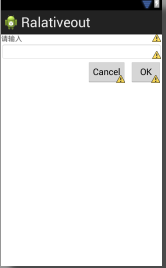
2、LinearLayout
<LinearLayout xmlns:android="http://schemas.android.com/apk/res/android"

    xmlns:tools="http://schemas.android.com/tools"

    android:layout_width="fill_parent"

    android:layout_height="fill_parent"

     android:orientation="vertical"

    >

    <TextView

        android:id="@+id/lable"

        android:layout_width="fill_parent"

        android:layout_height="wrap_content"

        android:text="请输入" />

    <EditText

         android:id="@+id/txt"

        android:layout_width="fill_parent"

        android:layout_height="wrap_content"

         android:background="@android:drawable/editbox_background"

         android:layout_below="@id/lable"

        />

    <Button

        android:id="@+id/OK"

        android:layout_width="wrap_content"

        android:layout_height="wrap_content"

        android:layout_below="@id/txt"

        android:text="OK"

       android:layout_gravity="right"

        />

         />

</LinearLayout>
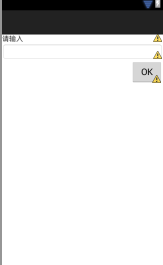
3、TableLayout
<TableLayout xmlns:android="http://schemas.android.com/apk/res/android"

    android:layout_width="fill_parent"

    android:layout_height="fill_parent"

    android:stretchColumns="1"

    >

   <TableRow >

       <TextView

           android:text="col1"

           android:padding="3dip"

           />

        <TextView

           android:text="col2"

           android:padding="3dip"

           android:gravity="right"

           />

   </TableRow>

    <TableRow >

       <TextView

           android:text="col1"

           android:padding="3dp"

           />

        <TextView

           android:text="col2"

           android:padding="3dp"

           android:gravity="right"

           />

   </TableRow>

</TableLayout>
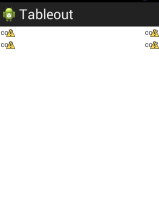
4、FrameLayout
<FrameLayout xmlns:android="http://schemas.android.com/apk/res/android"

    xmlns:tools="http://schemas.android.com/tools"

    android:layout_width="fill_parent"

    android:layout_height="fill_parent"

    >

     <ImageView

         android:layout_height="fill_parent"

         android:layout_width="fill_parent"

         android:src="@drawable/movie"

         />

     <ImageView

         android:layout_height="wrap_content"

         android:layout_width="wrap_content"

         android:src="@drawable/play"

          android:layout_gravity="center"

         />

</FrameLayout>


android 入门 001 (界面布局)的更多相关文章
- Android 你知道界面布局嵌套多少层之后会Crash吗
我们先放一张Hierarchy Viewer的图:(模拟器Android4.4) 看到数字6了吗,那个RelativeLayout是MainActivity的根ViewGroup, 而在Relativ ...
- Android实现入门界面布局
Android实现入门界面布局 开发工具:Andorid Studio 1.3 运行环境:Android 4.4 KitKat 代码实现 首先是常量的定义,安卓中固定字符串应该定义在常量中. stri ...
- Android入门(十):界面的布局方式及其实际应用
关于Android界面布局,网上已经有了很多非常不错的学习资料,在这里我也不班门弄斧了,推荐两篇我认为写的不错的教程,然后再重点讲一下几种布局方式的实际应用. 教程链接:①http://www.cnb ...
- Android基础-系统架构分析,环境搭建,下载Android Studio,AndroidDevTools,Git使用教程,Github入门,界面设计介绍
系统架构分析 Android体系结构 安卓结构有四大层,五个部分,Android分四层为: 应用层(Applications),应用框架层(Application Framework),系统运行层(L ...
- 【详细】Android入门到放弃篇-YES OR NO-》各种UI组件,布局管理器,单元Activity
问:达叔,你放弃了吗? 答:不,放弃是不可能的,丢了Android,你会心疼吗?如果别人把你丢掉,你是痛苦呢?还是痛苦呢?~ 引导语 有人说,爱上一个人是痛苦的,有人说,喜欢一个人是幸福的. 人与人之 ...
- 2013 duilib入门简明教程 -- 界面布局(9)
上一个教程实现的标题栏代码中,并没有看到处理自适应窗口大小的代码,但是窗口大小变化后,按钮的位置会跟着变化,这是因为我们将按钮放到了HorizontalLayout.VerticalLayou ...
- Android界面布局基本知识简述
Android手机操作系统在模拟器中进行相关的编写,可以帮助我们实现各种功能需求.尤其是在界面的操作方面显得更为突出.在这里我们就可以对Android界面布局的相关操作来对这方面的知识进行一个深入的了 ...
- Android基础总结(3)——UI界面布局
Android的UI设计有好几种界面程序编写方式.大体上可分为两大类:一类是利用可视化工具来进行,允许你进行拖拽控件来进行布局:还有一类是编写xml文档来进行布局.这两种方法可以相互转换. 1.常见的 ...
- [Android 性能优化系列]降低你的界面布局层次结构的一部分
大家假设喜欢我的博客,请关注一下我的微博,请点击这里(http://weibo.com/kifile),谢谢 转载请标明出处(http://blog.csdn.net/kifile),再次感谢 原文地 ...
随机推荐
- 侧菜单栏的实现SlidingPaneLayout
SlidingPaneLayout分为两部分,上面的 左划出部分和没划出的时候 <?xml version="1.0" encoding="utf-8"? ...
- springday04-go1
springmvc02:1.创建项目,导入jar包 2.复制xml文件到src下 3.在web.xml中配置DispatcherServlet(代码一致) <?xml version=" ...
- CCSprite的使用方法大全
一.精灵创建及初始化 1.从图片文件创建: CCSprite *sprite = [CCSprite spriteWithFile:@"ImageFileName.png"]; 默 ...
- paper 72 :高动态范围(HDR)图像 HDR (High Dynamic Range)
In standard rendering, the red, green and blue values for a pixel are each represented by a fraction ...
- paper 54 :图像频率的理解
我一直在思考一个问题,图像增强以后,哪些方面的特征最为显著,思来想去,无果而终!翻看了一篇知网的paper,基于保真度(VIF)的增强图像质量评价,文章中指出无参考质量评价,可以从三个方面考虑:平均梯 ...
- [转]乐死我了,怎么样成为一个全栈程序员(Full Stack Developer),附我想专注的语言
受苏格拉底大神的启迪,我也来谈谈全栈.禅师:成为全栈工程师,这个问题等于如何成为全才,有可能吗码农:有可能,不过可能性比较低,因为达芬奇这类人毕竟是百年一遇的奇才.不过,因为我热爱这个行业,也有一定天 ...
- [php]gd图像
<?php /* 处理图像 */ /* {php5} 动态图像的处理更容易. 在 php.ini中就包含了GD扩展包, 去掉 其中的注释即可. extension=php_gd2.dll 其中 ...
- 八、Java基础---------基本语法
一.学习Java注意的细节: 1.1 Java语言拼写上严格区分大小写: 1.2 一个Java源文件里可以定义多个Java类,但其中最多只能有一个类被定义成public类: 1.3 若源文件中 ...
- 使用javascript判断浏览器对css3的支持情况【译】
Quick Tip: Detect CSS3 Support in Browsers with JavaScript Jeffrey Way on Nov 15th 2010 步骤 1 首先我们要确 ...
- PHPCMS V9 环境搭建
PHPCMS V9的学习总结分为以下几点: [1]PHPCMS 简介 PHP原始为Personal Home Page的缩写,(外文名:PHP: Hypertext Preprocessor,中文名: ...