
Spring入门详细教程(一)
一、spring概述
Spring是一个开放源代码的设计层面框架,他解决的是业务逻辑层和其他各层的松耦合问题,因此它将面向接口的编程思想贯穿整个系统应用。Spring是于2003 年兴起的一个轻量级的Java 开发框架,由Rod Johnson创建。简单来说,Spring是一个分层的JavaSE/EE full-stack(一站式) 轻量级开源框架。
二、Spring特点
1、方便解耦,简化开发。
2、AOP编程的支持。
3、声明式事务的支持。
4、方便程序的测试
5、方便集成各种优秀框架
三、spring下载
下载地址:https://repo.spring.io/libs-release-local/org/springframework/spring/
进入后可选择下载版本,选择版本后,进入目录结构。其中dist是最终发布版本,包含开发所需lib和源码。docs是开发文档。schema是一些约束文件。
四、spring搭建入门案例
1、在eclipse中创建一个动态的web工程。
2、导入spring的基础lib包到lib文件夹下。
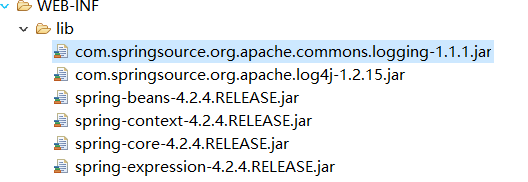
3、编写一个实体User类
package com.jichi.entity;

public class User {

    private String name;

    private Integer age ;

    public String getName() {

        return name;

    }

    public void setName(String name) {

        this.name = name;

    }

    public Integer getAge() {

        return age;

    }

    public void setAge(Integer age) {

        this.age = age;

    }

}
4、创建applicationContext.xml文件
在src文件下,新建applicationContext.xml文件,同时引入约束。
<?xml version="1.0" encoding="UTF-8"?>

<beans xmlns="http://www.springframework.org/schema/beans"

    xmlns:xsi="http://www.w3.org/2001/XMLSchema-instance"

    xmlns:util="http://www.springframework.org/schema/util"

    xmlns:jee="http://www.springframework.org/schema/jee"

    xmlns:lang="http://www.springframework.org/schema/lang"

    xmlns:jms="http://www.springframework.org/schema/jms"

    xmlns:aop="http://www.springframework.org/schema/aop"

    xmlns:tx="http://www.springframework.org/schema/tx"

    xmlns:context="http://www.springframework.org/schema/context"

    xmlns:jdbc="http://www.springframework.org/schema/jdbc"

    xmlns:cache="http://www.springframework.org/schema/cache"

    xmlns:mvc="http://www.springframework.org/schema/mvc"

    xmlns:oxm="http://www.springframework.org/schema/oxm"

    xmlns:task="http://www.springframework.org/schema/task"

    xmlns:tool="http://www.springframework.org/schema/tool"

    xmlns:websocket="http://www.springframework.org/schema/websocket"

    xsi:schemaLocation="

        http://www.springframework.org/schema/beans http://www.springframework.org/schema/beans/spring-beans.xsd

        http://www.springframework.org/schema/util http://www.springframework.org/schema/util/spring-util.xsd

        http://www.springframework.org/schema/jee http://www.springframework.org/schema/jee/spring-jee.xsd

        http://www.springframework.org/schema/lang http://www.springframework.org/schema/lang/spring-lang.xsd

        http://www.springframework.org/schema/jms http://www.springframework.org/schema/jms/spring-jms.xsd

        http://www.springframework.org/schema/aop http://www.springframework.org/schema/aop/spring-aop.xsd

        http://www.springframework.org/schema/tx http://www.springframework.org/schema/tx/spring-tx.xsd

        http://www.springframework.org/schema/context http://www.springframework.org/schema/context/spring-context.xsd

        http://www.springframework.org/schema/jdbc http://www.springframework.org/schema/jdbc/spring-jdbc.xsd

        http://www.springframework.org/schema/cache http://www.springframework.org/schema/cache/spring-cache.xsd

        http://www.springframework.org/schema/mvc http://www.springframework.org/schema/mvc/spring-mvc.xsd

        http://www.springframework.org/schema/oxm http://www.springframework.org/schema/oxm/spring-oxm.xsd

        http://www.springframework.org/schema/task http://www.springframework.org/schema/task/spring-task.xsd

        http://www.springframework.org/schema/tool http://www.springframework.org/schema/tool/spring-tool.xsd

        http://www.springframework.org/schema/websocket http://www.springframework.org/schema/websocket/spring-websocket.xsd">

</beans>
5、在beans内将user实体配置进去
<bean name="user" class="com.jichi.entity.User"></bean>
6、书写测试代码
public class TestDemo {

    @Test

    public void test1(){

        ApplicationContext ac = new ClassPathXmlApplicationContext("applicationContext.xml");

        User user = (User) ac.getBean("user");

        System.out.println(user);

    }

}
7、结果显示,将user对象交给spring容器管理成功
com.jichi.entity.User@db5e9c
五、spring中的工厂BeanFactory与ApplicationContext的区别
1、BeanFactory
spring原始接口,功能较为单一,在从容器中获得对象的时候才会创建对象。
2、ApplicationContext
每次启动容器的时候,初始化容器中的所有对象并提供更多功能。
其中的实现类ClassPathXmlApplicationContext是加载类路径下的spring配置文件,FileSystemXmlApplicationContext是加载本地磁盘下spring的配置文件。
3、实现图
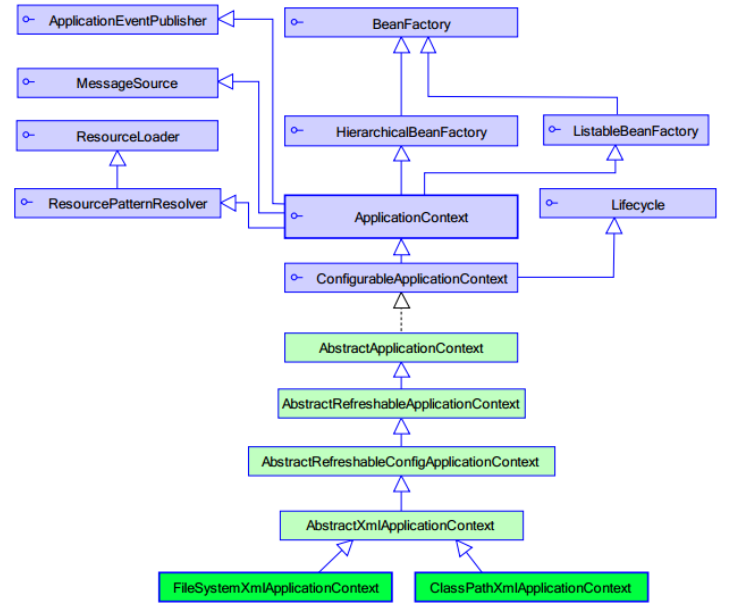
4、结论
web开发中,使用applicationContext。
在资源匮乏的环境可以使用BeanFactory。
六、spring的bean元素属性详解
1、class:被容器管理对象的完整类名。
2、name:被容器管理对象的名称,根据此名称从容器中获得该对象,可以重复,可以使用特殊字符。
3、id:被容器管理对象的唯一标识,id不可重复,不可使用特殊字符,作用与name相同,建议使用name。
4、scope:
(1)singleton(默认):单例对象,该对象在spring容器中只会存在一个。
(2)prototype:多例模式,配置为多例的对象不会在spring容器中创建,只有在从容器中要获取该对象的时候,容器对该对象进行创建,每次创建都是一个新的对象。注意在与struts2配合使用的时候,struts2中的action对象必须要配置成prototype这种多例模式。
(3)request:web项目中,创建一个对象,将其存放在request域中。
(4)session:web项目中,创建一个对象,将其存放在session域中。
5、init-method与destory-method
init-method是对象创建的时候所执行的方法,destory-method是对象销毁时所执行的方法。对象必须是单例的,同时容器关闭的时候,对象的销毁方法才会执行。
<bean name="user" class="com.jichi.entity.User" init-method="init" destroy-method="destory"></bean>
public class User {

    private String name;

    private Integer age ;

    public String getName() {

        return name;

    }

    public void setName(String name) {

        this.name = name;

    }

    public Integer getAge() {

        return age;

    }

    public void setAge(Integer age) {

        this.age = age;

    }

    public void init(){

        System.out.println("初始");

    }

    public void destory(){

        System.out.println("销毁");

    }

}
七、spring创建对象的方式
1、空参构造方法
<bean name="user" class="com.jichi.entity.User" ></bean>
2、静态工厂实例化
(1)创建一个工厂类
public class UserFactory {

    public static User createUser(){

        return new User();

    }

}
(2)配置
<bean name="user" class="com.jichi.factory.UserFactory" factory-method="createUser"></bean>
3、实例工厂实例化
(1)创建一个工厂类
public class UserFactory {

    public static User createUser(){

        return new User();

    }

}
(2)配置
<bean name="user" factory-bean="userFactory" factory-method="createUser"></bean>
Spring入门详细教程(一)的更多相关文章
- spring入门详细教程(五)
前言 本篇紧接着spring入门详细教程(三),建议阅读本篇前,先阅读第一篇,第二篇以及第三篇.链接如下: Spring入门详细教程(一) https://www.cnblogs.com/jichi/ ...
- Spring入门详细教程(四)
前言 本篇紧接着spring入门详细教程(三),建议阅读本篇前,先阅读第一篇,第二篇以及第三篇.链接如下: Spring入门详细教程(一) https://www.cnblogs.com/jichi/ ...
- Spring入门详细教程(三)
前言 本篇紧接着spring入门详细教程(二),建议阅读本篇前,先阅读第一篇和第二篇.链接如下: Spring入门详细教程(一) https://www.cnblogs.com/jichi/p/101 ...
- Spring入门详细教程(二)
前言 本篇紧接着spring入门详细教程(一),建议阅读本篇前,先阅读第一篇.链接如下: Spring入门详细教程(一) https://www.cnblogs.com/jichi/p/1016553 ...
- ThinkJS框架入门详细教程(二)新手入门项目
一.准备工作 参考前一篇:ThinkJS框架入门详细教程(一)开发环境 安装thinkJS命令 npm install -g think-cli 监测是否安装成功 thinkjs -v 二.创建项目 ...
- 经典Spring入门基础教程详解
经典Spring入门基础教程详解 https://pan.baidu.com/s/1c016cI#list/path=%2Fsharelink2319398594-201713320584085%2F ...
- Xcode和github入门详细教程
Xcode和github详细教程! 主要是参考了现在网上的一些资料给没整过的人一个详细的指南. (1)先在github上注册账号,自行解决! (2)在导航栏右上角new一个repository(仓库) ...
- SpringBoot入门详细教程
一.SpringBoot入门 1.SpringBoot简介 SpringBoot是整个Spring技术栈的整合,来简化Spring应用开发,约定大于配置,去繁从简,just run 就能创建一 个独立 ...
- windows下Gulp入门详细教程 &&gulp安装失败的原因(红色)
以下教程亲自实践可行: 另外添加一个Gulp自动编译.压缩.更新.测试的教程链接:https://markpop.github.io/2014/09/17/Gulp%E5%85%A5%E9%97%A8 ...
随机推荐
- 痞子衡嵌入式:让你从此高效写作的轻量级标记语言(Markdown)
大家好,我是痞子衡,是正经搞技术的痞子.今天痞子衡给大家介绍的是轻量级标记语言Markdown. 1.假如你有过这样的烦恼? 想写出排版优雅简洁的文章,并且能够轻易地发表(连同文字和排版)到各大网站上 ...
- Mysql加锁过程详解(4)-select for update/lock in share mode 对事务并发性影响
Mysql加锁过程详解(1)-基本知识 Mysql加锁过程详解(2)-关于mysql 幻读理解 Mysql加锁过程详解(3)-关于mysql 幻读理解 Mysql加锁过程详解(4)-select fo ...
- 三大主流软件负载均衡器对比(LVS VS Nginx VS Haproxy)
LVS:1.抗负载能力强.抗负载能力强.性能高,能达到F5硬件的60%:对内存和cpu资源消耗比较低2.工作在网络4层,通过vrrp协议转发(仅作分发之用),具体的流量由linux内核处理,因此没有流 ...
- CPU上下文切换
CPU上下文切换包括进程上下文切换.线程上下文切换及中断上下文切换,当任务进行io或发生时间片事件及发生中断(如硬件读取完成)时,就会进入内核态,发生CPU上下文切换. 进程上下文切换,进程的上下文信 ...
- SHELL脚本--tr命令用法和特性全解
bash&shell系列文章:http://www.cnblogs.com/f-ck-need-u/p/7048359.html 1.1 简介 tr主要用于将从标准输入读取的数据进行结果集映射 ...
- 翻译:insert on duplicate key update(已提交到MariaDB官方手册)
本文为mariadb官方手册:INSERT ON DUPLICATE KEY UPDATE的译文. 原文:https://mariadb.com/kb/en/insert-on-duplicate-k ...
- Zepto整体概况
var Zepto = (function(){ var zepto = {},$; zepto.Z = function(dom, selector) { return new Z(dom,sele ...
- 如何把ASP.NET MVC项目部署到本地IIS上
默认情况下,在VisualStudio中开发网站,会运行在IISExpress中,如果想把网站部署到本地的IIS服务器上该怎么办呢? 一.首先,以管理员身份运行VisualStudio,否则在修改项目 ...
- c#调用腾讯云API的实例
//获取时间戳 .net framework /* DateTime dt = TimeZone.CurrentTimeZone.ToLocalTime(new DateTime(1970, 1, 1 ...
- mysql left join的深入探讨
即使你认为自己已对 MySQL 的 LEFT JOIN 理解深刻,但我敢打赌,这篇文章肯定大致也许可能让你学会点东西! ON 子句与 WHERE 子句的不同 一种更好地理解带有 WHERE ... I ...