
Python time模块详解--转载
1.在Python中,通常有这几种方式来表示时间:1)时间戳 2)格式化的时间字符串 3)元组(struct_time)共九个元素。由于Python的time模块实现主要调用C库,所以各个平台可能有所不同。
2.UTC(Coordinated Universal Time,世界协调时)亦即格林威治天文时间,世界标准时间。在中国为UTC+8。DST(Daylight Saving Time)即夏令时。
3.时间戳(timestamp)的方式:通常来说,时间戳表示的是从1970年1月1日00:00:00开始按秒计算的偏移量。我们运行“type(time.time())”,返回的是float类型。返回时间戳方式的函数主要有time(),clock()等。
4.元组(struct_time)方式:struct_time元组共有9个元素,返回struct_time的函数主要有gmtime(),localtime(),strptime()。下面列出这种方式元组中的几个元素:
| 索引(Index) | 属性(Attribute) | 值(Values) |
|---|---|---|
| 0 | tm_year(年) | 比如2011 |
| 1 | tm_mon(月) | 1 - 12 |
| 2 | tm_mday(日) | 1 - 31 |
| 3 | tm_hour(时) | 0 - 23 |
| 4 | tm_min(分) | 0 - 59 |
| 5 | tm_sec(秒) | 0 - 61 |
| 6 | tm_wday(weekday) | 0 - 6(0表示周日) |
| 7 | tm_yday(一年中的第几天) | 1 - 366 |
| 8 | tm_isdst(是否是夏令时) | 默认为-1 |
接着介绍time模块中常用的几个函数:
1)time.localtime([secs]):将一个时间戳转换为当前时区的struct_time。secs参数未提供,则以当前时间为准。
time.struct_time(tm_year=2011, tm_mon=5, tm_mday=5, tm_hour=14, tm_min=14, tm_sec=50, tm_wday=3, tm_yday=125, tm_isdst=0)
>>> time.localtime(1304575584.1361799)
time.struct_time(tm_year=2011, tm_mon=5, tm_mday=5, tm_hour=14, tm_min=6, tm_sec=24, tm_wday=3, tm_yday=125, tm_isdst=0)
2)time.gmtime([secs]):和localtime()方法类似,gmtime()方法是将一个时间戳转换为UTC时区(0时区)的struct_time。
time.struct_time(tm_year=2011, tm_mon=5, tm_mday=5, tm_hour=6, tm_min=19, tm_sec=48, tm_wday=3, tm_yday=125, tm_isdst=0)
3)time.time():返回当前时间的时间戳。
1304575584.1361799
4)time.mktime(t):将一个struct_time转化为时间戳。
1304576839.0
5)time.sleep(secs):线程推迟指定的时间运行。单位为秒。
6)time.clock():这个需要注意,在不同的系统上含义不同。在UNIX系统上,它返回的是“进程时间”,它是用秒表示的浮点数(时间戳)。而在WINDOWS中,第一次调用,返回的是进程运行的实际时间。而第二次之后的调用是自第一次调用以后到现在的运行时间。(实际上是以WIN32上QueryPerformanceCounter()为基础,它比毫秒表示更为精确)
if __name__ == '__main__':
time.sleep(1)
print "clock1:%s" % time.clock()
time.sleep(1)
print "clock2:%s" % time.clock()
time.sleep(1)
print "clock3:%s" % time.clock()
运行结果:
clock1:3.35238137808e-006
clock2:1.00004944763
clock3:2.00012040636
其中第一个clock()输出的是程序运行时间
第二、三个clock()输出的都是与第一个clock的时间间隔
7)time.asctime([t]):把一个表示时间的元组或者struct_time表示为这种形式:'Sun Jun 20 23:21:05 1993'。如果没有参数,将会将time.localtime()作为参数传入。
'Thu May 5 14:55:43 2011'
8)time.ctime([secs]):把一个时间戳(按秒计算的浮点数)转化为time.asctime()的形式。如果参数未给或者为None的时候,将会默认time.time()为参数。它的作用相当于time.asctime(time.localtime(secs))。
'Thu May 5 14:58:09 2011'
>>> time.ctime(time.time())
'Thu May 5 14:58:39 2011'
>>> time.ctime(1304579615)
'Thu May 5 15:13:35 2011'
9)time.strftime(format[, t]):把一个代表时间的元组或者struct_time(如由time.localtime()和time.gmtime()返回)转化为格式化的时间字符串。如果t未指定,将传入time.localtime()。如果元组中任何一个元素越界,ValueError的错误将会被抛出。
| 格式 | 含义 | 备注 |
|---|---|---|
| %a | 本地(locale)简化星期名称 | |
| %A | 本地完整星期名称 | |
| %b | 本地简化月份名称 | |
| %B | 本地完整月份名称 | |
| %c | 本地相应的日期和时间表示 | |
| %d | 一个月中的第几天(01 - 31) | |
| %H | 一天中的第几个小时(24小时制,00 - 23) | |
| %I | 第几个小时(12小时制,01 - 12) | |
| %j | 一年中的第几天(001 - 366) | |
| %m | 月份(01 - 12) | |
| %M | 分钟数(00 - 59) | |
| %p | 本地am或者pm的相应符 | 一 |
| %S | 秒(01 - 61) | 二 |
| %U | 一年中的星期数。(00 - 53星期天是一个星期的开始。)第一个星期天之前的所有天数都放在第0周。 | 三 |
| %w | 一个星期中的第几天(0 - 6,0是星期天) | 三 |
| %W | 和%U基本相同,不同的是%W以星期一为一个星期的开始。 | |
| %x | 本地相应日期 | |
| %X | 本地相应时间 | |
| %y | 去掉世纪的年份(00 - 99) | |
| %Y | 完整的年份 | |
| %Z | 时区的名字(如果不存在为空字符) | |
| %% | ‘%'字符 |
备注:
“%p”只有与“%I”配合使用才有效果。
文档中强调确实是0 - 61,而不是59,闰年秒占两秒(汗一个)。
当使用strptime()函数时,只有当在这年中的周数和天数被确定的时候%U和%W才会被计算。
举个例子:
'2011-05-05 16:37:06'
10)time.strptime(string[, format]):把一个格式化时间字符串转化为struct_time。实际上它和strftime()是逆操作。
time.struct_time(tm_year=2011, tm_mon=5, tm_mday=5, tm_hour=16, tm_min=37, tm_sec=6, tm_wday=3, tm_yday=125, tm_isdst=-1)
在这个函数中,format默认为:"%a %b %d %H:%M:%S %Y"。
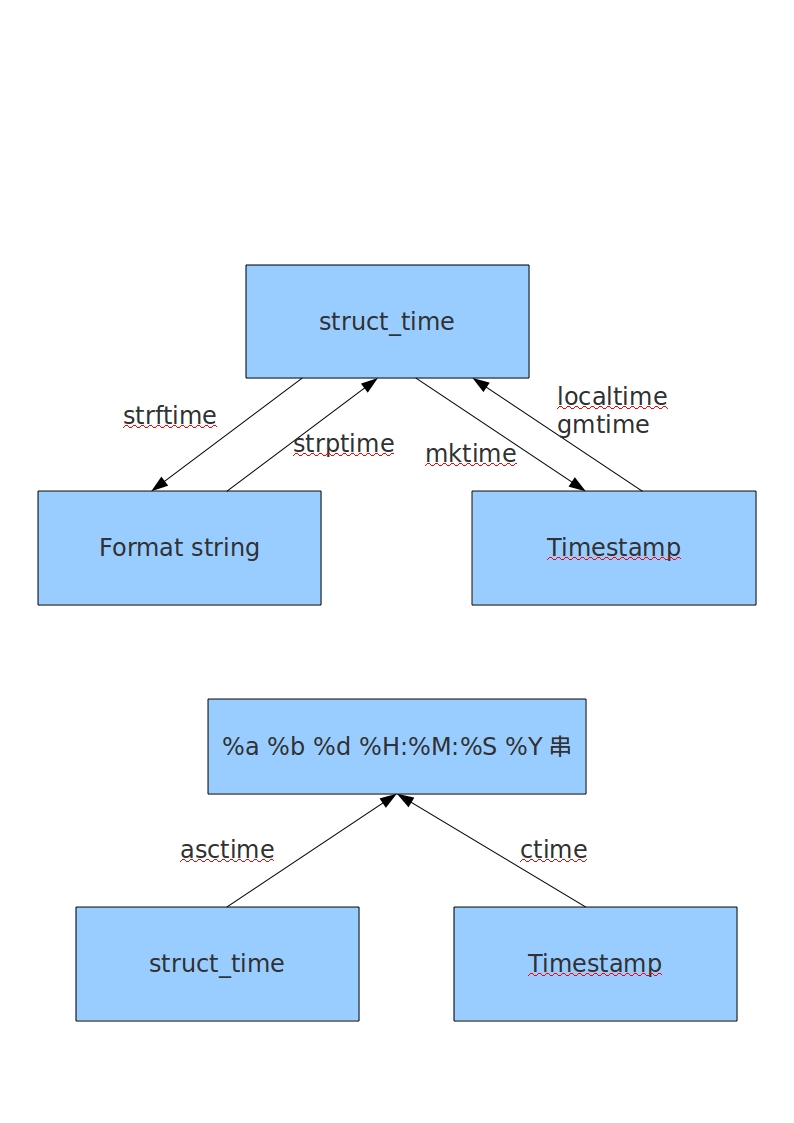
最后,我们来对time模块进行一个总结。根据之前描述,在Python中共有三种表达方式:1)timestamp 2)tuple或者struct_time 3)格式化字符串。
它们之间的转化如图所示:
Python time模块详解--转载的更多相关文章
- python time模块详解
python time模块详解 转自:http://blog.csdn.net/kiki113/article/details/4033017 python 的内嵌time模板翻译及说明 一.简介 ...
- python docopt模块详解
python docopt模块详解 docopt 本质上是在 Python 中引入了一种针对命令行参数的形式语言,在代码的最开头使用 """ ""&q ...
- (转)python collections模块详解
python collections模块详解 原文:http://www.cnblogs.com/dahu-daqing/p/7040490.html 1.模块简介 collections包含了一些特 ...
- python pathlib模块详解
python pathlib模块详解
- Python Fabric模块详解
Python Fabric模块详解 什么是Fabric? 简单介绍一下: Fabric是一个Python的库和命令行工具,用来提高基于SSH的应用部署和系统管理效率. 再具体点介绍一下,Fabri ...
- python time 模块详解
Python中time模块详解 发表于2011年5月5日 12:58 a.m. 位于分类我爱Python 在平常的代码中,我们常常需要与时间打交道.在Python中,与时间处理有关的模块就包括: ...
- python常用模块详解
python常用模块详解 什么是模块? 常见的场景:一个模块就是一个包含了python定义和声明的文件,文件名就是模块名字加上.py的后缀. 但其实import加载的模块分为四个通用类别: 1 使用p ...
- python os模块详解
一.Python os模块(Linux环境) 1.1 执行shell命令 os.system('cmd') 执行命令不保存结果 os.popen('command') 执行后返回结果,使用.read( ...
- Python ZipFile模块详解(转)
Python zipfile模块用来做zip格式编码的压缩和解压缩的,zipfile里有两个非常重要的class, 分别是ZipFile和ZipInfo, 在绝大多数的情况下,我们只需要使用这两个cl ...
随机推荐
- Java 7代码层面上的更新
Java 7已经完成的7大新功能: 1 对集合类的语言支持: 2 自动资源管理: 3 改进的通用实例创建类型推断: 4 数字字面量下划线支持: ...
- Jmeter接口自动化测试 (四)(持续构建)
本文转载至http://www.cnblogs.com/chengtch/p/6145867.html Jmeter是压力测试.接口测试工具,Ant是基于Java的构建工具,具有跨平台的作用,jen ...
- 209. Minimum Size Subarray Sum(双指针)
Given an array of n positive integers and a positive integer s, find the minimal length of a contigu ...
- C/S模型之命名管道
说明:利用管道实现服务端与客户端之间的交互.效果等同于利用socket. 命名管道(NamedPipe)是一种简单的进程间通信(IPC)机制,是服务器进程和一个或多个客户进程之间通信的单向或双向管道. ...
- KM算法模板
大白书P248有证明,此处贴出两种复杂度的方案, n^4 大白书P350 n^3 #include <algorithm> #include <string.h> #inclu ...
- Python: 去掉字符串开头、结尾或者中间不想要的字符
①Strip()方法用于删除开始或结尾的字符.lstrip()|rstirp()分别从左右执行删除操作.默认情况下会删除空白或者换行符,也可以指定其他字符. ②如果想处理中间的空格,需要求助其他技术 ...
- pm2 观察报错时 pm2 start app.js --watch
pm2 start app.js --watch[PM2][ERROR] Script already launched, add -f option to force re-execution
- [转载]onclientclick和onclick区别
OnClientClick是客户端脚本,一般使用javascript,在客户端,也就是IE中运行,点击后马上执行OnClick是服务器端事件处理函数,使用C#或者vb.net,在服务器端,也就是IIS ...
- php打印负载函数、Linux awk打印负载
php的sys_getloadavg sys_getloadavt()可以获得系统负载情况.该函数返回一个包含三个元素的数组,每个元素分别代表系统再过去的1.5和15分钟内的平均负载. 与其让服务器因 ...
- 编译安装 http
1. 安装 apr http服务依赖 apr和apr-util ,安装 http 前需先安装这两个程序 apr 简介:http://www.cnblogs.com/Alight/p/3997777.h ...