
centos7.4 64位安装 google-chrome 与 chromedriver 运行 Python selenium 项目
centos7.4 实例

利用 yum 命令安装 google-chrome 超级简单(安装最新版):
yum install https://dl.google.com/linux/direct/google-chrome-stable_current_x86_64.rpm
chromedriver 也下载最新版就好,和Mac 版本一样,我依旧选择这个最新版本:
http://chromedriver.storage.googleapis.com/index.html?path=70.0.3538.16/

Python3.7 之前安装过:
Centos7 环境下 Python2.7 换成 Python3.7 运行 scrapy 应用所遇到的问题记录
然后配置一下,就能跑起来 selenium 项目了,当然该 pip install xxx 安装模块就缺什么安装什么了
# 设置 webdriver 参数

        options = webdriver.ChromeOptions()

        # 设置谷歌浏览器的一些选项

        #  proxy 代理 options 选项

        options.add_argument(r'--proxy--server=http:\\' + ip)

        uas = get_uas()

        # 设置user-agent

        options.add_argument('user-agent=' + choice(uas))

        # 以 headless 方案运行

        options.add_argument('--headless')

        options.add_argument('--no-sandbox')

        # options.add_argument('--disable-dev-shm-usage')

        # 禁用图片访问

        # prefs = {"profile.managed_default_content_settings.images": 2}

        # options.add_experimental_option("prefs", prefs)
如果不配置 # 以 headless 方案运行
会抛出下面异常
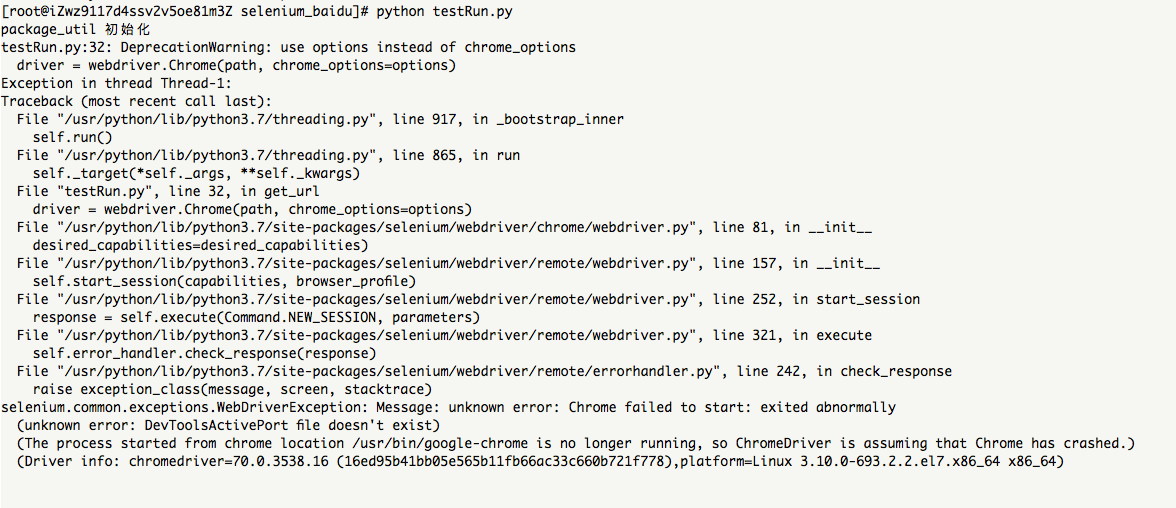
[root@iZwz9117d4ssv2v5oe81m3Z selenium_baidu]# python testRun.py

package_util 初始化

testRun.py:: DeprecationWarning: use options instead of chrome_options

  driver = webdriver.Chrome(path, chrome_options=options)

Exception in thread Thread-:

Traceback (most recent call last):

  File "/usr/python/lib/python3.7/threading.py", line , in _bootstrap_inner

    self.run()

  File "/usr/python/lib/python3.7/threading.py", line , in run

    self._target(*self._args, **self._kwargs)

  File "testRun.py", line , in get_url

    driver = webdriver.Chrome(path, chrome_options=options)

  File "/usr/python/lib/python3.7/site-packages/selenium/webdriver/chrome/webdriver.py", line , in __init__

    desired_capabilities=desired_capabilities)

  File "/usr/python/lib/python3.7/site-packages/selenium/webdriver/remote/webdriver.py", line , in __init__

    self.start_session(capabilities, browser_profile)

  File "/usr/python/lib/python3.7/site-packages/selenium/webdriver/remote/webdriver.py", line , in start_session

    response = self.execute(Command.NEW_SESSION, parameters)

  File "/usr/python/lib/python3.7/site-packages/selenium/webdriver/remote/webdriver.py", line , in execute

    self.error_handler.check_response(response)

  File "/usr/python/lib/python3.7/site-packages/selenium/webdriver/remote/errorhandler.py", line , in check_response

    raise exception_class(message, screen, stacktrace)

selenium.common.exceptions.WebDriverException: Message: unknown error: Chrome failed to start: exited abnormally

  (unknown error: DevToolsActivePort file doesn't exist)

  (The process started from chrome location /usr/bin/google-chrome is no longer running, so ChromeDriver is assuming that Chrome has crashed.)

  (Driver info: chromedriver=70.0.3538.16 (16ed95b41bb05e565b11fb66ac33c660b721f778),platform=Linux 3.10.-693.2..el7.x86_64 x86_64)
selenium 代码正确运行:

centos7.4 64位安装 google-chrome 与 chromedriver 运行 Python selenium 项目的更多相关文章
- centos7.3 64位 安装git
1.安装编译git时需要的包 # yum install curl-devel expat-devel gettext-devel openssl-devel zlib-devel # yum ins ...
- centos7.2 64位安装java
1. wget http://download.oracle.com/otn-pub/java/jdk/8u131-b11/d54c1d3a095b4ff2b6607d096fa80163/jdk- ...
- centos7.4 64位安装 git
参考博客:Linux Jenkins配置Git 1. git --version 查看有没有安装 过 git,没有则 继续 2. git 压缩包下载地址:https://mirrors.edge.ke ...
- centos7.4 64位安装 redis-4.0.0
1. 下载 redis 包 链接:https://pan.baidu.com/s/1g1UE_GTreXoD9uOXB7G3HA 提取码:ug8p 2. 安装gcc.ruby .rubygems等环 ...
- Ubuntu 14.04 LTS下安装Google Chrome浏览器
在Ubuntu 14.04下安装Google Chrome浏览器非常简单,只要到Chrome的网站下载Deb安装包并进行安装即可.当然你也可以使用APT软件包管理器来安装Google Chrome浏览 ...
- 在ubuntu下安装google chrome
由于手上有两台电脑,再加上我那个选择困难症加上纠结劲.所以果断把其中一台电脑只装linux系统,另一台电脑只装windows了.免得我老纠结!于是linux便选择了ubuntu. 由于浏览器一直用的是 ...
- ubuntu14.04 64位 安装eclipse
ubuntu14.04 64位 安装eclipse 1 在官网上下载eclipse http://www.eclipse.org/downloads/下载eclipse-jee-luna-SR1-li ...
- Windows 7 64位安装cURL
安装cURL. 1, 下载64位的SSL版cURL,网址: http://curl.download.nextag.com/download/curl-7.21.7-win64-ssl-sspi.zi ...
- ubuntu 14.04 64位安装iNodeClient
ubuntu 14.04 64位安装iNodeClieng(华三校园客服端) http://pan.baidu.com/s/12dpxk ubuntu 14.04 64bit Install H3C ...
随机推荐
- (18)ProcessPoolExecutor进程池
# 新版本的进程池 ProcessPoolExecutor # 实例化进程池 ProcessPoolExcutor(cpu_count) # 异步提交任务 submit / map # 阻塞直到任务完 ...
- ubuntu18.04.2LTS下安装和配置MySql数据库 --ubuntu
1.安装MySql ubuntu@thanlon-Ubuntu:~$ sudo apt install mysql-server 2.mysql安装完成后,默认用户名不是root,为了方便,一般我们需 ...
- HTTP安全通信:Https和SSL
1. HTTPS概念 1)简介 HTTPS(全称:Hypertext Transfer Protocol over Secure Socket Layer),是以安全为目标的HTTP通道,简单讲是HT ...
- selenium java 文件上传、下载
1.webdriver对页面文件的下载 我们一般操作浏览器下载时会让我们选择下载的目录然后经过一系列操作后才进行文件下载操作,但是用webdriver不能按这样的方式操作.经过查询资料找到了如下的实现 ...
- 漏洞复现——Apache HTTPD多后缀解析漏洞
漏洞原理:Apache Httpd支持一个文件拥有多个后缀,不同的后缀执行不同的命令,也就是说当我们上传的文件中只要后缀名含有php,该文件就可以被解析成php文件,利用Apache Httpd这个特 ...
- js获取当前时间:封装js的日期时间
<!DOCTYPE html> <html> <head> <meta http-equiv="Content-Type" content ...
- 牛客网第4场A
链接:https://www.nowcoder.com/acm/contest/142/A 来源:牛客网 题目描述 A ternary , , or . Chiaki has a ternary in ...
- 码云git使用五(创建远程分支和更新远程分支)
1.创建一个与远程分支没有关联的本地分支 2.从远程拉取到本地分支 3.创建远程分支() 4.搞定了.
- ID绘图工具的使用5.29
1.按住ALT拖动矩形工具,以中心绘制矩形. 绘制矩形的过程中,按住空格键可以调整矩形的位置. 2选择矩形工具,单击,可以精确输入尺寸. 3“窗口‘”信息“面板调出来.这样在绘制的时候可以边绘制边看 ...
- vue 自定义组件使用v-model
<input v-model="something"> v-model指令其实是下面的语法糖包装而成: <input :value="something ...