
Spring Cloud config中,使用数据库存储配置信息
主要内容
在springcloud config中,使用数据库存储配置信息。
系统默认采用git的方式,此处我们介绍使用jdbc的方式存储配置信息
准备数据库
数据库我们使用mysql。
新建库 p-config-server
创建配置需要的表,并初始化一些配置信息
CREATE TABLE `properties` (

  `id` bigint(20) NOT NULL AUTO_INCREMENT,

  `application` varchar(64) COLLATE utf8_bin NOT NULL DEFAULT '',

  `profile` varchar(64) COLLATE utf8_bin NOT NULL DEFAULT '',

  `label` varchar(64) COLLATE utf8_bin NOT NULL DEFAULT '',

  `key` varchar(128) COLLATE utf8_bin NOT NULL DEFAULT '',

  `value` varchar(4096) COLLATE utf8_bin NOT NULL DEFAULT '',

  PRIMARY KEY (`id`)

) ENGINE=InnoDB AUTO_INCREMENT=9 DEFAULT CHARSET=utf8 COLLATE=utf8_bin;

INSERT INTO `properties` VALUES ('1', 'p-config-client', 'dev', 'master', 'key-1', 'value-1');

INSERT INTO `properties` VALUES ('2', 'p-config-client', 'dev', 'master', 'key-2', 'value-2');

INSERT INTO `properties` VALUES ('3', 'p-config-client', 'dev1', 'master', 'key-1', 'value-3');

INSERT INTO `properties` VALUES ('4', 'p-config-client', 'dev1', 'master', 'key-4', 'value-4');

INSERT INTO `properties` VALUES ('5', 'p-config-client', 'dev1', 'master', 'key-5', 'value-5');
创建eureka注册中心
创建springcloud项目p-eureka
groupId: com.ms

artifactId: p-eureka
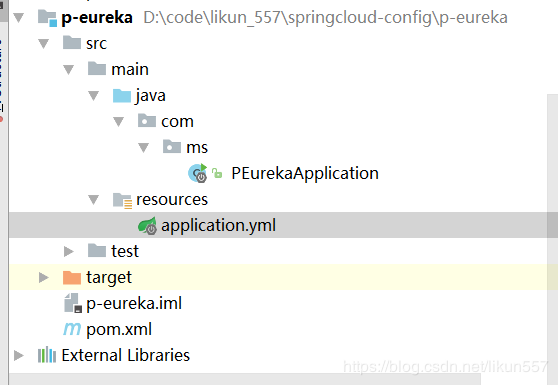
pom.xml内容
<?xml version="1.0" encoding="UTF-8"?>

<project xmlns="http://maven.apache.org/POM/4.0.0" xmlns:xsi="http://www.w3.org/2001/XMLSchema-instance"

	xsi:schemaLocation="http://maven.apache.org/POM/4.0.0 http://maven.apache.org/xsd/maven-4.0.0.xsd">

	<modelVersion>4.0.0</modelVersion>

	<parent>

		<groupId>org.springframework.boot</groupId>

		<artifactId>spring-boot-starter-parent</artifactId>

		<version>2.1.4.RELEASE</version>

		<relativePath/> <!-- lookup parent from repository -->

	</parent>

	<groupId>com.ms</groupId>

	<artifactId>p-eureka</artifactId>

	<version>0.0.1-SNAPSHOT</version>

	<name>p-eureka</name>

	<description>Demo project for Spring Boot</description>

	<properties>

		<java.version>1.8</java.version>

		<spring-cloud.version>Greenwich.SR1</spring-cloud.version>

	</properties>

	<dependencies>

		<dependency>

			<groupId>org.springframework.cloud</groupId>

			<artifactId>spring-cloud-starter-netflix-eureka-server</artifactId>

		</dependency>

		<dependency>

			<groupId>org.springframework.boot</groupId>

			<artifactId>spring-boot-starter-test</artifactId>

			<scope>test</scope>

		</dependency>

	</dependencies>

	<dependencyManagement>

		<dependencies>

			<dependency>

				<groupId>org.springframework.cloud</groupId>

				<artifactId>spring-cloud-dependencies</artifactId>

				<version>${spring-cloud.version}</version>

				<type>pom</type>

				<scope>import</scope>

			</dependency>

		</dependencies>

	</dependencyManagement>

	<build>

		<plugins>

			<plugin>

				<groupId>org.springframework.boot</groupId>

				<artifactId>spring-boot-maven-plugin</artifactId>

			</plugin>

		</plugins>

	</build>

</project>
application.properties改为application.yml
server:

  port: 7001

spring:

  application:

    name: p-eureka

eureka:

  client:

    register-with-eureka: false

    fetch-registry: false

    service-url:

      defaultZone: http://localhost:7001/eureka/
PEurekaApplication内容
package com.ms;

import org.springframework.boot.SpringApplication;

import org.springframework.boot.autoconfigure.SpringBootApplication;

import org.springframework.cloud.netflix.eureka.server.EnableEurekaServer;

@SpringBootApplication

@EnableEurekaServer

public class PEurekaApplication {

	public static void main(String[] args) {

		SpringApplication.run(PEurekaApplication.class, args);

	}

}
注意:
- @EnableEurekaServer:表示这是一个eureka注册中心
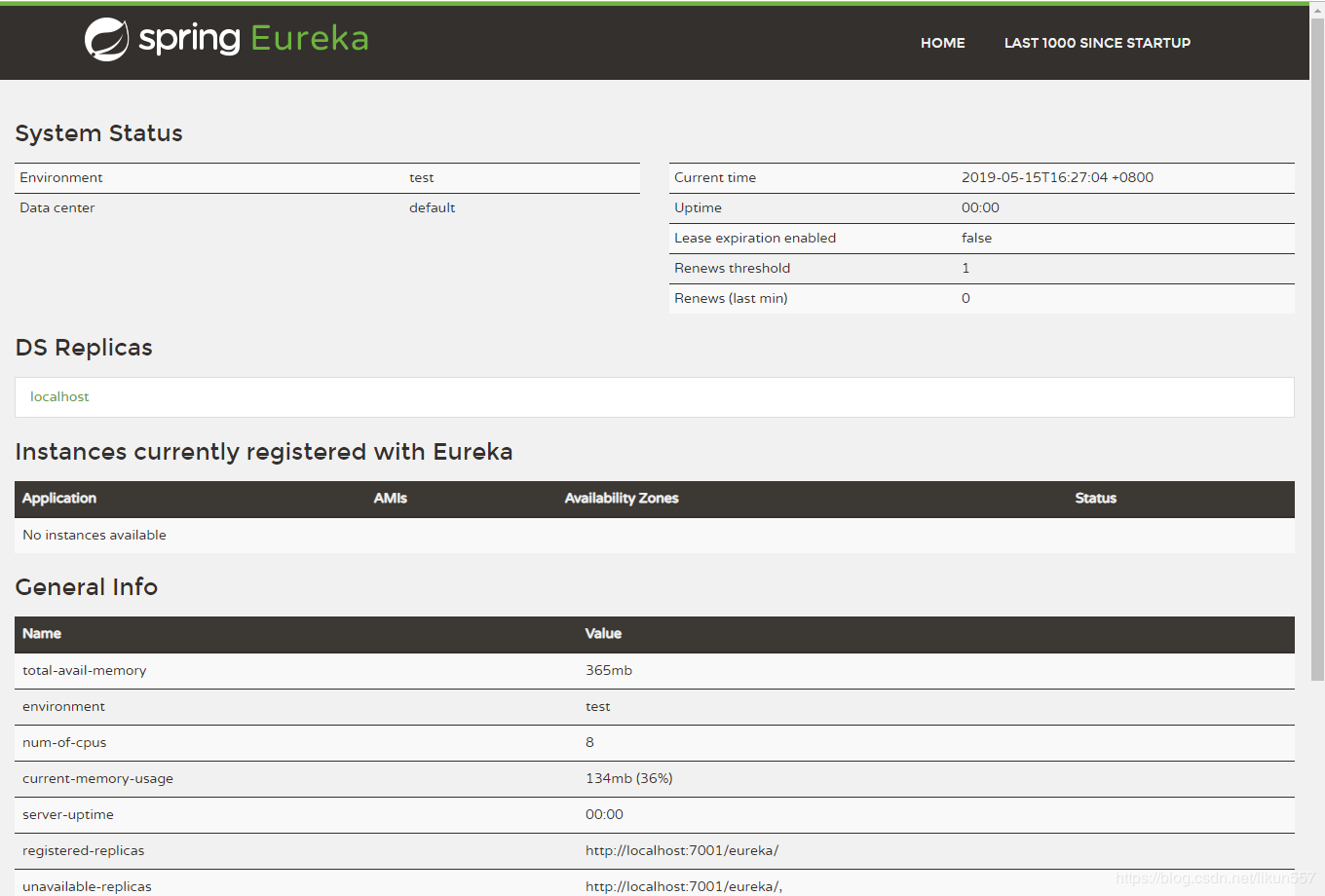
运行PEurekaApplication
访问http://localhost:7001/
创建配置中心(config server)
创建springcloud项目p-config-server
groupId: com.ms

artifactId: p-config-server
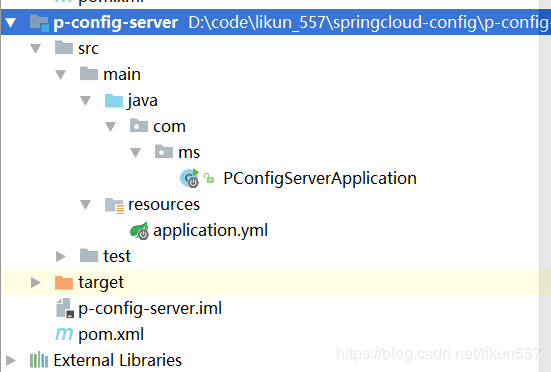
pom.xml内容
<?xml version="1.0" encoding="UTF-8"?>

<project xmlns="http://maven.apache.org/POM/4.0.0" xmlns:xsi="http://www.w3.org/2001/XMLSchema-instance"

         xsi:schemaLocation="http://maven.apache.org/POM/4.0.0 http://maven.apache.org/xsd/maven-4.0.0.xsd">

    <modelVersion>4.0.0</modelVersion>

    <parent>

        <groupId>org.springframework.boot</groupId>

        <artifactId>spring-boot-starter-parent</artifactId>

        <version>2.0.4.RELEASE</version>

        <relativePath/> <!-- lookup parent from repository -->

    </parent>

    <groupId>com.ms</groupId>

    <artifactId>p-config-server</artifactId>

    <version>0.0.1-SNAPSHOT</version>

    <name>p-config-server</name>

    <description>Demo project for Spring Boot</description>

    <properties>

        <java.version>1.8</java.version>

        <spring-cloud.version>Finchley.SR1</spring-cloud.version>

    </properties>

    <dependencies>

        <dependency>

            <groupId>org.springframework.cloud</groupId>

            <artifactId>spring-cloud-config-server</artifactId>

        </dependency>

        <dependency>

            <groupId>org.springframework.cloud</groupId>

            <artifactId>spring-cloud-starter-netflix-eureka-client</artifactId>

        </dependency>

        <dependency>

            <groupId>org.springframework.boot</groupId>

            <artifactId>spring-boot-starter-jdbc</artifactId>

        </dependency>

        <dependency>

            <groupId>mysql</groupId>

            <artifactId>mysql-connector-java</artifactId>

            <scope>runtime</scope>

        </dependency>

        <dependency>

            <groupId>org.springframework.boot</groupId>

            <artifactId>spring-boot-starter-test</artifactId>

            <scope>test</scope>

        </dependency>

    </dependencies>

    <dependencyManagement>

        <dependencies>

            <dependency>

                <groupId>org.springframework.cloud</groupId>

                <artifactId>spring-cloud-dependencies</artifactId>

                <version>${spring-cloud.version}</version>

                <type>pom</type>

                <scope>import</scope>

            </dependency>

        </dependencies>

    </dependencyManagement>

    <build>

        <plugins>

            <plugin>

                <groupId>org.springframework.boot</groupId>

                <artifactId>spring-boot-maven-plugin</artifactId>

            </plugin>

        </plugins>

    </build>

</project>
application.yml 内容
server:

  port: 8080

eureka:

  client:

    service-url:

      defaultZone: http://localhost:7001/eureka/

spring:

  application:

    name: p-config-server

  cloud:

    config:

      enabled: true

      profile: jdbc

      server:

        jdbc:

          sql: SELECT `key`, `value` from PROPERTIES where application=? and profile=? and label=?

  datasource:

    driver-class-name: com.mysql.jdbc.Driver

    url: jdbc:mysql://localhost:3306/config-server?characterEncoding=UTF-8

    username: root

    password: root123

    type: com.zaxxer.hikari.HikariDataSource

  profiles:

    active: jdbc
注意:
- 数据连接地址、用户名、密码,这些值根据自己的机器进行修改
PConfigServerApplication内容
package com.ms;

import org.springframework.boot.SpringApplication;

import org.springframework.boot.autoconfigure.SpringBootApplication;

import org.springframework.cloud.config.server.EnableConfigServer;

import org.springframework.cloud.netflix.eureka.EnableEurekaClient;

@SpringBootApplication

@EnableConfigServer

@EnableEurekaClient

public class PConfigServerApplication {

    public static void main(String[] args) {

        SpringApplication.run(PConfigServerApplication.class, args);

    }

}
注意:
- @EnableConfigServer:表示这是一个注册中心应用
- @EnableEurekaClient:将当前服务注册到eureka中,可以被其他应用发现,然后使用
运行PConfigServerApplication
访问:http://localhost:8080/master/p-config-client-dev,dev1.yml 结果如下:
key-1: value-3

key-2: value-2

key-4: value-4

key-5: value-5
创建客户端
创建springcloud项目p-config-client
groupId: com.ms

artifactId: p-config-client
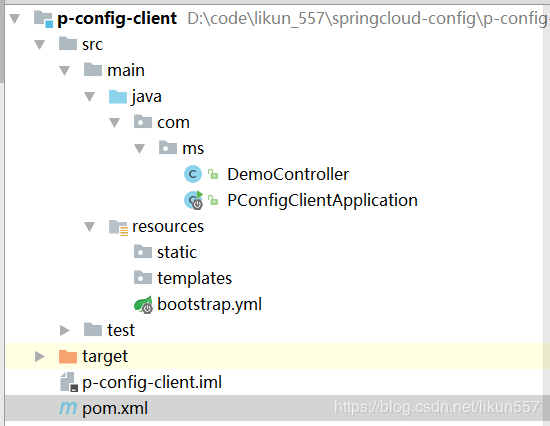
pom.xml内容
<?xml version="1.0" encoding="UTF-8"?>

<project xmlns="http://maven.apache.org/POM/4.0.0" xmlns:xsi="http://www.w3.org/2001/XMLSchema-instance"

         xsi:schemaLocation="http://maven.apache.org/POM/4.0.0 http://maven.apache.org/xsd/maven-4.0.0.xsd">

    <modelVersion>4.0.0</modelVersion>

    <parent>

        <groupId>org.springframework.boot</groupId>

        <artifactId>spring-boot-starter-parent</artifactId>

        <version>2.0.4.RELEASE</version>

        <relativePath/> <!-- lookup parent from repository -->

    </parent>

    <groupId>com.ms</groupId>

    <artifactId>p-config-client</artifactId>

    <version>0.0.1-SNAPSHOT</version>

    <name>p-config-client</name>

    <description>Demo project for Spring Boot</description>

    <properties>

        <java.version>1.8</java.version>

        <spring-cloud.version>Finchley.SR1</spring-cloud.version>

    </properties>

    <dependencies>

        <dependency>

            <groupId>org.springframework.boot</groupId>

            <artifactId>spring-boot-starter-web</artifactId>

        </dependency>

        <dependency>

            <groupId>org.springframework.cloud</groupId>

            <artifactId>spring-cloud-starter-config</artifactId>

        </dependency>

        <dependency>

            <groupId>org.springframework.cloud</groupId>

            <artifactId>spring-cloud-starter-netflix-eureka-client</artifactId>

        </dependency>

        <dependency>

            <groupId>org.projectlombok</groupId>

            <artifactId>lombok</artifactId>

            <optional>true</optional>

        </dependency>

        <dependency>

            <groupId>org.springframework.boot</groupId>

            <artifactId>spring-boot-starter-test</artifactId>

            <scope>test</scope>

        </dependency>

    </dependencies>

    <dependencyManagement>

        <dependencies>

            <dependency>

                <groupId>org.springframework.cloud</groupId>

                <artifactId>spring-cloud-dependencies</artifactId>

                <version>${spring-cloud.version}</version>

                <type>pom</type>

                <scope>import</scope>

            </dependency>

        </dependencies>

    </dependencyManagement>

    <build>

        <plugins>

            <plugin>

                <groupId>org.springframework.boot</groupId>

                <artifactId>spring-boot-maven-plugin</artifactId>

            </plugin>

        </plugins>

    </build>

</project>
application.properties改为bootstrap.yml 内容
注意:此处必须使用bootstrap名称
server:

  port: 8081

spring:

  application:

    name: p-config-client

  cloud:

    config:

      discovery:

        enabled: true

        service-id: p-config-server

      name: ${spring.application.name}

      profile: dev,dev1

      label: master

      override-system-properties: false

eureka:

  client:

    service-url:

      defaultZone: http://localhost:7001/eureka/
config.name对应数据库properties表中的application字段
config.profile对应表中的profile字段,config.profile如果包含多个值,之间用英文逗号隔开
config.label对应表中的label字段,我们可以使用label来区分环境(dev【开发环境】、test【测试环境】、prod【线上环境】)
PConfigClientApplication内容
package com.ms;

import org.springframework.boot.SpringApplication;

import org.springframework.boot.autoconfigure.SpringBootApplication;

import org.springframework.cloud.netflix.eureka.EnableEurekaClient;

@SpringBootApplication

@EnableEurekaClient

public class PConfigClientApplication {

	public static void main(String[] args) {

		SpringApplication.run(PConfigClientApplication.class, args);

	}

}
注意:
- @EnableEurekaClient:当前应用会访问eureka注册中心,发现config service
创建DemoController
package com.ms;

import lombok.extern.slf4j.Slf4j;

import org.springframework.beans.factory.annotation.Autowired;

import org.springframework.beans.factory.annotation.Value;

import org.springframework.core.env.Environment;

import org.springframework.web.bind.annotation.PathVariable;

import org.springframework.web.bind.annotation.RequestMapping;

import org.springframework.web.bind.annotation.RestController;

import java.util.HashMap;

import java.util.Map;

@RestController

@Slf4j

public class DemoController {

    @Autowired

    private Environment environment;

    @RequestMapping("/{key}")

    public String index(@PathVariable("key") String key) {

        return this.environment.getProperty(key);

    }

}
运行PConfigClientApplication
访问 http://localhost:8081/key-1 结果如下:
value-3
总结
- 使用数据库存储配置信息还是比较靠谱的,相对于git来说会更好一些
- 代码已上传至git,获取源码方式:微信公众号javacode2018,发送:sccj
可以关注公众号:路人甲Java,获取年薪50万课程,获取最新文章。

Spring Cloud config中,使用数据库存储配置信息的更多相关文章
- springcloud(六):Spring Cloud 配置中心采用数据库存储配置内容
Spring Cloud 配置中心采用数据库存储配置内容 转自:Spring Cloud Config采用数据库存储配置内容[Edgware+] Spring Cloud Server配置中心采用了G ...
- Spring Cloud Config中文文档
https://springcloud.cc/spring-cloud-config.html 目录 快速开始 客户端使用 Spring Cloud Config服务器 环境库 健康指标 安全 加密和 ...
- 关于spring cloud “Finchley.RC2”版本在spring cloud config中的ArrayIndexOutOfBoundsException
原文 https://www.cnblogs.com/Little-tree/p/9166382.html 在学spring cloud config的时候遇到一个ArrayIndexOutOfBou ...
- Spring Cloud(十)高可用的分布式配置中心 Spring Cloud Config 中使用 Refresh
上一篇文章讲了SpringCloudConfig 集成Git仓库,配和 Eureka 注册中心一起使用,但是我们会发现,修改了Git仓库的配置后,需要重启服务,才可以得到最新的配置,这一篇我们尝试使用 ...
- Spring Cloud Config 配置中心实践过程中,你需要了解这些细节!
本文导读: Spring Cloud Config 基本概念 Spring Cloud Config 客户端加载流程 Spring Cloud Config 基于消息总线配置 Spring Cloud ...
- Spring Cloud config之一:分布式配置中心入门介绍
Spring Cloud Config为服务端和客户端提供了分布式系统的外部化配置支持.配置服务器为各应用的所有环境提供了一个中心化的外部配置.它实现了对服务端和客户端对Spring Environm ...
- Spring Boot + Spring Cloud 构建微服务系统(九):配置中心(Spring Cloud Config)
技术背景 如今微服务架构盛行,在分布式系统中,项目日益庞大,子项目日益增多,每个项目都散落着各种配置文件,且随着服务的增加而不断增多.此时,往往某一个基础服务信息变更,都会导致一系列服务的更新和重启, ...
- Spring Cloud学习笔记【九】配置中心Spring Cloud Config
Spring Cloud Config 是 Spring Cloud 团队创建的一个全新项目,用来为分布式系统中的基础设施和微服务应用提供集中化的外部配置支持,它分为服务端与客户端两个部分.其中服务端 ...
- 跟我学SpringCloud | 第六篇:Spring Cloud Config Github配置中心
SpringCloud系列教程 | 第六篇:Spring Cloud Config Github配置中心 Springboot: 2.1.6.RELEASE SpringCloud: Greenwic ...
随机推荐
- iOS开发者福利之精品源码汇总!免费下载
汇总一些看着不错的源码,有需要的朋友过来下载吧!{:4_102:} 1.用swift制作的色彩炫丽的进度条-KDCircularProgressKDCircularProgress是使用swift制作 ...
- Selenium并行启动多个浏览器
如果你对 Selenium 自动化测试已经非常熟悉,你仅仅需要一个快速上手来使程序运行起来.本章节的内容能满足不同的技术层次,但是如果你仅仅需要一个可以快速上手的指引,那么就显得有点多.如果是这样,你 ...
- HDFS追加文件
配置:hdfs-site.xml <property> <name>dfs.support.append</name> <value>true</ ...
- p3201&bzoj1483 梦幻布丁
传送门(洛谷) 传送门(bzoj) 题目 N个布丁摆成一行,进行M次操作.每次将某个颜色的布丁全部变成另一种颜色的,然后再询问当前一共有多少段颜色. 例如颜色分别为1,2,2,1的四个布丁一共有3段颜 ...
- Spring入门第四课
注入参数详解:null值和级联属性 可以使用专用的<null/>元素标签为Bean的字符串或其他对象类型的属性注入null值. 和Struts,Hiberante等框架一样,Spring支 ...
- JavaScript中的真和假,==和===, 不等
咋JS中,下面这些值表示 “假”: "" (empty string) 0,-0,NaN (invalid number) null, undefined false 除了上面这些 ...
- Umbraco back office 中form显示不出来的问题
问题纠结了好久,没找到什么原因,具体就是在back office中,form显示不出来.如下: 按下F12,在chrome 的developer tools中发现如下错误 找了半天不知道原因,后来看到 ...
- URAL 2018 The Debut Album (DP)
题意:给出n长度的数列,其实1的连续个数不超过a,2的连续个数不超过b. 析:dp[i][j][k] 表示前 i 个数,以 j 结尾,并且连续了k个长度,要用滚动数组,要不然MLE. 代码如下: #p ...
- vue,webpack,node间的关系
针对在“思否”上看到的关于vue,node,webpack的一些问题及回复,做出如下的整理,给同样不是很清楚的朋友做了解,也供自己学习 原链接:https://segmentfault.com/q/1 ...
- Ansible Playbooks基本使用
你将学到什么 如何使用playbook 如何编写playbook 如何使用roles PlayBook使用 基础环境 ### 64 位 Ubuntu 16.04 LTS,创建CentOS LXC容器w ...