
Linux下多线程下载工具MWget和Axel使用介绍
linux运维在操作linux过程中,用得最多的linux下载工具想必一定是wget,没有看到哪一台服务器没装过wget的,或许有人使用ftp下载,也有人使用多线程的axel以及ProZilla,毫无疑问这两个工具都非常的出色,但是对于习惯使用wget的人来说显得不适应,于是老外便开发了多线程版本的wget工具mwget,m表示multi多线程的意思.
mwget
官方地址:http://sourceforge.net/projects/kmphpfm/?source=dlp
# cd /usr/local/src/
# wget http://jaist.dl.sourceforge.net/project/kmphpfm/mwget/0.1/mwget_0.1.0.orig.tar.bz2
# tar -xjvf mwget_0.1.0.orig.tar.bz2
# cd mwget_0.1.0.orig
# ./configure
# make
# make install
configure过程中如果出现如下错误,请安装大于等于0.35版本的intltool
checking for intltool >= 0.35.0... ./configure: line 6824: intltool-update: command not found
found
configure: error: Your intltool is too old. You need intltool 0.35.0 or later.
# yum install intltool
wget vs mwget速度测试
以下使用下载2.4.5版本的mongodb来取样.
mwget速度测试
# mwget http://fastdl.mongodb.org/linux/mongodb-linux-x86_64-2.4.5.tgz
Begin to download: mongodb-linux-x86_64-2.4.5.tgz
FileSize: 90M
36% [====> =====> ===> ====> ] [ 33M] [2.0M/s] [ETA:00:28]
mwget速度截图如下:
wget速度测试
# wget http://fastdl.mongodb.org/linux/mongodb-linux-x86_64-2.4.5.tgz
--2013-08-16 10:55:23-- http://fastdl.mongodb.org/linux/mongodb-linux-x86_64-2.4.5.tgz
Resolving fastdl.mongodb.org... 54.230.114.206, 54.230.113.36, 54.230.114.144, ...
Connecting to fastdl.mongodb.org|54.230.114.206|:80... connected.
HTTP request sent, awaiting response... 200 OK
Length: 94827295 (90M) [application/x-tar]
Saving to: “mongodb-linux-x86_64-2.4.5.tgz.1”
6% [==> ] 6,470,547 210K/s eta 6m 26s
wget速度截图如下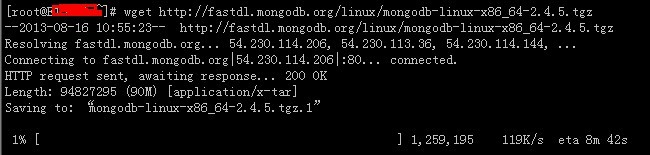
mwget用法:
# mwget -h
GNU MWget 0.1.0 ,a non-interactive and multiline network retriever of all POSTIX Systems.
Usage: mwget [Options]... [URL]...
Options:
-b, --debug Show the debug message
-c, --count=num Set the retry count to [num], no limit when "0", the default is "99"
-d, --directory=dir Set the local direcotry to [dir], the default is "."
-f, --file=file Rename the file to [file]
-h, --help A brief summary of all the options
-i, --interval=num Set the ftp retry interval to [num] seconds, the default is "5"
-n, --number=num Use [num] connections instead of the default (4)
-r, --referer=URL Include `Referer: [URL]' header in HTTP request.
-t, --timeout=num Set the connection timeout to [num] seconds, the default is "30"
-v, --version Show the version of the mwget and exit
-x, --proxy=URL Set the proxy [URL]
Mail bug reports and suggestions to <sa@kmlinux.tk><xiao_suo@hotmail.com>
On website bug reports and suggestions to <http://mwget.sourceforge.net/> <http://www.kmlinux.tk/>
We Welcome your BUG REPORT!
Axel
运维工作中,常常需要下载文件,因为网站下载速度限制或者网络等原因导致下载让人无法忍受,前面有介绍多线程wget工具mwget,提速不少,而且使用很简单。axel使用的人更多,不仅仅安装方法简单,命令更简单。往下看。
安装Axel
RPM安装Axel(方法一)
下载地址:http://pkgs.repoforge.org/axel/
如图,选择适合你服务器的RPM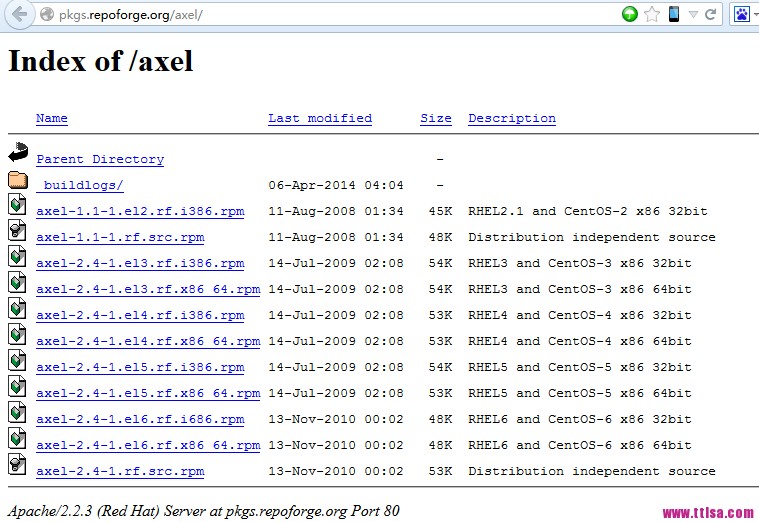
root@ttlsa # wget http://pkgs.repoforge.org/axel/axel-2.4-1.el6.rf.x86_64.rpm
root@ttlsa # rpm -ivh axel-2.4-1.el6.rf.x86_64.rpm
Preparing... ########################################### [100%]
1:axel ########################################### [100%]
yum安装Axel(方法二)
root@ttlsa # yum install axel
apt-get安装Axel
如果你是Ubuntu系统
root@ttlsa # axel -h
Usage: axel [options] url1 [url2] [url...]
--max-speed=x -s x 最大速度 (字节/秒)
--num-connections=x -n x 最大连接数
--output=f -o f 指定文件名
--search[=x] -S [x] Search for mirrors and download from x servers
--header=x -H x 添加header
--user-agent=x -U x 设置用户代理
--no-proxy -N 不使用任何代理
--quiet -q Leave stdout alone
--verbose -v 显示更多状态信息
--alternate -a 显示简单进度条
--help -h 帮助
--version -V 版本信息
axel使用实例
下载centos
root@ttlsa # axel http://mirrors.btte.net/centos/6.5/isos/x86_64/CentOS-6.5-x86_64-bin-DVD1.iso
[ 1%] .......... .......... .......... .......... .......... [4654.5KB/s]
[ 1%] .......... .......... .......... .......... .......... [4657.1KB/s]
[ 1%] .......... .......... .......... .......... .......... [4656.5KB/s]
[ 1%] .......... .......... .......... .......... .......... [4659.3KB/s]
下载运维生存时间某图片
root@ttlsa # axel http://www.ttlsa.com/wp-content/uploads/2014/04/<a href="http://www.ttlsa.com/monitor/zabbix/" title="zabbix"target="_blank">zabbix</a>-adduser-01.jpg
Initializing download: http://www.ttlsa.com/wp-content/uploads/2014/04/zabbix-adduser-01.jpg
File size: 73009 bytes
Opening output file zabbix-adduser-01.jpg
Starting download</p> <p>root@ttlsa # axel http://www.ttlsa.com/wp-content/uploads/2014/04/zabbix-adduser-01.jpg
Initializing download: http://www.ttlsa.com/wp-content/uploads/2014/04/zabbix-adduser-01.jpg
File size: 73009 bytes
Opening output file zabbix-adduser-01.jpg
Starting download
[ 0%] .......... .......... .......... .......... .......... [ 598.0KB/s]
[ 70%] .......... .......... .
Connection 0 finished
Downloaded 71.3 kilobytes in 0 seconds. (710.02 KB/s)
简单进度条
默认情况下,整个屏幕都是进度条,加上-a参数,进度条类似wget。
root@ttlsa # axel -a http://mirrors.btte.net/centos/6.5/isos/x86_64/CentOS-6.5-x86_64-bin-DVD1.iso
Initializing download: http://mirrors.btte.net/centos/6.5/isos/x86_64/CentOS-6.5-x86_64-bin-DVD1.iso
File size: 4467982336 bytes
Opening output file CentOS-6.5-x86_64-bin-DVD1.iso
Starting download</p> <p>[ 1%] [0 1 2 3 ] [ 3.2MB/s] [21:47]
下载限速
ttlsa的网站带宽有限制,我要保证下载的同时又不影响用户的访问,例如限制为1MB/s的下载速度,如下可以看到速度基本保证在1MB以内。
root@ttlsa # axel -s 1024000 http://mirrors.btte.net/centos/6.5/isos/x86_64/CentOS-6.5-x86_64-bin-DVD1.iso
Initializing download: http://mirrors.btte.net/centos/6.5/isos/x86_64/CentOS-6.5-x86_64-bin-DVD1.iso
File size: 4467982336 bytes
Opening output file CentOS-6.5-x86_64-bin-DVD1.iso
State file found: 30522952 bytes downloaded, 4437459384 to go.
Starting download
,,,,,,,... .......... .......... .......... .......... [ 394.8KB/s]
[ 0%] .......... .......... .......... .......... .......... [ 689.2KB/s]
[ 0%] .......... .......... .......... .......... .......... [ 879.5KB/s]
[ 0%] .......... .......... .......... .......... .......... [ 974.5KB/s]
[ 0%] .......... .......... .......... .......... .......... [1086.4KB/s]
[ 0%] .......... .......... .......... .......... .......... [ 967.5KB/s]
[ 0%] .......... .......... .......... .......... .......... [ 943.8KB/s]
[ 0%] .......... .......... .......... .......... .......... [1021.0KB/s]
[ 0%] .......... .......... .......... .......... .......... [1066.1KB/s]
最后
完成,方法很简单,功能很简单。运维生存时间的服务器以及安装了axel,你的安装了吗?
Linux下多线程下载工具MWget和Axel使用介绍的更多相关文章
- Linux下多线程下载工具myget
[root@superdba ~]# mytgetMytget 0.0.99: A download accelerator for GNU/LinuxUsage: mytget [options]. ...
- Linux下多线程下载工具 - Axel
Axel 是 Linux 下一个不错的HTTP/FTP高速下载工具.支持多线程下载.断点续传,且可以从多个地址或者从一个地址的多个连接来下载同一个文件.适合网速不给力时多线程下载提高下载速度.比如在国 ...
- Axel linux下多线程下载工具
Axel 是 Linux 下一个不错的HTTP/FTP高速下载工具.支持多线程下载.断点续传,且可以从多个地址或者从一个地址的多个连接来下载同一个文件.适合网速不给力时多线程下载提高下载速度.比如在国 ...
- linux多线程下载工具mwget
linux多线程下载工具mwget 经常使用wget进行文件下载,然而wget的处理速度并不如人意.遇到一些国外的站点,经常慢得像蜗牛一般.然而为了解决这个问题,便有了mwget:m表示multi多线 ...
- Linux下的下载工具介绍----aria2
ariac 项目地址:http://aria2.sourceforge.net/ 下载地址:http://sourceforge.net/projects/aria2/files/stable/ari ...
- Linux下的多线程下载工具mwget
之前在做项目的时候,遇到一个难题,需要一个多线程下载器,于是阴差阳错的看到了这款工具--mwget,之所以是阴差阳错,是因为mwget的多线程下载功能,并不是我们想要的多线程. wget大家都知道吧, ...
- linux常用多线程下载工具
1.axel 下载安装yum install axel 这个软件下载速度实时显示
- Linux下多线程下载利器 axel
参考 https://teddysun.com/377.html 使用示例: axel -an https://ubuntu-mate.org/raspberry-pi/ubuntu-mate-16. ...
- Linux下多线程查看工具(pstree、ps、pstack),linux命令之-pstree使用说明, linux 查看线程状态。 不指定
0.最常用 pstree:[root@iZ25dcp92ckZ temp]# pstree -a|grep multe | | `-multepoolser | | ...
随机推荐
- Laravel5.1 模型 --多态关联
什么是多态关联? 一个例子你就明白了:好比如说评论 它可以属于视频类 也可以属于文章类,当有个需求是 从评论表中取到视频类的数据,这就需要用到多态关联了. 简单的一句话总结:一张表对应两张表. 1 实 ...
- Java Something
Java静态代码检查工具 FindBugs FindBugs is a defect detection tool for Java that uses static analysis to look ...
- iOS-更新CocoaPods出现错误 提示重复文件
当多人开发的时候,或者引入了一些别人的第三方库文件的时候,当我们再更新CocoaPods时会出现错误,错误提示有一些文件 出现重复,这个时候我们需要查看一些是什么文件出现了重复,错误提示是xxxx三方 ...
- 网络虚拟化之FlowVisor:网络虚拟层(上)
概念解释:切片:虚拟网络的一个实例 一. 网络虚拟化(虚拟网络) 人类社会的发展在很大方面得益于自然界,飞机受益于鸟,雷达受益于蝙蝠等等,所以专门有个学科为仿生学就是研究和模仿生物的特殊本质,利用生物 ...
- 【BZOJ4513】[Sdoi2016]储能表 数位DP
[BZOJ4513][Sdoi2016]储能表 Description 有一个 n 行 m 列的表格,行从 0 到 n−1 编号,列从 0 到 m−1 编号.每个格子都储存着能量.最初,第 i 行第 ...
- mysql数据库导入到oracle数据库
首先,写一个cmd脚本 xx.cmd sqlldr username/password control=xx.ctl errors=10000000 direct=y 再写一个bat脚本xx.bat ...
- Django开发流程
1.创建Django工程 django-admin startproject pro1 2.settings.py配置中文和时区,和在pro1根目录下创建一个'static'目录,并在settings ...
- Oracle数据库的连接模式connection Mode、连接connection与会话session
数据库的连接模式Connection Mode: Dedicated Server Mode(专有模式) 当用户发出请求时,如远程的client端通过监听器连接数据库上,ORACLE的服务器端会启用一 ...
- info 手册
info flex 可以查看flex帮助. h就可以看到相关命令,常用命令已经加粗: x 关闭此帮助窗口. q 一并退出 Info. RET ...
- submit按钮修改宽高的坑
近些天对h5非常感兴趣,边工作边学习,虽然比较累,但过得很踏实.每天都要学习一点东西,这样才能对得起自己.好了,废话不多说,进入今天的主题. 今天遇到了一个非常有趣的东西,就是在修改submit按钮的 ...