
Unity EditorWindow 笔记
一:功能
1.实例化

 //设置插件在菜单栏的位置   和快捷键

    [MenuItem("YCC's Tools/模型更改/更改父物体和测量长度 %W")]

    //实例化窗体

    static void Init()

    {

        myTools window = (myTools)EditorWindow.GetWindow(typeof(myTools));

        window.titleContent.text = "更改父物体/测长";

        window.Show();

    }
2.选项卡制作
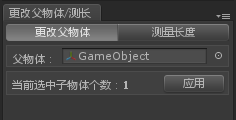
 //用GUI画出窗体的空间布局

    void OnGUI()

    {

        toolbarOption = GUILayout.Toolbar(toolbarOption, toolbarTexts);

        switch (toolbarOption)

        {

            case :

                fnChangeParent();

                break;

            case :

                fnLength();

                break;

        }

    }
3.多个物体更改模型父物体
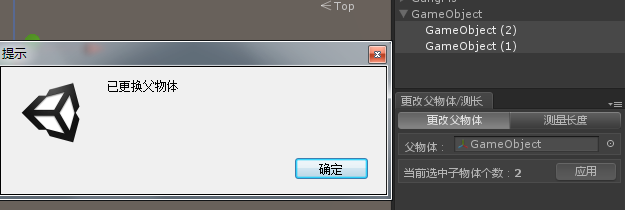
void fnChangeParent()

    {

        GUILayout.BeginHorizontal("box");

        GUILayout.Label("父物体:", EditorStyles.boldLabel);

        ObjParent = EditorGUILayout.ObjectField(ObjParent, typeof(Transform)) as Transform;

        GUILayout.EndHorizontal();

        GUILayout.BeginHorizontal("box");

        iChildCount = Selection.transforms.Length;//获取当前鼠标选中的物体个数

        if (Selection.transforms.Length > )

        {

            GUILayout.Label("当前选中子物体个数:"+iChildCount, EditorStyles.boldLabel);

            if (GUILayout.Button("应用"))

            {

                if (ObjParent != null)

                {

                    for (int i = ; i < iChildCount; i++)

                    {

                        if (Selection.transforms[i].parent != ObjParent)

                            Selection.transforms[i].parent = ObjParent;

                    }

                    EditorUtility.DisplayDialog("提示", "已更换父物体", "确定");//显示对话框 DisplayDialog (title : string, message : string, ok : string, cancel : string = "") : bool

                }

                else

                    this.ShowNotification(new GUIContent("当前没有父物体!"));//显示通知

            }

        }

        else

            GUILayout.Label("当前没有选中子物体" , EditorStyles.boldLabel);

        GUILayout.EndHorizontal();

    }
4.测量两个物体在场景中的距离
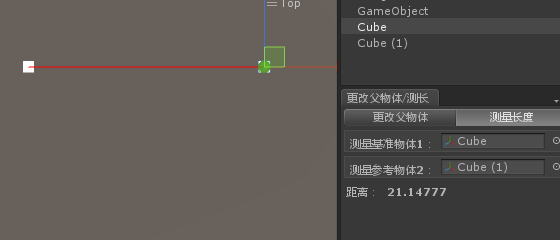
 void fnLength()

    {

        GUILayout.BeginHorizontal("box");

        GUILayout.Label("测量基准物体1:", EditorStyles.boldLabel);

        T1 = EditorGUILayout.ObjectField(T1, typeof(Transform)) as Transform;

        GUILayout.EndHorizontal();

        GUILayout.BeginHorizontal("box");

        GUILayout.Label("测量参考物体2:", EditorStyles.boldLabel);

        T2 = EditorGUILayout.ObjectField(T2, typeof(Transform)) as Transform;

        GUILayout.EndHorizontal();

        GUILayout.BeginHorizontal();

        if (T1 != null && T2 != null)

        {

            Debug.DrawLine(T1.position, T2.position, Color.red);

            //if (GUILayout.Button("查    寻"))

            //{

            fDistance = Vector3.Distance(T1.position, T2.position);

            //}

            GUILayout.Label("距离:", EditorStyles.boldLabel);

            EditorGUILayout.FloatField(fDistance, EditorStyles.boldLabel);

        }

        GUILayout.EndHorizontal();

    }
二:注意
1.重绘
 //在OnInspectorUpdate上调用重绘,因为它在窗口上较少重绘,就好象是OnGUI/Update

    void OnInspectorUpdate()

    {

        Repaint();//重绘

    }
2.错误
出现错误: Invalid editor window UnityEditor.FallbackEditorWindow 解决方法:Layout-> Revert Factory Settings
Unity EditorWindow 笔记的更多相关文章
- C#程序员整理的Unity 3D笔记(十):Unity3D的位移、旋转的3D数学模型
遇到一个想做的功能,但是实现不了,核心原因是因为对U3D的3D数学概念没有灵活吃透.故再次系统学习之—第三次学习3D数学. 本次,希望实现的功能很简单: 如在小地图中,希望可以动态画出Player当前 ...
- [Unity Shader笔记]渲染路径--Forward渲染路径
[Unity Shader笔记]渲染路径--Forward渲染路径 (2014-04-22 20:08:25) 转载▼ 标签: shader unity renderingpath forward 游 ...
- unity入门笔记
我于2010年4月1日硕士毕业加入完美时空, 至今5年整.刚刚从一家公司的微端(就是端游技术+页游思想, 具体点就是c++开发, directX渲染, 资源采取所需才会下载)项目的前端主程职位离职, ...
- [Unity菜鸟] 笔记2 —— 问题篇
记录在学习<Unity 3.x 游戏开发 经典教材>时遇到的各种问题与笔记 1. 初始不能降低Terrain的高度,需要到Terrain设置的第二个按钮中将Height从0调高 (注意:最 ...
- 微软企业库Unity学习笔记
本文主要介绍: 关于Unity container配置,注册映射关系.类型,单实例.已存在对象和指出一些container的基本配置,这只是我关于Unity的学习心得和笔记,希望能够大家多交流相互学习 ...
- unity, editorWindow lose data when enter play mode
我写了个editorWindow,其中有个成员变量m_x,在创建editorWindow的时候为m_x赋的值,而在editorWindow的OnGUI里把m_x显示出来. 当我开着这个editorWi ...
- unity, editorWindow update计时
对于editorWindow,Time.deltaTime不起作用,所以需用下面方法对update进行计时: public class myEditorWindow : EditorWindow{ p ...
- Unity EditorWindow知识记录
1.创建EditorWindow using UnityEditor; using UnityEngine; public class ZZEditorWindow : EditorWindow { ...
- Unity 黑暗之光 笔记 第三章
第三章 角色控制 1.创建游戏运行场景并导入素材资源 2.创建和管理标签 1 //const 表明这个是一个共有的不可变的变量 2 public const string ground = &qu ...
随机推荐
- LayoutInflater的获取与使用
在实际开发中LayoutInflater这个类还是非常有用的,它的作用类似于findViewById().不同点是LayoutInflater是用来找res/layout/下的xml布局文件,并且实例 ...
- PBS
赞同,已经试验成功.后来查手册: $man qdel-p 的功能是强制净化队列.这个 "p" 可能是 "purge" 的缩略形式 qsub,qdel,qmgr ...
- 阿里云centOS6 下python安装及配置、pip安装及配置、ipython安装及配置
我是在阿里云服务器上进行的python环境搭建,阿里云服务器会自带python但是版本低,所以打算自己安装一个,期间遇到各种问题,而且百度根本不够用无奈上的外网很快解决了.在此分享一下. 一.pyth ...
- 发布FireBird数据库所需要DLL文件
数据库版本:2.5.2 ib_util.dll; icudt30.dll; icuin30.dll icuuc30.dll
- BZOJ 1690: [Usaco2007 Dec]奶牛的旅行
Description 作为对奶牛们辛勤工作的回报,Farmer John决定带她们去附近的大城市玩一天.旅行的前夜,奶牛们在兴奋地讨论如何最好地享受这难得的闲暇. 很幸运地,奶牛们找到了一张详细的城 ...
- Spring 自动装配
1.自动装配有 bytype 和byName两种模式. 2.可以使用autowire属性指定自动装配的方式,byName根据bean的名称和当前bean的setter风格属性进行自动装配:byType ...
- 为网站添加一个图标icon
<link rel="icon" href="/favicon.ico" type="image/x-icon"/> <l ...
- swift 学习资源
http://blog.csdn.net/sqc3375177/article/details/29206779
- 使用API网关构建微服务
使用传统的异步回调方法编写API组合代码会让你迅速坠入回调地狱.代码会变得混乱.难以理解且容易出错.一个更好的方法是使用响应式方法以一种声明式样式编写API网关代码.响应式抽象概念的例子有Scala中 ...
- Hibernate:1对1关系总结。
QQ和QQ空间是1对1关系:配置如下 一.主键关联,双方共同维护表关系,以主键关联 public class QQ { private Long id; private QQZone zone; } ...