
install stackless python on ubuntu
前言
我准备用stackless模拟游戏玩家登陆/注册等行为,测试游戏服务器的性能。
但是在安装stackless的过程中遇到了很多问题,特此记录下来,也分享给需要的朋友。
关于stackless
Stackless Python is an experimental implementation of the Python language.
Stackless was designed from the start to overcome the limitations of cPython's Global Interpreter Lock by using tasklets, which implement functions as microthreads.
environment
(1) Ubuntu 12.04.5 LTS (GNU/Linux 3.5.0-23-generic x86_64)
(2) Python 2.7.3 [GCC 4.6.3] on linux2
Install
First install the required libraries and get stackless itself:
 sudo apt-get install libreadline-dev

 cd /tmp

 wget http://www.stackless.com/binaries/stackless-273-export.tar.bz2

 bunzip2 stackless-273-export.tar.bz2

 tar xf stackless-273-export.tar
install stackless:
 cd /tmp/stackless-273-export/

 ./configure --prefix=/opt/stackless --enable-unicode=ucs4

 make


 sudo make install
如果./configure 报错,首先检查是否已安装gcc,安装命令sudo apt-get install gcc
Now it's time to link your standard (CPython) packages so that they can be used with stackless:
 sudo ln -s /usr/lib/python2.7/dist-packages/ /opt/stackless/lib/python2.7/dist-packages

 sudo ln -s /usr/local/lib/python2.7/dist-packages/ /opt/stackless/lib/python2.7/dist-packages

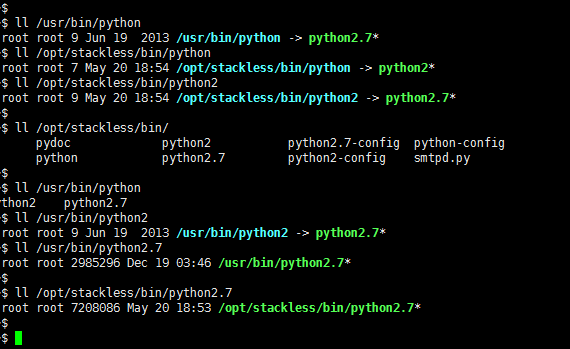
 sudo ln -s  /opt/stackless/bin/python /usr/bin/stackless
edit the paths in the site.py file.
At about line 302, edit the file to look like this. It's the second site-packages.append bit we're adding here:
 sudo vi /opt/stackless/lib/python2.7/site.py

 line 302:

           elif os.sep == '/':

               sitepackages.append(os.path.join(prefix, "lib",

                                           "python" + sys.version[:3],

                                           "site-packages"))

               sitepackages.append(os.path.join(prefix, "lib",

                                           "python" + sys.version[:3],

                                          "dist-packages"))

              sitepackages.append(os.path.join(prefix, "lib", "site-python"))
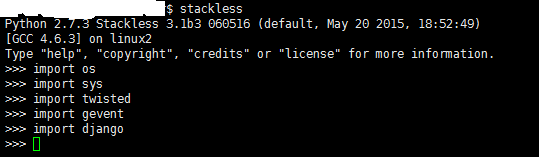
That should be it! Let's test it:
check symbolic link
Install success.
about stackless python
Introduction to Concurrent Programming with Stackless Python
english: (1) http://www.stackless.com/
(2) http://www.grant-olson.net/files/why_stackless.html
(3) https://bitbucket.org/stackless-dev
中文:http://gashero.yeax.com/?p=30
install stackless python on ubuntu的更多相关文章
- Install LAMP Stack On Ubuntu 16.04
原文:http://www.unixmen.com/how-to-install-lamp-stack-on-ubuntu-16-04/ LAMP is a combination of operat ...
- python mongodb ubuntu
mongodb install: sudo apt-get install mongodb Install pip 1. $ sudo apt-get install python-pip pytho ...
- Install Google Pinyin on Ubuntu 14.04
Install Google Pinyin on Ubuntu 14.04 I've been spending more and more time on Ubuntu and I'm not us ...
- HOWTO install Oracle 11g on Ubuntu Linux 12.04 (Precise Pangolin) 64bits
安装了Ubuntu 12.04 64bit, 想在上面安装Oracle 11gr2,网上找了好多文档都没成功,最后完全参考了MordicusEtCubitus的文章. 成功安装的关键点:install ...
- Install a Redmine on Ubuntu system
# How to install a Redmine on Ubuntu system Ref to: https://www.linode.com/docs/applications/project ...
- How do you install Google Chrome on Ubuntu?
https://askubuntu.com/questions/510056/how-to-install-google-chrome sudo apt-get install chromium-br ...
- Install eclipse ns3 in ubuntu 14.04
1. NS3 install 参考NS3 tutorial即可. 2.eclipse 2.1下载 下载地址:http://www.eclipse.org/downloads/ ...
- 【转载】Stackless Python并发式编程介绍[已校对版]
Stackless Python并发式编程介绍[已校对版] 作者: Grant Olson 电子邮件: olsongt@verizon.net 日期: 2006-07-07 译者: ...
- install dns server on ubuntu
参考 CSDN/Ubuntu环境下安装和配置DNS服务器 在 Ubuntu 上安裝 DNS server Install BIND 9 on Ubuntu and Configure It for U ...
随机推荐
- Netty 介绍和应用场景(一)
1.为什么选择Netty 需要了解了Socket通信(IO/NIO/AIO)编程,对于通信模型已经有了一个基本的认识.,果想把这些真正的用于实际工作中,那么还需要不断的完善.扩展和优化.比如经典的TC ...
- Python黑科技:6行代码轻松搭建FTP服务器
Python 黑科技 六行代码轻松搭建个人FTP服务器 什么是FTP服务器? FTP (File Transfer Protocol) 是一个用于客户端与服务器之间文件的协议.利用FTP我们就能做到在 ...
- 1-window搭建git
windows7搭建Git私服 作为版本控制工具大多公司会选用Git,但svn也具有一定的优势,在对开源项目管理方面,Git具有一定的优势,我们可以将自己的项目放到GitHub上面,供大家交流学习,但 ...
- sqli-labs(27a)
0X01测试闭合 ?id=" 报错 ?id="" 正常 0X02构造语句爆数据库名称 ?id= 和27关一样 只是 ’ 变成了 ” 其他语法就是打组合拳 0X03组合拳 ...
- android intent调用系统camera
利用android的camera通常有两种方式:利用intent调用系统的camera,或者结合surfaceview实现自己定制的camera.先分别对这两种方法说明如下: 一.使用系统自配的cam ...
- 初识REST
RESTful介绍: REST与技术无关,代表的是一种软件架构风格,REST是Representational State Transfer的简称,中文翻译为“表征状态转移”或“表现层状态转化”. 1 ...
- Chrome 抓包:快速定位HTTP协议问题
标签(空格分隔): 快速定位HTTP协议问题 Chrome:快速定位HTTP协议问题 快捷键:control+shift+i(windows),command+option+i(mac) 控制器: 控 ...
- Hybrid平台
需求说明 离线包管理平台主要负责对需要接入Hybrid平台的应用进行管理,通过这个平台可以实现对应用的静态资源进行构建.发布.生成离线包,版本控制等,核心场景如下: 将需要做预加载的应用在平台上注册, ...
- webpack bundle中parentJsonpFunction的作用
parentJsonpFunction作用:使异步加载的模块在多个不同的bundle内同步. 假设有多入口文件 bundle1.js: bundl2.js: 在webpack打包后 加载流程: 1.b ...
- 查询oracle中所有用户信息 禁用用户
----查询oracle中所有用户信息 ----1.查询数据库中的表空间名称 ----1)查询所有表空间 select tablespace_name from dba_tablespaces; se ...