
Android课程---布局管理器中的线性布局


线性布局实例:
<?xml version="1.0" encoding="utf-8"?>
<LinearLayout xmlns:android="http://schemas.android.com/apk/res/android"
    xmlns:tools="http://schemas.android.com/tools"
    android:layout_width="match_parent"
    android:layout_height="match_parent"

    tools:context="com.hanqi.test5.MainActivity"
    android:orientation="vertical"
    android:gravity="center_horizontal"

    android:padding="16dp">

    <!--orientation改方向   vertical垂直-->

    <LinearLayout
        android:layout_width="match_parent"
        android:layout_height="wrap_content">
        <TextView
            android:layout_width="wrap_content"
            android:layout_height="wrap_content"
            android:text="用户:" />

        <EditText
            android:layout_width="match_parent"
            android:layout_height="wrap_content"
            android:hint="请输入用户名"/>
    </LinearLayout>
    <LinearLayout
        android:layout_width="match_parent"
        android:layout_height="wrap_content">
        <TextView
            android:layout_width="wrap_content"
            android:layout_height="wrap_content"
            android:text="密码:"/>

        <EditText
            android:layout_width="match_parent"
            android:layout_height="wrap_content"
            android:hint="请输入密码"
            android:password="true"/>
    </LinearLayout>
    <LinearLayout
        android:layout_width="match_parent"
        android:layout_height="wrap_content"
        android:gravity="center_horizontal">
    <Button
        android:layout_width="wrap_content"
        android:layout_height="wrap_content"
        android:text="登陆"
        android:layout_weight="1"/>
        <!--权重:可以让按钮按屏幕长度的比例分配-->

    <Button
        android:layout_width="wrap_content"
        android:layout_height="wrap_content"
        android:text="注册"
        android:id="@+id/button2"
        android:layout_weight="1"/>
     <Button
            android:layout_width="wrap_content"
            android:layout_height="wrap_content"
            android:text="取消"
            android:layout_weight="1"/>
    </LinearLayout>

</LinearLayout>
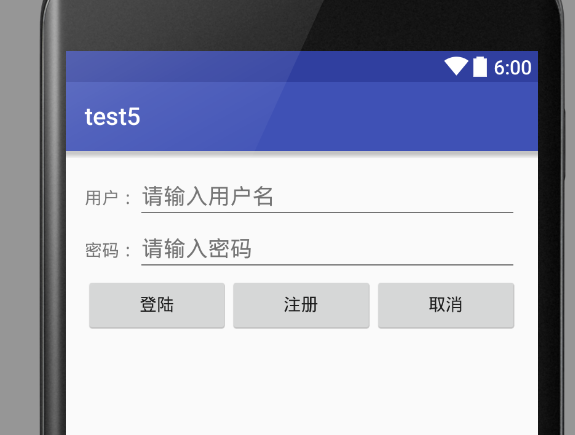
效果:
Android课程---布局管理器中的线性布局的更多相关文章
- Android布局管理器-使用TableLayout表格布局管理器实现简单的用户登录页面
场景 Android布局管理器-使用FrameLayout帧布局管理器显示层叠的正方形以及前景照片: https://blog.csdn.net/BADAO_LIUMANG_QIZHI/article ...
- java 图形化小工具Abstract Window Toolit ;布局管理器FlowLayout流式布局;BorderLayout边界布局;GridLayout网格布局;CardLayou重叠卡片布局;BoxLayout方框布局;绝对定位
1.FlowLayout流式布局管理器: FlowLayout布局管理器中,组件像水流一样向某方向流动(排列),遇到障碍(边界)就折回,重头开始排列 .在默认情况下,FlowLayout局管理器从左向 ...
- Android布局管理器-使用FrameLayout帧布局管理器显示层叠的正方形以及前景照片
场景 Android布局管理器-使用LinearLayout实现简单的登录窗口布局: https://blog.csdn.net/BADAO_LIUMANG_QIZHI/article/details ...
- android中的常用布局管理器(三)
接上篇博客 (5)TableLayout 表格布局管理器 在android中,线性布局和表格布局用的是最多的. 在很多的输出操作中,往往会使用表格的形式对显示的数据进行排版,tablelayo ...
- Android 布局管理器
为了更好地管理Android应用程序的用户界面组件,Android它提供了一个布局管理.通过使用布局管理,Android具有良好的平台无关的图形用户界面应用程序. 平时,推荐布局管理器来管理分布式组件 ...
- 二、Android应用的界面编程(二)布局管理器
一.线性布局所有布局都可以作为容器类使用,因此可以调用多个重载的addView()向布局管理器中添加组件.实际上,我们完全可以用一个布局管理器嵌套到其他布局管理器中---因为布局管理器也继承了View ...
- Android UI组件:布局管理器
为了更好的管理Android应用的用户界面中的组件,Android提供了布局管理器.通过使用布局管理器,Android应用的图形用户界面具有良好的平台无关性.通常,推荐使用布局管理器来管理组件的分布. ...
- Android布局管理器(表格布局)
表格布局有TableLayout所代表,TableLayout继承了LinearLayout,因此他的本质依然是LinearLayout. 表格布局采用行.列的形式来进行管理,在使用的时候不需要声明多 ...
- JAVA中GridBagLayout布局管理器应用详解
很多情况下,我们已经不需要通过编写代码来实现一个应用程序的图形界面,而是通过强大的IDE工具通过拖拽辅以简单的事件处理代码即可很轻松的完成.但是我们不得不面对这样操作存在的一些问题,有时候我们希望能够 ...
随机推荐
- AndroidManifest.xml权限大全
本文转 https://my.oschina.net/duwaiweb/blog/75935 问登记属性 android.permission.ACCESS_CHECKIN_PROPERTIES , ...
- AngularJS学习之Select(选择框)
1.AngularJS可以使用数组或对象创建一个下拉列表选项: 2.在AngularJS中我们可以使用ng-option指令创建一个下拉列表:列表项通过对象和数组循环输出: <div ng-ap ...
- 2016.5.27 php测试中敏感度高,怎么调整
在测试PHP代码的过程中,会遇到这样的问题:PHP提示Notice: Undefined variable,遇到这样的问题很纠结,但是很容易解决. 今天晚上,我就遇到了这样的问题,到网上搜索了很多解决 ...
- DSP using MATLAB 示例 Example3.11
用到的性质 上代码: n = -5:10; x = rand(1,length(n)); k = -100:100; w = (pi/100)*k; % freqency between -pi an ...
- HDU2191(多重背包)
#include <cstdio> #include <cstring> #include <algorithm> #include <iostream> ...
- MyBatis 缓存问题 session
iBatis(MyBatis)开启缓存后,通过外部程序修改或者删除数据库记录,如何让Cache清除?5 当其外部的数据库连接甚至是数据库管理系统,对数据库进行了更改,iBatis(MyBatis)的缓 ...
- Theano深度学习结构分析
Reference:Theano入门三部曲 http://deeplearning.net/tutorial/logreg.html (Softmax回归) http://deeplearning. ...
- 利用百度云盘API上传文件至百度云盘
一.获取Access Token示例 1. 请您将以下HTTP请求直接粘贴到浏览器地址栏内,并按下回车键. https://openapi.baidu.com/oauth/2.0/authorize? ...
- Codeforces Round #245 (Div. 2) B - Balls Game
暴利搜索即可 #include <iostream> #include <vector> #include <iostream> using namespace s ...
- ACM Coin Test
Coin Test 时间限制:3000 ms | 内存限制:65535 KB 难度:1 描述 As is known to all,if you throw a coin up and let ...