
android之fragment的使用
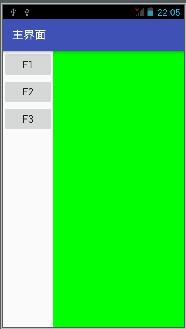
android中的fragment与html中的div很类似,下图中通过左边的按键可以控制右边的显示内容。右边的内容就是一个fragment,通过点击按键来控制fragment的实现。
工程目录
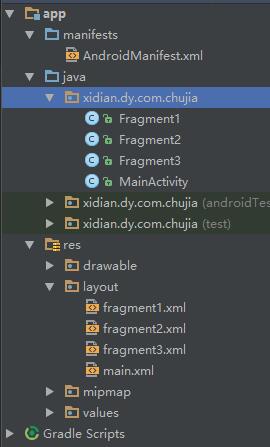
需要定义三个fragment类,每个类中显示不同的内容,每个fragment对应一个布局文件。将来的fragment会用布局文件来填充,填充好的fragment会被放到framelayout中显示
布局文件
在主布局文件定义按钮和帧布局
<?xml version="1.0" encoding="utf-8"?>

<LinearLayout

    xmlns:android="http://schemas.android.com/apk/res/android"

    android:layout_width="match_parent"

    android:layout_height="match_parent"

    android:orientation="horizontal">

    <LinearLayout

        android:id="@+id/left"

        android:layout_width="wrap_content"

        android:layout_height="match_parent"

        android:orientation="vertical">

        <Button

            android:layout_width="wrap_content"

            android:layout_height="wrap_content"

            android:text="f1"

            android:onClick="click1"/>

        <Button

            android:layout_width="wrap_content"

            android:layout_height="wrap_content"

            android:text="f2"

            android:onClick="click2"/>

        <Button

            android:layout_width="wrap_content"

            android:layout_height="wrap_content"

            android:text="f3"

            android:onClick="click3"/>

    </LinearLayout>

    <FrameLayout

        android:id="@+id/fragment"

        android:layout_width="match_parent"

        android:layout_height="match_parent">

    </FrameLayout>

</LinearLayout>
帧布局文件
<?xml version="1.0" encoding="utf-8"?>

<LinearLayout xmlns:android="http://schemas.android.com/apk/res/android"

    android:orientation="vertical" android:layout_width="match_parent"

    android:layout_height="match_parent"

    android:background="#ff0000">

</LinearLayout>
Fragment1类
fragment1类需要继承Fragment,这里注意是adroind类库中的fragment,而不是adroind支持类库中fragment类。
package xidian.dy.com.chujia;

import android.os.Bundle;

import android.support.annotation.Nullable;

import android.app.Fragment;

import android.view.LayoutInflater;

import android.view.View;

import android.view.ViewGroup;

/**

 * Created by dy on 2016/8/25.

 */

public class Fragment1 extends Fragment{

    @Nullable

    @Override

    //加载我们的帧布局文件,将要显示的内容来填充fragment

    public View onCreateView(LayoutInflater inflater, @Nullable ViewGroup container, @Nullable Bundle savedInstanceState) {

        View v = inflater.inflate(R.layout.fragment1, null);

        return v;

    }

}
Activity
在Activity中定义帧布局,当点击事件发生的时候切换帧
package xidian.dy.com.chujia;

import android.app.FragmentManager;

import android.app.FragmentTransaction;

import android.os.Bundle;

import android.support.v7.app.AppCompatActivity;

import android.view.View;

public class MainActivity extends AppCompatActivity {

    @Override

    public void onCreate(Bundle savedInstanceState) {

        super.onCreate(savedInstanceState);

        setContentView(R.layout.main);

    }

    public void click1(View v){

        Fragment1 f1 = new Fragment1();

        FragmentManager fm = getFragmentManager();

        FragmentTransaction ft =  fm.beginTransaction();

        ft.replace(R.id.fragment, f1);

        ft.commit();

    }

    public void click2(View v){

        Fragment2 f2 = new Fragment2();

        FragmentManager fm = getFragmentManager();

        FragmentTransaction ft =  fm.beginTransaction();

        ft.replace(R.id.fragment, f2);

        ft.commit();

    }

    public void click3(View v){

        Fragment3 f3 = new Fragment3();

        FragmentManager fm = getFragmentManager();

        FragmentTransaction ft =  fm.beginTransaction();

        ft.replace(R.id.fragment, f3);

        ft.commit();

    }

}
显示一个fragment的过程和数据库的事务很类似,首先需要通过FragmentManager来开启一个事务,然后通过replace方法来进行绑定。replace的第一参数的framelayout的ID,第二个参数是具体的fragment,最后进行事务的提交。
android之fragment的使用的更多相关文章
- Android:Activity+Fragment及它们之间的数据交换.
Android:Activity+Fragment及它们之间的数据交换 关于Fragment与Fragment.Activity通信的四种方式 比较好一点的Activity+Fragment及它们之间 ...
- Android中Fragment和ViewPager那点事儿(仿微信APP)
在之前的博文<Android中使用ViewPager实现屏幕页面切换和引导页效果实现>和<Android中Fragment的两种创建方式>以及<Android中Fragm ...
- Android中Fragment与Activity之间的交互(两种实现方式)
(未给Fragment的布局设置BackGound) 之前关于Android中Fragment的概念以及创建方式,我专门写了一篇博文<Android中Fragment的两种创建方式>,就如 ...
- Android中Fragment的两种创建方式
fragment是Activity中用户界面的一个行为或者是一部分.你可以在一个单独的Activity上把多个Fragment组合成为一个多区域的UI,并且可以在多个Activity中再使用.你可以认 ...
- android之Fragment基础详解(一)
一.Fragment的设计哲学 Android在3.0中引入了fragments的概念,主要目的是用在大屏幕设备上--例如平板电脑上,支持更加动态和灵活的UI设计.平板电脑的屏幕比手机的大得多,有 ...
- Android使用Fragment来实现ViewPager的功能(解决切换Fragment状态不保存)以及各个Fragment之间的通信
以下内容为原创,转载请注明:http://www.cnblogs.com/tiantianbyconan/p/3364728.html 我前两天写过一篇博客<Android使用Fragment来 ...
- Android使用Fragment定义弹出数字键盘
fragment主布局文件 <?xml version="1.0" encoding="utf-8"?> <LinearLayout xmln ...
- Android ViewPager Fragment使用懒加载提升性能
Android ViewPager Fragment使用懒加载提升性能 Fragment在如今的Android开发中越来越普遍,但是当ViewPager结合Fragment时候,由于Androi ...
- 33.Android之Fragment学习
Fragment Android是在Android 3.0 (API level 11)开始引入Fragment的. 可以把Fragment想成Activity中的模块,这个模块有自己的布局,有自己的 ...
随机推荐
- proteus怎么仿真?
加入hex 文件 双击 单片机芯片 AT89C51 弹出对话框,选择好 用keil 编译好的 hex 文件,晶振 12 即可. 运行
- oracle函数--trunc
作用:截取 语法:trunc(date,[fmt]) TRUNC函数,ORA-01898 精度说明符过多 TRUNC(SYSDATE)即可默认当前日期(年月日),---写到这一步就好了 TRUNC ...
- LNMP环境搭建
LNMP环境搭建 Linux + Nginx + MySQL + PHP PHP是一种脚本语言,当前中国乃至世界上使用PHP语言开发的网站非常普遍 Nginx是一个web服务软件,和apache是一类 ...
- xsd.exe的使用
xsd.exe的使用 XML文件生成XSD文件 xsd myFile.xml /outputdir:myOutputDir XSD文件生存实体类 xsd <你的XSD路径>.xsd / ...
- DPM(voc-release5) Matlab模型文件 Mat转XML
(转载请注明作者和出处 楼燚(yì)航的blog :http://www.cnblogs.com/louyihang loves baiyan/ 未经允许请勿用于商业用途) 由于目前DPM模型训练的代 ...
- js获取鼠标位置的各种方法
在一些DOM操作中我们经常会跟元素的位置打交道,鼠标交互式一个经常用到的方面,令人失望的是不同的浏览器下会有不同的结果甚至是有的浏览器下没结果,这篇文章就上鼠标点击位置坐标获取做一些简单的总结,没特殊 ...
- JAVA中遇到 UTF-八 序列的字节 1 无效
UTF-8 序列的字节 1 无效用dom4j操作xml文件, 出现了这个错误.原因是xml文件被创建的时候是ansi码格式. ( UTF-8 序列的字节 1 无效用dom4j操作xml文件, 出现 ...
- ANE接入平台心得记录(安卓)
开发环境:FlashBuilder4.7 AIR13.0 Eclipse 由于我懒得陪安卓的开发环境所以我下载了包含安卓SDK Manager的Eclipse,其实直接用FlashBuilder开发A ...
- flexslider.js和waypoints.js一起用时的巨坑
Flexslider has a callback API where you can execute functions after various actions:https://github.c ...
- Eclipse调整双击选取的字符颜色背景
Eclipse调整双击选取的字符颜色背景,如下图所示: 会有二点影响: 1. 编辑页的颜色 2. 右侧滚动条的小提示点的颜色.