
配置Tomcat直接显示目录结构和文件列表
Tomcat是直接显示目录结构和文件列表,只是在配置里面给关闭了。
关键在这里:\conf\web.xml
这个文件有一段配置直接控制Tomcat是允许显示目录结构和文件列表。
- <servlet>
- <servlet-name>default</servlet-name>
- <servlet-class>org.apache.catalina.servlets.DefaultServlet</servlet-class>
- <init-param>
- <param-name>debug</param-name>
- <param-value>0</param-value>
- </init-param>
- <init-param>
- <param-name>listings</param-name>
- <param-value>false</param-value>
- </init-param>
- <load-on-startup>1</load-on-startup>
- </servlet>
把listings选项改为true就可以了。 另外把<welcome-file>的配置去掉
例子
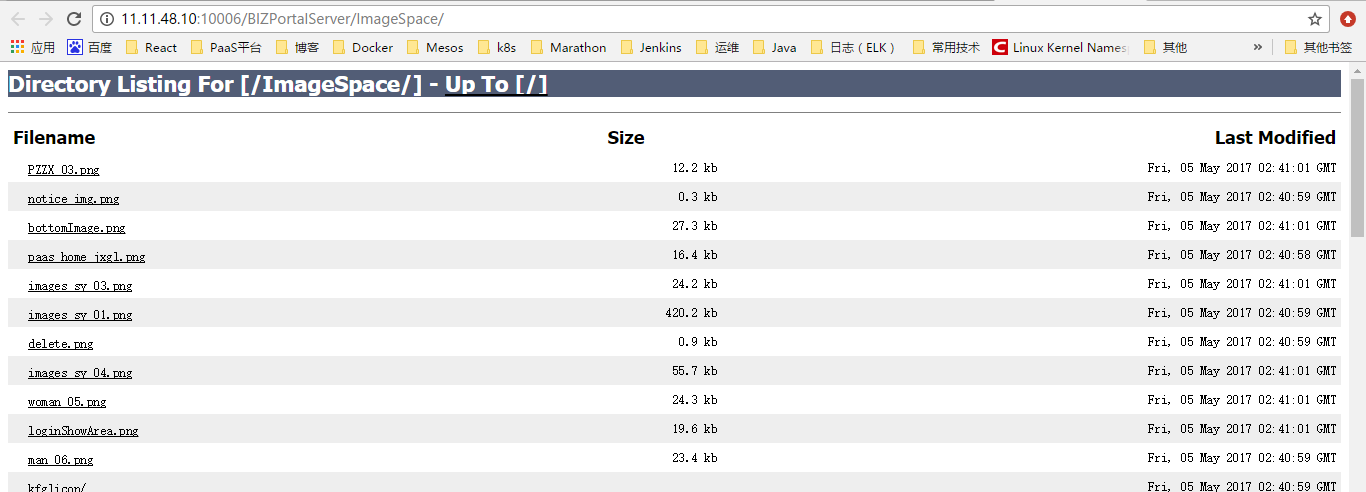
org.apache.catalina.servlets.DefaultServlet支持许多配置选项,在这个web.xml文件里面都有注释。
- <!-- The default servlet for all web applications, that serves static -->
- <!-- resources. It processes all requests that are not mapped to other -->
- <!-- servlets with servlet mappings (defined either here or in your own -->
- <!-- web.xml file. This servlet supports the following initialization -->
- <!-- parameters (default values are in square brackets): -->
- <!-- -->
- <!-- debug Debugging detail level for messages logged -->
- <!-- by this servlet. [0] -->
- <!-- -->
- <!-- fileEncoding Encoding to be used to read static resources -->
- <!-- [platform default] -->
- <!-- -->
- <!-- input Input buffer size (in bytes) when reading -->
- <!-- resources to be served. [2048] -->
- <!-- -->
- <!-- listings Should directory listings be produced if there -->
- <!-- is no welcome file in this directory? [false] -->
- <!-- WARNING: Listings for directories with many -->
- <!-- entries can be slow and may consume -->
- <!-- significant proportions of server resources. -->
- <!-- -->
- <!-- output Output buffer size (in bytes) when writing -->
- <!-- resources to be served. [2048] -->
- <!-- -->
- <!-- readonly Is this context "read only", so HTTP -->
- <!-- commands like PUT and DELETE are -->
- <!-- rejected? [true] -->
- <!-- -->
- <!-- readmeFile File name to display with the directory -->
- <!-- contents. [null] -->
- <!-- -->
- <!-- sendfileSize If the connector used supports sendfile, this -->
- <!-- represents the minimal file size in KB for -->
- <!-- which sendfile will be used. Use a negative -->
- <!-- value to always disable sendfile. [48] -->
- <!-- -->
- <!-- useAcceptRanges Should the Accept-Ranges header be included -->
- <!-- in responses where appropriate? [true] -->
- <!-- -->
- <!-- For directory listing customization. Checks localXsltFile, then -->
- <!-- globalXsltFile, then defaults to original behavior. -->
- <!-- -->
- <!-- localXsltFile Make directory listings an XML doc and -->
- <!-- pass the result to this style sheet residing -->
- <!-- in that directory. This overrides -->
- <!-- globalXsltFile[null] -->
- <!-- -->
- <!-- globalXsltFile Site wide configuration version of -->
- <!-- localXsltFile This argument is expected -->
- <!-- to be a physical file. [null] -->
- <!-- -->
- <!--
配置Tomcat直接显示目录结构和文件列表的更多相关文章
- IntelliJ和tomcat中的目录结构
IntelliJ和tomcat中的目录结构 IntelliJ的官网帮助中心:http://www.jetbrains.com/idea/webhelp/getting-help.html pr ...
- (大数据工程师学习路径)第一步 Linux 基础入门----目录结构及文件基本操作
Linux 目录结构及文件基本操作 介绍 1.Linux 的文件组织目录结构. 2.相对路径和绝对路径. 3.对文件的移动.复制.重命名.编辑等操作. 一.Linux 目录结构 在讲 Linux 目录 ...
- 第三百九十四节,Django+Xadmin打造上线标准的在线教育平台—Xadmin后台进阶开发配置2,以及目录结构说明
第三百九十四节,Django+Xadmin打造上线标准的在线教育平台—Xadmin后台进阶开发配置2,以及目录结构说明 设置后台列表页面可以直接修改字段内容 在当前APP里的adminx.py文件里的 ...
- Linux 目录结构及文件基本操作
Linux 目录结构及文件基本操作 实验介绍 1.Linux 的文件组织目录结构. 2.相对路径和绝对路径. 3.对文件的移动.复制.重命名.编辑等操作. 一.Linux 目录结构 在讲 Linux ...
- Linux 01 Liunx目录结构及文件基本操作
Linux目录结构及文件基本操作 1.Linux的文件组织目录结构(遵循FHS标准) FHS(Filesystem Hierarchy Standard)标准:多数Linux版本采用这种文件组织形式, ...
- springBoot(3)---目录结构,文件上传
目录结构,文件上传 一.目录结构 1.目录讲解 src/main/java:存放代码 src/main/resources static: 存放静态文件, ...
- vue 目录结构与文件配置说明
目录结构与文件配置说明 首先对目录结构进行说明, 1.build目录,主要利用webpack与node插件启动一些相关服务的js文件 2.config目录主要是针对开发环境,生产环境,测试环境的配置信 ...
- 实验楼学习linux第一章第四节linux目录结构及文件基本操作
linux目录结构及文件基本操作 常用命令 切换目录 cd 当前目录 . 上一级目录 .. (.和..开头的都是隐藏文件) 查看隐藏文件 ls -a 上一级所在目录 - 当前用户home目录 ~ 获取 ...
- 如何使用Shell写一个显示目录结构的命令?
公众号关注 「开源Linux」 回复「学习」,有我为您特别筛选的学习资料~ 在Linux中使用Shell写一个显示目录结构的命令,快速寻找目录结构. 1.代码 #!/usr/bin/env bash ...
随机推荐
- brew 中的时间格式转换
char * pACNowStr = NULL; JulianType jtNow; ISHELL_GetJulianDate(pIShell, , &jtNow); pACNowStr = ...
- DUBBO功能使用说明
DUBBO功能使用说明 1 DUBBO概述 DUBBO是阿里巴巴公司的一个分布式服务框架,致力于提供高性能和透明化的RPC远程服务调用方案,以及SOA服务治理方案. 相比于其他服务框架,DUBBO有如 ...
- ios开发之--UICollectionView的使用
最近项目中需要实现一种布局,需要用到UICollectionView,特在此整理记录下! 贴上最终实现的效果图: 1,声明 @interface FirstViewController ()<U ...
- Python 进阶(一)函数式编程
来自慕课网: 简介: 函数:function ,在入门课程已学 函数式:functional,一种编程范式 函数式编程是一种抽象计算的编程模式,函数≠函数式,好比:计算≠计算机
- [转载]会引起全表扫描的几种SQL
查询语句的时候尽量避免全表扫描,使用全扫描,索引扫描!会引起全表扫描的几种SQL如下 1.模糊查询效率很低: 原因:like本身效率就比较低,应该尽量避免查询条件使用like:对于like ‘%... ...
- unable to execute dex:GC overhead limit exceeded unable to execute dex:java heap space 解决方案
最近做厂商适配,厂商提供了一部分Framework的jar包,把jar包通过Add Jar放到Build Path中, 在生成APK过程中,Eclipse长时间停留在100%那个进度. 最后Eclip ...
- Vitamio与FFmpeg、LGPL、GPL的关系
转自:http://sun.sanniang.me/2014/04/26/the-relationship-vitamio-with-ffmepg-lgp-gpl Vitamio 使用了 FFmpeg ...
- Android中开发习惯
我觉得首先是命名规范.命名规范这种东西每个人都有自己的风格,Google 也有自己的一套规范(多看看 Android 系统源码就明白了).好的规范可以有效地提高代码的可读性,对于将来接手代码的小伙伴也 ...
- c/c++设置图片为透明图
在绘制图片的时候先把源位图填充背景设置为白色 例如:m_bufferpicture.FillSolidRect(0,0,m_nWidth,m_nHeight,RGB(255,255,255));//这 ...
- PyQt4将窗口放在屏幕中间
以下脚本显示了将窗口放在屏幕中间位置的方法. #!/usr/bin/python # -*- coding:utf-8 -*- import sys from PyQt4 import QtGui c ...