
[转]Creating a custom ribbon for Outlook 2013, 2010 and toolbar for Outlook 2007, 2003 – C# sample
The Outlook UI provides a lot of customization options, but one thing almost all Outlook add-ins share is either a ribbon tab or a toolbar or two. The Ribbon UI was introduced in Office 2007 although only the Inspector windows actually used it. The Explorer window still used the traditional menus and toolbars from previous Outlook versions.
Whichever version of Outlook you decide to develop for, Add-in Express for Office and .net provides visual designers and tools for both the Ribbon UI as well as for toolbars. Add-in Express fully supports Outlook 2013, 2010, 2007 and 2003 and works with Visual Studio 2012 – 2005 (C#, VB.NET or C++ .NET) .
Creating a custom Outlook ribbon
Before you can create your own Outlook ribbon, you need to add an ADXRibbonTab component to the AddinModule designer surface.

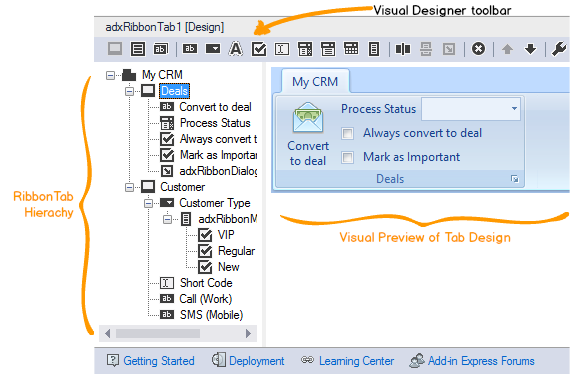
When you select the ADXRibbonTab component in Visual Studio, the visual designer will become active. When designing your Ribbon Tab, you need to follow a certain hierarchy, for example, any control you add to the Ribbon Tab, needs to be inside a Ribbon Group first.
You can add a Ribbon Group by clicking on its toolbar button inside the visual designer. The visual designer will display the control hierarchy as well as a preview of what the Ribbon Tab will look like inside Outlook.
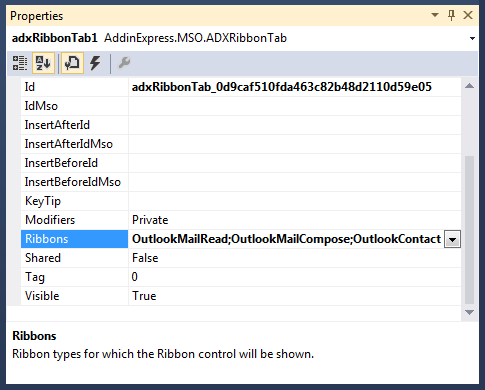
You need to stipulate the Ribbons property in order to specify where in Outlook your ribbon tab should be displayed.
Find more about Ribbon designer.
Ribbon context-sensitivity
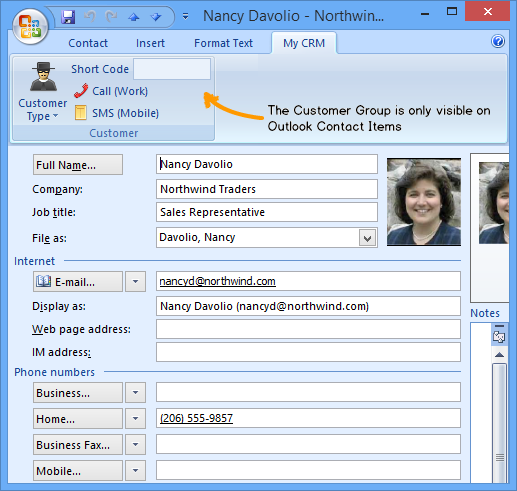
This property is available on all ribbon controls and it enables you to display or hide different controls based on the type of item in Outlook. Consider the following ribbon design:
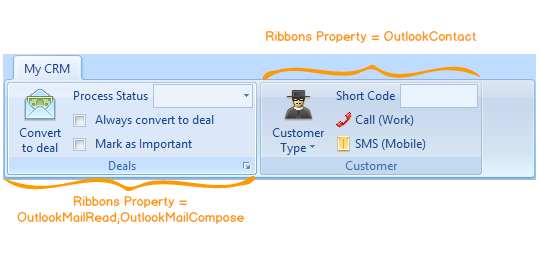
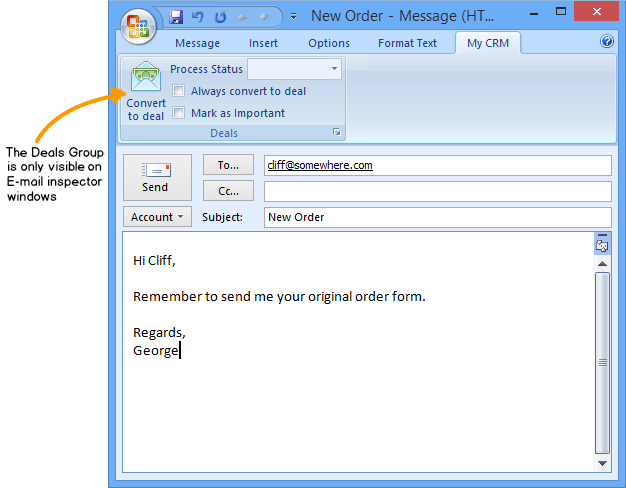
The Ribbons property of the first ribbon group is set to OutlookMailRead and OutlookMailCompose. The second ribbon group’s Ribbons property is set to OutlookContact. When building and running the add-in in Outlook, you’ll only see the first ribbon group when you either edit or open an e-mail.
The second ribbon group will be visible when you have a contact inspector window open. Be careful thought, for this to work the Ribbon Tab’s Ribbons property needs to be set to OutlookMailRead,OutlookMailComposeandOutlookContact.
Creating a custom Outlook toolbar
Creating a custom toolbar or a commandbar for any pre-ribbon versions of Outlook 2007, 2003 and 2000 is done in a similar fashion as creating ribbons. However, Add-in Express provides two separate command bar components for pre-ribbon versions of Outlook:
- ADXOLExplorerCommandBar
- ADXOLInspectorCommandBar
The names of the two components are pretty self-explanatory. When you would like to add controls to an existing or create a new toolbar for the Outlook Explorer window, you would need to use the ADXOLExplorerCommandBar component.

For all other pre-ribbon Outlook Inspector windows you would need to use the ADXOLInspectorCommandBarcomponent.

When you select the ADXOLExplorerCommandBar component in Visual Studio, Add-in Express will display a visual designer for you, to visually design the toolbar.
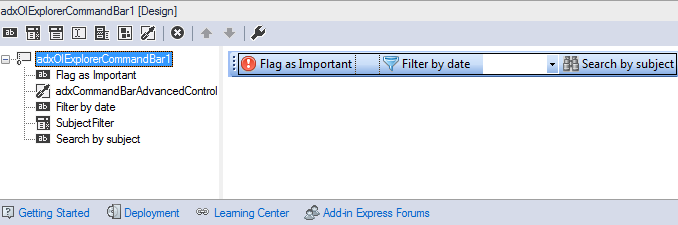
The visual designer also comes with its own toolbar that contains all the standard commandbar controls you can add. However, I want to draw your attention to a very special control: the CommandBar Advanced Control.
This control gives you the ability to embed any non-Office control to an Outlook toolbar. This can include anything from a date picker to a tree view control!
Find more about Toolbar designer.
Advanced Toolbar control
Once you’ve added an advanced command bar control to your toolbar, you need to add the control you want to embed to the AddinModule designer surface. In this example, I’ve simply dragged a DateTimePickercontrol onto my designer surface.
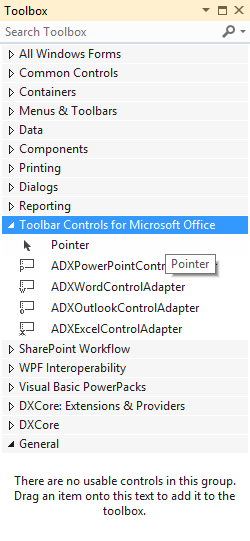
Next, you’ll need to add an Outlook Control Adapter control onto the designer surface as well. You’ll find this control in your Visual Studio toolbox, under the “Toolbar Controls for Microsoft Office” group.
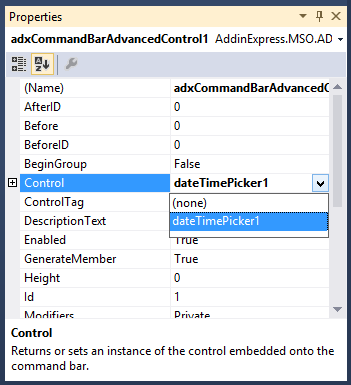
With the control adapter in place, select the advanced command bar control and select the name of the Date Picker control in the drop-down list next to the Control property.
With the controls and properties in place, we can build, register and run our Outlook add-in project. When you have your Inbox open in Outlook 2007 and earlier, you should see the following toolbar:
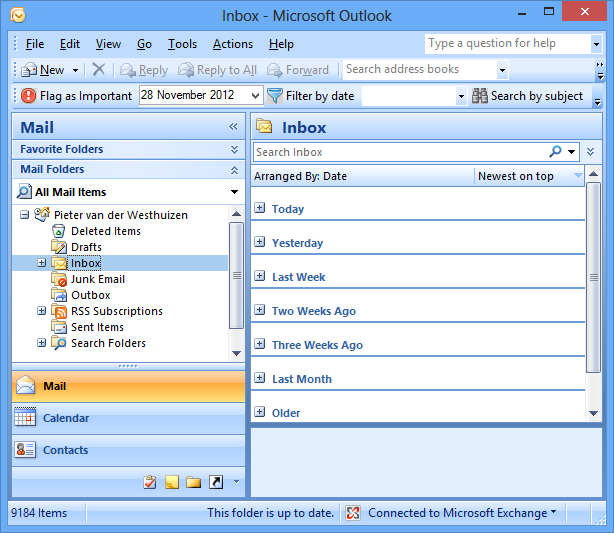
Toolbar context-sensitivity
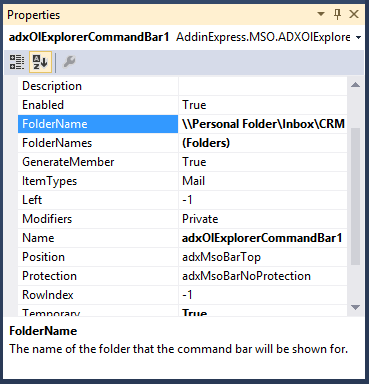
As with the ribbon control you can also display a toolbar or certain controls on the toolbar depending on the folder name or item types (Mail, Contact, Task, Calendar etc.). If you want to show the toolbar when a certain folder is selected, specify the folder name in the FolderName property. If you need it to show for a collection of forms, add their folder names to the FolderNames property.
If, for example, you would only like to show certain components on the toolbar based on which type(s) of item is selected, select the toolbar component and either specify the Outlook item type in the OlExplorerItemTypes or OlInspectorItemTypes property depending on whether you’re using an Explorer or Inspector toolbar.
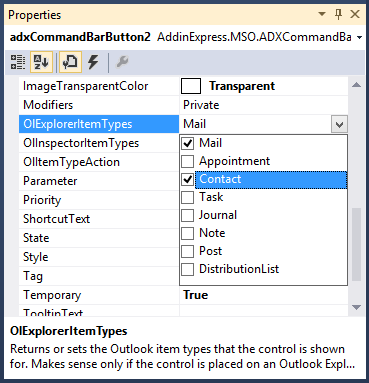
And as easy as that you can have a toolbar which only shows or hides certain controls depending on the types of items or folders that are selected.
Thank you for reading! Until next time, keep coding!
Outlook 2013 add-in development in Visual Studio 2012 for beginners
- Part 1: Outlook add-in development: Outlook Application and base objects
- Part 2: Creating custom Outlook views
- Part 3: Creating custom Outlook forms
- Part 4: Outlook UI – Explorer and Inspector Windows. What is customizable?
- Part 5: Customizing Outlook main menu, context menus and Backstage view
- Part 6: Creating custom Outlook ribbons and toolbars
- Part 7: Advanced view regions for Outlook 2013 – 2003
- Part 8: Advanced form regions for Outlook 2013 – 2003
- Part 9: Working with Outlook Accounts, Stores, Folders and Items
- Part 10: Working with Outlook calendar
- Part 11: Working with Outlook tasks
You may also be interested in:
[转]Creating a custom ribbon for Outlook 2013, 2010 and toolbar for Outlook 2007, 2003 – C# sample的更多相关文章
- Creating a Custom Page Layout in SharePoint 2013
Creating a Custom Page Layout in SharePoint 2013 In my last article, I documented how to create a Ma ...
- iOS Programming Recipe 6: Creating a custom UIView using a Nib
iOS Programming Recipe 6: Creating a custom UIView using a Nib JANUARY 7, 2013 BY MIKETT 12 COMMENTS ...
- 使用 InstallShield limited edition 打包部署Outlook 2013 Office add-in插件
原文: Outlook: Deploying an Outlook 2013 add-in (using InstallShield LE) Today I had to create an inst ...
- Outlook 2013 电子邮件账户设置备份与恢复
与之前版本不同,Outlook 2013需要备份以下注册表内容:HKEY_CURRENT_USER\Software\Microsoft\Office\15.0\Outlook\Profiles恢复时 ...
- outlook 2013撤消已经发送的邮件
使用Outlook 2013发送邮件的时候,发送后,发现邮件写错了或者其它原因需要撤消发送邮件,这里介绍一下. 工具/原料 outlook 2013 方法/步骤 需要打开已经发送的邮件 点 ...
- Creating a custom analyzer in ElasticSearch Nest client
Creating a custom analyzer in ElasticSearch Nest client Question: Im very very new to elasticsearch ...
- 配置Office Outlook 2013
导航 背景——配置过程——错误(Error)——参考资料 背景 最近,折腾了一阵子邮箱客户端,包括:Foxmail.thuderbird.outlook:最后,考虑到outlook对文本的强大的支持能 ...
- GHOST CMS - 创建自定义主页 Creating a custom home page
创建自定义主页 Creating a custom home page 为你的网站创建一个自定义的主页是一个让你从人群中脱颖而出的好方法,并把你自己独特的印记存放在你的网上.本教程向您展示了如何在Gh ...
- Outlook 2013 您的组织策略阻止我们为您完成此操作... 解决方法
问题:点击outlook超链接,弹出“您的组织策略阻止我们为您完成此操作”的提示,无法打开链接. 环境 OS: Win10 专业版x64bit Outlook: 2013 浏览器:搜狗浏览器 解决办法 ...
随机推荐
- C#判断本地文件,网络文件是否存在是否存在
File.Exists 方法 (String) 确定指定的文件是否存在. 命名空间: System.IO程序集: mscorlib(位于 mscorlib.dll) 参数 path Type: ...
- C#时间加减
DateTime dt =......//减数DateTime dt_n = DateTime.Now;//被减数 long x = dt .ToFileTime();//表示自协调世界时 (UTC) ...
- js中null, undefined 和 typeof
参考自:http://www.cnblogs.com/wicub/p/3442891.html typeof 是运算符,注意不是函数,是运算符,其作用,是考察变量究竟是什么类型.或曰,是变量是否定义或 ...
- 企业项目开发--分布式缓存memcached(3)
此文已由作者赵计刚授权网易云社区发布. 欢迎访问网易云社区,了解更多网易技术产品运营经验. 3.3.ssmm0-data 结构: 3.3.1.pom.xml 1 <?xml version=& ...
- 程序媛计划——python初级课时3~5
产生1-10中的随机数: for 循环:所有可遍历对象都能用于for循环,如一个字符串. len(list),list中的元素类型可以各不相同:可以直接用下标对list元素赋值来更新列表 对字符串可以 ...
- JQuery - Ajax和Tomcat跨域请求问题解决方法!
在JQuery里面使用Ajax和Tomcat服务器之间进行数据交互,遇到了跨域请求问题,无法成功得到想要的数据! 错误信息部分截图: 通过错误信息判断知道已经发生在Ajax跨域请求问题了! 当前Tom ...
- python 函数中使用全局变量
python 函数中如果需要使用全局变量,需要使用 global + 变量名 进行声明, 如果不声明,那么就是重新定义一个局部变量,并不会改变全局变量的值 n [1]: a = 3 In [2]: d ...
- jzoj100031
這題是結論題 好玄學,不懂 代碼: #include<bits/stdc++.h> using namespace std; struct no{ int v,p; bool operat ...
- 使用Navicat 创建mysql存储过程,实现日期加流水号序列
目的:使用Navicat 创建mysql存储过程,实现格式为8位日期(年月日)+5位流水号序列. 步骤: 1.打开Navicat 登录数据库,点击导航栏上的函数,如下图: 2.点击新建函数,选择“过程 ...
- 队列(循环队列)----C语言
线性结构:有且只有一个根节点,且每个节点最多有一个直接前驱和一个直接后继的非空数据结构 非线性结构:不满足线性结构的数据结构 队列 队列一般分为两类:链式队列和顺序队列 链式队列---链式队列即用链表 ...