
[AngularJS] New in Angular 1.3 - Performance Boost with debugInfoEnabled
By default, Angular provides a lot of debug information on the DOM that's only necessary for tools like Protractor and Batarang. Angular 1.3 allows you to turn off the debug information to give your app a simple performance boost.
See: https://docs.angularjs.org/api/ng/provider/$compileProvider
More: https://docs.angularjs.org/guide/production#disabling-debug-data
<!DOCTYPE html>

<html ng-app="app">

<head>

    <title></title>

    <link href="//maxcdn.bootstrapcdn.com/bootstrap/3.3.1/css/bootstrap.min.css" rel="stylesheet">

    <script src="//cdnjs.cloudflare.com/ajax/libs/angular.js/1.3.3/angular.js"></script>

    <script src="//cdnjs.cloudflare.com/ajax/libs/angular-ui-router/0.2.11/angular-ui-router.js"></script>

    <script src="app.js"></script>

</head>

<body>

  <script type="text/ng-template" id="templates/home.html">

    <note message="Hello"></note>

  </script>

<ui-view></ui-view>

</body>

</html>
angular.module("app", ["ui.router"])

    .config(function config($stateProvider, $compileProvider) {

        $stateProvider.state("home", {

            url: "",

            templateUrl: "templates/home.html"

        })

        $compileProvider.debugInfoEnabled(false);

    })

    .directive("note", function note() {

        return {

            template: "<div>{{ note.message }} {{ note.person }}</div>",

            controller: "NoteController as note",

            bindToController: true,

            scope: {

                message: "@"

            }

        }

    })

    .controller("NoteController", function NoteController() {

        var note = this;

        note.person = "John";

    })
Without debug info:
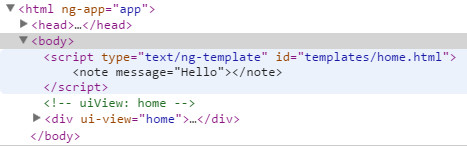
If you want open the debug info again:
in console:
angular.reloadWithDebugInfo();

[AngularJS] New in Angular 1.3 - Performance Boost with debugInfoEnabled的更多相关文章
- [AngularJS] Enable Animations Explicitly For A Performance Boost In AngularJS
http://www.bennadel.com/blog/2935-enable-animations-explicitly-for-a-performance-boost-in-angularjs. ...
- [Angular] Use Angular components in AngularJS applications with Angular Elements
When migrating AngularJS (v1.x) applications to Angular you have different options. Using Angular El ...
- 【js类库AngularJs】解决angular+springmvc的post提交问题
[js类库AngularJs]解决angular+springmvc的post提交问题 AngularJS诞生于2009年,由Misko Hevery 等人创建,后为Google所收购.是一款优秀的前 ...
- [AngularJS] Lazy loading Angular modules with ocLazyLoad
With the ocLazyLoad you can load AngularJS modules on demand. This is very handy for runtime loading ...
- [AngularJS] New in Angular 1.5 ng-animate-swap
<!DOCTYPE html> <html ng-app="MyApplication"> <head> <link rel=" ...
- AngularJS进阶(五)Angular实现下拉菜单多选
Angular实现下拉菜单多选 写这篇文章时,引用文章地址如下: http://ngmodules.org/modules/angularjs-dropdown-multiselect http:// ...
- AngularJS进阶(四)ANGULAR.JS实现下拉菜单单选
ANGULAR.JS: NG-SELECT AND NG-OPTIONS PS:其实看英文文档比看中文文档更容易理解,前提是你的英语基础还可以.英文文档对于知识点讲述简明扼要,通俗易懂,而有些中文文档 ...
- [AngularJS] Using the Angular scope $destroy event and method
With Angular scopes, you have access to a $destroy event that can be used to watch $scope events. Th ...
- [AngularJS] New in Angular 1.3 - bindToController
If you want to use controllers, instead of a link function, you can use bindToController. <!DOCTY ...
随机推荐
- Android功能模块化之生成验证码Bitmap
Android生成验证码Bitmap,主要使用Canvas绘制,实现的步骤如下: 1.生成验证码.主要采用java的随机函数生成序号,然后对应获取预设的Char数组的值,生成长度固定的验证码: 2.C ...
- 2、列表item_圆头像_信息提示
import android.app.Activity; import android.os.Bundle; import android.view.LayoutInflater; import an ...
- Apache OFBiz 学习笔记 之 服务引擎 一
概述 服务定义为一段独立的逻辑顺序,当多个服务组合一起时可完成不同类型的业务需求 服务有很多类型,WorkFlow.Rules.Java.SOAP.BeanShell等.java类型的 ...
- 【转】发布python的包至pypi服务器
[原文链接]http://yejinxin.github.io/distribute-python-packages-to-pypi-server/ 使用pip或easy_install可以管理和安装 ...
- 读《HTML5与CSS3权威指南(上册)》笔记
第二章 1.内容类型:“text/html”.DOCTYPE声明:<!DOCTYPE html>.指定字符编码:<meta charset="utf-8"> ...
- android开发关于popupwindow显示关闭的笔记
一.方法一: popupWindow.setFocusable(false); //这样popupWindow无法获得焦点,无法处理popupWindow中的事件 设置MainActivity的onT ...
- 编译器对C++ 11变参模板(Variadic Template)的函数包扩展实现的差异
编译器对C++ 11变参模板(Variadic Template)的函数包扩展实现的差异 题目挺绕口的.C++ 11的好东西不算太多,但变参模板(Variadic Template)肯定是其中耀眼的一 ...
- iOS 8 Xcode6 设置Launch Image 启动图片<转>
Step1 1.点击Image.xcassets 进入图片管理,然后右击,弹出"New Launch Image" 2.如图,右侧的勾选可以让你选择是否要对ipad,横屏,竖屏,以 ...
- 最全面的 MySQL 索引详解
什么是索引? 1.索引 索引是表的目录,在查找内容之前可以先在目录中查找索引位置,以此快速定位查询数据.对于索引,会保存在额外的文件中. 2.索引,是数据库中专门用于帮助用户快速查询数据的一种数据结构 ...
- 对"一维最大子数组和"问题的思考(homework-01)
一维最大子数组和问题,即给定一个数组,在它所有的连续子数组的和中,求最大的那个和.“最大子数组和”是一个很好的IT面试考题,在<编程之美>一书中同时阐述了一维数组和二维数组的讨论.本篇博客 ...