
[Javascript] Webpack Loaders, Source Maps, and ES6
Using ES6
To use ES6, we need loader.
- Modify webpack.config.js file:
module.exports = {

    entry: './index.js',

    output: {

        filename: 'bundle.js',

        path: __dirname

    },

    module: {

        loaders: [

            {test: /\.js$/, loader: 'babel', exclude: '/node_modules/'}

        ]

    }

};
We add module property, which is an object. We define the loaders property here which is an array of objects.
- test: It is a regex, will include all the files which match the regex. In the exmaple, we say that "include all the js files".
- loader: You need to define the ES6 loader for this, which is 'babel'. For that, you need to install it by:
npm install babel-loader
- exclude: Tell which files you don't want to include.
2. Change file using ES6 style:
//lam-dom-binding.js

export default {

  bindEls(el1, el2){

    el1.addEventListener('keyup', () =>  el2.value = el1.value)

    el2.addEventListener('keyup', () =>  el1.value = el2.value)

  }

}
3. run: webpack --watch
Source map
One useful thing is see the source map (means see lam-dom-binding.js map to which part in the bundle.js). The reason it is useful is because when we open the devtool, we just saw a big bundle.js file:

which is not useful for debugging.
To enable the source map, we need to add one property in webpack.config.js:
module.exports = {

    entry: './index.js',

    output: {

        filename: 'bundle.js',

        path: __dirname

    },

    devtool: 'eval', //init compile fast, recompile also very fast

    module: {

        loaders: [

            {test: /\.js$/, loader: 'babel', exclude: '/node_modules/'}

        ]

    }

};
After that, run 'webpack --watch' again. We can see from the devtool, it show the 'webpack://'
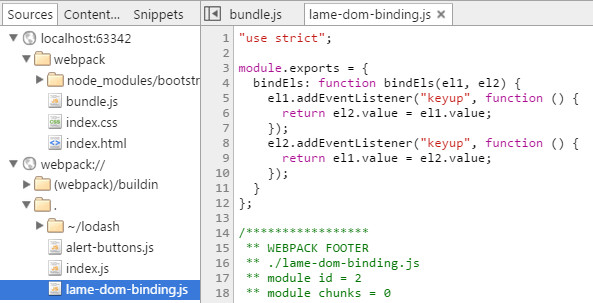
But you can see that code is still ES5 style, if you want what you coded, instead of using 'eval', you can use 'eval-source-map'.
module.exports = {

    entry: './index.js',

    output: {

        filename: 'bundle.js',

        path: __dirname

    },

    devtool: 'eval-source-map',

    module: {

        loaders: [

            {test: /\.js$/, loader: 'babel', exclude: '/node_modules/'}

        ]

    }

};
This can a little bit longer time to compile, then you can see the code you just worte:

Both 'eval' and 'eval-source-map' are recommended using in dev time.
If you want to use in production code:
module.exports = {

    entry: './index.js',

    output: {

        filename: 'bundle.js',

        path: __dirname

    },

    devtool: 'source-map',

    module: {

        loaders: [

            {test: /\.js$/, loader: 'babel', exclude: '/node_modules/'}

        ]

    }

};
It will add a .map file for you. That file is not actually loaded into the browser until the DevTools are brought up.
[Javascript] Webpack Loaders, Source Maps, and ES6的更多相关文章
- [AngualrJS + Webpack] Production Source Maps
When you uglify your Angular code with Webpack's uglify plugin, debugging your application can be a ...
- JavaScript Source Maps浅析
阅读目录 有用的链接 Link: 原文链接 译文开始: 对网站进行性能优化对一个最容易的方法就是把JS和CSS进行打包压缩.但是当你需要调试这些压缩文件中的代码的时候,会发生什么?可能会是一场噩梦.但 ...
- Source Maps简介
提高网站性能最简单的方式之一是合并压缩JavaScript和CSS文件.但是当你需要调试这些压缩文件中的代码时,那将会是一场噩梦.不过也不用担心,souce maps将会帮你解决这一问题. Sourc ...
- 【译】Source Maps浅析
Time:2019/10/27~2019/10/29 Link: 原文链接 译文开始: 对网站进行性能优化对一个最容易的方法就是把JS和CSS进行打包压缩.但是当你需要调试这些压缩文件中的代码的时候, ...
- Sentry(v20.12.1) K8S 云原生架构探索,SENTRY FOR JAVASCRIPT Source Maps 详解
系列 Sentry-Go SDK 中文实践指南 一起来刷 Sentry For Go 官方文档之 Enriching Events Snuba:Sentry 新的搜索基础设施(基于 ClickHous ...
- Introduction to JavaScript Source Maps
下载jquery时候发现:jquery.min.map 这什么鬼呀? https://cdnjs.cloudflare.com/ajax/libs/jquery/3.0.0/core.js http ...
- [转] Webpack的devtool和source maps
source maps Webpack打包生成的.map后缀文件,使得我们的开发调试更加方便,它能帮助我们链接到断点对应的源代码的位置进行调试(//# souceURL),而devtool就是用来指定 ...
- WebStorm 9 自动编译 LESS 产出 CSS 和 source maps
1.双击桌面Chrome图标,打开Chrome,按键盘“F12”键,打开开发工具界面,点击其右上角的“设置”按钮,勾选“Enable JavaScript source maps” 及“Enable ...
- 前端构建:Source Maps详解
一.前言 当使用CoffeeScript.ClojureScript编写前端脚本时,当使用Less.Sacc编写样式规则时,是否觉得调试时无法准确找到源码位置呢?当使用jquery.min.js等经压 ...
随机推荐
- C# 分布式缓存服务器方案
- 使用Amoeba 实现MySQL DB 读写分离
Amoeba(变形虫)项目是一个开源框架,于2008年开始发布一款 Amoeba for Mysql软件: 这个软件致力于MySQL的分布式数据库前端代理层,它主要在应用层访问MySQL的时候充当SQ ...
- win8.1 64 安装用友T3+sql2005-64步骤
1. 环境:win8.1 64 专业版 4G内存 .net framwork 3.5 2.初始过程及所需软件 安装sql2008数据库,安装完T3发现并不支持此数据库,运行T3老是出现连接数据时的 ...
- PostgreSql与sqlserver对比杂记
PostgreSql与MSSqlServer区别 增删查改没有语法一样. 排序Group Having 聚集函数使用一样 联结查询 ON 子句是最常见的连接条件的类型:它接收一个和 WHERE 子句相 ...
- 利用文件实现Free Pascal中的简单排序功能
此程序主要是验证文件功能的读写功能,总结到的东西有:①文件无论是读还是写,都要先建立链接关系才可以进行;②读与写不能同时进行,必须分开操作,这也可以理解,在实际鼠标操作时也是如此的!③读写后必须用cl ...
- lightoj 1019
裸的最短路 dijkstra #include<cstdio> #include<string> #include<cstring> #include<ios ...
- xmbc 资源
http://raspberrypi.diandian.com/post/2013-02-25/40048470423 http://blog.csdn.net/lincyang/article/de ...
- 问题:关于坛友的一个js轮播效果的实现
需求:点击向前按钮进行向前翻页,向后按钮进行向后翻页,点击中间蓝色小圆圈可以来回自由切换 我的大概思路:先默认显示一个div 然后在原位置在隐藏一个div 给按钮添加click事件,转到下一个时 ...
- Deep learning:三十四(用NN实现数据的降维)
数据降维的重要性就不必说了,而用NN(神经网络)来对数据进行大量的降维是从2006开始的,这起源于2006年science上的一篇文章:reducing the dimensionality of d ...
- bzoj 2815 [ZJOI2012]灾难(构造,树形DP)
[题意] 求把每个点删除后,不可达点的数目. [思路] 构造一棵“灭绝树”,要求这棵树满足如果删除根节点后则该子树内的所有结点都不可达.则答案为子树大小-1. 如何构造这棵“灭绝树”? 将原图拓扑排序 ...