
Internationalization
Internationalization
If you are building a site for an international audience, you will likely want to provide localized versions of common strings on your website, including menu items, form labels, button labels, and more. Additionally, some websites require that route path segments be localized.
Zend Framework provides internationalization (i18n) tools via the zend-i18ncomponent, and integration with zend-mvc via the zend-mvc-i18n component.
Installation
Install zend-mvc-i18n via Composer:
$ composer require zendframework/zend-mvc-i18nAssuming you are using zend-component-installer (which is installed by default with the skeleton application), this will prompt you to install the component as a module in your application; make sure you select eitherapplication.config.php or modules.config.php for the location.
Once installed, this component exposes several services, including:
MvcTranslator, which implements the zend-i18nTranslatorInterface, as well as the version specific to zend-validator, providing an instance that can be used for all application contexts.- A "translator aware" router.
By default, until you configure translations, installation has no practical effect. So the next step is creating translations to use in your application.
Creating translations
The zend-i18n Translation chapter covers the details of adding translations to your application. You can use PHP arrays, INI files, or the popular gettext package (which allows you to use industry standard tools such as poedit to edit translations).
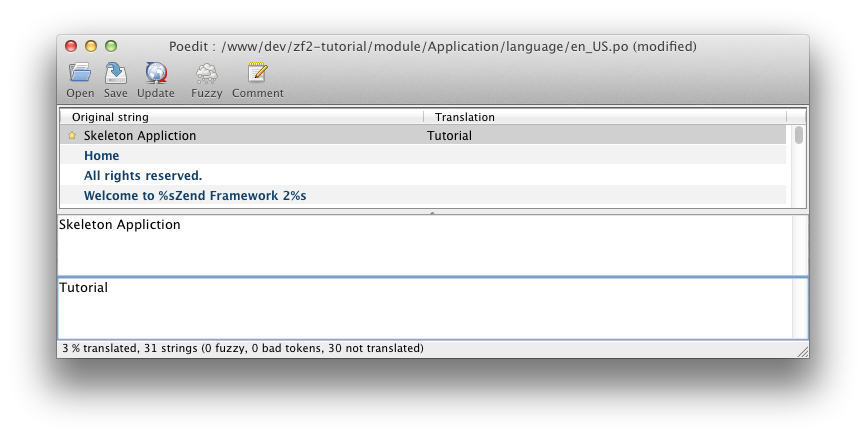
Once you have some translation sources, you will need to put them somewhere your application can access them. Options include:
- In a subdirectory of the module that defines and/or consumes the translation strings. As an example,
module/Application/language/. - In your application data directory; e.g.,
data/language/.
Make sure you follow the guidelines from the zend-i18n documentation with regards to naming your files. Additionally, you may want to further segregate any such directory by text domain.
From here, you need to configure the translator to use your files. This requires adding configuration in either your module or application configuration files that provides:
- The default locale if none is provided.
- Translation file patterns, which include:
- the translation source type (e.g.,
gettext,phparray,ini) - the base directory in which they are stored
- a file pattern for identifying the files to use
As examples:
// in a module's module.config.php:

'translator' => [

    'locale' => 'en_US',

    'translation_file_patterns' => [

        [

            'type'     => 'gettext',

            'base_dir' => __DIR__ . '/../language',

            'pattern'  => '%s.mo',

        ],

    ],

],

// or in config/autoload/global.php:

'translator' => [

    'locale' => 'en_US',

    'translation_file_patterns' => [

        [

            'type'     => 'gettext',

            'base_dir' => getcwd() .  '/data/language',

            'pattern'  => '%s.mo',

        ],

    ],

],
Once the above configuration is in place, the translator will be active in your application, allowing you to use it.
Translating strings in templates
Once you have defined some strings to translate, and configured the application to use them, you can translate them in your application. Thetranslate() and translatePlural() view helpers allow you to provide translations within your view scripts.
As an example, you might want to translate the string "All rights reserved" in your footer. You could do the following in your layout script:
<p>© 2016 by Examples Ltd. <?= $this->translate('All rights reserved') ?></p>Translating route segments
In order to enable route translation, you need to do two things:
- Tell the router to use the translation-aware route class.
- Optionally, tell it which text domain to use (if not using the default text domain).
To tell the application to use the translation-aware route class, we can update our routing configuration. Underneath the top-level router key, we'll add therouter_class key:
// In a module.config.php file, or config/autoload/global.php:

'router' => [

    'router_class' => Zend\Mvc\I18n\Router\TranslatorAwareTreeRouteStack::class,

    'routes' => [

        /* ... */

    ],

],
If you want to use an alternate text domain, you can do so via thetranslator_text_domain key, also directly below the router key:
// In a module.config.php file, or config/autoload/global.php:

'router' => [

    'router_class' => Zend\Mvc\I18n\Router\TranslatorAwareTreeRouteStack::class,

    'translator_text_domain' => 'router',

    'routes' => [

        /* ... */

    ],

],
Now that the router is aware of translations, we can use translatable strings in our routes. To do so, surround the string capable of translation with braces ({}). As an example:
'route' => '/{login}',specifies the word "login" as translatable.
Internationalization的更多相关文章
- 国际化(Internationalization)
1:什么是国际化? 国际化(internationalization)是设计和制造容易适应不同区域要求的产品的一种方式.它要求从产品中抽离所有的与语言,国家/地区和文化相关的元素.换言之,应用程序的功 ...
- Struts2 internationalization(国际化)
1:什么是国际化? 国际化(internationalization)是设计和制造容易适应不同区域要求的产品的一种方式.它要求从产品中抽离所有的与语言,国家/地区和文化相关的元素.换言之,应用程序的功 ...
- Struts2(十三)国际化-internationalization
一.国际化是什么--I18N 即internationalization 首字母i-结束字母n之间有18个字母 特征:在程序不做修改的情况下,可以根据不同的语言环境显示相应内容 二.Java内置国际化 ...
- Struts2学习笔记 国际化(Internationalization)
概述 国际化(Internationalization),通途的讲,就是让软件实现对多种语言的支持.可以通过简单的设置就可以从一种语言切换到另一种语言.用的最多的地方就是在应用程序的界面表示上.我们经 ...
- 使用 PySide2 开发 Maya 插件系列三:qt语言国际化(internationalization)
使用 PySide2 开发 Maya 插件系列三:qt语言国际化(internationalization) 前言: 这是 qt for python 的语言国际化,基于 UI 的,python 也有 ...
- Internationalization(i18n) support in SAP CRM,UI5 and Hybris
i18n(其来源是英文单词 internationalization的首末字符i和n,18为中间的字符数)是"国际化"的简称.对程序来说,在不修改内部代码的情况下,能根据不同语言及 ...
- current status of the installation and the internationalization of Samba 3.0
Only about 8 months from release of Samba 3.0.0, there is beginning to be the transition from 2.2.x. ...
- i18n 和 L10n (internationalization and localization) 国际化与本地化(具有全球战略眼光的公司企业的必由之路)
i18n 和 L10n (internationalization and localization) 国际化与本地化(具有全球战略眼光的公司企业的必由之路) 1 1 https://zh.wiki ...
- Internationalization API & ECMA-402
Internationalization API & ECMA-402 i18n https://caniuse.com/?search=Internationalization API In ...
随机推荐
- 【转】报错:Program "sh" not found in PATH
原文网址:http://www.cnblogs.com/SadNight/p/3406201.html (1) 报错:Program "sh" not found in PATH ...
- 网页推送库 SignalR
SignalR 可以用这个库开发网页聊天室应用 ASP.NET SignalR 是为 ASP.NET 开发人员提供的一个库,可以简化开发人员将实时 Web 功能添加到应用程序的过程.实时 Web 功能 ...
- 常规页生命周期(class0620)
常规页声明周期阶段 阶段 说明 页请求 开始 页初始化 加载 验证 回发事件处理 卸载 生命周期事件 页事件 典型使用
- OpenStack Swift client开发
如果你搭建好了Swift环境 ,你应该可以通过Swift 命令 来尝试去测试上传下载等功能,这是因为在安装Swift的时候,通常会安装一个python-swiftclient客户端,这个一个pytho ...
- python 调试
python 调试基本和gdb调试一样,举例: debug .py #!/usr/bin/python print "hello" i=0 for j in range(10) ...
- 【转载】setjmp和longjmp函数使用详解
[说明]本文上半部分转载自 wykwdy007 的转载文章 http://blog.csdn.net/wykwdy007/article/details/6535322 --------------- ...
- Android的Spinner
使用Spinner遇到不少坑啊 3.自定义spinner样式 <style name="AppTheme" parent="Theme.AppCompat.Ligh ...
- Android实例-处理隐藏输入法后不再显示问题(XE8+小米2)
结果: 1.可以处理再次显示问题,但缺点是每个控件都要处理一次,累.哪位大神有好的处理方法,请M我. 实例代码: unit Unit1; interface uses System.SysUtils, ...
- 获取本机IP地址和MAC地址
unit NetFunc; interface uses SysUtils, Windows, dialogs, winsock, Classes, ComObj, WinInet, Variants ...
- Property cannot be found on forward class object?
I have a UIView and I'm trying to set its layer properties. self.colorSwatch = [[UIView alloc] initW ...