
resin服务之三---独立resin的配置
独立resin的配置
|
关掉httpd服务: [root@data-1-1 ~]# killall httpd [root@data-1-1 ~]# lsof -i :80 ------>httpd服务的80端口已经停掉!
配置resin主配置文件修改如下内容: 90 <http address="*" port="80"/> 104 <http address="*" port="80"/>
启动服务: [root@data-1-1 ~]# killall java [root@data-1-1 ~]# /application/resin/bin/httpd.sh -server peng start Resin/3.1.13 started -server 'peng' for watchdog at 127.0.0.1:6921 [root@data-1-1 ~]# /application/resin/bin/httpd.sh -server peng01 start Resin/3.1.13 started -server 'peng01' for watchdog at 127.0.0.1:6922
查看的80端口是resin开通的: [root@data-1-1 ~]# lsof -i :80 COMMAND PID USER FD TYPE DEVICE SIZE/OFF NODE NAME java 27876 root 73u IPv6 2885724 0t0 TCP *:http (LISTEN) |
测试(此时是resin独立做web服务)
|
[root@data-1-1 ~]# curl http://www.peng.cc/test.jsp 99+1=100 [root@data-1-1 ~]# curl http://blog.peng.cc/test.jsp 99+1=100 [root@data-1-1 ~]# curl http://blog.peng.org/test.jsp 1+1=2 [root@data-1-1 ~]# curl http://www.peng.org/test.jsp 1+1=2 |
为resin配置别名功能
实现Apache前端多个域名对应后端一个或多个resin的域名。
|
265 <!--Create first virtual hosts at 20160112.--> 266 <host id="www.peng.org" root-directory="/application/resin/webapps"> 267 <host-alias>blog.peng.org</host-alias> <host-alias>bbs.peng.org</host-alias> |
为resin配置错误页面优雅显示
|
282 <error-page error-code='404' location='/tips/404.html'/> |
提示:以上配置在每个对应的resin host里都要配置。
演示过程如下:
|
[root@data-1-1 ~]# cd /application/resin/webapps/peng/ [root@data-1-1 peng]# mkdir tips [root@data-1-1 peng]# echo 'this is 404 error page!' >>tips/404.html [root@data-1-1 peng]# cat tips/404.html this is 404 error page! 提示:错误页面配置内容的根目录是resin站点的根目录,例如:/application/resin/webapps/peng
访问一个不存在的页面,客户端访问发现已经进行了404错误页面跳转了: [root@data-1-1 peng]# curl http://www.peng.org/b.jsp this is 404 error page! 提示:Windows客户端谷歌支持,IE和搜狗测试支持的不是很好。 |
为resin配置状态信息显示页面
|
278 <servlet-mapping servlet-class='com.caucho.servlets.ResinStatusServlet'> 279 <url-pattern>/resin-status-peng.org</url-pattern> 280 <init enable="read"/> 281 </servlet-mapping> |
浏览器输入如下地址,查看显示结果:
http://www.peng.org/resin-status-peng.org
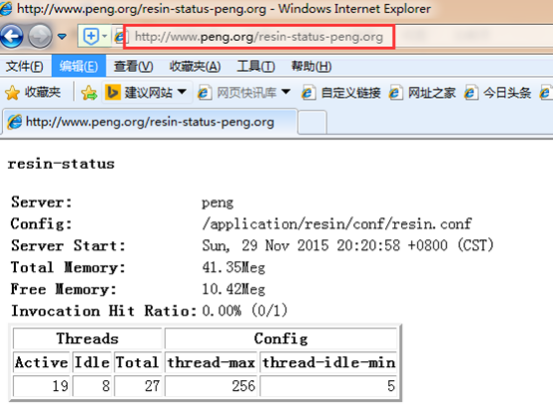
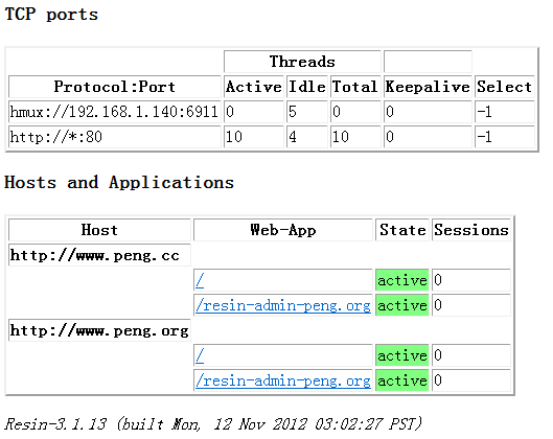
独立resin web服务与整合企业里如何选用?
Apache+resin
1)resin下的8080和8081端口要不要开启?
解答:看业务需求!
Apache+resin ==》提供服务
Resin+http80(内置web服务器)==》提供服务
2)如果开启了,实现了哪些功能?
解答:resin独立提供web服务。
3)关闭了,又有什么好处呢?
解答:Apache和resin一起工作,轻松,动静分离。
为resin配置管理页面
|
285 <web-app id="/resin-admin-peng.org" root-directory="${resin.home}/php/admin"> 286 <character-encoding>utf8</character-encoding> 287 <prologue> 288 <resin:set var="resin_admin_external" value="true"/> 289 <resin:set var="resin_admin_insecure" value="true"/> 290 </prologue> 291 <security-constraint> 292 <web-resource-collection> 293 <url-pattern>/*</url-pattern> 294 </web-resource-collection> 295 </security-constraint> 296 </web-app> |
操作演示如下:
浏览器上输入地址:http://www.peng.org/resin-admin-peng.org/
出现如下界面:

在标红的地方输入用户名:peng 密码:redhat
出现如下内容:
The digest for user peng in realm resin is Ji1p9d0+6tX5O0iEGgnPMQ==
The following can now be set in the resin.conf file to enable administration functionality.
<resin xmlns="http://caucho.com">
<management path="admin">
<user name="peng" password="Ji1p9d0+6tX5O0iEGgnPMQ=="/>
...
</management>
...
</resin>
By default, access to the administration application is limited to the localhost. The default behaviour can be changed in the resin.conf file. To enable access to clients other than localhost:
<resin:set var="resin_admin_external" value="true"/>
Once the file has been updated, you can continue to the administration area.
When prompted, use the username and password you provided.
修改resin.conf配置文件(增加标黄的内容):
|
21 <management path="${resin.root}/admin"> 22 <user name="peng" password="Ji1p9d0+6tX5O0iEGgnPMQ==" disable="false"/> 23 24 <resin:if test="${resin.professional}"> 25 <deploy-service/> 26 <jmx-service/> 27 <log-service/> 28 <xa-log-service/> 29 </resin:if> 30 </management> |
重启服务:
|
[root@data-1-1 ~]# killall java [root@data-1-1 ~]# /application/resin/bin/httpd.sh -server peng start Resin/3.1.13 started -server 'peng' for watchdog at 127.0.0.1:6921 [root@data-1-1 ~]# /application/resin/bin/httpd.sh -server peng01 start Resin/3.1.13 started -server 'peng01' for watchdog at 127.0.0.1:6922 |
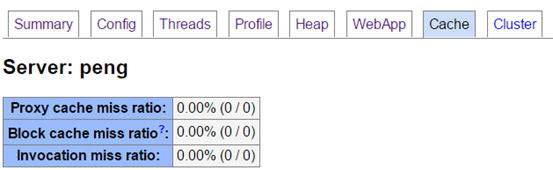
在浏览器界面填入相关信息点击提交:

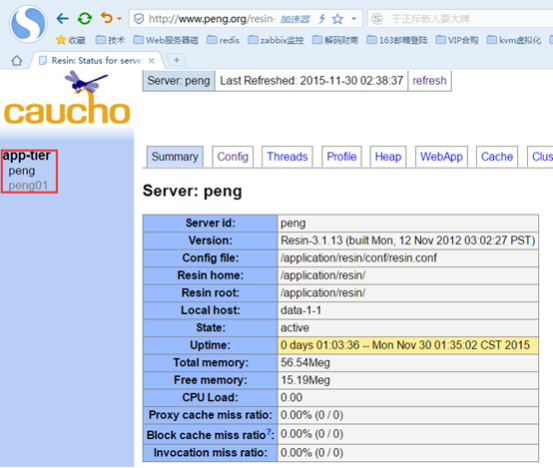


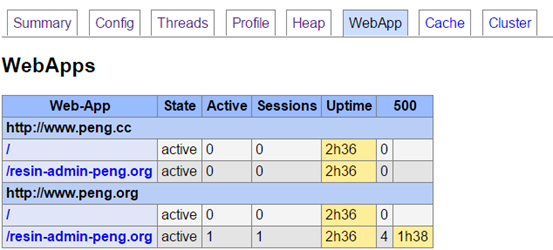
resin服务之三---独立resin的配置的更多相关文章
- Apached+resin服务搭建
一.前言 Resin是CAUCHO公司的产品,是一个非常流行的支持servlets 和jsp的引擎,速度非常快.对servlet和JSP提供了良好的支持,性能也比较优良,resin自身采用JAVA语言 ...
- resin服务之一---安装及部署
参考网站: http://caucho.com/ http://www.oschina.net/p/resin http://caucho.com/resin-4.0/admin/starting-r ...
- resin服务之二----整合resin+Apache服务
整合resin+Apache服务 1.为什么要整合Apache和resin? a. 早期的resin,tomcat对httpd服务支持不好. b. tomcat,resin对rewrite,expi ...
- resin服务一直不停重启
resin服务不断重启. 原因为resin配置文件使用域名.需要到服务上绑定一下域名.
- Reporting Service服务SharePoint集成模式安装配置(3、4、安装sharepoint 2010必备组件及产品)
Reporting Service服务SharePoint集成模式安装配置 第三步和第四部 第三步 安装sharepoint 2010必备组件 1.安装SharePoint2010必备组件,执行Pre ...
- SVN1.6服务端和客户端安装配置指导
本节向大家描述SVN1.6服务端和客户端安装配置步骤,随着SVN的快速发展,版本也进行了升级更新,本节就和大家一起学习一下SVN1.6服务端和客户端安装配置步骤,欢迎大家一起来学习.下面是具体介绍.1 ...
- Windows下基于IIS服务的SSL服务器的配置
Windows下基于IIS服务的SSL服务器的配置 实验环境 Windows Server 2008 R1(CA) Windows Server 2008 R2(web服务器) Windows 7 x ...
- paip. java resin 远程 调试 java resin remote debug
paip. java resin 远程 调试 java resin remote debug 作者Attilax 艾龙, EMAIL:1466519819@qq.com 来源:attilax的专栏 ...
- CAS单点登录(SSO)服务端的部署和配置---连接MySQL进行身份认证
一.修改系统host,加入 127.0.0.1 server.test.com127.0.0.1 client1.test.com127.0.0.1 client2.test.com 二.安装grad ...
随机推荐
- iOS自动化测试驱动工具探索
本文主要介绍了字节 iOS 自动化测试驱动工具的探索过程及实现原理 作者:字节跳动终端技术--陈友辉 一.背景 随着业务的扩张,单个 App 的功能越来越多,工程复杂度越来越高,每天MR可达上百次,代 ...
- 【C# 线程】数据槽 LocalDataStoreSlot简称DataSlot
背景 为了确保在线程中声明特定类型的变量,在每个线程中的值都是唯一的,不受到其他线程对该变量读写的影响.也就是俗称的线程本地存储 (TLS),可用于存储对线程和应用程序域唯一的数据. 例如:主线程中声 ...
- Oracle导出/导入数据方法--两种方法(pde格式/dmp格式)
转至:https://www.cnblogs.com/houbxblogs/articles/13365557.html?ivk_sa=1024320u 1.导出数据方法一(pde格式) 工具→ 导出 ...
- Java基础--Eclipse关联Java源码
打开Eclipse,Window->Preferences->Java 点Edit按钮后弹出: 点Source Attachment后弹出: 选择Java安装路径下的src.zip文件即可 ...
- cmd:WIN7操作系统下cmd窗口下的复制粘贴
1.右击cmd的顶部栏,点开属性 2.在 选项 下,勾选"快速编辑模式" 3.按住鼠标左键标注需要复制的区域 再点击一下右键,则上文的标记区域就已经被复制了,可以通过ctrl+v进 ...
- 解决 Page 'http://localhost:63342/v3/js/math/math.map' requested without authorization页面未授权问题
用webstorm调试页面时,老是弹出对话框说页面未授权,如下图: 解决方法尝试了两种都有效,感觉第一种是正解通用,第二种大家也可以了解一下作为参考 第一种: File--Settings如下图 第二 ...
- 积分图(三) - Boxfilter 的实现过程分析
Boxfilter 快速计算 它可以使复杂度为O(MN)的求和,求方差等运算降低到O(1)或近似于O(1)的复杂度,它的缺点是不支持多尺度. Boxfilter 的原理有点类似 Integral Im ...
- 使用windows自带linux子系统开发esp32
步骤: 1.打开windows商店,搜索ubuntu,安装18.04版本. 2.控制面板 /程序和功能 /打开或关闭windows功能 3.关机重启 4.打开刚安装得ubuntu,设置用户名和密码. ...
- Swagger整合Jwt授权配置
Swagger整合Jwt授权配置 欢迎关注博主公众号「Java大师」, 专注于分享Java领域干货文章http://www.javaman.cn/sb2/swagger-jwt 一.Swagger入门 ...
- AQS 源码解读之加锁篇
以 ReentrantLock 创建的非公平锁为基础,进行 AQS 全流程的分析. 分析 demo 一共有 A.B.C 三个线程. public class AQSDemo { // 带入一个银行办理 ...