
UIScrollerView当前显示3张图
WSLScrollView 功能描述:这是在继承UIView的基础上利用UIScrollerView进行了封装,支持循环轮播、自动轮播、自定义时间间隔、图片间隔、当前页码和图片大小,采用Block返回当前页码和处理当前点击事件的一个View。
一、效果图

二、实现过程
- 逻辑结构示意图


①、首先像往常一样写一个基本的UIScrollerView,会得到下图:
    _scrollerView = [[UIScrollView alloc] init];

    _scrollerView.frame = CGRectMake((SELF_WIDTH - _currentPageSize.width) / 2, 0,    _currentPageSize.width, _currentPageSize.height);

    _scrollerView.delegate = self;

    _scrollerView.pagingEnabled = YES;

    _scrollerView.showsHorizontalScrollIndicator = NO;

    [self addSubview:_scrollerView];

- 然后设置我们通常会忽略UIScrollerView的一个属性clipsToBounds为NO,默认是Yes,你会看到_scrollerView其它部分相邻的图片,但是你会发现那部分相邻的图片不会响应在它上面的任何触摸事件,因为那部分子视图超出了它的父视图,可以用响应链机制解决这个问题:
_scrollerView.clipsToBounds = NO;

//处理超过父视图部分不能点击的问题,重写UIView里的这个方法

- (UIView *)hitTest:(CGPoint)point withEvent:(UIEvent *)event {

    if ([self pointInside:point withEvent:event]) {

        CGPoint newPoint = [_scrollerView convertPoint:point fromView:self];

        for (UIImageView * imageView in _scrollerView.subviews) {

            if (CGRectContainsPoint(imageView.frame, newPoint)) {

                CGPoint newSubViewPoint = [imageView convertPoint:point fromView:self];

                return [imageView hitTest:newSubViewPoint withEvent:event];

            }

        }

    }

    return nil;

}

②、接下来实现循环的功能:我相信好多人也都会想到 《 4 + 0 - 1 - 2 - 3 - 4 + 0 》这个方案,也就是先在数组的最后插入原数组的第一个元素,再在第一个位置插入原数组的最后一个元素;得到如下图效果:(注意看:第一个向最后一个,最后向第一个循环过渡的时候有个Bug哦)
    self.imageArray = [NSMutableArray arrayWithArray:_images];

    [self.imageArray addObject:_images[0]];

    [self.imageArray insertObject:_images.lastObject atIndex:0];

    //初始化时的x偏移量要向前多一个单位的_currentPageSize.width

    _scrollerView.contentOffset = CGPointMake(_currentPageSize.width * (self.currentPageIndex + 1), 0);

- 解决上述Bug的方案就是利用UIScrollView的两个代理方法;在前后循环过渡处,刚开始拖拽时就在Bug的位置画上对应的视图;即《 3 + 4 + 0 - 1 - 2 - 3 - 4 + 0 + 1》,结束拖拽之后,再改变UIScrollView的contentOffset,不带动画;
//开始拖拽时执行

- (void)scrollViewWillBeginDragging:(UIScrollView *)scrollView{

   //开始拖拽时停止计时器

    [self.timer invalidate];

    self.timer = nil;

    // 3 + 4 + 0 - 1 - 2 - 3 - 4 + 0 + 1

    NSInteger index = scrollView.contentOffset.x/_currentPageSize.width;

    //是为了解决循环滚动的连贯性问题

    if (index == 1) {

        [self.scrollerView addSubview:self.lastView];

    }

    if (index == self.imageArray.count - 2) {

        [self.scrollerView addSubview:self.firstView];

    }

}

//结束拖拽时执行

- (void)scrollViewDidEndDecelerating:(UIScrollView *)scrollView{

    NSInteger index = scrollView.contentOffset.x/_currentPageSize.width;

   //停止拖拽时打开计时器

    if (_isTimer) {

        [self statrScroll:_second];

    }

  //是为了解决循环滚动的连贯性问题

    if (index == 0) {

        scrollView.contentOffset = CGPointMake(_currentPageSize.width * (self.imageArray.count - 2) , 0);

    }

    if (index == self.imageArray.count - 1) {

        scrollView.contentOffset = CGPointMake(_currentPageSize.width  , 0);

    }

}
③实现定时器自动循环轮播功能,需要解决的问题就是首尾过渡的时候,
如下图所示:解决的思路和上述类似,主要代码已标明→WSLScrollView

- (void)statrScroll:(CGFloat)second{

    if (_timer == nil && _isTimer) {

        _timer = [NSTimer scheduledTimerWithTimeInterval:second target:self selector:@selector(autoNextPage) userInfo:nil repeats:YES];

    }

}

- (void)autoNextPage{

    [_scrollerView setContentOffset:CGPointMake( _currentPageSize.width * (_currentPageIndex + 1 + 1), 0) animated:YES];

 if (_currentPageIndex + 2 == self.imageArray.count - 1) {

        //是为了解决自动滑动到最后一页再从头开始的连贯性问题

        [_scrollerView addSubview:self.firstView];

    }

}

- (void)scrollViewDidScroll:(UIScrollView *)scrollView{

    CGFloat index = scrollView.contentOffset.x/_currentPageSize.width;

    if (index == 0 ) {

        _currentPageIndex = self.imageArray.count - 1- 2;

    }else if(index < 1){

    }else if(index == self.imageArray.count - 1 || index == 1){

        _currentPageIndex = 0;

        //是为了解决自动滑动到最后一页再从头开始的连贯性问题

        [_scrollerView setContentOffset:CGPointMake( _currentPageSize.width , 0) animated:NO];

    }else if(index == ceil(index)){

        _currentPageIndex = index - 1 ;

    }

    if (self.scrollEndBlock != nil) {

        self.scrollEndBlock(_currentPageIndex);

    }

}
三、项目结构图
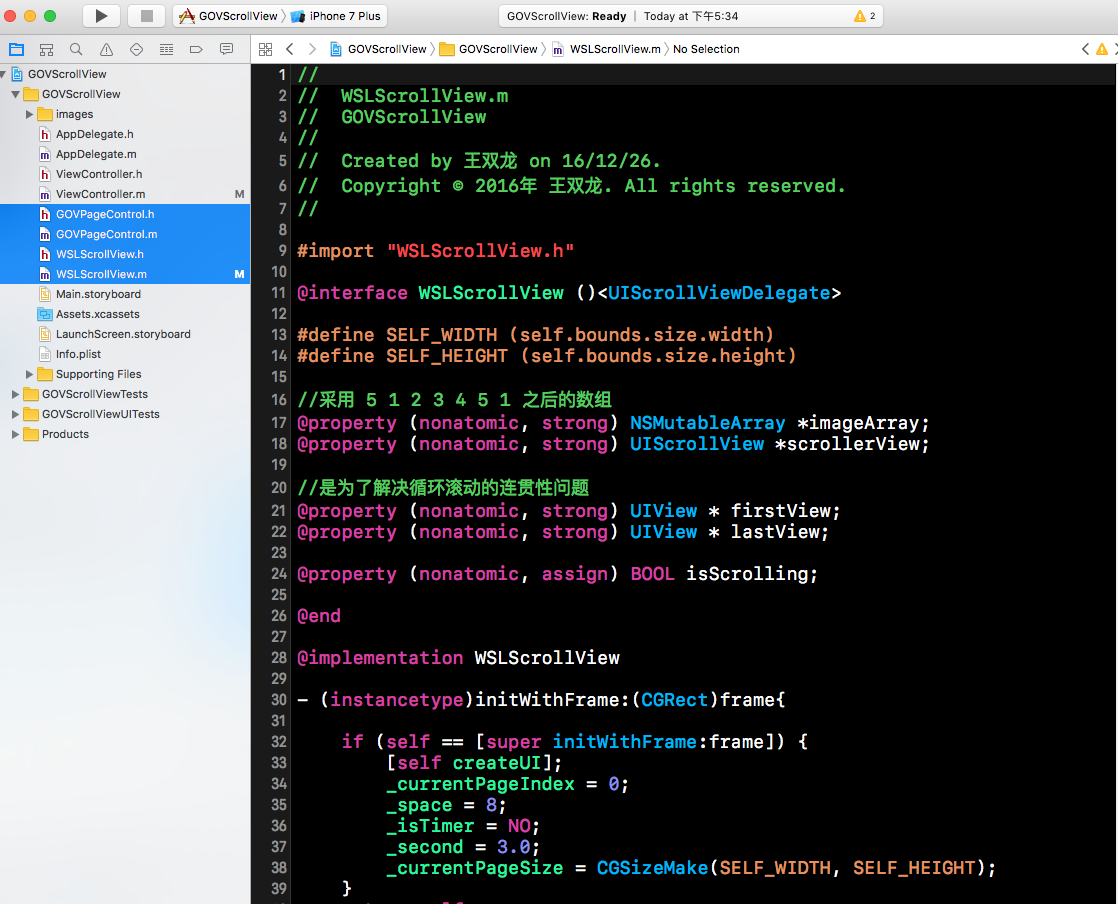
UIScrollerView当前显示3张图
注:本文著作权归作者,由demo大师代发,拒绝转载,转载需要作者授权
UIScrollerView当前显示3张图的更多相关文章
- Python中使用"subplot"在一张画布上显示多张图
subplot(arg1, arg2, arg3) arg1: 在垂直方向同时画几张图 arg2: 在水平方向同时画几张图 arg3: 当前命令修改的是第几张图 t = np.arange(0,5,0 ...
- prefuse学习(二)显示一张图
1. 把数据以点连线的方式在画面中显示 2. 数据按照数据的性别属性使用不同的颜色 3. 鼠标左键可以把图在画面中拖动 4. 鼠标右键可以把图放大或者缩小 5. 鼠标单击某个数据上,该数据点 ...
- R: 一页显示多张图的方法
################################################### 问题:一页多图显示 18.4.30 怎么实现,在一页上画多幅图,并且安排图的大小.个数等?? ...
- JavaScript实现轮播图(隔3秒显示一张图)
<!DOCTYPE html><html> <head> <script> var time; function init(){ //获取div里面的东 ...
- 一张图搞定OAuth2.0 在Office应用中打开WPF窗体并且让子窗体显示在Office应用上 彻底关闭Excle进程的几个方法 (七)Net Core项目使用Controller之二
一张图搞定OAuth2.0 目录 1.引言 2.OAuth2.0是什么 3.OAuth2.0怎么写 回到顶部 1.引言 本篇文章是介绍OAuth2.0中最经典最常用的一种授权模式:授权码模式 非常 ...
- PIL合并4张图demo 800px以下的居中显示小例子
from PIL import Image #新建一个空白文件 大小为1600*1600 颜色为白色 newIm= Image.new('RGB', (1600, 1600), 'white') #打 ...
- 一张图看懂ANSYS17.0 流体 新功能与改进
一张图看懂ANSYS17.0 流体 新功能与改进 提交 我的留言 加载中 已留言 一张图看懂ANSYS17.0 流体 新功能与改进 原创2016-02-03ANSYS模拟在线模拟在线 模拟在线 ...
- 一张图读懂https加密协议
搭建CA服务器和iis启用https:http://blog.csdn.net/dier4836/article/details/7719532 一张图读懂https加密协议 https是一种加密传输 ...
- Javscript轮播 支持平滑和渐隐两种效果(可以只有两张图)
原文:Javscript轮播 支持平滑和渐隐两种效果(可以只有两张图) 先上两种轮播效果:渐隐和移动 效果一:渐隐 1 2 3 4 效果二:移动 1 2 3 4 接下来,我们来大致说下整个轮播的思 ...
随机推荐
- 【bzoj1594】猜数游戏
1594: [Usaco2008 Jan]猜数游戏 Time Limit: 10 Sec Memory Limit: 162 MBSubmit: 556 Solved: 225 Descripti ...
- SpringBoot整合Mybatis多数据源 (AOP+注解)
SpringBoot整合Mybatis多数据源 (AOP+注解) 1.pom.xml文件(开发用的JDK 10) <?xml version="1.0" encoding=& ...
- Activity(活动)生命周期(1)--返回栈
Android是使用任务(task)来管理活动的,一个任务就是一组存放在栈里的活动的集合,这个栈也被称为返回栈(Back stack).栈是一种后进先出的数据结构,在默认情况下,每当我们启动了一个新的 ...
- 【伪随机数】【搜索】【RE】【bugku】mountainclimbing WriteUp
Mountain Climbing WP 拿到题首先熟练地查个壳再用各种脱壳工具脱个壳. 脱壳之后熟练地双击感受一下出题者的恶意: 根据字面意思得知,是要根据一系列的操作来得到收益最大值,于是用ida ...
- WPF Interaction框架简介(一)——Behavior
在WPF 4.0中,引入了一个比较实用的库——Interactions,这个库主要是通过附加属性来对UI控件注入一些新的功能,除了内置了一系列比较好用的功能外,还提供了比较良好的扩展接口.本文这里简单 ...
- fmri 实验设计 / 范式设计/ paradigm design
reference:http://www.psychology.gatech.edu/cabi/Resources/Course/index.html sluggish 懒散的,无精打采的.哈哈,pp ...
- Unity-EasyTouch插件之One Finger
这节课,我们主要讲下单个手指的测试.比如单击啊,双击啊,拖动,单手滑动等. 单击: public class TouchTest : MonoBehaviour { // Subscribe to e ...
- 使用免安装版本在windows上手动安装PostgreSQL
PostgreSQL支持管理员直接手动安装数据库,给用户提供了更大的方便. 1. 在PostgreSQL官方网站上下载免安装二进制的包,名字类似于postgresql-*.*.*.*-bina ...
- 二、ELKStack集群架构设计
一.ELKStack介绍与入门实践 二.Elasticsearch 集群架构图 服务器配置:Centos6.6 x86_64 CPU:1核心 MEM:2G (做实验,配置比较低一些) 注:这里配置el ...
- linux下安装oracle需要的配置
1.检查系统包安装情况 rpm -qa|grep binutils rpm -ivh sysstat-7.0.2.rpm rpm -ivh binutils-2.17.50.0.6-14.el5.*. ...