
《DSP using MATLAB》Problem 8.45


代码:
%% ------------------------------------------------------------------------

%%            Output Info about this m-file

fprintf('\n***********************************************************\n');

fprintf('        <DSP using MATLAB> Problem 8.45.4 \n\n');

banner();

%% ------------------------------------------------------------------------

%%

%%          Chebyshev-1 bandpass and lowpass, parallel form,

%%          by toolbox function in MATLAB,

%%

%% ------------------------------------------------------------------------

%--------------------------------------------------------

%           PART1 bandpass

% Digital Filter Specifications:   Chebyshev-1 bandpass

% -------------------------------------------------------

wsbp = [0.40*pi 0.90*pi];             % digital stopband freq in rad

wpbp = [0.60*pi 0.80*pi];             % digital passband freq in rad

delta1 = 0.05;

delta2 = 0.01;

Ripple = 0.5-delta1;                     % passband ripple in absolute

Attn = delta2;                           % stopband attenuation in absolute

  Rp = -20*log10(Ripple/0.5);             % passband ripple in dB

  As = -20*log10(Attn/0.5);               % stopband attenuation in dB

% Calculation of Chebyshev-1 filter parameters:

[N, wn] = cheb1ord(wpbp/pi, wsbp/pi, Rp, As);

fprintf('\n  ********* Chebyshev-1 Digital Bandpass Filter Order is = %3.0f \n', 2*N)

% Digital Chebyshev-1 Bandpass Filter Design:

[bbp, abp] = cheby1(N, Rp, wn);

[C, B, A] = dir2cas(0.5*bbp, abp)

% Calculation of Frequency Response:

[dbbp, magbp, phabp, grdbp, wwbp] = freqz_m(0.5*bbp, abp);

% -----------------------------------------------------

%    PART2  lowpass

% Digital Highpass Filter Specifications:

% -----------------------------------------------------

wslp = 0.40*pi;             % digital stopband freq in rad

wplp = 0.30*pi;             % digital passband freq in rad

delta1 = 0.10;

delta2 = 0.01;

Ripple = 1.0-delta1;                     % passband ripple in absolute

Attn = delta2;                           % stopband attenuation in absolute

  Rp = -20*log10(Ripple/1.0);             % passband ripple in dB

  As = -20*log10(Attn/1.0);               % stopband attenuation in dB

% Calculation of Chebyshev-1 filter parameters:

[N, wn] = cheb1ord(wplp/pi, wslp/pi, Rp, As);

fprintf('\n  ********* Chebyshev-1 Digital Lowpass Filter Order is = %3.0f \n', N)

% Digital Chebyshev-1 lowpass Filter Design:

[blp, alp] = cheby1(N, Rp, wn);

[C, B, A] = dir2cas(blp, alp)

% Calculation of Frequency Response:

[dblp, maglp, phalp, grdlp, wwlp] = freqz_m(blp, alp);

% ---------------------------------------------

%      PART3   parallel form of bp and lp

% ---------------------------------------------

abp;

bbp;

alp;

blp;

fprintf('\n  ********* Chebyshev-1 Digital Lowpass parrell with Bandpass Filter *******\n');

fprintf('\n  ********* Coefficients of Direct-Form: *******\n');

a = conv(2*abp, alp)

b = conv(bbp, alp) + conv(blp, 2*abp)

[C, B, A] = dir2cas(b, a)

% Calculation of Frequency Response:

[db, mag, pha, grd, ww] = freqz_m(b, a);

%% -----------------------------------------------------------------

%%                             Plot

%% -----------------------------------------------------------------

figure('NumberTitle', 'off', 'Name', 'Problem 8.45.4 combination of Chebyshev-1 bp and lp, by cheby1 function in MATLAB')

set(gcf,'Color','white');

M = 1;                          % Omega max

subplot(2,2,1); plot(ww/pi, mag); axis([0, M, 0, 1.2]); grid on;

xlabel('Digital frequency in \pi units'); ylabel('|H|'); title('Magnitude Response');

set(gca, 'XTickMode', 'manual', 'XTick', [0, wplp/pi, wsbp(1)/pi, wpbp/pi, wsbp(2)/pi, M]);

set(gca, 'YTickMode', 'manual', 'YTick', [0, 0.01, 0.45, 0.5, 0.9, 1]);

subplot(2,2,2); plot(ww/pi, db); axis([0, M, -100, 2]); grid on;

xlabel('Digital frequency in \pi units'); ylabel('Decibels'); title('Magnitude in dB');

set(gca, 'XTickMode', 'manual', 'XTick', [0, wplp/pi, wsbp(1)/pi, wpbp/pi, wsbp(2)/pi, M]);

set(gca, 'YTickMode', 'manual', 'YTick', [-76, -46, -41, -1, 0]);

set(gca,'YTickLabelMode','manual','YTickLabel',['76'; '46'; '41';'1 ';' 0']);

subplot(2,2,3); plot(ww/pi, pha/pi); axis([0, M, -1.1, 1.1]); grid on;

xlabel('Digital frequency in \pi nuits'); ylabel('radians in \pi units'); title('Phase Response');

set(gca, 'XTickMode', 'manual', 'XTick', [0, wplp/pi, wsbp(1)/pi, wpbp/pi, wsbp(2)/pi, M]);

set(gca, 'YTickMode', 'manual', 'YTick', [-1:0.5:1]);

subplot(2,2,4); plot(ww/pi, grd); axis([0, M, 0, 80]); grid on;

xlabel('Digital frequency in \pi units'); ylabel('Samples'); title('Group Delay');

set(gca, 'XTickMode', 'manual', 'XTick', [0, wplp/pi, wsbp(1)/pi, wpbp/pi, wsbp(2)/pi, M]);

set(gca, 'YTickMode', 'manual', 'YTick', [0:20:80]);

figure('NumberTitle', 'off', 'Name', 'Problem 8.45.4 combination of Chebyshev-1 bp and lp, by cheby1')

set(gcf,'Color','white');

M = 1;                          % Omega max

%subplot(2,2,1);

plot(ww/pi, mag); axis([0, M, 0, 1.2]); grid on;

xlabel('Digital frequency in \pi units'); ylabel('|H|'); title('Magnitude Response');

set(gca, 'XTickMode', 'manual', 'XTick', [0, wplp/pi, wsbp(1)/pi, wpbp/pi, wsbp(2)/pi, M]);

set(gca, 'YTickMode', 'manual', 'YTick', [0, 0.01, 0.45, 0.5, 0.9, 1]);

figure('NumberTitle', 'off', 'Name', 'Problem 8.45.4 Pole-Zero Plot')

set(gcf,'Color','white');

zplane(b, a);

title(sprintf('Pole-Zero Plot'));

%pzplotz(b,a);
运行结果:
看题目设计要求,是Chebyshev-1型低通和带通的组合。
我们先设计带通,系统函数串联形式的系数如下:

其次,Chebyshev-1型数字低通,阶数为7,系统函数串联形式的系数如下:

再次,低通和带通进行组合,等效滤波器的系统函数,直接形式和串联形式,系数分别如下:


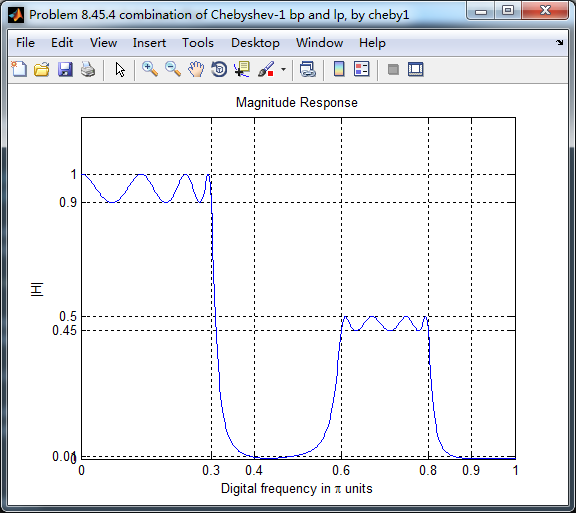
等效滤波器,幅度谱如下,频带边界频率和指标画出直线,
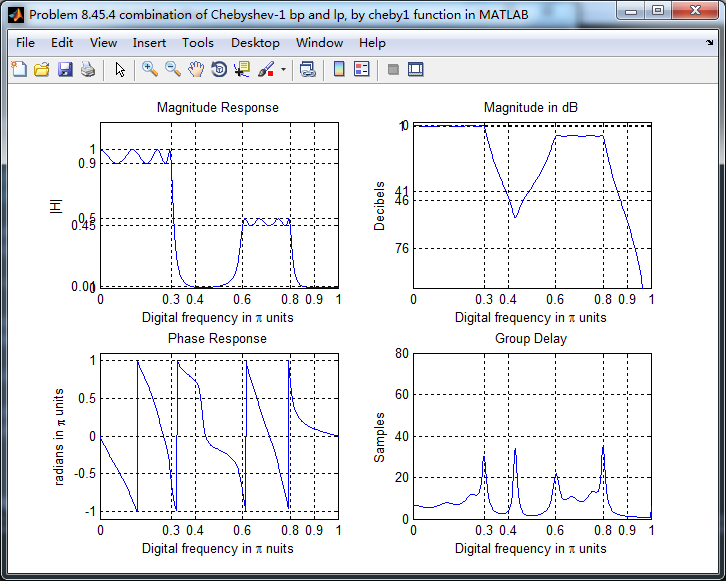
幅度谱、相位谱和群延迟响应
零极点图

《DSP using MATLAB》Problem 8.45的更多相关文章
- 《DSP using MATLAB》Problem 7.27
代码: %% ++++++++++++++++++++++++++++++++++++++++++++++++++++++++++++++++++++++++++++++++ %% Output In ...
- 《DSP using MATLAB》Problem 7.26
注意:高通的线性相位FIR滤波器,不能是第2类,所以其长度必须为奇数.这里取M=31,过渡带里采样值抄书上的. 代码: %% +++++++++++++++++++++++++++++++++++++ ...
- 《DSP using MATLAB》Problem 7.25
代码: %% ++++++++++++++++++++++++++++++++++++++++++++++++++++++++++++++++++++++++++++++++ %% Output In ...
- 《DSP using MATLAB》Problem 7.24
又到清明时节,…… 注意:带阻滤波器不能用第2类线性相位滤波器实现,我们采用第1类,长度为基数,选M=61 代码: %% +++++++++++++++++++++++++++++++++++++++ ...
- 《DSP using MATLAB》Problem 7.23
%% ++++++++++++++++++++++++++++++++++++++++++++++++++++++++++++++++++++++++++++++++ %% Output Info a ...
- 《DSP using MATLAB》Problem 7.15
用Kaiser窗方法设计一个台阶状滤波器. 代码: %% +++++++++++++++++++++++++++++++++++++++++++++++++++++++++++++++++++++++ ...
- 《DSP using MATLAB》Problem 7.14
代码: %% ++++++++++++++++++++++++++++++++++++++++++++++++++++++++++++++++++++++++++++++++ %% Output In ...
- 《DSP using MATLAB》Problem 7.13
代码: %% ++++++++++++++++++++++++++++++++++++++++++++++++++++++++++++++++++++++++++++++++ %% Output In ...
- 《DSP using MATLAB》Problem 7.12
阻带衰减50dB,我们选Hamming窗 代码: %% ++++++++++++++++++++++++++++++++++++++++++++++++++++++++++++++++++++++++ ...
随机推荐
- siege之-服务端性能测试
官方网站http://www.joedog.org/ 有3种操作模式: 1) Regression (when invoked by bombardment)Siege从配置文件中读取URLs,按递归 ...
- Java习题练习
Java习题练习 1. 依赖注入和控制反转是同一概念: 依赖注入和控制反转是对同一件事情的不同描述,从某个方面讲,就是它们描述的角度不同.依赖注入是从应用程序的角度在描述,可以把依赖注入描述完整点:应 ...
- JAVA学习之环境搭建
了解到JAVA语言的跨平台性的原理是通过在不同的操作系统中安装对应版本的的JAVA虚拟机(JVM)实现 开发JAVA前必须先搭建JAVA环境: 1.JAVA开发工具包JDK(JAVA DEVELOPM ...
- IdentityServer4认证服务器集成Identity&配置持久化数据库
文章简介 asp.net core的空Web项目集成相关dll和页面文件配置IdnetityServer4认证服务器 Ids4集成Identity Ids4配置持久化到数据库 写在最前面,此文章不详细 ...
- vbs 之 wscript
https://www.jb51.net/article/20919.htm '''''''''''''''''''''''''''''''''''''''''''''''''''''''''' ' ...
- 常用的一些js事件及案例
比如金额需要显示的时候转换成有千分位,小数点后保留2位等.去编辑的时候,又要格式化,把逗号都去掉.网上找了段代码,但是再次编辑会有问题,修改了一下,代码如下: function outputMoney ...
- jsk
题目描述 码队的女朋友非常喜欢玩某款手游,她想让码队带他上分.但是码队可能不会带青铜段位的女朋友上分,因为码队的段位太高(已经到达王者),恐怕不能和他的女朋友匹配游戏. 码队的女朋友有些失落,她希望能 ...
- ArcGis EsriAddin加载项的安装路径与程序启动路径
安装路径: 在C:\Users\用户名\Documents\ArcGIS\AddIns\Desktop版本号\{…………一组GUID…………}这样的路径下. 例:C:\Users\Adminis ...
- box-shadow单侧投影,双侧投影,不规则图案投影
底部投影box-shadow: 0 5px 4px -4px black; 底部右侧投影 3px 3px 6px -3px black 两侧投影 box-shadow: 7px 0 7px -7px ...
- MySQL高可用配置(主从复制)
主从复制包含两个步骤: 在 master 主服务器(组)上的设置,以及在 slave 从属服务器(组)上的设置. 环境: MASTER: 192.168.155.101SLAVE: 192.168.1 ...