
Python Scrapy环境配置教程+使用Scrapy爬取李毅吧内容
Python爬虫框架Scrapy
Scrapy框架
1、Scrapy框架安装

直接通过这里安装scrapy会提示报错:
error: Microsoft Visual C++ 14.0 is required <Unable to find vcvarsall.bat>

building 'twisted test.raiser' extension error:Unable to find cyarsall.bat

Failed building wheel for lxml
解决方法:
在http://www.lfd.uci.edu/~gohlke/pythonlibs/有很多用于windows的编译好的Python第三方库,我们下载好对应自己Python版本的库即可。
- 在cmd中输入指令python,查看python的版本,如下:
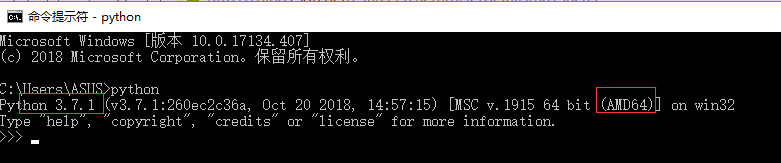
从上图可以看出可以看出我的Python版本为Python3.7.1-64bit。
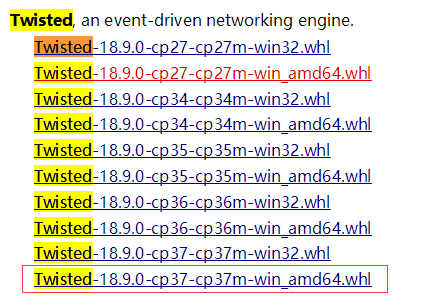
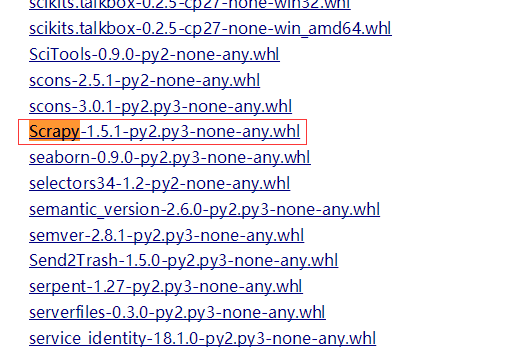
- 登陆http://www.lfd.uci.edu/~gohlke/pythonlibs/,Ctrl+F搜索Lxml、Twisted、Scrapy,下载对应的版本,例如:lxml-3.7.3-cp35-cp35m-win_adm64.whl,表示lxml的版本为3.7.3,对应的python版本为3.5-64bit。我下载的版本如下图所示:

- 在cmd中输入DOS指令,进入下载好的whl文件夹下,例如我的三个whl文件放在了Scrapy文件夹下:
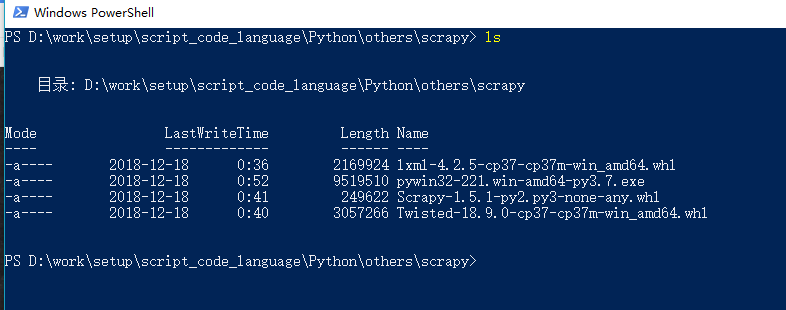
依次执行如下命令:
需要先安装pip:
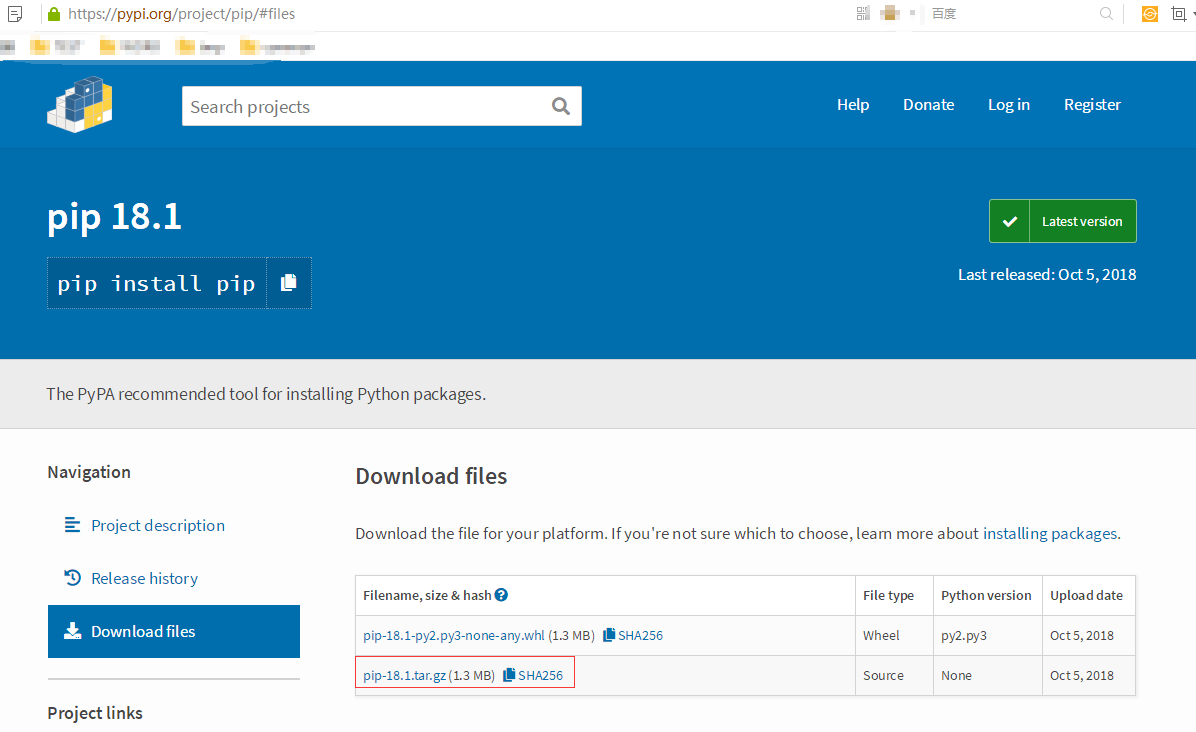
下载完成之后,随便解压到一个文件夹,最好解压到python文件夹,用CMD控制台进入解压目录,即 cd *****(地址),输入:
PS D:\work\setup\script_code_language\Python\others\pip-18.1> python setup.py install

creating 'dist\pip-18.1-py3.7.egg' and adding 'build\bdist.win-amd64\egg' to it

removing 'build\bdist.win-amd64\egg' (and everything under it)

Processing pip-18.1-py3.7.egg

creating d:\work\setup\script_code_language\python\python37\lib\site-packages\pip-18.1-py3.7.egg

Extracting pip-18.1-py3.7.egg to d:\work\setup\script_code_language\python\python37\lib\site-packages

Adding pip 18.1 to easy-install.pth file

Installing pip-script.py script to D:\work\setup\script_code_language\Python\Python37\Scripts

Installing pip.exe script to D:\work\setup\script_code_language\Python\Python37\Scripts

Installing pip3-script.py script to D:\work\setup\script_code_language\Python\Python37\Scripts

Installing pip3.exe script to D:\work\setup\script_code_language\Python\Python37\Scripts

Installing pip3.7-script.py script to D:\work\setup\script_code_language\Python\Python37\Scripts

Installing pip3.7.exe script to D:\work\setup\script_code_language\Python\Python37\Scripts

Installed d:\work\setup\script_code_language\python\python37\lib\site-packages\pip-18.1-py3.7.egg

Processing dependencies for pip==18.1

Finished processing dependencies for pip==18.1

PS D:\work\setup\script_code_language\Python\others\pip-18.1>
安装好之后,我们直接在命令行输入pip,同样会显示‘pip’不是内部命令,也不是可运行的程序。因为我们还没有添加环境变量。
PS D:\work\setup\script_code_language\Python\others\pip-18.1> pip

Usage:

  pip <command> [options]

Commands:

  install                     Install packages.

  download                    Download packages.

  uninstall                   Uninstall packages.

  freeze                      Output installed packages in requirements format.

  list                        List installed packages.

  show                        Show information about installed packages.

  check                       Verify installed packages have compatible dependencies.

  config                      Manage local and global configuration.

  search                      Search PyPI for packages.

  wheel                       Build wheels from your requirements.

  hash                        Compute hashes of package archives.

  completion                  A helper command used for command completion.

  help                        Show help for commands.

General Options:

  -h, --help                  Show help.

  --isolated                  Run pip in an isolated mode, ignoring environment variables and user configuration.

  -v, --verbose               Give more output. Option is additive, and can be used up to 3 times.

  -V, --version               Show version and exit.

  -q, --quiet                 Give less output. Option is additive, and can be used up to 3 times (corresponding to WARNING, ERROR, and CRITICAL logging levels).

  --log <path>                Path to a verbose appending log.

  --proxy <proxy>             Specify a proxy in the form [user:passwd@]proxy.server:port.

  --retries <retries>         Maximum number of retries each connection should attempt (default 5 times).

  --timeout <sec>             Set the socket timeout (default 15 seconds).

  --exists-action <action>    Default action when a path already exists: (s)witch, (i)gnore, (w)ipe, (b)ackup, (a)bort).

  --trusted-host <hostname>   Mark this host as trusted, even though it does not have valid or any HTTPS.

  --cert <path>               Path to alternate CA bundle.

  --client-cert <path>        Path to SSL client certificate, a single file containing the private key and the certificate in PEM format.

  --cache-dir <dir>           Store the cache data in <dir>.

  --no-cache-dir              Disable the cache.

  --disable-pip-version-check

                              Don't periodically check PyPI to determine whether a new version of pip is available for download. Implied with --no-index.

  --no-color                  Suppress colored output

PS D:\work\setup\script_code_language\Python\others\pip-18.1>
pip install Wheel #1) 先安装whell

   PS D:\work\setup\script_code_language\Python\others\scrapy> pip install .\lxml-4.2.5-cp37-cp37m-win_amd64.whl   # 2) 安装lxml

   Processing d:\work\setup\script_code_language\python\others\scrapy\lxml-4.2.5-cp37-cp37m-win_amd64.whl

   Installing collected packages: lxml

   Successfully installed lxml-4.2.5

   PS D:\work\setup\script_code_language\Python\others\scrapy> pip install .\Twisted-18.9.0-cp37-cp37m-win_amd64.whl  # 3) 安装twisted

   Processing d:\work\setup\script_code_language\python\others\scrapy\twisted-18.9.0-cp37-cp37m-win_amd64.whl

   Collecting Automat>=0.3.0 (from Twisted==18.9.0)

     Using cached https://files.pythonhosted.org/packages/a3/86/14c16bb98a5a3542ed8fed5d74fb064a902de3bdd98d6584b34553353c45/Automat-0.7.0-py2.py3-none-any.whl

   Collecting zope.interface>=4.4.2 (from Twisted==18.9.0)

     Using cached https://files.pythonhosted.org/packages/a8/d2/e2fb1052cdf1c1d05a23c5f7a192a8dc104d5afda0539f86b9839264e1cc/zope.interface-4.6.0-cp37-cp37m-win_amd64.whl

   Collecting incremental>=16.10.1 (from Twisted==18.9.0)

     Using cached https://files.pythonhosted.org/packages/f5/1d/c98a587dc06e107115cf4a58b49de20b19222c83d75335a192052af4c4b7/incremental-17.5.0-py2.py3-none-any.whl

   Collecting PyHamcrest>=1.9.0 (from Twisted==18.9.0)

     Using cached https://files.pythonhosted.org/packages/9a/d5/d37fd731b7d0e91afcc84577edeccf4638b4f9b82f5ffe2f8b62e2ddc609/PyHamcrest-1.9.0-py2.py3-none-any.whl

   Collecting constantly>=15.1 (from Twisted==18.9.0)

     Using cached https://files.pythonhosted.org/packages/b9/65/48c1909d0c0aeae6c10213340ce682db01b48ea900a7d9fce7a7910ff318/constantly-15.1.0-py2.py3-none-any.whl

   Collecting attrs>=17.4.0 (from Twisted==18.9.0)

     Using cached https://files.pythonhosted.org/packages/3a/e1/5f9023cc983f1a628a8c2fd051ad19e76ff7b142a0faf329336f9a62a514/attrs-18.2.0-py2.py3-none-any.whl

   Collecting hyperlink>=17.1.1 (from Twisted==18.9.0)

     Using cached https://files.pythonhosted.org/packages/a7/b6/84d0c863ff81e8e7de87cff3bd8fd8f1054c227ce09af1b679a8b17a9274/hyperlink-18.0.0-py2.py3-none-any.whl

   Collecting six (from Automat>=0.3.0->Twisted==18.9.0)

     Using cached https://files.pythonhosted.org/packages/73/fb/00a976f728d0d1fecfe898238ce23f502a721c0ac0ecfedb80e0d88c64e9/six-1.12.0-py2.py3-none-any.whl

   Requirement already satisfied: setuptools in d:\work\setup\script_code_language\python\python37\lib\site-packages (from zope.interface>=4.4.2->Twisted==18.9.0) (39.0.1)

   Collecting idna>=2.5 (from hyperlink>=17.1.1->Twisted==18.9.0)

     Using cached https://files.pythonhosted.org/packages/14/2c/cd551d81dbe15200be1cf41cd03869a46fe7226e7450af7a6545bfc474c9/idna-2.8-py2.py3-none-any.whl

   Installing collected packages: attrs, six, Automat, zope.interface, incremental, PyHamcrest, constantly, idna, hyperlink, Twisted

   Successfully installed Automat-0.7.0 PyHamcrest-1.9.0 Twisted-18.9.0 attrs-18.2.0 constantly-15.1.0 hyperlink-18.0.0 idna-2.8 incremental-17.5.0 six-1.12.0 zope.interface-4.6.0

   PS D:\work\setup\script_code_language\Python\others\scrapy>

   PS D:\work\setup\script_code_language\Python\others\scrapy> pip install .\Scrapy-1.5.1-py2.py3-none-any.whl    # 4) 安装scrapy

   Processing d:\work\setup\script_code_language\python\others\scrapy\scrapy-1.5.1-py2.py3-none-any.whl

   Requirement already satisfied: lxml in d:\work\setup\script_code_language\python\python37\lib\site-packages (from Scrapy==1.5.1) (4.2.5)

   Collecting parsel>=1.1 (from Scrapy==1.5.1)

     Using cached https://files.pythonhosted.org/packages/96/69/d1d5dba5e4fecd41ffd71345863ed36a45975812c06ba77798fc15db6a64/parsel-1.5.1-py2.py3-none-any.whl

   Collecting pyOpenSSL (from Scrapy==1.5.1)

     Using cached https://files.pythonhosted.org/packages/96/af/9d29e6bd40823061aea2e0574ccb2fcf72bfd6130ce53d32773ec375458c/pyOpenSSL-18.0.0-py2.py3-none-any.whl

   Requirement already satisfied: Twisted>=13.1.0 in d:\work\setup\script_code_language\python\python37\lib\site-packages (from Scrapy==1.5.1) (18.9.0)

   Requirement already satisfied: six>=1.5.2 in d:\work\setup\script_code_language\python\python37\lib\site-packages (from Scrapy==1.5.1) (1.12.0)

   Collecting w3lib>=1.17.0 (from Scrapy==1.5.1)

     Using cached https://files.pythonhosted.org/packages/37/94/40c93ad0cadac0f8cb729e1668823c71532fd4a7361b141aec535acb68e3/w3lib-1.19.0-py2.py3-none-any.whl

   Collecting cssselect>=0.9 (from Scrapy==1.5.1)

     Using cached https://files.pythonhosted.org/packages/7b/44/25b7283e50585f0b4156960691d951b05d061abf4a714078393e51929b30/cssselect-1.0.3-py2.py3-none-any.whl

   Collecting PyDispatcher>=2.0.5 (from Scrapy==1.5.1)

     Using cached https://files.pythonhosted.org/packages/cd/37/39aca520918ce1935bea9c356bcbb7ed7e52ad4e31bff9b943dfc8e7115b/PyDispatcher-2.0.5.tar.gz

   Collecting queuelib (from Scrapy==1.5.1)

     Using cached https://files.pythonhosted.org/packages/4c/85/ae64e9145f39dd6d14f8af3fa809a270ef3729f3b90b3c0cf5aa242ab0d4/queuelib-1.5.0-py2.py3-none-any.whl

   Collecting service-identity (from Scrapy==1.5.1)

     Using cached https://files.pythonhosted.org/packages/e9/7c/2195b890023e098f9618d43ebc337d83c8b38d414326685339eb024db2f6/service_identity-18.1.0-py2.py3-none-any.whl

   Collecting cryptography>=2.2.1 (from pyOpenSSL->Scrapy==1.5.1)

     Using cached https://files.pythonhosted.org/packages/c7/c7/2b97b9af3b16ea45aeabd5fe7eb07902c0c24c5d596b68f677c1f50ae55e/cryptography-2.4.2-cp37-cp37m-win_amd64.whl

   Requirement already satisfied: zope.interface>=4.4.2 in d:\work\setup\script_code_language\python\python37\lib\site-packages (from Twisted>=13.1.0->Scrapy==1.5.1) (4.6.0)

   Requirement already satisfied: attrs>=17.4.0 in d:\work\setup\script_code_language\python\python37\lib\site-packages (from Twisted>=13.1.0->Scrapy==1.5.1) (18.2.0)

   Requirement already satisfied: Automat>=0.3.0 in d:\work\setup\script_code_language\python\python37\lib\site-packages (from Twisted>=13.1.0->Scrapy==1.5.1) (0.7.0)

   Requirement already satisfied: constantly>=15.1 in d:\work\setup\script_code_language\python\python37\lib\site-packages (from Twisted>=13.1.0->Scrapy==1.5.1) (15.1.0)

   Requirement already satisfied: hyperlink>=17.1.1 in d:\work\setup\script_code_language\python\python37\lib\site-packages (from Twisted>=13.1.0->Scrapy==1.5.1) (18.0.0)

   Requirement already satisfied: PyHamcrest>=1.9.0 in d:\work\setup\script_code_language\python\python37\lib\site-packages (from Twisted>=13.1.0->Scrapy==1.5.1) (1.9.0)

   Requirement already satisfied: incremental>=16.10.1 in d:\work\setup\script_code_language\python\python37\lib\site-packages (from Twisted>=13.1.0->Scrapy==1.5.1) (17.5.0)

   Collecting pyasn1-modules (from service-identity->Scrapy==1.5.1)

     Using cached https://files.pythonhosted.org/packages/19/02/fa63f7ba30a0d7b925ca29d034510fc1ffde53264b71b4155022ddf3ab5d/pyasn1_modules-0.2.2-py2.py3-none-any.whl

   Collecting pyasn1 (from service-identity->Scrapy==1.5.1)

     Using cached https://files.pythonhosted.org/packages/d1/a1/7790cc85db38daa874f6a2e6308131b9953feb1367f2ae2d1123bb93a9f5/pyasn1-0.4.4-py2.py3-none-any.whl

   Requirement already satisfied: idna>=2.1 in d:\work\setup\script_code_language\python\python37\lib\site-packages (from cryptography>=2.2.1->pyOpenSSL->Scrapy==1.5.1) (2.8)

   Collecting cffi!=1.11.3,>=1.7 (from cryptography>=2.2.1->pyOpenSSL->Scrapy==1.5.1)

     Using cached https://files.pythonhosted.org/packages/ca/f2/e375b7469a2dfe9d1feac81a10df97f18cd771b9a10ac62ca9864b760f7c/cffi-1.11.5-cp37-cp37m-win_amd64.whl

   Collecting asn1crypto>=0.21.0 (from cryptography>=2.2.1->pyOpenSSL->Scrapy==1.5.1)

     Using cached https://files.pythonhosted.org/packages/ea/cd/35485615f45f30a510576f1a56d1e0a7ad7bd8ab5ed7cdc600ef7cd06222/asn1crypto-0.24.0-py2.py3-none-any.whl

   Requirement already satisfied: setuptools in d:\work\setup\script_code_language\python\python37\lib\site-packages (from zope.interface>=4.4.2->Twisted>=13.1.0->Scrapy==1.5.1) (39.0.1)

   Collecting pycparser (from cffi!=1.11.3,>=1.7->cryptography>=2.2.1->pyOpenSSL->Scrapy==1.5.1)

     Using cached https://files.pythonhosted.org/packages/68/9e/49196946aee219aead1290e00d1e7fdeab8567783e83e1b9ab5585e6206a/pycparser-2.19.tar.gz

   Building wheels for collected packages: PyDispatcher, pycparser

     Running setup.py bdist_wheel for PyDispatcher ... done

     Stored in directory: C:\Users\ASUS\AppData\Local\pip\Cache\wheels\88\99\96\cfef6665f9cb1522ee6757ae5955feedf2fe25f1737f91fa7f

     Running setup.py bdist_wheel for pycparser ... done

     Stored in directory: C:\Users\ASUS\AppData\Local\pip\Cache\wheels\f2\9a\90\de94f8556265ddc9d9c8b271b0f63e57b26fb1d67a45564511

   Successfully built PyDispatcher pycparser

   Installing collected packages: cssselect, w3lib, parsel, pycparser, cffi, asn1crypto, cryptography, pyOpenSSL, PyDispatcher, queuelib, pyasn1, pyasn1-modules, service-identity, Scrapy

   Successfully installed PyDispatcher-2.0.5 Scrapy-1.5.1 asn1crypto-0.24.0 cffi-1.11.5 cryptography-2.4.2 cssselect-1.0.3 parsel-1.5.1 pyOpenSSL-18.0.0 pyasn1-0.4.4 pyasn1-modules-0.2.2 pycparser-2.19 queuelib-1.5.0 service-identity-18.1.0 w3lib-1.19.0

   PS D:\work\setup\script_code_language\Python\others\scrapy>
这样Scrapy的安装就完成了,请忽略最后两行让我升级pip的信息。*.*
Srapy已经安装成功,还要下载pywin32,找到对应版本下载,一路下一步安装即可。安装完成后,就可以正常使用Scrapy了。
https://sourceforge.net/projects/pywin32/files/pywin32/Build 221/

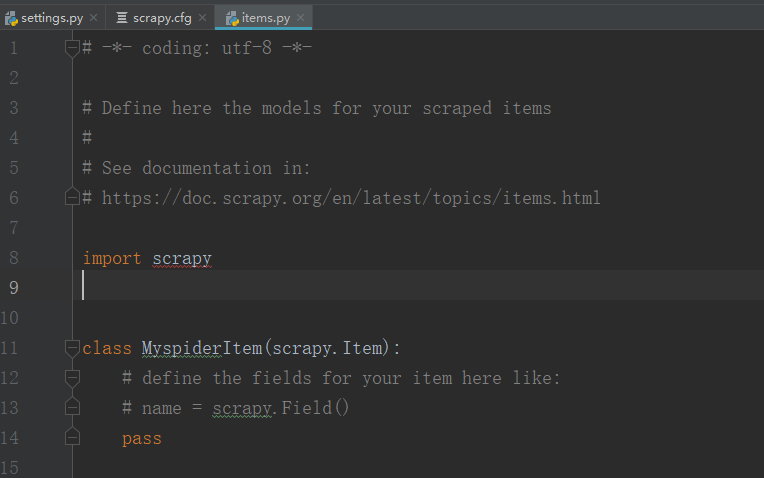
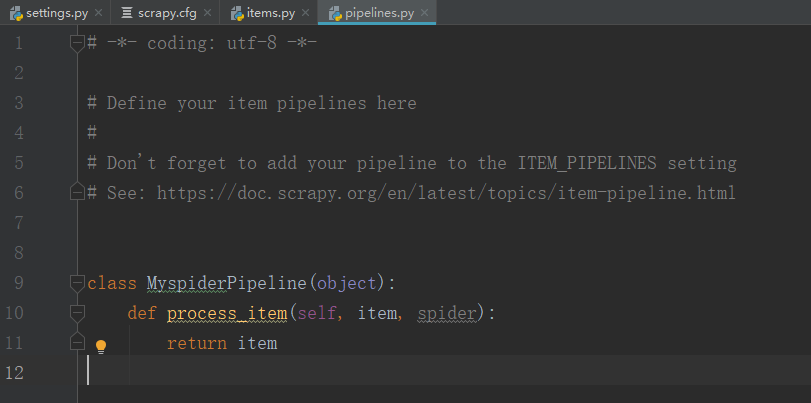
至此,大功告成,我们可以愉快的使用Scrapy了。
Scrapy笔记
scrapy使用
1、创建scrapy项目
scrapy startproject mySpider
2、编写第一个scrapy爬虫
#可以用于调试xpath或css选择器

scrapy shell https://tieba.baidu.com/f?kw=%E6%9D%8E%E6%AF%85%E5%90%A7
运行爬虫
scrapy crawl first_spider #first_spider是你在类中定义的name值
爬取李毅吧下的第一页贴子链接和文本:
import scrapy

class firstSpider(scrapy.Spider):

    # # 构造方法

    # def __init__(self, name, age):

    #     self.name = name

    #     self.age = age

    name = 'first_spider'

    def start_requests(self):# 此方法用于通过链接爬取页面

        # 爬取页面的链接

        urls = [

            "https://tieba.baidu.com/f?kw=%E6%9D%8E%E6%AF%85%E5%90%A7"

        ]

        yield scrapy.Request(urls[0], callback=self.parse)  # 爬取页面内容后如何处理通过self.parse来执行

    # 定义回调函数

    def parse(self, response):

        # 指定规则下的所有a标签元素

        xpath='//ul[@id="thread_list"]/li[@class=" j_thread_list clearfix"]//div[@class="threadlist_lz clearfix"]/div/a'

        link_list = response.xpath(xpath)

        for link in link_list:

            href = link.xpath('@href').extract_first()

            text = link.xpath('text()').extract_first()

            print('text: %s, href: %s' % (text, href))

if __name__ == '__main__':

    pass

    # 获得类的实例

    # a = firstSpider('张三', 18)

    # print('name: %s, age: %d' % (a.name, a.age))
爬取李毅吧下的下一页贴子链接和文本:
import scrapy

class firstSpider(scrapy.Spider):

    # # 构造方法

    # def __init__(self, name, age):

    #     self.name = name

    #     self.age = age

    name = 'second_spider'

    def start_requests(self): # 此方法用于通过链接爬取页面

        # 爬取页面的链接

        urls = [

            "https://tieba.baidu.com/f?kw=%E6%9D%8E%E6%AF%85%E5%90%A7"

        ]

        yield scrapy.Request(urls[0], callback=self.parse)  # 爬取页面内容后如何处理通过self.parse来执行

    # 定义回调函数

    def parse(self, response):

        # 指定规则下的所有a标签元素

        xpath='//ul[@id="thread_list"]/li[@class=" j_thread_list clearfix"]//div[@class="threadlist_lz clearfix"]/div/a'

        link_list = response.xpath(xpath)

        filename = '李毅吧贴子内容.txt'

        for link in link_list:

            href = link.xpath('@href').extract_first()

            text = link.xpath('text()').extract_first()

            line = 'text: %s, href: %s' % (text, href)

            print(line)

            # 写文件

            # a 追加到文件末尾

            with open(filename, 'a', encoding='utf-8',) as f:

                f.write(line)

                f.write('\n')

        # 爬取下一页的链接地址:css选择器

        next_page = response.css('#frs_list_pager a:nth-last-child(2)::attr(href)').extract_first()

        # 判断下一页是否不为空

        if next_page is not None:

            next_page = 'https:'+next_page

            yield scrapy.Request(next_page, callback=self.parse)

if __name__ == '__main__':

    pass

    # 获得类的实例

    # a = firstSpider('张三', 18)

    # print('name: %s, age: %d' % (a.name, a.age))
urls的简写形式
import scrapy

class firstSpider(scrapy.Spider):

    # # 构造方法

    # def __init__(self, name, age):

    #     self.name = name

    #     self.age = age

    name = 'three_spider'

    # 简化形式

    start_urls = [

        "https://tieba.baidu.com/f?kw=%E6%9D%8E%E6%AF%85%E5%90%A7",

        "https://www.baidu.com"

    ]

    # def start_requests(self): # 此方法用于通过链接爬取页面

    #     # 爬取页面的链接

    #     urls = [

    #         "https://tieba.baidu.com/f?kw=%E6%9D%8E%E6%AF%85%E5%90%A7"

    #     ]

    #

    #     yield scrapy.Request(urls[0], callback=self.parse)  # 爬取页面内容后如何处理通过self.parse来执行

    # 定义回调函数

    def parse(self, response):

        # 指定规则下的所有a标签元素

        xpath='//ul[@id="thread_list"]/li[@class=" j_thread_list clearfix"]//div[@class="threadlist_lz clearfix"]/div/a'

        link_list = response.xpath(xpath)

        for link in link_list:

            href = link.xpath('@href').extract_first()

            text = link.xpath('text()').extract_first()

            print('text: %s, href: %s' % (text, href))

if __name__ == '__main__':

    pass

    # 获得类的实例

    # a = firstSpider('张三', 18)

    # print('name: %s, age: %d' % (a.name, a.age))
Python Scrapy环境配置教程+使用Scrapy爬取李毅吧内容的更多相关文章
- Scrapy教程——搭建环境、创建项目、爬取内容、保存文件
1.创建项目 在开始爬取之前,您必须创建一个新的Scrapy项目.进入您打算存储代码的目录中,运行新建命令. 例如,我需要在D:\00Coding\Python\scrapy目录下存放该项目,打开命令 ...
- Python学习 1 一 Python2.75的安装及环境配置教程
Python2.75的安装及环境配置教程 Python的语法简洁,功能强大,有大量的第三方开发包(模块),非常适合初学者上手.同时Python不像java一样对内存要求非常高,适合做一些经常性的任务方 ...
- PyCharm Django Python 开发环境配置 详细教程
PyCharm Django Python 开发环境配置 详细教程 1. Python 下载及安装 (1)根据需要的版本去 Python 官网(https://www.python.org/downl ...
- scrapy爬取动态分页内容
1.任务定义: 爬取某动态分页页面中所有子话题的内容. 所谓"动态分页":是指通过javascript(简称"js")点击实现翻页,很多时候翻页后的页面地址ur ...
- 详细的图文介绍如何利用XAMPP本地建站的环境配置教程
原文:详细的图文介绍如何利用XAMPP本地建站的环境配置教程 WordPress 是一个简便快捷,用途广,人气旺的一个开源的博客建站程序.很有很多等您去发现. 简便快捷:在性能上易于操作.易于浏览: ...
- Linux—CentOS7下python开发环境配置
CentOS7下python开发环境配置 上一篇博客讲了如何在Centos7下安装python3(https://www.cnblogs.com/zivli/p/9937608.html),这一次配置 ...
- python 开发环境配置
上篇文章配置了虚机基础环境,本篇文章介绍配置python开发环境 配置YUM源 使用国内yum源 mv /etc/yum.repos.d/CentOS-Base.repo /etc/yum.repos ...
- centos7.0 安装日志--图文具体解释-python开发环境配置
centos7.0公布之后,就下载了everthing的DVD镜像.今天有时间,所以决定在vbox底下体验一番--- 上图: watermark/2/text/aHR0cDovL2Jsb2cuY3Nk ...
- 最简单的VScode Python 开发环境配置以及中文化
前置条件 Python 3.X(2020年了,建议使用Python3.X版本) 一.下载VSCode VSCode官方下载链接 由于安装过程是中文界面,此处略过. 二.VSCode中文化 不需要配置什 ...
随机推荐
- ios初识UITableView及简单用法二(模型数据)
// // ViewController.m // ZQRTableViewTest // // Created by zzqqrr on 17/8/24. // Copyright (c) 2017 ...
- delphi-search-path-vs-library-path-vs-browsing-path
https://stackoverflow.com/questions/812042/delphi-search-path-vs-library-path-vs-browsing-path Del ...
- Hibernate总结以及在面试中的一些问题.
Hibernate总结以及在面试中的一些问题. 1.为什么要使用Hibernate开发你的项目呢?Hibernate的开发流程是怎么样的? 为什么要使用 ①.对JDBC访问数据库的代码做了封装,大 ...
- A + B 问题
要求: 问题:给出两个整数a和b, 求他们的和, 但不能使用 + 等数学运算符. 示例: 如果 a=1 并且 b=2,返回3 代码: package main import ( "fmt&q ...
- py解释器PC
pycharm激活方法: 今天更新了一下pycharm,结果之前的激活就不能用了,下面是激活方法: 1.mac下在终端进入etc目录: cd /etc 2.编辑hosts文件: vi hosts 将“ ...
- Gym.101955: Asia Shenyang Regional Contest(寒假自训第10场)
C.Insertion Sort 题意:Q次询问,每次给出N,M,Mod,问你有多少种排列,满足前面M个数字排序之后整个序列的LIS>=N-1. 思路:我们把数字看成[1,M],[N-M+1,N ...
- s21day04 python笔记
s21day04 python笔记 一.上周知识回顾及补充 回顾 补充 编译型语言和解释性语言 编译型:代码写完后,编译器将其变成成另外一个文件,然后交给计算机执行 常见的编译型语言:C,C++,Ja ...
- HashSet remove()
HashSet继承自Set接口的方法:boolean remove(Object o); case1: public class ShortTest { public static void main ...
- 2017.4.28 KVM 内存虚拟化及其实现
概述 KVM(Kernel Virtual Machine) , 作为开源的内核虚拟机,越来越受到 IBM,Redhat,HP,Intel 等各大公司的大力支持,基于 KVM 的开源虚拟化生态系统也日 ...
- Bellman-Ford的队列优化
Bellman-Ford算法在每实施依次松弛后,就会有一些顶点已经求得最短路,此后这些顶点的最短路的估计值就会一直不变,不再收后续松弛操作的影响,但是每次还要判断是否需要松弛,这就浪费时间了. 从上面 ...