
Aliyun cdn访问日志下载
1、日志下载代码(cdn.py)(请在Linux系统下运行)
#!/usr/bin/python2.7

# -*- coding:utf-8 -*-

import sys,os,gzip,json,requests,urllib

import base64,hmac,time,uuid,ConfigParser

from hashlib import sha1

download_path=os.path.join(os.path.dirname(os.path.abspath(__file__)),"download")

cdn_server_address = 'https://cdn.aliyuncs.com'

class read_config(object):

    '''

    解析配置文件

    '''

    def __init__(self):

        self._CONFIGFILE=os.path.join(os.path.dirname(os.path.abspath(__file__)), "aliyun.ini")

        self._config=ConfigParser.ConfigParser()

        self._config.read(self._CONFIGFILE)

        self._access_id = self._config.get('Credentials', 'accesskeyid')

        self._access_key = self._config.get('Credentials', 'accesskeysecret')

        self._Action = self._config.get('Must', 'Action')

        self._DomainName = self._config.get('Must', 'DomainName')

        self._Must_list=self._config.items('Select')

        self._user_param={}

    @property

    def access_key_id(self):

        return self._access_id

    @property

    def access_key_secret(self):

        return self._access_key

    @property

    def user_params(self):

        if self._Action and self._DomainName:

            self._user_param['Action'] = self._Action

            self._user_param['DomainName'] = self._DomainName

            for i in self._Must_list:

                self._user_param[i[0]] = i[1]

            return self._user_param

class read_write(object):

    '''

    保存已下载过的日志

    '''

    def __init__(self):

        self._logfilename = os.path.join(os.path.dirname(os.path.abspath(__file__)), ".download")

    @property

    def read(self):

        try:

            with open(self._logfilename, 'rb', ) as f:

                logfile = f.read()

                logfile = json.loads(logfile)

                if len(logfile) > 20:

                    logfile.pop(0)

            return logfile

        except IOError as f:

            return []

    def write(self,logfile):

        with open(self._logfilename, "wb") as f:

            file = json.dumps(logfile)

            f.write(file)

class GZipTool(object):

    """

    压缩与解压gzip

    """

    def __init__(self, bufSize=1024 * 8):

        self.bufSize = bufSize

        self.fin = None

        self.fout = None

    def compress(self, src, dst):

        self.fin = open(src, 'rb')

        self.fout = gzip.open(dst, 'wb')

        self.__in2out()

    def decompress(self, gzFile, dst):

        self.fin = gzip.open(gzFile, 'rb')

        self.fout = open(dst, 'wb')

        self.__in2out()

    def __in2out(self, ):

        while True:

            buf = self.fin.read(self.bufSize)

            if len(buf) < 1:

                break

            self.fout.write(buf)

        self.fin.close()

        self.fout.close()

def percent_encode(str):

    res = urllib.quote(str.decode('UTF-8').encode('utf8'), '')

    res = res.replace('+', '%20')

    res = res.replace('*', '%2A')

    res = res.replace('%7E', '~')

    return res

def compute_signature(parameters, access_key_secret):

    '''

    :param parameters: 生成签名需要的数据

    :param access_key_secret: 访问阿里云需要的key

    :return: 返回签名信息

    '''

    sortedParameters = sorted(parameters.items(), key=lambda parameters: parameters[0])

    canonicalizedQueryString = ''

    for (k,v) in sortedParameters:

        canonicalizedQueryString += '&' + percent_encode(k) + '=' + percent_encode(v)

    stringToSign = 'GET&%2F&' + percent_encode(canonicalizedQueryString[1:])

    h = hmac.new(access_key_secret + "&", stringToSign, sha1)

    signature = base64.encodestring(h.digest()).strip()

    return signature

def compose_url(readconfig):

    '''

    :param user_params: 生成第一次请求URL所需要的参数

    :param readconfig: 配置文件对象

    :return: 第一次请求的URL

    '''

    timestamp = time.strftime("%Y-%m-%dT%H:%M:%SZ", time.gmtime())

    parameters = { \

            'Format'        : 'JSON', \

            'Version'       : '2014-11-11', \

            'AccessKeyId'   : readconfig.access_key_id, \

            'SignatureVersion'  : '1.0', \

            'SignatureMethod'   : 'HMAC-SHA1', \

            'SignatureNonce'    : str(uuid.uuid1()), \

            'TimeStamp'         : timestamp, \

   }

    for key in readconfig.user_params.keys():

        if  readconfig.user_params[key]:

            parameters[key] = readconfig.user_params[key]

    signature = compute_signature(parameters, readconfig.access_key_secret)

    parameters['Signature'] = signature

    url = cdn_server_address + "/?" + urllib.urlencode(parameters)

    return url

def make_request(readconfig,readwrite):

    '''

    :param user_params: 生成第一次请求URL所需要的参数

    :param readconfig: 配置文件对象

    :param readwrite: 读取和保存已下载过的文件对象

    :return: 返回一个字典,key为日志文件名,value为日志的URL地址

    '''

    url = compose_url(readconfig)

    path_dic={}

    try:

        res=requests.get(url)

        res=res.json()

        res=res['DomainLogModel']['DomainLogDetails']['DomainLogDetail']

        logfile = readwrite.read

        for i in res:

            if i['LogName'] not in logfile:

                logfile.append(i['LogName'])

                path_dic[i['LogName']]=i['LogPath']

        readwrite.write(logfile)

        return path_dic

    except Exception:

        return False

def download(download_path,readconfig,readwrite):

    '''

    :param download_path: 日志URL

    :param user_params: 生成第一次请求URL所需要的参数

    :param readconfig: 配置文件对象

    :param readwrite: 读取和保存已下载过的文件对象

    :return:

    '''

    link_path=make_request(readconfig,readwrite)

    if link_path:

        for name,path in link_path.items():

            filename=os.path.join(download_path,name)

            logname=filename[:-3]+'.txt'

            pathurl="https://%s" %path

            r = requests.get(pathurl)

            with open(filename, 'wb') as f:

                f.write(r.content)

            GZipTool().decompress(filename, logname)

            os.remove(filename)

    os.system("find %s -type f -mtime +7 |xargs rm -rf" % download_path)

if __name__ == '__main__':

    readconfig = read_config()

    readwrite=read_write()

    if not readconfig.user_params:

        sys.exit(1)

    else:

        download(download_path,readconfig,readwrite)
2、配置文件内容(aliyun.ini)
[Credentials]

accesskeyid =

accesskeysecret =

[Must]

Action =

DomainName =

[Select]

LogDay=

PageSize=

PageNumber=
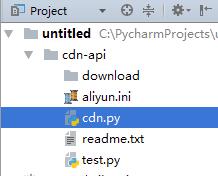
3、文件结构图
4、阿里云日志下载API接口
https://help.aliyun.com/document_detail/27224.html?spm=a2c4g.11186623.6.704.vz36cV
https://docs-aliyun.cn-hangzhou.oss.aliyun-inc.com/cn/cdn/0.1.99/assets/api/callmethod_sdk_python.zip #python版本签名生成代码
Aliyun cdn访问日志下载的更多相关文章
- centos LAMP第二部分apache配置 下载discuz!配置第一个虚拟主机 安装Discuz! 用户认证 配置域名跳转 配置apache的访问日志 配置静态文件缓存 配置防盗链 访问控制 apache rewrite 配置开机启动apache tcpdump 第二十节课
centos LAMP第二部分apache配置 下载discuz!配置第一个虚拟主机 安装Discuz! 用户认证 配置域名跳转 配置apache的访问日志 配置静态文件缓存 配置防盗链 ...
- iNeedle日志下载功能问题
问题: iNeedle系统本身包含日志下载功能,主要是将web服务器中的用户访问日志按照一定条件进行筛选并下载,提供管理者分析.但是这次的测试中发现iNeedle日志下载一直会卡住,web界面显示正在 ...
- Hadoop第8周练习—Pig部署及统计访问日志例子
:搭建Pig环境 :计算每个IP点击次数 内容 运行环境说明 1.1 硬软件环境 线程,主频2.2G,6G内存 l 虚拟软件:VMware® Workstation 9.0.0 build- ...
- nginx自动切割访问日志
Web 访问日志 (access_log) 记录了所有外部客户端对Web服务器的访问行为,包含了客户端IP,访问日期,访问的URL资源,服务器返回的HTTP状态码等重要信息. 一条典型的Web访问日志 ...
- 使用 awstats 分析 Nginx 的访问日志(IBM)
前言 在我的上一篇文章<使用 Nginx 提升网站访问速度>中介绍了 Nginx 这个 HTTP 服务器以及如何通过它来加速网站的访问速度.在实际的网站运营中,我们经常需要了解到网站的访问 ...
- 打包发布到NPM并通过CDN访问
本文主要讲述基于webpack编写js包文件后上传到npm,并通过cdn进行访问. 创建项目 在自己新建的文件夹下执行如下代码: npm init name: (mtmap) version: (1. ...
- 使用awstat分析Nginx的访问日志
在我的上一篇文章<使用 Nginx 提升网站访问速度>中介绍了 Nginx 这个 HTTP 服务器以及如何通过它来加速网站的访问速度.在实际的网站运营中,我们经常需要了解到网站的访问情况, ...
- nginx访问日志中添加接口返回值
因为nginx作为web服务器时,会代理后端的一些接口,这时访问日志中只能记录访问接口的status码,也就是说,只能获得200.404 这些的值 那么如何获得接口返回的response值呢? 下面开 ...
- 登录日志的访问日志的 统计 MapReduce
登录日志的访问日志的 统计 MapReduce <!-- https://mvnrepository.com/artifact/org.apache.hadoop/hadoop-commo ...
随机推荐
- uniGUI试用笔记(七)
uniGUI的文件下载由于TUniSession的存在而变得非常简单,最典型的一个例子就是将列表中的所有数据导出到Excel中.服务器上采用TMS FlexCel控件,先将数据集中的记录导入到Exce ...
- SpringBoot 使用okhttp3
1.添加pom.xml依赖 <dependency> <groupId>com.squareup.okhttp3</groupId> <artifactId& ...
- extern 用法,全局变量与头文件(重复定义)
转自 https://www.cnblogs.com/chengmin/archive/2011/09/26/2192008.html 当你要引用一个全局变量的时候,你就要声明,extern int ...
- Forms Authentication and Role based Authorization: A Quicker, Simpler, and Correct Approach
https://www.codeproject.com/Articles/36836/Forms-Authentication-and-Role-based-Authorization Problem ...
- Java后台要看的书
推荐一个 搜书的网站,挺好用的 鸠摩搜书 Java基础 <Head first Java> (入门用) <Java 编程思想> <Java核心技术卷> 并发 < ...
- 题解——洛谷P2734 游戏A Game 题解(区间DP)
题面 题目背景 有如下一个双人游戏:N(2 <= N <= 100)个正整数的序列放在一个游戏平台上,游戏由玩家1开始,两人轮流从序列的任意一端取一个数,取数后该数字被去掉并累加到本玩家的 ...
- (转载)西门子PLC学习笔记十五-(数据块及数据访问方式)
一.数据块 数据块是在S7 CPU的存储器中定义的,用户可以定义多了数据块,但是CPU对数据块数量及数据总量是有限制的. 数据块与临时数据不同,当逻辑块执行结束或数据块关闭,数据块中的数据是会保留住的 ...
- (转载)C#:Enum、Int和String的互相转换,枚举转换
Enum为枚举提供基类,其基础类型可以是除 Char 外的任何整型.如果没有显式声明基础类型,则使用 Int32.编程语言通常提供语法来声明由一组已命名的常数和它们的值组成的枚举.注意:枚举类型的基类 ...
- [转载]grep查看上下文及简单正则表达式
转载自:https://www.cnblogs.com/mfryf/p/3336288.html inux grep 显示前后几行的信息2016年03月02日 14:10:58 ChenHui246 ...
- ECharts配置项之title(标题)
1.标题居中 //left的值为'left', 'center', 'right' title:{ left:'center' } 2.主副标题之间的间距 title:{ //默认为10 itemGa ...