
Linux文件系统3--打开文件
1.前言
本文所述关于文件管理的系列文章主要是对陈莉君老师所讲述的文件系统管理知识讲座的整理。
Linux可以支持不同的文件系统,它源于unix文件系统,也是unix文件系统的一大特色。
本文将以不同文件系统之间的拷贝为实例进行讲述
2. 实例:文件拷贝
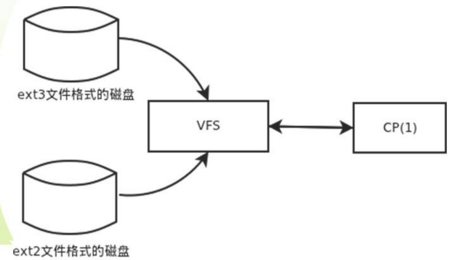
图 不同文件系统之间的拷贝
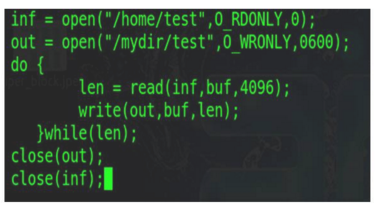
图 文件拷贝对应的C语言片段
3.打开文件
3.1 open函数
文件读写之前都要先打开文件,打开函数的原型如下:
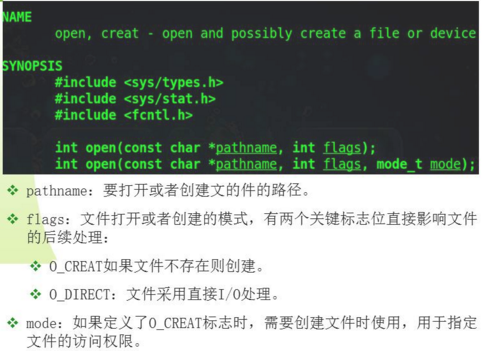
- open通过路径名、标志和mask信息,打开或创建文件,最后返回此文件对应的fd
- 用户态下调用open,进入系统调用处理程序后,会调用内核相应的系统调用服务例程
3.2 打开文件的内核实现
从整体流程来看,open的内核实现如下:
进程从用户态获取路径名到内核缓冲区;
然后查找到父目录;如果设置了O_CREAT标志,则继续查找路径最后一个分量
最后获取对应文件的打开文件结构
将这个结构与当前进程的打开文件表联系起来,返回相应的fd。
4. do_sys_open
 long do_sys_open(int dfd, const char __user *filename, int flags, umode_t mode)

 {

     struct open_flags op;

     int fd = build_open_flags(flags, mode, &op);

     struct filename *tmp;

     if (fd)

         return fd;

     tmp = getname(filename);

     if (IS_ERR(tmp))

         return PTR_ERR(tmp);

     fd = get_unused_fd_flags(flags);

     if (fd >= ) {

         struct file *f = do_filp_open(dfd, tmp, &op);

         if (IS_ERR(f)) {

             put_unused_fd(fd);

             fd = PTR_ERR(f);

         } else {

             fsnotify_open(f);

             fd_install(fd, f);

         }

     }

     putname(tmp);

     return fd;

 }
open系统调用服务例程的核心为do_sys_open
4.1 do_filp_open
 struct file *do_filp_open(int dfd, struct filename *pathname,

         const struct open_flags *op)

 {

     struct nameidata nd;

     int flags = op->lookup_flags;

     struct file *filp;

     set_nameidata(&nd, dfd, pathname);

     filp = path_openat(&nd, op, flags | LOOKUP_RCU);

     if (unlikely(filp == ERR_PTR(-ECHILD)))

         filp = path_openat(&nd, op, flags);

     if (unlikely(filp == ERR_PTR(-ESTALE)))

         filp = path_openat(&nd, op, flags | LOOKUP_REVAL);

     restore_nameidata();

     return filp;

 }
当内核要访问一个文件时,第一步需要找到这个文件,这由do_filp_open完成
在do_filp_open的实现中,查找文件过程由path_openat调用path_init和link_path_walk完成
这两个函数将用户传进来的用字符串表示的文件路径,转换成一个dentry结构,建立好相应的inode,并返回file对象
4.2 fd_install
 void fd_install(unsigned int fd, struct file *file)

 {

     __fd_install(current->files, fd, file);

 }
 void __fd_install(struct files_struct *files, unsigned int fd,

         struct file *file)

 {

     struct fdtable *fdt;

     might_sleep();

     rcu_read_lock_sched();

     while (unlikely(files->resize_in_progress)) {

         rcu_read_unlock_sched();

         wait_event(files->resize_wait, !files->resize_in_progress);

         rcu_read_lock_sched();

     }

     /* coupled with smp_wmb() in expand_fdtable() */

     smp_rmb();

     fdt = rcu_dereference_sched(files->fdt);

     BUG_ON(fdt->fd[fd] != NULL);

     rcu_assign_pointer(fdt->fd[fd], file);

     rcu_read_unlock_sched();

 }
- do_sys_open完成以上处理后,将获取到的file结构体通过fd_install到当前进程的打开文件表中。其索引为fd
4.3 do_sys_open剩余操作
do_sys_open的剩余将进程关联的file的描述符返回用户
用户随后通过文件描述符,来访问这些数据结构
如上打开文件的核心是查找文件
5.查找文件
1. 打开文件的核心为查找,通常内核将查找过程分为两部分:
- 查找起始位置信息
主要是判断是系统根目录还是当前工作目录,以获取后面循环查找的起始位置(如/home/clj/file1.c中的“/”)
- 循环查找路径名后续分量
以起始位置开始,循环查找后续每个路径分量
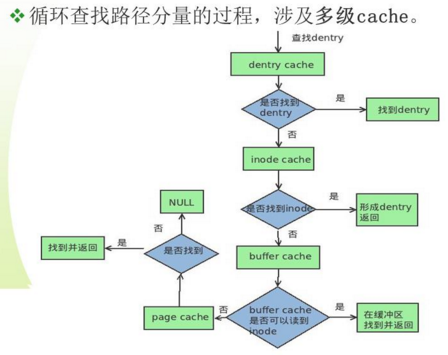
2. 循环查找路径分量的过程,涉及多级cache.
循环查找后续路径分量,首先从dentry cache开始查找,在dentry cache中查找对应的dentry,若找到则直接返回;
若没有找到,则必须去底层文件系统查找对应的dentry
5.1 dentry cache的引入
由于块设备速度比较慢,可能需要很长时间才能找到与一个文件名关联的inode信息,所以引入dentry cache
5.2 dentry cache的描述
- 缓存的组织
散列表:包含了所有活动的dentry对象。散列表由dentry_hashtable组织,dentry通过d_hash连入散列表中;
LRU链表:dentry结构体中由d_lru链表组织。LRU链表中的元素同时也在dentry cache中;
- 缓存的查找
缓存由d_hash计算散列值,通过值对应的索引从dentry_hashtable中查找相应的队列;
再从队列头循环查找对应的dentry;
并将其从LRU中移除
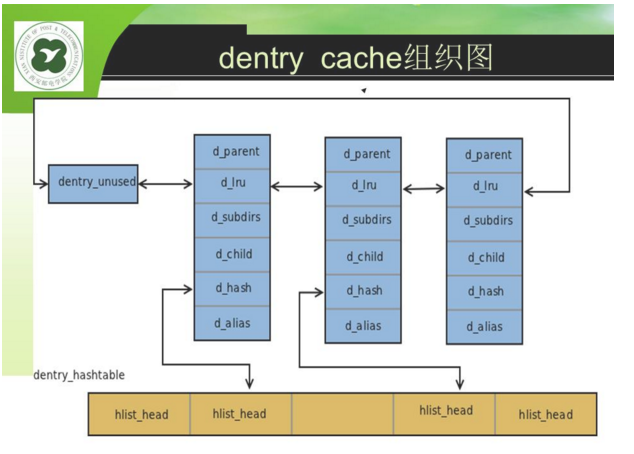
图 dentry cache组织图
5.3 快速查找关键结构体qstr
 struct qstr {

     union {

         struct {

             HASH_LEN_DECLARE;

         };

         u64 hash_len;

     };

     const unsigned char *name;

 };
5.4 dentry cache查找关键代码
 struct dentry *__d_lookup(const struct dentry *parent, const struct qstr *name)

 {

     unsigned int len = name->len;

     unsigned int hash = name->hash;

     const unsigned char *str = name->name;

     struct hlist_bl_head *b = d_hash(parent, hash);

     struct hlist_bl_node *node;

     struct dentry *found = NULL;

     struct dentry *dentry;

     /*

      * Note: There is significant duplication with __d_lookup_rcu which is

      * required to prevent single threaded performance regressions

      * especially on architectures where smp_rmb (in seqcounts) are costly.

      * Keep the two functions in sync.

      */

     /*

      * The hash list is protected using RCU.

      *

      * Take d_lock when comparing a candidate dentry, to avoid races

      * with d_move().

      *

      * It is possible that concurrent renames can mess up our list

      * walk here and result in missing our dentry, resulting in the

      * false-negative result. d_lookup() protects against concurrent

      * renames using rename_lock seqlock.

      *

      * See Documentation/filesystems/path-lookup.txt for more details.

      */

     rcu_read_lock();

     hlist_bl_for_each_entry_rcu(dentry, node, b, d_hash) {

         if (dentry->d_name.hash != hash)

             continue;

         spin_lock(&dentry->d_lock);

         if (dentry->d_parent != parent)

             goto next;

         if (d_unhashed(dentry))

             goto next;

         /*

          * It is safe to compare names since d_move() cannot

          * change the qstr (protected by d_lock).

          */

         if (parent->d_flags & DCACHE_OP_COMPARE) {

             int tlen = dentry->d_name.len;

             const char *tname = dentry->d_name.name;

             if (parent->d_op->d_compare(parent, dentry, tlen, tname, name))

                 goto next;

         } else {

             if (dentry->d_name.len != len)

                 goto next;

             if (dentry_cmp(dentry, str, len))

                 goto next;

         }

         dentry->d_lockref.count++;

         found = dentry;

         spin_unlock(&dentry->d_lock);

         break;

 next:

         spin_unlock(&dentry->d_lock);

      }

      rcu_read_unlock();

      return found;

 }
Linux文件系统3--打开文件的更多相关文章
- Linux操作系统中打开文件数量的查看方法
Linux操作系统中打开文件数量的查看方法ulimit -n 4096也就是限制用户的最大文件打开数为4096个 在网上查了关于怎么查看文件打开数的文章大致有两种说法/proc/sys/fs/file ...
- 【Linux学习】Linux文件系统5—查看文件内容命令
Linux文件系统5-查看文件内容命令 cat: 由第一行开始显示文件内容 more: 一页一页地显示文件内容,空格键可以继续翻页显示下一页内容 less:与more类似,但是可以往前翻页 head: ...
- Linux下Firefox打开文件jnlp文件
ubuntu(linux)打开jnlp文件 咘咘 2019-05-20 15:12:48 1331 收藏展开 前提条件是安装有java环境.whereis java 查看自己java安装目录.本人是在 ...
- Linux文件系统与日志文件
目录 一.inode和block 1.1.inode和block概述 1.2.inode的内容 inode包含文件的元信息: 查看inode号两种方式 目录文件的结构 1.3.inode的号码 用户通 ...
- 深入理解Linux文件系统与日志文件
目录: 一.inode与block 二.inode内容 三.inode的号码 四.inode的大小 五.链接文件 六.inode节点耗尽故障处理 七.恢复EXT类型的文件编译安装extundelete ...
- Linux文件系统之删除文件、文件夹(rm,rmdir)
rm命令,rmdir命令 rm命令Remove,功能:1)删除目录,2)删除文件. (可以递归的删除指定目录的所有文件及子目录) 注意:rm是一个危险的命令,使用的时候要特别当心,尤其对于初学者来说 ...
- 【Linux】系统打开文件最大数量限制(进程打开的最大文件句柄数设置)
利用ulimit命令可以对资源的可用性进行控制. -H选项和-S选项分别表示对给定资源的硬限制(hard limit)和软限制(soft limit)进行设置. 硬限制(hard limit)一旦被设 ...
- Linux记录-lsof打开文件工具常用操作
lsof `which httpd` //那个进程在使用apache的可执行文件 lsof /etc/passwd //那个进程在占用/etc/passwd lsof /dev/hda6 //那个进程 ...
- Linux文件系统之复制文件cp(文件复制)
cp 命令(文件复制) cp命令用来将一个或多个源文件或者目录复制到指定的目的文件或目录.它可以将单个源文件复制成一个指定文件名的具体的文件或一个已经存在的目录下.cp命令还支持同时复制多个文件, ...
随机推荐
- 架构师成长之路6.3 DNS服务器搭建(部署单台DNS)
点击返回架构师成长之路 架构师成长之路6.3 DNS服务器搭建(部署单台DNS) 1.安装bind yum -y install bind-utils bind bind-devel bind-chr ...
- loj #117. 有源汇有上下界最小流
题目链接 有源汇有上下界最小流,->上下界网络流 注意细节,边数组也要算上后加到SS,TT边. #include<cstdio> #include<algorithm> ...
- [luogu3455][POI2007]ZAP-Queries【莫比乌斯反演】
题目描述 FGD正在破解一段密码,他需要回答很多类似的问题:对于给定的整数a,b和d,有多少正整数对x,y,满足x<=a,y<=b,并且gcd(x,y)=d.作为FGD的同学,FGD希望得 ...
- 机器学习&深度学习资料收集
缘由 以下博客都是我在学习过程中看到的一些知识讲解非常好的博文,就不转载了,直接给出链接方便以后重复访问.有了自己的理解之后再重新整理资料发布吧 : ) sklearn系列 http://www.cn ...
- C# ADO.NET基础&实战
什么是ADO.NET:数据库访问技术! 作用:通过程序来连接访问数据库! 一.基础: using System.Data.SqlClient; //数据库连接命名空间 string connec ...
- CrossFire Round #481 div.3 978 打后感
虚拟赛,头一次打div.3感觉好TM水啊...... 一共7道题,我A了6道,第7题有思路但是没时间了. 结果还是排在700多名,可能其他人也觉得太水了吧. 逐一解析题目: A好简单,因为不想离散化我 ...
- java.net.SocketException: Connection reset 硬件防火墙也有罪?
今天早上例行进行远程备份,可是我却发现,整个备份过程无法顺利完成. 在备份的过程中不断的抛出异常: java.net.SocketException: Connection reset 奇怪,在之前的 ...
- FTP文件乱码和传输模式解释
转: FTP文件乱码和传输模式解释 2017年02月18日 10:50:03 -Hermes- 阅读数:12112更多 所属专栏: 异常解决方案急诊室 版权声明:大侠,在转载时请注明出处,小弟不胜 ...
- C++中hpp的适用
本文第一部分转载百度百科,在此感谢百度.第二部分示例为独立编写. hpp,其实质就是将.cpp的实现代码混入.h头文件当中,定义与实现都包含在同一文件,则该类的调用者只需要include该hpp文件即 ...
- Linux新系统的安全优化和内核参数优化
拿到一个新的linux系统需要做的安全和内核优化,主要是为了提升系统安全和提升性能,满足后续的应用需要.这里简单记录一下拿到一个新的系统需要做的一些事情,仅此抛砖引玉,具体可根据自己实际情况进行设置. ...