
SpringBoot整合多数据源实现
项目架构
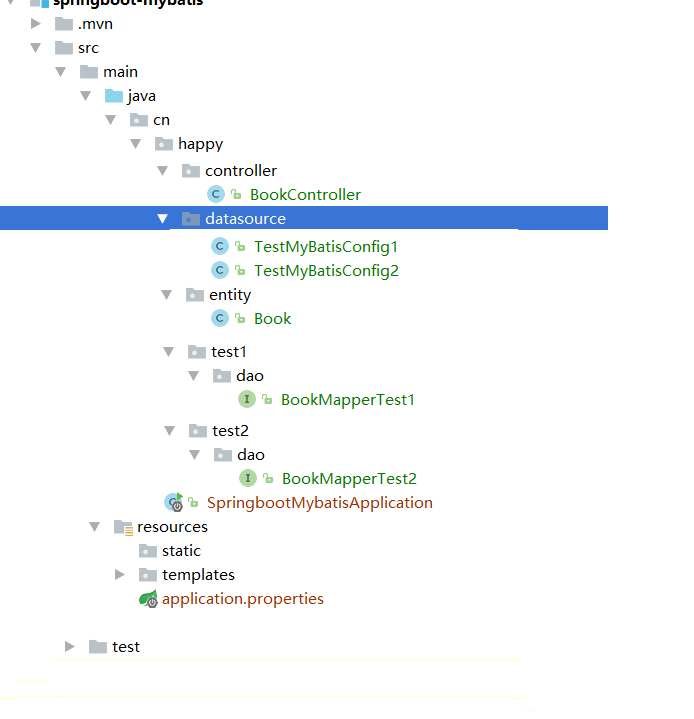
1.导入相关依赖
 <dependency>

             <groupId>org.springframework.boot</groupId>

             <artifactId>spring-boot-starter-web</artifactId>

         </dependency>

         <dependency>

             <groupId>org.springframework.boot</groupId>

             <artifactId>spring-boot-starter-test</artifactId>

             <scope>test</scope>

         </dependency>

         <!--freemarker支持-->

         <dependency>

             <groupId>org.springframework.boot</groupId>

             <artifactId>spring-boot-starter-freemarker</artifactId>

         </dependency>

         <!-- mysql驱动 -->

         <dependency>

             <groupId>mysql</groupId>

             <artifactId>mysql-connector-java</artifactId>

         </dependency>

         <!--整合mybatis-->

         <dependency>

             <groupId>org.mybatis.spring.boot</groupId>

             <artifactId>mybatis-spring-boot-starter</artifactId>

             <version>1.1.1</version>

         </dependency>
2.application.properties
 ## test1 数据源配置

 #spring.datasource.test1.driverClassName=com.mysql.jdbc.Driver

 #spring.datasource.test1.jdbc-url=jdbc:mysql://localhost:3306/test1?useUnicode=true&characterEncoding=utf8

 #spring.datasource.test1.username=root

 #spring.datasource.test1.password=123

 ## test2 数据源配置

 #spring.datasource.test2.driverClassName=com.mysql.jdbc.Driver

 #spring.datasource.test2.jdbc-url=jdbc:mysql://localhost:3306/test2?useUnicode=true&characterEncoding=utf8

 #spring.datasource.test2.username=root

 #spring.datasource.test2.password=123
3.创建datasource包 下TestMyBatisConfig1
 @Configuration

 @MapperScan(basePackages = "cn.happy.test1", sqlSessionFactoryRef =  "test1SqlSessionFactory")

 public class DataSource1Config {

         @Bean(name = "test1DataSource")

         @ConfigurationProperties(prefix = "spring.datasource.test1")

         @Primary

         public DataSource testDataSource() {

             return DataSourceBuilder.create().build();

         }

         @Bean(name = "test1SqlSessionFactory")

         @Primary

         public SqlSessionFactory testSqlSessionFactory(@Qualifier("test1DataSource") DataSource dataSource) throws Exception {

             SqlSessionFactoryBean bean = new SqlSessionFactoryBean();

             bean.setDataSource(dataSource);

             //读取mybatis小配置文件

            // bean.setMapperLocations(new PathMatchingResourcePatternResolver().getResources("classpath:mybatis/mapper/test1/*.xml"));

             return bean.getObject();

         }

         @Bean(name = "test1TransactionManager")

         @Primary

         public DataSourceTransactionManager testTransactionManager(@Qualifier("test1DataSource") DataSource dataSource) {

             return new DataSourceTransactionManager(dataSource);

         }

         @Bean(name = "test1SqlSessionTemplate")

         @Primary

         public SqlSessionTemplate testSqlSessionTemplate(@Qualifier("test1SqlSessionFactory") SqlSessionFactory sqlSessionFactory) throws Exception {

             return new SqlSessionTemplate(sqlSessionFactory);

         }

 }
@Primary注解标识默认使用的数据源
如果不加启动会报如下错误:意思是有两个数据源 不知需要使用哪个数据源

3.创建datasource包 下TestMyBatisConfig2
 @Configuration

 @MapperScan(basePackages = "cn.happy.test2", sqlSessionFactoryRef =  "test2SqlSessionFactory")

 public class DataSource2Config {

         @Bean(name = "test2DataSource")

         @ConfigurationProperties(prefix = "spring.datasource.test2")

         public DataSource testDataSource() {

             return DataSourceBuilder.create().build();

         }

         @Bean(name = "test2SqlSessionFactory")

         public SqlSessionFactory testSqlSessionFactory(@Qualifier("test2DataSource") DataSource dataSource) throws Exception {

             SqlSessionFactoryBean bean = new SqlSessionFactoryBean();

             bean.setDataSource(dataSource);

             //读取mybatis小配置文件

            // bean.setMapperLocations(new PathMatchingResourcePatternResolver().getResources("classpath:mybatis/mapper/test2/*.xml"));

             return bean.getObject();

         }

         @Bean(name = "test2TransactionManager")

         public DataSourceTransactionManager testTransactionManager(@Qualifier("test2DataSource") DataSource dataSource) {

             return new DataSourceTransactionManager(dataSource);

         }

         @Bean(name = "test2SqlSessionTemplate")

         public SqlSessionTemplate testSqlSessionTemplate(@Qualifier("test2SqlSessionFactory") SqlSessionFactory sqlSessionFactory) throws Exception {

             return new SqlSessionTemplate(sqlSessionFactory);

         }

     }
4.entity层
 /**

  * author:  刘涛

  *

  * @create 2018-04-04 11:18

  */

 public class Book {

     private Integer bookid;

     private String bookname;

     private Integer bookprice;

 get  set省略。。

 }
5.test1下的dao中BookMapperTest1
 public interface BookMapperTest1 {

     @Select("select * from book where bookname=#{bookname}")

     public Book findByName(@Param("bookname") String bookname);

     @Insert("insert into book(bookname,bookprice) values (#{bookname},#{bookprice})")

     public int insertBook(@Param("bookname") String bookname, @Param("bookprice") Double bookprice);

     @Select("select * from book")

     public Book findBook(@Param("Book") Book book);

 }
6.test2下的dao中BookMapperTest2
 public interface BookMapperTest2 {

     @Select("select * from book where bookname=#{bookname}")

     public Book findByName(@Param("bookname") String bookname);

     @Insert("insert into book(bookname,bookprice) values (#{bookname},#{bookprice})")

     public int insertBook(@Param("bookname") String bookname, @Param("bookprice") Double bookprice);

 }
7.controller层
@RestController

public class BookController {

    @Autowired

    private BookMapperTest1 bookMapperTest1;

    @Autowired

    private BookMapperTest2 bookMapperTest2;

    @RequestMapping("insert001")

    public String insert001(String bookname,Double bookprice){

        bookMapperTest1.insertBook(bookname,bookprice);

        return "success";

    }

    @RequestMapping("insert002")

    public String insert002(String bookname,Double bookprice){

        bookMapperTest2.insertBook(bookname,bookprice);

        return "success";

    }

}
8.启动项目
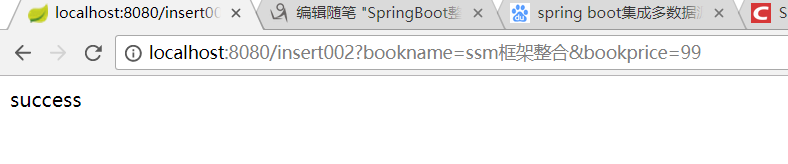
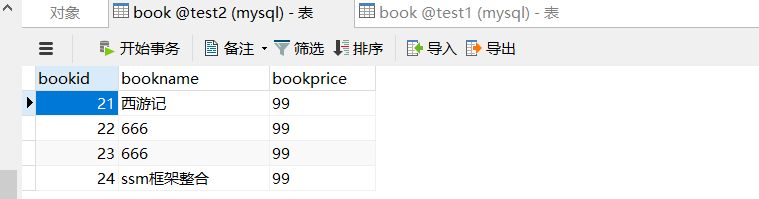
test1数据库

test2数据库
SpringBoot整合多数据源实现的更多相关文章
- springBoot整合多数据源
springBoot整合相关 1:springBoot整合多数据源: 应用场景: 项目需要同时连接两个不同的数据库A, B,并且它们都为主从架构,一台写库,多台读库. 工具/版本: jdk1. ...
- springboot整合多数据源解决分布式事务
一.前言 springboot整合多数据源解决分布式事务. 1.多数据源采用分包策略 2.全局分布式事务管理:jta-atomikos. ...
- springboot整合多数据源及事物
有两种方式:一种是分包的方式.一种是加注解的方式(@DataSource(ref="")). 分包方式:项目结构图如下: 分为com.itmayiedu.test01.com.it ...
- SpringBoot整合Druid数据源
关于SpringBoot数据源请参考我上一篇文章:https://www.cnblogs.com/yueshutong/p/9409295.html 一:Druid介绍 1. Druid是什么? Dr ...
- SpringBoot整合Mybatis【非注解版】
接上文:SpringBoot整合Mybatis[注解版] 一.项目创建 新建一个工程 选择Spring Initializr,配置JDK版本 输入项目名 选择构建web项目所需的state ...
- SpringBoot整合Mybatis之项目结构、数据源
已经有好些日子没有总结了,不是变懒了,而是我一直在奋力学习springboot的路上,现在也算是完成了第一阶段的学习,今天给各位总结总结. 之前在网上找过不少关于springboot的教程,都是一些比 ...
- SpringBoot整合阿里Druid数据源及Spring-Data-Jpa
SpringBoot整合阿里Druid数据源及Spring-Data-Jpa https://mp.weixin.qq.com/s?__biz=MzU0MDEwMjgwNA==&mid=224 ...
- SpringBoot系列七:SpringBoot 整合 MyBatis(配置 druid 数据源、配置 MyBatis、事务控制、druid 监控)
1.概念:SpringBoot 整合 MyBatis 2.背景 SpringBoot 得到最终效果是一个简化到极致的 WEB 开发,但是只要牵扯到 WEB 开发,就绝对不可能缺少数据层操作,所有的开发 ...
- SpringBoot整合Mybatis多数据源 (AOP+注解)
SpringBoot整合Mybatis多数据源 (AOP+注解) 1.pom.xml文件(开发用的JDK 10) <?xml version="1.0" encoding=& ...
随机推荐
- 在Ubuntu/CentOS/Debian系统下,使用CPU挖Monero (XMR)币
CentOS7(增加源) yum repolist # 查看yum源列表 yum localinstall http://dl.fedoraproject.org/pub/epel/7/x86_64/ ...
- PHP中的数组
一.数组的基础 php数组的分类 按照下标的不同,php分为关联数组与索引数组: 索引数组:下标从零依次增长(以前那种) 关联数组:下标为字符串格式,每个下标字符串与数组的值一一关联对应(有点儿像对象 ...
- react动态路由以及获取动态路由
业务中会遇到点击列表跳转到详情页, 1.在index.js修改我们的跟组件 新建router2的文件 import React from 'react' import { HashRouter as ...
- springboot-文件上传xls及POI操作Excel
1.pom导入依赖文件 <dependency> <groupId>org.apache.poi</groupId> <artifactId>poi-o ...
- 解决axios在ie浏览器下提示promise未定义的问题
参考链接: https://blog.csdn.net/bhq1711617151/article/details/80266436 在做项目的时候发现在ie11上出现不兼容的问题,对于和后台交互这块 ...
- Request method 'POST' not supported解决办法
(1)考虑拦截器是否将该链接拦截
- CSScript 使用纪要
CSScript 运行C#脚本的开源项目,在笔者简要使用过程中,遇到了一些问题,现简单记录. 1. CS0433 使用非基本类型 当遇到 CS0433错误,提示 type is defined mul ...
- ubuntu系统的teamviewer的安装及使用
参考链接: 安装: https://blog.csdn.net/weixin_34613450/article/details/80541799 使用: https://jingyan.baidu.c ...
- C#基于websocket-sharp实现简易httpserver(封装)
一.背景 其实就是很简单的,公司会桌面开发的人员紧缺啊,项目又赶,而我们公司的前端人员人多还厉害(ps:吐槽下,后端的人真的少啊,会桌面开发的更少啊),所以萌生出了使用html+js来构建本地应用程序 ...
- MYSQL的安全模式:sql_safe_updates介绍
什么是安全模式 在mysql中,如果在update和delete没有加上where条件,数据将会全部修改.不只是初识mysql的开发者会遇到这个问题,工作有一定经验的工程师难免也会忘记写入where条 ...