
图片服务器FastDFS的安装及使用
FastDFS介绍
FastDFS是用c语言编写的一款开源的分布式文件系统。FastDFS为互联网量身定制,充分考虑了冗余备份、负载均衡、线性扩容等机制,并注重高可用、高性能等指标,使用FastDFS很容易搭建一套高性能的文件服务器集群提供文件上传、下载等服务。
FastDFS架构
FastDFS架构包括 Tracker server和 Storage server。客户端请求Tracker server进行文件上传、下载,通过Tracker server调度最终由Storage server完成文件上传和下载。
Tracker server作用是负载均衡和调度,通过Tracker server在文件上传时可以根据一些策略找到Storage server提供文件上传服务。可以将tracker称为追踪服务器或调度服务器。
Storage server作用是文件存储,客户端上传的文件最终存储在Storage服务器上,Storage server没有实现自己的文件系统而是利用操作系统 的文件系统来管理文件。可以将storage称为存储服务器。
架构图

架构说明:
服务端两个角色:
Tracker:管理集群,tracker也可以实现集群。每个tracker节点地位平等。收集Storage集群的状态。
Storage:实际保存文件,Storage分为多个组,每个组之间保存的文件是不同的。每个组内部可以有多个成员,组成员内部保存的内容是一样的,组成员的地位是一致的,没有主从的概念。
FastDFS的安装
这个图片服务器的安装方法有点儿麻烦(安装手册见左边栏的链接)
下面直接提供一个安装好FastDFS的虚拟机文件,开机就能用(服务都是自启动的)(虚拟机文件也见左边栏的链接)
注意:在虚拟机放到VMware中后,启动的时候,会弹出一个对话框,如下图
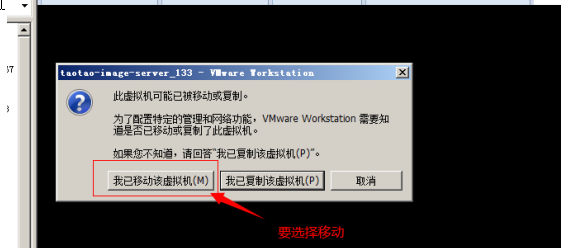
说明:
移动:网络配置不发生变化。要使用图片服务器,需要保证网络配置不变。
复制:重新生成一块网卡mac地址是新地址。
对于开发人员来说,我们只需熟悉其上传、下载的流程以及Java客户端的使用方法。
上传流程:
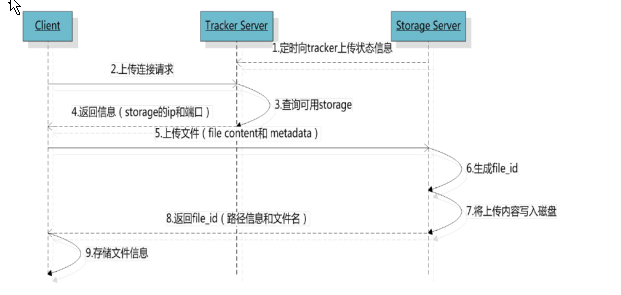
客户端上传文件后存储服务器将文件ID返回给客户端,此文件ID用于以后访问该文件的索引信息。文件索引信息包括:组名,虚拟磁盘路径,数据两级目录,文件名。
即:
目录的说明:
组名:文件上传后所在的storage组名称,在文件上传成功后有storage服务器返回,需要客户端自行保存。
虚拟磁盘路径:storage配置的虚拟路径,与磁盘选项store_path*对应。如果配置了store_path0则是M00,如果配置了store_path1则是M01,以此类推。
数据两级目录:storage服务器在每个虚拟磁盘路径下创建的两级目录,用于存储数据文件。
文件名:与文件上传时不同。是由存储服务器根据特定信息生成,文件名包含:源存储服务器IP地址、文件创建时间戳、文件大小、随机数和文件拓展名等信息。
下载流程:

Java客户端的使用
	@Test

	public void testUpload() throws Exception {

		//创建一个配置文件。文件名任意。内容就是tracker服务器的地址。

		//使用全局对象加载配置文件。

		ClientGlobal.init("D:/workspaces-itcast/JavaEE32/e3-manager-web/src/main/resources/conf/client.conf");

		//创建一个TrackerClient对象

		TrackerClient trackerClient = new TrackerClient();

		//通过TrackClient获得一个TrackerServer对象

		TrackerServer trackerServer = trackerClient.getConnection();

		//创建一个StrorageServer的引用,可以是null

		StorageServer storageServer = null;

		//创建一个StorageClient,参数需要TrackerServer和StrorageServer

		StorageClient storageClient = new StorageClient(trackerServer, storageServer);

		//使用StorageClient上传文件。

		String[] strings = storageClient.upload_file("D:/Documents/Pictures/images/2f2eb938943d.jpg", "jpg", null);

		for (String string : strings) {

			System.out.println(string);

		}

	}
用工具类的方法:
public class FastDFSClient {

	private TrackerClient trackerClient = null;

	private TrackerServer trackerServer = null;

	private StorageServer storageServer = null;

	private StorageClient1 storageClient = null;

	public FastDFSClient(String conf) throws Exception {

		if (conf.contains("classpath:")) {

			conf = conf.replace("classpath:", this.getClass().getResource("/").getPath());

		}

		ClientGlobal.init(conf);

		trackerClient = new TrackerClient();

		trackerServer = trackerClient.getConnection();

		storageServer = null;

		storageClient = new StorageClient1(trackerServer, storageServer);

	}

	/**

	 * 上传文件方法

	 * <p>Title: uploadFile</p>

	 * <p>Description: </p>

	 * @param fileName 文件全路径

	 * @param extName 文件扩展名,不包含(.)

	 * @param metas 文件扩展信息

	 * @return

	 * @throws Exception

	 */

	public String uploadFile(String fileName, String extName, NameValuePair[] metas) throws Exception {

		String result = storageClient.upload_file1(fileName, extName, metas);

		return result;

	}

	public String uploadFile(String fileName) throws Exception {

		return uploadFile(fileName, null, null);

	}

	public String uploadFile(String fileName, String extName) throws Exception {

		return uploadFile(fileName, extName, null);

	}

	/**

	 * 上传文件方法

	 * <p>Title: uploadFile</p>

	 * <p>Description: </p>

	 * @param fileContent 文件的内容,字节数组

	 * @param extName 文件扩展名

	 * @param metas 文件扩展信息

	 * @return

	 * @throws Exception

	 */

	public String uploadFile(byte[] fileContent, String extName, NameValuePair[] metas) throws Exception {

		String result = storageClient.upload_file1(fileContent, extName, metas);

		return result;

	}

	public String uploadFile(byte[] fileContent) throws Exception {

		return uploadFile(fileContent, null, null);

	}

	public String uploadFile(byte[] fileContent, String extName) throws Exception {

		return uploadFile(fileContent, extName, null);

	}

}

@Test

	public void testFastDfsClient() throws Exception {

		FastDFSClient fastDFSClient = new FastDFSClient("D:/workspaces-itcast/JavaEE32/e3-manager-web/src/main/resources/conf/client.conf");

		String string = fastDFSClient.uploadFile("D:/Documents/Pictures/images/200811281555127886.jpg");

		System.out.println(string);

	}
附注:fastDFS的jar包在右边栏的文件中
图片服务器FastDFS的安装及使用的更多相关文章
- JAVAEE——宜立方商城04:图片服务器FastDFS、富文本编辑器KindEditor、商品添加功能完成
1. 学习计划 1.图片上传 a) 图片服务器FastDFS b) 图片上传功能实现 2.富文本编辑器的使用KindEditor 3.商品添加功能完成 2. 图片服务器的安装 1.存储空间可扩展. 2 ...
- 分片式图片服务器fastDFS安装过程
1. 什么是FastDFS FastDFS 是用 c 语言编写的一款开源的分布式文件系统.FastDFS 为互联网量身定制, 充分考虑了冗余备份.负载均衡.线性扩容等机制,并注重高可用.高性能等指标, ...
- 图片服务器(FastDFS)的搭建
1.1 什么是FastDFS FastDFS是用c语言编写的一款开源的分布式文件系统.FastDFS为互联网量身定制,充分考虑了冗余备份.负载均衡.线性扩容等机制,并注重高可用.高性能等指标,使用Fa ...
- 分布式图片服务器FastDFS
1. 什么是FastDFS FastDFS 是用 c 语言编写的一款开源的分布式文件系统.FastDFS 为互联网量身定制,充分考虑了冗余备份.负载均衡.线性扩容等机制,并注重高可用.高性能等指标,使 ...
- 用Lighttpd做图片服务器
http://www.lsanotes.cn/install_lighttpd 用Lighttpd做图片服务器 一.安装lighttpd所需的库文件1.安装 pcrewgetftp://ftp.csx ...
- linux中创建图片服务器减轻传统服务器的压力
1.1. 传统项目中的图片管理 传统项目中,可以在web项目中添加一个文件夹,来存放上传的图片.例如在工程的根目录WebRoot下创建一个images文件夹.把图片存放在此文件夹中就可以直接使用在 ...
- [转帖]FastDFS图片服务器单机安装步骤
FastDFS图片服务器单机安装步骤 https://www.cnblogs.com/yuesf/p/11847103.html 前面已经讲 一张图秒懂微服务的网络架构,通过此文章可以了解FastDF ...
- FastDFS 与 Nginx 实现分布式图片服务器
FastDFS 与 Nginx 实现分布式图片服务器 本人的 Ubuntu18.04 用户名为 jj 点我下载所有所需的压缩包文件 一.FastDFS安装 1.安装 fastdfs 依赖包 ① 解压 ...
- dubbo 图片服务器(FastDFS) redis solr ActiveMQ等简单配置使用
一.dubbo 项目基于soa的架构,表现层和服务层是不同的工程.所以要实现商品列表查询需要两个系统之间进行通信. 1.1如何实现远程通信? 1.Webservice:效率不高基于soap协议.项目中 ...
随机推荐
- .net core event bus
NServiceBus (收费) https://docs.particular.net/tutorials/quickstart/ MassTransit http://masstransit-pr ...
- oracle学习笔记(十六) PL/SQL 异常和goto语句
PL/SQL 异常和goto语句 异常 预定义异常 oracle常见预定义异常: 错误号 异常错误信息名称 说明 ORA-0001 DUP_VAL_ON_INDEX 试图破坏一个唯一性限制 ORA-0 ...
- vue-列表动画
实现列表动画 li { border: 1px dashed #999; margin: 5px; line-height: 35px; padding-left: 5px; font-size: 1 ...
- JQuery Easy UI 1.7官网最新版附1.7API
最新的Easy UI 1.7包括1.7的API已上传至百度云盘,有需要的,请自行下载!!! 使用示例: 注:红色加粗的必须引入!!! <!DOCTYPE html> <html> ...
- Vue中computed和watch的区别
在vue中computed和watch的真正区别是:computed产生于它的依赖,而watch产生于它的依赖的变化.只要依赖存在,我们就能访问到其对应的computed属性:但只有依赖发生了改变,我 ...
- Oracle 12C Win 10 安装 应用 总结
安装参考 https://www.cnblogs.com/onezg/p/8768597.html 我当时安装的是Oracle 12c Release 1(Version 12.1.0.1.0,64位 ...
- FCC---Use CSS Animation to Change the Hover State of a Button---鼠标移过,背景色变色,用0.5s的动画制作
You can use CSS @keyframes to change the color of a button in its hover state. Here's an example of ...
- SQLi-LABS Page-4 (Challenges) Less-54-Less-65
Less-54 union - 1 http://10.10.202.112/sqli/Less-54?id=-1' union select 1,2,group_concat(table_name) ...
- linux 编译源码报错,找不到libXrender.so.1
1.通过xshell连接到服务器编译hadoop源码得时候遇到问题, 2.使用Xshell的时候登陆后的环境变量中会比SecureCRT登陆后的环境变量多出一条 DISPLAY=localhost:1 ...
- [b0004] Hadoop 版hello word mapreduce wordcount 运行
目的: 初步感受一下hadoop mapreduce 环境: hadoop 2.6.4 1 准备输入文件 paper.txt 内容一般为英文文章,随便弄点什么进去 hadoop@ssmaster:~$ ...