
<转>WPF 中的绑定
在WPF应用的开发过程中Binding是一个非常重要的部分。
在实际开发过程中Binding的不同种写法达到的效果相同但事实是存在很大区别的。
这里将实际中碰到过的问题做下汇总记录和理解。
1. source = {binding} 和source = {binding RelativeSource={RelativeSource self},Path=DataContext}效果相同
理解:{binding} 不设定明确的绑定的source,这样binding就去从本控件类为开始根据可视树的层次结构自下而上查找不为空的Datacontext属性的值。
{binding RelativeSource={RelativeSource self},Path=DataContext}中RelativeSource self的含义为绑定的source为控件自身,这样binding 就绑定了自身控件的Datacontext。
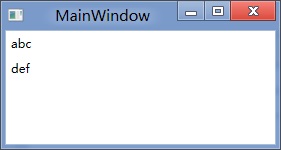
效果:
<StackPanel DataContext="abc"> <Label Content="{Binding}"></Label> <Label Content="{Binding RelativeSource={RelativeSource Self},Path=DataContext}"></Label> </StackPanel>

<StackPanel DataContext="abc"> <Label Content="{Binding}"></Label> <Label DataContext="def" Content="{Binding RelativeSource={RelativeSource Self},Path=DataContext}"></Label> </StackPanel>
2.在Template的Trigger中改变Template中某个样式控件的属性
<Style TargetType="{x:Type Button}"> <Setter Property="Template"> <Setter.Value> <ControlTemplate TargetType="{x:Type Button}"> <Border> <Label x:Name="PART_Label" Content="{TemplateBinding ContentA}" /> </Border>
<ControlTemplate.Triggers> <Trigger Property="IsChecked" Value="True"> 注: <Setter TargetName="PART_Label" Property="Content" Value="{Binding Path=ContentB, RelativeSource={RelativeSource TemplatedParent}}" /> </Trigger> </ControlTemplate.Triggers> </ControlTemplate> </Setter.Value> </Setter> </Style>
当然把注:的这句改成<Setter TargetName="PART_Label" Property="Content" Value="{Binding Path=ContentB, RelativeSource={RelativeSource AncestorType={x:Type Button}}}">效果一样。
我们来看一看Elementname,Source,RelativeSource 三种绑定的方式
1.ElementName顾名思义就是根据Ui元素的Name来进行绑定:
例子:
<Window x:Name="MainWindow">
<Grid> <Button Background=”{Binding ElementName=MainWindow, Path=Background}”/> </Grid>
</Window>
效果等同于
<Window>
<Grid> <Button Background=”{Binding RelativeSource={RelativeSource Mode=FindAncestor, AncestorType={x:Type Window},Path=Background}”/> </Grid>
</Window>
区别:
ElementName属性用于引用一个UI对象的名称,其的作用域在同一XAML文件内,不能引用另一XAML文件的某个Ui元素名。
2.Source属性用于指定对象绑定路径的引用。 其特点是:Source属性通常用于绑定设置的对象时,是已知的。
<Window x:Name="MainWindow">
<Grid> <Button Background=”{Binding Source={StaticResource ButtonStyle}}”/> </Grid>
</Window>
3.RelativeSource
在不确定绑定的Source时,但知道与绑定对象两者相对关系时就需要使用RelativeSource,这也是RelativeSource 与ElementName和Source的最大区别。
RelativeSource 的三种典型用法:
/1.UI元素的一个属性绑定在自身的另一个属性上
<Label Background = {Binding Path=Forgroud, RelativeSource={RelativeSource Self}} />
/2.UI元素的一个属性绑定在某个父元素的属性上
<Grid>
<Label Background = {Binding Path=Background, RelativeSource={RelativeSource AncestorType={x:Type Grid}}}/>
</Grid>
/3.Template中的元素的属性绑定在Template使用者元素的属性上
{Binding Path=PathToProperty, RelativeSource={RelativeSource TemplatedParent}}
例子:
<Style TargetType="{x:Type local:NumericUpDown}"> <Setter Property="HorizontalAlignment" Value="Center"/> <Setter Property="VerticalAlignment" Value="Center"/> <Setter Property="Template"> <Setter.Value> <ControlTemplate TargetType="{x:Type local:NumericUpDown}"> <Grid Margin="3"> <Grid.RowDefinitions> <RowDefinition/> <RowDefinition/> </Grid.RowDefinitions> <Grid.ColumnDefinitions> <ColumnDefinition/> <ColumnDefinition/> </Grid.ColumnDefinitions> <Border BorderThickness="1" BorderBrush="Gray" Margin="2" Grid.RowSpan="2" VerticalAlignment="Center" HorizontalAlignment="Stretch">
<TextBlock Text="{Binding RelativeSource={RelativeSource TemplatedParent}, Path=Value}" Width="60" TextAlignment="Right" Padding="5"/> </Border> </Grid> </ControlTemplate> </Setter.Value> </Setter> </Style>
利用TemplateBinding 绑定模板与原对象之间的属性
{TemplateBinding Path=PathToProperty}
例子:
<ControlTemplate TargetType="{x:Type Button}" x:Key="buttonTemp"> <Border BorderThickness="3" Background="{TemplateBinding Foreground}"> <TextBlock Foreground="{TemplateBinding Background}"/> </Border> </ControlTemplate>
<转>WPF 中的绑定的更多相关文章
- 封装:WPF中可以绑定的BindPassWord控件
原文:封装:WPF中可以绑定的BindPassWord控件 一.目的:本身自带的PassWord不支持绑定 二.Xaml部分 <UserControl x:Class="HeBianG ...
- WPF 中双向绑定通知机制之ObservableCollection使用
msdn中 ObservableCollection<T> 类 表示一个动态数据集合,在添加项.移除项或刷新整个列表时,此集合将提供通知. 在许多情况下,所使用的数据是对象的集合 ...
- WPF中RadioButton绑定数据的正确方法
RadioButton一般用于单选的时候,也就是从一组值中选择一个值. 比如性别有“男”和“女”两种取值,而对于一个员工的实例来说,性别的取值要么是男,要么是女. 这种时候一般就会用到RadioBut ...
- ComboBox在WPF中的绑定示例:绑定项、集合、转换,及其源代码
示例1.Selector(基类) 的示例Controls/SelectionControl/SelectorDemo.xaml <Page x:Class="Windows10.Con ...
- WPF中Grid绑定DataTable数据。
1.首先引用DocumentFormat.OpenXml.dll 2.然后新建一个OpenExcelHelper类,将Excel转化为Datatable. /// <summary> ...
- WPF 中的绑定方式
1.元素间的绑定 xaml方式 <Slider Name="slider1" Value="20"/> <TextBlock T ...
- WPF中ItemsControl绑定到Google ProtocolBuffer的结构体时的性能问题
背景: 最近遇到一个DataGrid的性能问题:里面大概有4000个数据, 绑定的ItemSource的类也只有一层数据,即简单的List(里面每个是Protocol Buffer自动产生的一个类,1 ...
- wpf中datagrid绑定数据源发生改变
1.若datagrid绑定的数据源是同一个的话,即使里面的数据不同.页面也不会刷新,则需要重置数据源,再绑定.处理如下: datagrid1.ItemsSource=ListModule; 若List ...
- WPF中ComboBox绑定数据库自动读取产生数据
前台端 <ComboBox HorizontalAlignment="Name="cmb_SSBM" DisplayMemberPath="NAME&qu ...
随机推荐
- liteos分散加载(十四)
1. 概述 1.1 基本概念 分散加载是一种实现特定代码快速启动的技术,通过优先加载特定代码到内存,达到缩短从系统开机到特定代码执行的时间.可被应用来实现关键业务的快速启动. 嵌入式系统通过uboot ...
- PyCharm重命名文件时更改引用的地方
Shift + F6 在文件夹直接更改文件名称时,其它文件里有调用这个模块的话,名称是不会改变的,只会报错,显示找不到这个模块,这时,可以在pycharm里直接更改 右键你需要改名的文件,选择Refa ...
- 无序数组中用 快速排序的分治思想 寻找第k大元素
#include <stdio.h> int *ga; int galen; void print_a(){ ; i < galen; i++){ printf("%d & ...
- 9.Java基础_for/while/do-while循环
/* for循环(同C++) 初始化变量的作用域为循环体 出了循环体,初始化的局部变量消失 for(初始化;条件判断;条件控制){ 循环体; } while循环 while(条件判断){ 循环体; } ...
- Centos 7 自动安装系统-pxe
一.简介 PXE(Pre-boot Execution Environment,预启动执行环境)是由Intel公司开发的最新技术,工作于Client/Server的网络模式,支持工作站通过网络从远端服 ...
- Pwnable-fd
打开Ubuntu输入ssh fd@pwnable.kr -p2222,连接之后输入密码guest 之后就是ls -l看看里面的文件和权限,fd.fd.c.flag 看看fd.c的源码 #include ...
- C++ int 和string互相转化
1.int转换成string );//"-12" );//"12" +);//"1" 2.string转换成int );//"-1 ...
- NOIP201310华容道
题目描述 Description 小 B 最近迷上了华容道,可是他总是要花很长的时间才能完成一次.于是,他想到用编程来完成华容道:给定一种局面, 华容道是否根本就无法完成,如果能完成, 最少需要多少时 ...
- 冒泡排序法(C语言)
冒泡排序(Bubble Sort)一种计算机科学领域的较简单的排序算法.它重复地走访过要排序的元素列,依次比较两个相邻的元素,如果顺序(如从大到小.首字母从从Z到A)错误就把他们交换过来.走访元素的工 ...
- 关于webpack的面试题
随着现代前端开发的复杂度和规模越来越庞大,已经不能抛开工程化来独立开发了,如react的jsx代码必须编译后才能在浏览器中使用:又如sass和less的代码浏览器也是不支持的. 而如果摒弃了这些开发框 ...