
PIE SDK 基于Dot net bar实现比例尺控件
最近在搭建主界面的过程中,为了界面美观大方,使用了Dot net bar。但是,在Dot net bar的状态栏中放置PIE SDK自带的比例尺控件,运行主界面程序后,比例尺控件始终不显示比例尺信息,得不到想要的效果。如果使用Windows Form自带的状态栏,则能够正常显示比例尺信息。我猜想,可能是PIE SDK自带的比例尺控件与Dot net bar不兼容。我参考了官方博客(https://www.cnblogs.com/PIESat/p/10272779.html),利用Dot net bar拓展实现了比例尺控件。
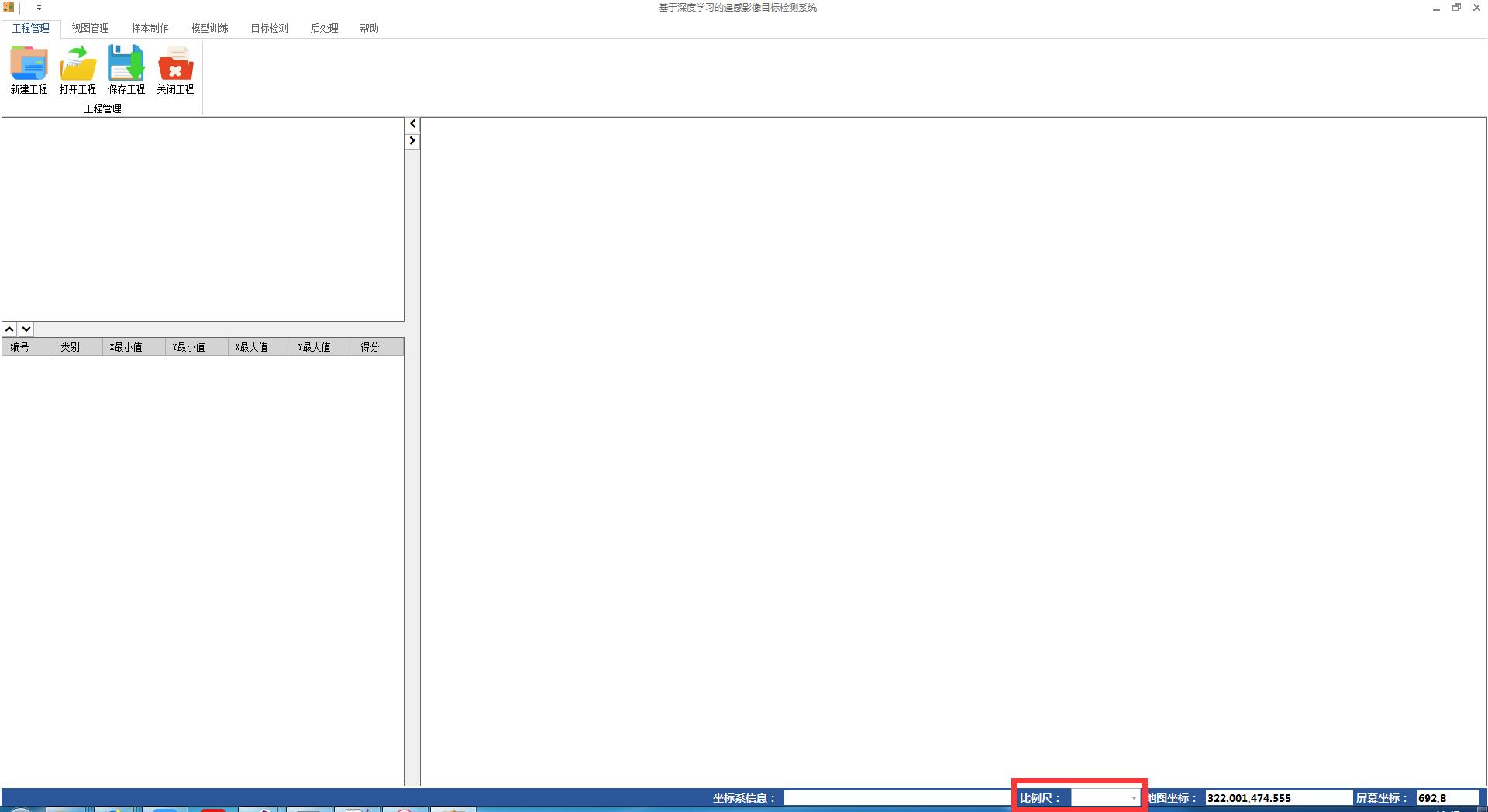
基于Dot net bar,利用PIE SDK自带的比例尺控件(代码如下),运行程序后的显示效果如下图(不能正常显示比例尺信息):
  public FormMain()

         {

             InitializeComponent();

             mapControlMain.OnExtentUpdated += mapControlMain_OnExtentUpdated;//鹰眼图

             ///比例尺控件

             //Common.MapScaleCommandControl mapScaleControl = new Common.MapScaleCommandControl();

             //mapScaleControl.Control = comboBoxItem_MapScale;

             //mapScaleControl.OnCreate(mapControlMain);

             MapScaleCommandControl mapScale = new MapScaleCommandControl();

             mapScale.Control = comboBoxItem_MapScale;

             mapScale.OnCreate(mapControlMain);

             //进度条//首先隐藏需要时显现

             this.progressBarItem.Visible = false;

             Control.CheckForIllegalCrossThreadCalls = false;

         }
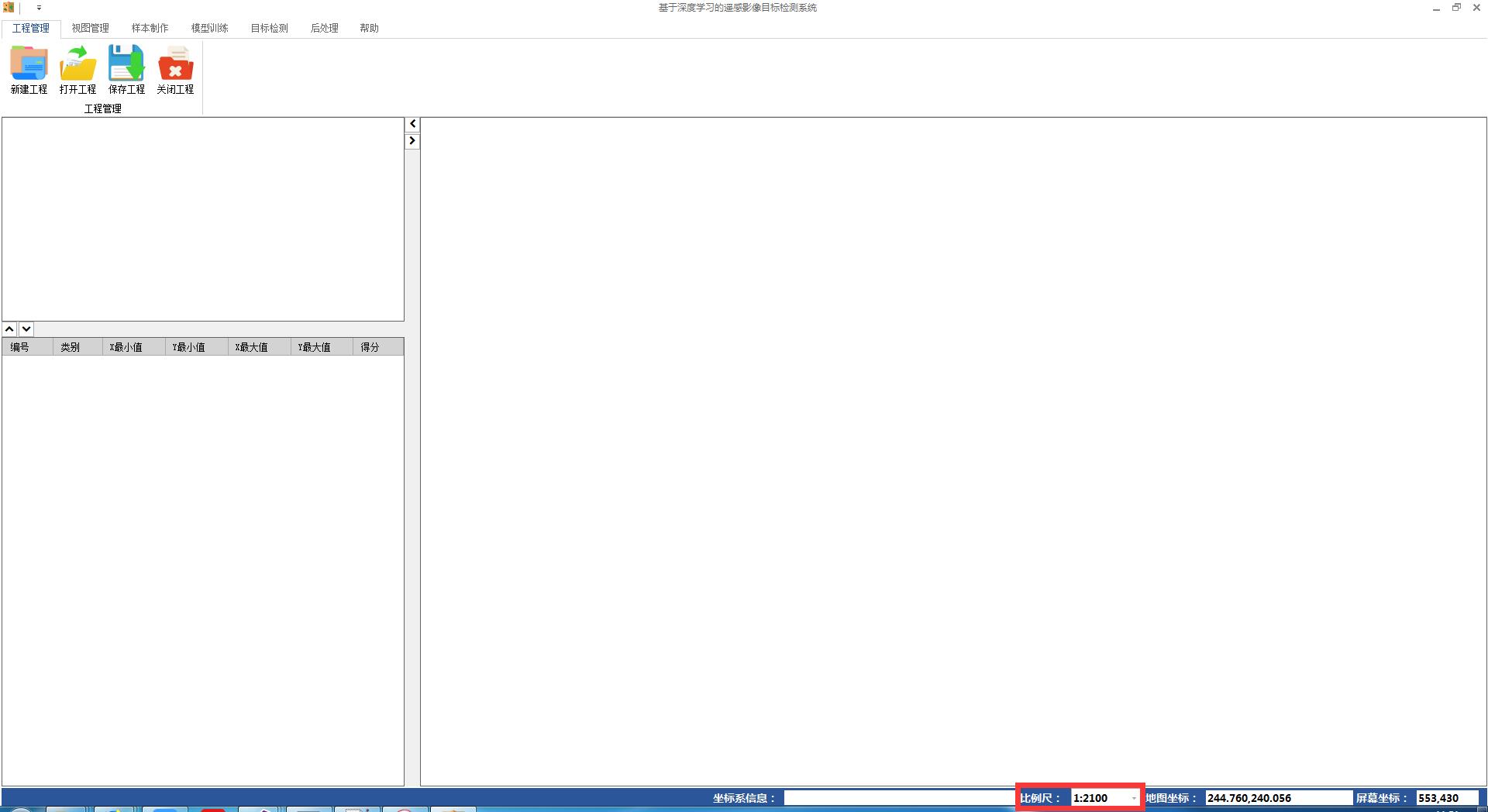
利用基于Dot net bar拓展实现的比例尺控件(代码如下),运行程序后显示的效果如下图(可正常显示比例尺信息):
 public FormMain()

         {

             InitializeComponent();

             mapControlMain.OnExtentUpdated += mapControlMain_OnExtentUpdated;//鹰眼图

             ///比例尺控件

             Common.MapScaleCommandControl mapScaleControl = new Common.MapScaleCommandControl();

             mapScaleControl.Control = comboBoxItem_MapScale;

             mapScaleControl.OnCreate(mapControlMain);

             //MapScaleCommandControl mapScale = new MapScaleCommandControl();

             //mapScale.Control = comboBoxItem_MapScale;

             //mapScale.OnCreate(mapControlMain);

             //进度条//首先隐藏需要时显现

             this.progressBarItem.Visible = false;

             Control.CheckForIllegalCrossThreadCalls = false;

         }
利用Dot net bar拓展实现的比例尺控件代码如下:
 /// <summary>

     /// 比例尺控件

     /// </summary>

     #region

     class MapScaleCommandControl : PIE.Controls.BaseCommandControl

     {

         #region 成员变量

         /// <summary>

         /// ToolStripComboBox

         /// </summary>

         private DevComponents.DotNetBar.ComboBoxItem m_DotNetBarComboxItem = null;

         #endregion

         /// <summary>

         /// 构造函数

         /// </summary>

         public MapScaleCommandControl()

         {

             this.Caption = "";

             this.Name = "";

             this.Checked = false;

             this.Enabled = false;

         }

         /// <summary>

         /// Control

         /// </summary>

         public override object Control

         {

             get

             {

                 return m_DotNetBarComboxItem;

             }

             set

             {

                 m_DotNetBarComboxItem = value as DevComponents.DotNetBar.ComboBoxItem;

             }

         }

         /// <summary>

         /// 是否可用

         /// </summary>

         public override bool Enabled

         {

             get

             {

                 if (m_Hook == null || m_HookHelper.ActiveView.FocusMap.LayerCount < ) return false;

                 return true;

             }

             protected set

             {

                 base.Enabled = value;

             }

         }

         /// <summary>

         /// 创建插件对象

         /// </summary>

         /// <param name="hook"></param>

         public override void OnCreate(object hook)

         {

             if (hook == null) return;

             if (!(hook is PIE.Carto.IPmdContents)) return;

             this.Enabled = true;

             m_Hook = hook;

             m_HookHelper.Hook = hook;

             if (m_DotNetBarComboxItem == null) return;

             DevComponents.DotNetBar.ComboBoxItem comboxItem = this.m_DotNetBarComboxItem as DevComponents.DotNetBar.ComboBoxItem;

             if (comboxItem == null) return;

             comboxItem.Items.Add("1:500");

             comboxItem.Items.Add("1:1000");

             comboxItem.Items.Add("1:5000");

             comboxItem.Items.Add("1:10000");

             comboxItem.Items.Add("1:50000");

             comboxItem.Items.Add("1:100000");

             comboxItem.Items.Add("1:500000");

             comboxItem.Items.Add("1:1000000");

             //comboxItem.KeyPress += comboxItem_KeyPress;

             comboxItem.SelectedIndexChanged += comboxItem_SelectedIndexChanged;

             (hook as PIE.AxControls.MapControl).OnExtentUpdated += MapScaleCommandControl_OnExtentUpdated;

         }

         void comboxItem_SelectedIndexChanged(object sender, EventArgs e)

         {

             //获取选中的比例尺

             string strScale = m_DotNetBarComboxItem.Text.ToString();

             int count = strScale.Length;

             if (count < ) return;

             string str = strScale.Substring(, count - );

             double scale = Convert.ToDouble(str);

             if (scale < ) return;

             //改变地图的比例尺并更新

             m_HookHelper.ActiveView.DisplayTransformation.MapScale = scale;

             m_HookHelper.ActiveView.PartialRefresh(PIE.Carto.ViewDrawPhaseType.ViewAll);

         }

         private void MapScaleCommandControl_OnExtentUpdated(object sender, bool sizeChanged, PIE.Geometry.IEnvelope newEnvelope)

         {

             string strScale = m_HookHelper.ActiveView.DisplayTransformation.MapScale.ToString();

             double scale = Convert.ToDouble(strScale);

             strScale = "1:" + scale.ToString("");

             m_DotNetBarComboxItem.ComboBoxEx.Text = strScale;

             this.m_DotNetBarComboxItem.Text = strScale;

         }

         /// <summary>

         /// 比例尺文本变化事件

         /// </summary>

         /// <param name="sender"></param>

         /// <param name="e"></param>

         void comboxItem_TextChanged(object sender, EventArgs e)

         {

             //获取选中的比例尺

             string strScale = m_DotNetBarComboxItem.Text.ToString();

             int count = strScale.Length;

             if (count < ) return;

             string str = strScale.Substring(, count - );

             double scale = Convert.ToDouble(str);

             if (scale < ) return;

             //改变地图的比例尺并更新

             m_HookHelper.ActiveView.DisplayTransformation.MapScale = scale;

             m_HookHelper.ActiveView.PartialRefresh(PIE.Carto.ViewDrawPhaseType.ViewAll);

         }

         /// <summary>

         /// 点击事件

         /// </summary>

         public override void OnClick()

         {

             base.OnClick();

         }

     }

 #endregion
有不对的地方,请大家批评指正。
PIE SDK 基于Dot net bar实现比例尺控件的更多相关文章
- 基于存储过程的MVC开源分页控件--LYB.NET.SPPager
摘要 现在基于ASP.NET MVC的分页控件我想大家都不陌生了,百度一下一大箩筐.其中有不少精品,陕北吴旗娃杨涛大哥做的分页控件MVCPager(http://www.webdiyer.com/)算 ...
- FineUI 基于 ExtJS 的专业 ASP.NET 控件库
FineUI 基于 ExtJS 的专业 ASP.NET 控件库 http://www.fineui.com/
- 基于Bootstrap的JQuery TreeView树形控件,数据支持json字符串、list集合(MVC5)<二>
上篇博客给大家介绍了基于Bootstrap的JQuery TreeView树形控件,数据支持json字符串.list集合(MVC5)<一>, 其中的两种方式都显得有些冗余.接着上篇博客继续 ...
- 百度地图API示例之添加/删除工具条、比例尺控件
代码 <!DOCTYPE html> <html> <head> <meta http-equiv="Content-Type" cont ...
- 基于Qt的第三方库和控件
====================== 基于Qt的第三方库和控件 ====================== libQxt -------- http://dev.libqxt.o ...
- 基于存储过程的MVC开源分页控件
基于存储过程的MVC开源分页控件--LYB.NET.SPPager 摘要 现在基于ASP.NET MVC的分页控件我想大家都不陌生了,百度一下一大箩筐.其中有不少精品,陕北吴旗娃杨涛大哥做的分页控件M ...
- Web应用程序开发,基于Ajax技术的JavaScript树形控件
感谢http://www.cnblogs.com/dgrew/p/3181769.html#undefined 在Web应用程序开发领域,基于Ajax技术的JavaScript树形控件已经被广泛使用, ...
- 基于Bootstrap仿淘宝分页控件实现
.header { cursor: pointer } p { margin: 3px 6px } th { background: lightblue; width: 20% } table { t ...
- 【转】Appium基于安卓的各种FindElement的控件定位方法实践
原文地址:http://blog.csdn.net/zhubaitian/article/details/39754041#t11 AppiumDriver的各种findElement方法的尝试,尝试 ...
随机推荐
- SQL Server 两条数据创建时自动关联
begin ),(, ))) from workplan a join org_employee b on b.id = a.idowner , LEN(aa.sglzbbh))) glh from ...
- Django之 数据库ORM
一.ORM Django的 业务 少不了 跟数据库打交道,不然没有数据库保存一些数据将是一件很糟糕的事情.Django 对 数据库 支持原生的 SQL语句,但更好的对数据库支持,Django自己有一套 ...
- 不设置readable,读取图片数据
直接加载非Readable的Texture,是不能访问其像素数据的: // 加载 var tex = AssetDatabase.LoadAssetAtPath<Texture2D>(as ...
- Python 大佬 的经典设计格言 ---- 铭记于心
美丽优于丑陋.清楚优于含糊.简单优于复杂.复杂优于繁琐.平坦优于曲折.宽松优于密集.重要的是可读性.特殊的案例不足以特殊到破坏规则.尽管实践可以打破真理.错误却不可置之不理.除非另有明确要求.面对模棱 ...
- vue-router路由传参之query和params
首先简单来说明一下$router和$route的区别 //$router : 是路由操作对象,只写对象 //$route : 路由信息对象,只读对象 //操作 路由跳转 this.$router.pu ...
- BeanShell实现加密解密功能
一,在IDEA中写好加密的脚本 二,然后将整个包文件导出,生成jar包 三,将jar包文件放到jmeter的lib/ext目录下 然后在jmeter的BeanShell中引入该类,调用其中的加密方法 ...
- git stash 命令
摘自: http://blog.csdn.net/longxiaowu/article/details/26815433 关于git stash命令的使用方法网上一大把,我想记录的是我在使用过程中觉得 ...
- node fs相对路径
如果在js里面使用了node.js的fs,在传入path参数时,如果使用相对路径,按照根目录的层级就是用就好. 比如:目录结构为: a -b -c -c1.js d 在c1.js中调用时,如果需要使用 ...
- ionic-环境搭建-入门
环境搭建 1.官方推荐: npm install -g cordova ionic 使用npm国内安装小坑,下载慢,还是失败 2.先安装cnpm,使用淘宝镜像:: npm install -g cnp ...
- Linux学习笔记-第9天 与windows相同的分区知识
可能是因为之前自己已经对分区.引导.操作系统已经有了足够的认知和实践经验,也可能是因为这个知识已经看了三遍的原因.最近笔记有点少. 不是特别同意老师 新硬盘也可以不分区的关点.默认硬盘不分区应该是不能 ...