
数学之路-python计算实战(21)-机器视觉-拉普拉斯线性滤波
拉普拉斯线性滤波,.边缘检測
Laplacian
Calculates the Laplacian of an image.
- C++: void Laplacian(InputArray src, OutputArray dst, int ddepth, int ksize=1, double scale=1, double delta=0, int borderType=BORDER_DEFAULT )
- Python: cv2.Laplacian(src, ddepth[, dst[, ksize[, scale[, delta[, borderType]]]]]) → dst
- C: void cvLaplace(const CvArr* src, CvArr* dst, int aperture_size=3 )
highlight=laplace#void cvLaplace(const CvArr* src, CvArr* dst, int aperture_size)" title="Permalink to this definition" style="color: rgb(101, 161, 54); text-decoration: none; visibility: hidden; font-size: 0.8em; padding: 0px 4px;">
- Python: cv.Laplace(src, dst, apertureSize=3) → None
-
Parameters: - src – Source image.
- dst – Destination image of the same size and the same number of channels as src .
- ddepth – Desired depth of the destination image.
- ksize – Aperture size used to compute the second-derivative filters. See getDerivKernels() for details. The size must be positive and odd.
- scale – Optional scale factor for the computed Laplacian values. By default, no scaling is applied. See
highlight=laplace#void getDerivKernels(OutputArray kx, OutputArray ky, int dx, int dy, int ksize, bool normalize, int ktype)" title="void getDerivKernels(OutputArray kx, OutputArray ky, int dx, int dy, int ksize, bool normalize, int ktype)" style="color: rgb(0, 144, 217); text-decoration: none;">getDerivKernels()
for details. - delta – Optional delta value that is added to the results prior to storing them in dst .
- borderType – Pixel extrapolation method. See
highlight=laplace#int borderInterpolate(int p, int len, int borderType)" title="int borderInterpolate(int p, int len, int borderType)" style="color: rgb(0, 144, 217); text-decoration: none;">borderInterpolate()
for details.
The function calculates the Laplacian of the source image by adding up the second x and y derivatives calculated using the Sobel operator:

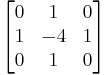
This is done when ksize > 1 . When ksize == 1 , the Laplacian is computed by filtering the image with the following  aperture:

Laplace
计算图像的 Laplacian 变换
void cvLaplace( const CvArr* src, CvArr* dst, int aperture_size=3 );
- src
- 输入图像.
- dst
- 输出图像.
- aperture_size
- 核大小 (与 cvSobel 中定义一样).
函数 cvLaplace 计算输入图像的 Laplacian变换,方法是先用 sobel 算子计算二阶 x- 和 y- 差分,再求和:
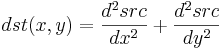
对 aperture_size=1 则给出最快计算结果,相当于对图像採用例如以下内核做卷积:
本博客全部内容是原创,假设转载请注明来源
http://blog.csdn.net/myhaspl/
# -*- coding: utf-8 -*-

#线性锐化滤波,拉普拉斯图像变换

#code:myhaspl@myhaspl.com

import cv2

fn="test6.jpg"

myimg=cv2.imread(fn)

img=cv2.cvtColor(myimg,cv2.COLOR_BGR2GRAY)

jgimg=cv2.Laplacian(img,-1)

cv2.imshow('src',img)

cv2.imshow('dst',jgimg)

cv2.waitKey()

cv2.destroyAllWindows()

本博客全部内容是原创,假设转载请注明来源
http://blog.csdn.net/myhaspl/
数学之路-python计算实战(21)-机器视觉-拉普拉斯线性滤波的更多相关文章
- 数学之路-python计算实战(20)-机器视觉-拉普拉斯算子卷积滤波
拉普拉斯算子进行二维卷积计算,线性锐化滤波 # -*- coding: utf-8 -*- #线性锐化滤波-拉普拉斯算子进行二维卷积计算 #code:myhaspl@myhaspl.com impor ...
- 数学之路-python计算实战(17)-机器视觉-滤波去噪(中值滤波)
Blurs an image using the median filter. C++: void medianBlur(InputArray src, OutputArray dst, int ks ...
- 数学之路-python计算实战(15)-机器视觉-滤波去噪(归一化块滤波)
# -*- coding: utf-8 -*- #code:myhaspl@myhaspl.com #归一化块滤波 import cv2 import numpy as np fn="tes ...
- 数学之路-python计算实战(14)-机器视觉-图像增强(直方图均衡化)
我们来看一个灰度图像,让表示灰度出现的次数,这样图像中灰度为 的像素的出现概率是 是图像中全部的灰度数, 是图像中全部的像素数, 实际上是图像的直方图,归一化到 . 把 作为相应于 的累计概率 ...
- 数学之路-python计算实战(19)-机器视觉-卷积滤波
filter2D Convolves an image with the kernel. C++: void filter2D(InputArray src, OutputArray dst, int ...
- 数学之路-python计算实战(9)-机器视觉-图像插值仿射
插值 Python: cv2.resize(src, dsize[, dst[, fx[, fy[, interpolation]]]]) → dst interpolation – interpol ...
- 数学之路-python计算实战(13)-机器视觉-图像增强
指数变换的基本表达式为:y=bc(x-a)-1 当中參数b.c控制曲线的变换形状,參数a控制曲线的位置. 指数变换的作用是扩展图像的高灰度级.压缩低灰度级.能够用于亮度过高的图像 本博客全部内容是原创 ...
- 数学之路-python计算实战(16)-机器视觉-滤波去噪(邻域平均法滤波)
# -*- coding: utf-8 -*- #code:myhaspl@myhaspl.com #邻域平均法滤波,半径为2 import cv2 import numpy as np fn=&qu ...
- 数学之路-python计算实战(18)-机器视觉-滤波去噪(双边滤波与高斯滤波 )
高斯滤波就是对整幅图像进行加权平均的过程.每个像素点的值,都由其本身和邻域内的其它像素值经过加权平均后得到.高斯滤波的详细操作是:用一个模板(或称卷积.掩模)扫描图像中的每个像素.用模板确定的邻域内像 ...
随机推荐
- Tensorflow入门-上
前置准备 在阅读本文之前,请确定你已经了解神经网络的基本结构以及前向传播.后向传播的基本原理,如果尚未了解,可以查看下文. 深度学习之神经网络 什么是TensorFlow? TensorFlow是Go ...
- bash - GNU Bourne-Again SHell
概述(SYNOPSIS) bash [options] [file] 版权所有(COPYRIGHT) Bash is Copyright (C) 1989-2002 by the Free Softw ...
- 聚类和EM算法——K均值聚类
python大战机器学习——聚类和EM算法 注:本文中涉及到的公式一律省略(公式不好敲出来),若想了解公式的具体实现,请参考原著. 1.基本概念 (1)聚类的思想: 将数据集划分为若干个不想交的子 ...
- [笔记] APIO 2018 Day1
计算折纸 computaional origami 全息算法(???) margulis napkin problem 素数里有任意长的等差数列 xor gate Σxi or gate(exact ...
- [Python3网络爬虫开发实战] 2.5-代理的基本原理
我们在做爬虫的过程中经常会遇到这样的情况,最初爬虫正常运行,正常抓取数据,一切看起来都是那么美好,然而一杯茶的功夫可能就会出现错误,比如403 Forbidden,这时候打开网页一看,可能会看到“您的 ...
- Centos7 静态IP配置
先将虚拟机设置为桥接模式: 虚拟机网络将VMnet8设置为NAT模式: 查看本机IP地址,ipconfig,记住ipv4地址和默认网关地址,等会配置的时候要用 启动Centos,进入终端模式,设置IP ...
- Orcad中较好的习惯背景
设置背景,能让眼睛不那么疲劳,尤其是白色背景,有的时候很耀眼,看的时间长了,眼疼. 因此萌生出更换背景的想法: Option->Preference中 第一列的Prin中"Alias& ...
- Mac 共享无线网络
dock栏启动『设置』进入下一步. 进入设置后,点击『共享』进入下一步. 进入共享后 1.选择左边框中『互联网共享』,就会看到截图右边的样子 2.『共享以下来源链接』一项选择『以太网』(默认应 ...
- Python 循环语句(break和continue)
Python 循环语句(break和continue) while 语句时还有另外两个重要的命令 continue,break 来跳过循环,continue 用于跳过该次循环,break 则是用于退出 ...
- xtu summer individual-4 A - Beautiful IP Addresses
Beautiful IP Addresses Time Limit: 2000ms Memory Limit: 262144KB This problem will be judged on Code ...