
制作并发布个人CocoaPods库
随着对 CocoaPods 越来越多的依赖,我们也可以尝试把自己的库发布到它上面。
1.在Github上新建一个项目(名字我随便取了一个,其他步骤截图为WCUIKit)。自己做相应修改即可。
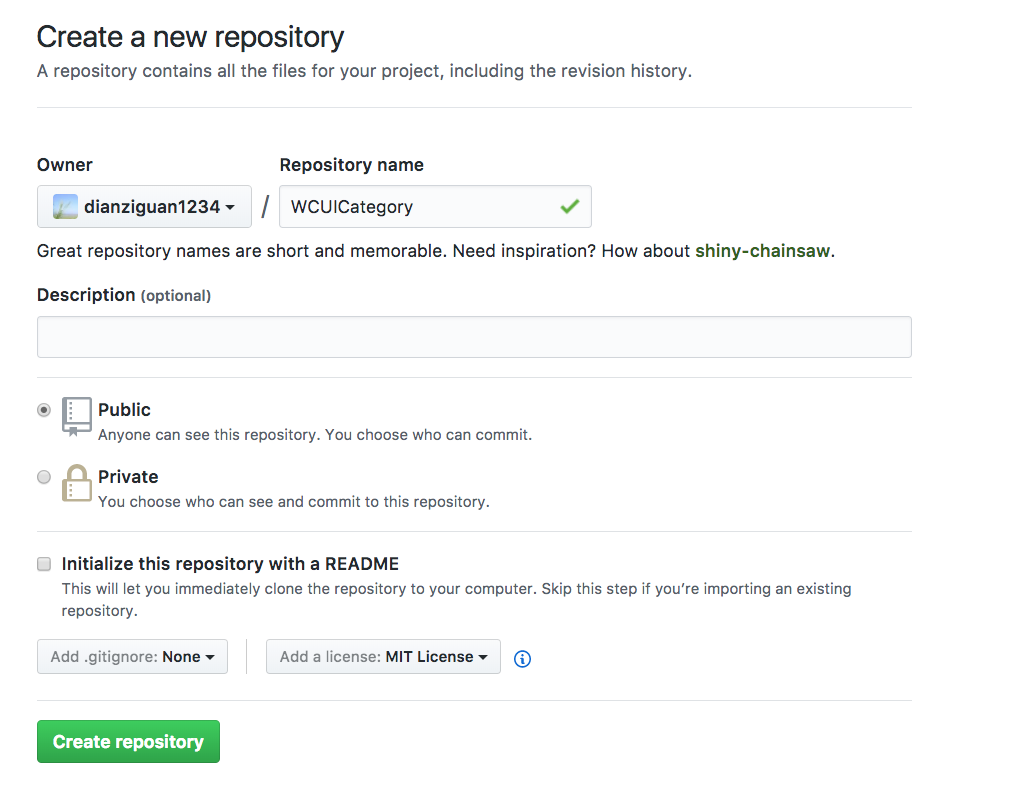
2.克隆到本地 git clone https://github.com/dianziguan1234/WCUIKit.git
Xcode创建项目。添加自己的代码。目录结构大致为
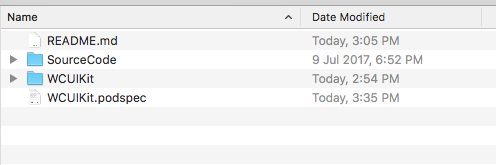
其中SourceCode存放源码部分,就是后来通过cocoapods安装以后得到的代码块。
WCUIKit存放我们Xcode创建的项目。
3.重要的一步。添加tag并提交github master分支。
git add -A && git commit -m "Release 1.0.2"

git tag '1.0.2'

git push --tags

git push origin master
4:创建podspec文件。
cd WCUIKit

pod spec create WCUIKit.podspec
之后在该目录下会生成一个 WCUIKit.podspec 文件,该文件是 Ruby 编写的,打开并编辑这个文件,填写好配置文件。
#

#  Be sure to run `pod spec lint WCUIKit.podspec' to ensure this is a

#  valid spec and to remove all comments including this before submitting the spec.

#

#  To learn more about Podspec attributes see http://docs.cocoapods.org/specification.html

#  To see working Podspecs in the CocoaPods repo see https://github.com/CocoaPods/Specs/

#

Pod::Spec.new do |s|

  # ―――  Spec Metadata  ―――――――――――――――――――――――――――――――――――――――――――――――――――――――――― #

  #

  #  These will help people to find your library, and whilst it

  #  can feel like a chore to fill in it's definitely to your advantage. The

  #  summary should be tweet-length, and the description more in depth.

  #

  s.name         = "WCUIKit"

  s.version      = "1.0.2"

  s.summary      = "任意视图添加角标"

  # This description is used to generate tags and improve search results.

  #   * Think: What does it do? Why did you write it? What is the focus?

  #   * Try to keep it short, snappy and to the point.

  #   * Write the description between the DESC delimiters below.

  #   * Finally, don't worry about the indent, CocoaPods strips it!

  s.homepage     = "https://github.com/dianziguan1234/WCUIKit"

  # s.screenshots  = "www.example.com/screenshots_1.gif", "www.example.com/screenshots_2.gif"

  # ―――  Spec License  ――――――――――――――――――――――――――――――――――――――――――――――――――――――――――― #

  #

  #  Licensing your code is important. See http://choosealicense.com for more info.

  #  CocoaPods will detect a license file if there is a named LICENSE*

  #  Popular ones are 'MIT', 'BSD' and 'Apache License, Version 2.0'.

  #

  #s.license      = "MIT (example)"

   s.license      = { :type => "MIT", :file => "FILE_LICENSE" }

  # ――― Author Metadata  ――――――――――――――――――――――――――――――――――――――――――――――――――――――――― #

  #

  #  Specify the authors of the library, with email addresses. Email addresses

  #  of the authors are extracted from the SCM log. E.g. $ git log. CocoaPods also

  #  accepts just a name if you'd rather not provide an email address.

  #

  #  Specify a social_media_url where others can refer to, for example a twitter

  #  profile URL.

  #

  s.author             = { "guanweicheng" => "1396539283@qq.com" }

  # Or just: s.author    = "guanweicheng"

  # s.authors            = { "guanweicheng" => "1396539283@qq.com" }

  # s.social_media_url   = "http://twitter.com/guanweicheng"

  # ――― Platform Specifics ――――――――――――――――――――――――――――――――――――――――――――――――――――――― #

  #

  #  If this Pod runs only on iOS or OS X, then specify the platform and

  #  the deployment target. You can optionally include the target after the platform.

  #

   s.platform     = :ios

   s.platform     = :ios, "8.0"

  #  When using multiple platforms

  # s.ios.deployment_target = "5.0"

  # s.osx.deployment_target = "10.7"

  # s.watchos.deployment_target = "2.0"

  # s.tvos.deployment_target = "9.0"

  # ――― Source Location ―――――――――――――――――――――――――――――――――――――――――――――――――――――――――― #

  #

  #  Specify the location from where the source should be retrieved.

  #  Supports git, hg, bzr, svn and HTTP.

  #

  s.source       = { :git => "https://github.com/dianziguan1234/WCUIKit.git", :tag => "#{s.version}" }

  # ――― Source Code ―――――――――――――――――――――――――――――――――――――――――――――――――――――――――――――― #

  #

  #  CocoaPods is smart about how it includes source code. For source files

  #  giving a folder will include any swift, h, m, mm, c & cpp files.

  #  For header files it will include any header in the folder.

  #  Not including the public_header_files will make all headers public.

  #

  s.source_files  = 'SourceCode/**/*.{h,m}'

  #s.exclude_files = "SourceCode/"

  s.public_header_files = "SourceCode/**/*.h"

  # ――― Resources ―――――――――――――――――――――――――――――――――――――――――――――――――――――――――――――――― #

  #

  #  A list of resources included with the Pod. These are copied into the

  #  target bundle with a build phase script. Anything else will be cleaned.

  #  You can preserve files from being cleaned, please don't preserve

  #  non-essential files like tests, examples and documentation.

  #

  # s.resource  = "icon.png"

  # s.resources = "Resources/*.png"

  # s.preserve_paths = "FilesToSave", "MoreFilesToSave"

  # ――― Project Linking ―――――――――――――――――――――――――――――――――――――――――――――――――――――――――― #

  #

  #  Link your library with frameworks, or libraries. Libraries do not include

  #  the lib prefix of their name.

  #

  # s.framework  = "SomeFramework"

  # s.frameworks = "SomeFramework", "AnotherFramework"

  # s.library   = "iconv"

  # s.libraries = "iconv", "xml2"

  # ――― Project Settings ――――――――――――――――――――――――――――――――――――――――――――――――――――――――― #

  #

  #  If your library depends on compiler flags you can set them in the xcconfig hash

  #  where they will only apply to your library. If you depend on other Podspecs

  #  you can include multiple dependencies to ensure it works.

   s.requires_arc = true

  # s.xcconfig = { "HEADER_SEARCH_PATHS" => "$(SDKROOT)/usr/include/libxml2" }

  # s.dependency "JSONKit", "~> 1.4"

end
红色部分稍微留意下。如果需要详细文档请移步 Specs and the Specs Repo。
5.验证podspec文件
cd WCUIKit
pod spec lint WCUIKit.podspec
6.注册上传到cocoapods
pod trunk register 1396539283@qq.com 'guanweicheng' --description='gwc'

pod trunk push WCUIKit.podspec
如果不出意外的话。会恭喜你发布成功。
7.然后可以pod search 你自己的库文件了。这里可能会出搜索不到的情况。参考链接解决即可(原理简单)。http://blog.cocoachina.com/article/29127
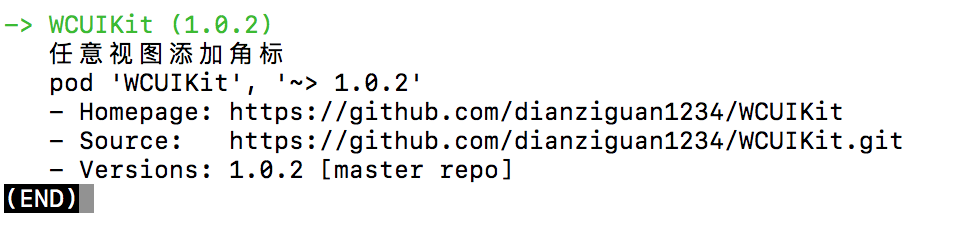
podspec文件可以参考我的项目。https://github.com/dianziguan1234/WCUIKit.git
制作并发布个人CocoaPods库的更多相关文章
- Xamarin:制作并发布apk
原文:Xamarin:制作并发布apk 终于到了激动人心的时刻:要向真机发布apk了.流程如下: 1 制作release版的android应用安装包apk文件: 1.1 用VS2012中文版制作:记得 ...
- 制作pypi上的安装库
下载地址 如何制作分发工具呢 setuppy 源码包 其他文件 制作过程 首先上场的肯定是setuppy了如下 然后是LICENCE 注册 测试 总结 自从接触Python以来也有几个月了,虽然主要的 ...
- 手把手图文并茂教你发布Android开源库
转载请把头部出处链接和尾部二维码一起转载,本文出自逆流的鱼,文章链接: http://blog.csdn.net/hejjunlin/article/details/52452220 经常逛githu ...
- 教你一步步发布一个开源库到 JCenter
今天想来分享下,如何一步步自己发布一个开源库到 JCenter 这方面的博客网上已经特别多了,所以本篇并不打算仅仅只是记录流程步骤而已,而是尽可能讲清楚,为什么需要有这个步骤,让大伙知其然的同时还知其 ...
- Egret第三方库的制作和使用(模块化 第三方库)
一.第三方库的制作 官方教程:第三方库的使用方法 水友帖子:新版本第三方库制作细节5.1.x 首先在任意需要创建第三方库的地方,右键,选择"在此处打开命令窗口" 输入egret c ...
- 【我的Android进阶之旅】快速创建和根据不同的版本类型(Dev、Beta、Release)发布Android 开发库到Maven私服
前言 由于项目越来越多,有很多公共的代码都可以抽取出一个开发库出来传到公司搭建好的Maven私服,以供大家使用. 之前搭建的Maven仓库只有Release和Snapshot两个仓库,最近由于开发库有 ...
- 发布Android开源库,看这个文章就够了!
最近在Flipboard实习期间写了一个轮播工具,技术上没什么难点,不过动画效果还是不错的,决定改改代码写个库开源出去.项目地址:http://github.com/chengdazhi/Decent ...
- Docker系列-(2) 镜像制作与发布
上篇文章引入了Docker的基本原理和操作,本节文章主要介绍如何制作Docker镜像和发布. 镜像文件结构 Docker镜像的本质是一系列文件的集合,这些文件依次叠加,形成了最后的镜像文件,类似于下图 ...
- 使用Jitpack发布开源Java库
原文:使用Jitpack发布开源Java库 | Stars-One的杂货小窝 很久之前也写过一篇使用Jitpack发布Android开源库的文章,详见Android开发--发布第三方库到JitPack ...
随机推荐
- tyvj1031 热浪
背景 USACO OCT09 9TH 描述 德克萨斯纯朴的民眾们这个夏天正在遭受巨大的热浪!!!他们的德克萨斯长角牛吃起来不错,可是他们并不是很擅长生產富含奶油的乳製品.Farmer John此时以先 ...
- Linux下汇编语言学习笔记44 ---
这是17年暑假学习Linux汇编语言的笔记记录,参考书目为清华大学出版社 Jeff Duntemann著 梁晓辉译<汇编语言基于Linux环境>的书,喜欢看原版书的同学可以看<Ass ...
- UVA 140_Bandwidth
题意: 定义一个结点的带宽是其距离所有相连结点的最远距离,一个图的带宽是图中所有结点带宽的最小值.给出一个图中各个结点的相邻情况,要求写出一个结点的排列,使得其所构成的图带宽最小. 分析: 枚举全排列 ...
- [bzoj3527][Zjoi2014]力_FFT
力 bzoj-3527 Zjoi-2014 题目大意:给定长度为$n$的$q$序列,定义$F_i=\sum\limits_{i<j}\frac{q_iq_j}{(i-j)^2}-\sum\lim ...
- Model、ModelMap、ModelAndView的使用和区别
1.Model的使用 数据传递:Model是通过addAttribute方法向页面传递数据的: 数据获取:JSP页面可以通过el表达式或C标签库的方法获取数据: return:return返回的是指定 ...
- DTRACE简介(2)
By samwan on 三月 21, 2007 通过上一次的介绍,相信大家对DTRACE已经有了一个初步的认识.上一次结束时专门留了一个例子,可能大家第一次看有很多不明白的地方,没有关系,随着我们对 ...
- PyMySQL - Python3 MySQL数据库连接 - 基本操作
一.Python连接MySQL数据库 1.导入模块 #导入模块 import pymysql 2.打开数据库连接 #打开数据库连接 #注意:这里已经假定存在数据库testdb,db指定了连接的 ...
- 【python自制】让大白成为你的个人助手!
我做这个软件就是要让卖萌进行究竟! 官方站点:http://www.jackeriss.com/companions.htm GitHub:https://github.com/Jackeriss/C ...
- zabbix学习系列之QQ消息报警
安装依赖包 环境 Zabbix: 3.2 OS:Centos 安装依赖包 yum install lrzsz chrony gcc gcc-c++ git openssl-devel perl-Ext ...
- leetcode第一刷_Best Time to Buy and Sell Stock
这样的题就不要去考虑N^2的算法了.肯定会超时的.乍一看,非常可能会想到贪心,可是普通的贪心思路是不行的,比方想找到一个最小值用来买入.尽管它跟最大值之间的差一定是最好的,可是最大值出如今它前面就不行 ...