
Navigation bar 的注意事项
Navigation bar 的注意事项
Bar button item 使用 button 作为 custom view,初始化 isEnabled 为 false,注意顺序
需要设置 bar button item 的 custom view 为 button,但一开始 isEnabled 要为 false。
生成一个 button
let leftButton = UIButton(frame: CGRect(x: 0, y: 0, width: 80, height: 44))

leftButton.setTitleColor(UIColor.green, for: .normal)

leftButton.setTitleColor(UIColor.red, for: .disabled)

leftButton.setTitle("Enabled", for: .normal)

leftButton.setTitle("Disabled", for: .disabled)

leftButton.addTarget(self, action: #selector(leftButtonClicked(_:)), for: .touchUpInside)
如果先设置 isEnabled,后设置 bar button item
leftButton.isEnabled = false

navigationItem.leftBarButtonItem = UIBarButtonItem(customView: leftButton)
结果 isEnabled 还是 true
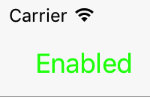
正确的顺序
navigationItem.leftBarButtonItem = UIBarButtonItem(customView: leftButton)

leftButton.isEnabled = false // or navigationItem.leftBarButtonItem?.isEnabled = false
结果 isEnabled 是 false
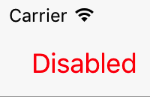
改变 navigation bar isTranslucent 属性会改变 view 的坐标
放置两个 label。其中, frameLabel 没有添加约束(NSLayoutConstraint),constraintLabel 左、右、下都有约束,与 view 相接。
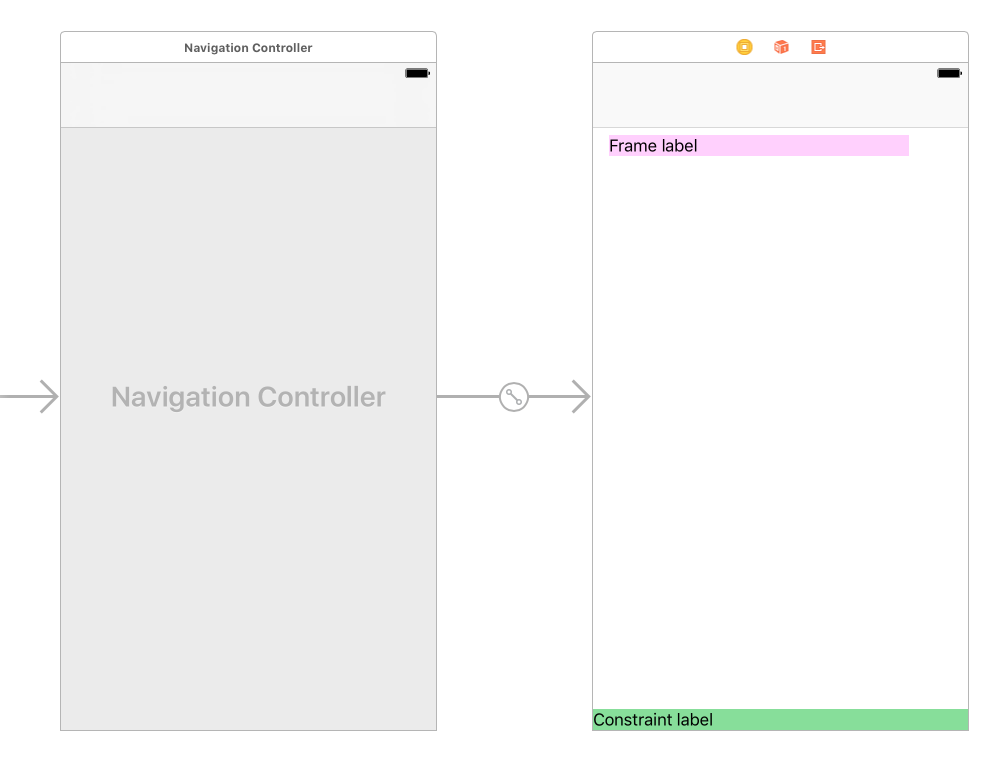
设置右上角按钮动作
navigationItem.rightBarButtonItem = UIBarButtonItem(title: "Change", style: .plain, target: self, action: #selector(rightButtonClicked(_:)))
改变 navigation bar isTranslucent 属性,显示 label 的坐标
@objc private func rightButtonClicked(_ sender: AnyObject) {

        navigationController?.navigationBar.isTranslucent = !navigationController!.navigationBar.isTranslucent

        updateLabelContent()

}

private func updateLabelContent() {

	title = navigationController!.navigationBar.isTranslucent ? "Translecent" : "Opaque"

	let frameLabelOrigin = frameLabel.frame.origin

	frameLabel.text = "Frame label. x = \(frameLabelOrigin.x), y = \(frameLabelOrigin.y)"

	let constraintLabelOrigin = constraintLabel.frame.origin

	constraintLabel.text = "Constraint label. x = \(constraintLabelOrigin.x), y = \(constraintLabelOrigin.y)"

	print("\(title)")

	print("Status bar frame:", UIApplication.shared.statusBarFrame) // (0.0, 0.0, 375.0, 20.0)

	print("Navigation bar frame:", navigationController!.navigationBar.frame) // (0.0, 20.0, 375.0, 44.0)

}
通过点击右上角按钮,来查看变化。
透明时

不透明时
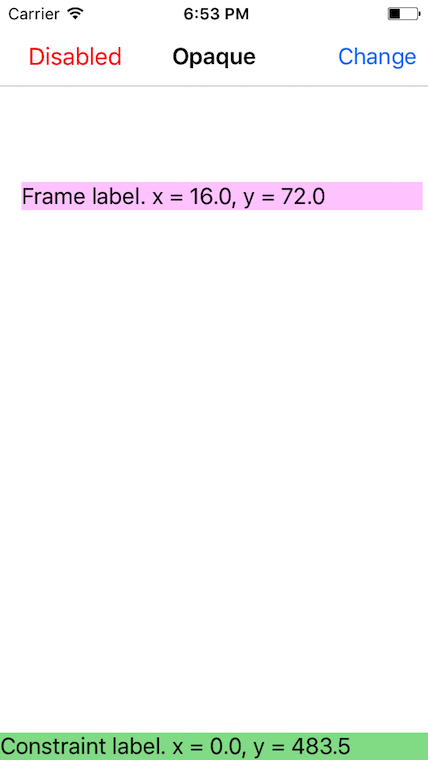
View controller 的 view 坐标改变,Status bar 和 navigation bar 的坐标不变
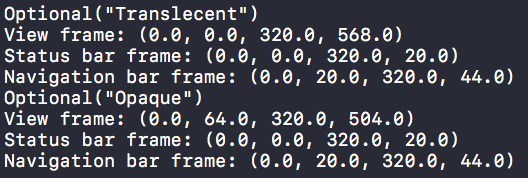
Navigation bar 从不透明变透明,status bar 和 navigation bar 的坐标都不变。整个 view 下移64,高度减小64,不会超出 window。没加约束的 frameLabel 坐标不变,但相对 window 的位置随着 view 一起下移。添加约束的 constraintLabel 的坐标改变,但是相对 window 的位置不变。
如果需要改变 navigation bar isTranslucent 属性,就要考虑对其他 view 会不会有影响,是否使用约束来定位。
转载请注明出处:http://www.cnblogs.com/silence-cnblogs/p/6262471.html
Navigation bar 的注意事项的更多相关文章
- android隐藏底部虚拟键Navigation Bar实现全屏
隐藏底部虚拟键Navigation Bar实现全屏有两种情况 第一种:始终隐藏,触摸屏幕时也不出现 解决办法:同时设置以下两个参数 View.SYSTEM_UI_FLAG_HIDE_NAVIGATIO ...
- 非常不错的Navigation Bar效果
非常不错的Navigation Bar效果,该源码转载于源码天堂的,大家可以了解一下吧,多视图应用程序中,我们常常使用到自定义UINavigationBar来完成导航条的设置. 源码我就不上传了,大家 ...
- HTML5设计网页熔岩灯导航(navigation bar)插件 已经加上完整源代码
导航栏(navigation bar): 1.指位于页眉区域的,在页眉横幅图片上边或下边的一排水平导航按钮,它起着链接博客的各个页面的作用. 2.网页设计中不可缺少的部分,它是指通过一定的技术手段,为 ...
- 与Status Bar和Navigation Bar相关的一些东西
Android Navigation Bar Status Bar 与StatusBar和NavigationBar相关的东西有两种,一是控制它们的显示与隐藏,二是控制它们的透明与否及背景. 在2 ...
- Customizing Navigation Bar and Status Bar
Like many of you, I have been very busy upgrading my apps to make them fit for iOS 7. The latest ver ...
- 配置navigation bar外观
/* 配置navigation bar外观开始 */ self.navigationBar.translucent = YES; self.navigationBar.titleTextAttribu ...
- [工作积累] Android: Hide Navigation bar 隐藏导航条
https://developer.android.com/training/system-ui/navigation.html View decorView = getWindow().getDec ...
- nested pop animation can result in corrupted navigation bar
nested pop animation can result in corrupted navigation barFinishing up a navigation transition in a ...
- nested push animation can result in corrupted navigation bar
2013-12-06 10:15:51.668 CodingForFun[4569:70b] nested push animation can result in corrupted navigat ...
随机推荐
- [React] React Fundamentals: Component Lifecycle - Mounting Basics
React components have a lifecycle, and you are able to access specific phases of that lifecycle. Thi ...
- careercup-递归和动态规划 9.11
9.11 给定一个布尔表达式,由0.1.&.|和^等符号组成,以及一个想要的布尔结果result,实现一个函数,算出有几种括号的放法可使该表达式得出result值. 解法: 跟其他递归问题一样 ...
- cocos js响应过程
使用ccbi: js加载ccbi时候,会调用CCBReader的函数readNodeGraphFromData,从根节点递归解析子节点,使用readNodeGraph函数解析单个节点. 当碰到CCMe ...
- android自定义控件实现刮刮乐效果
只是简单的实现了效果,界面没怎么做优化,不过那都是次要的啦!! 其中主要的彩票视图类和橡皮擦类都是通过代码的方式构建视图,布局文件就一个主activity_main 上代码!! 主activity ...
- 服务器CPU使用率过高排查与解决思路
发现服务器的cpu使用率特别高 排查思路: -使用top或者mpstat查看cpu的使用情况# mpstat -P ALL 2 1Linux 2.6.32-358.el6.x86_64 (linux— ...
- Unity3D 中3D刚体组件的力
一般一个物体除了手动添加刚体受到重力作用外,还可以给该刚体添加一个其他的力. 这里就要涉及到一个恒定力(Constant Force)组件 首先要去掉物体的重力(因为重力是刚体组件中默认的一个向下的力 ...
- A Swift Tour(4) - Objects and Classes
Objects and Classes(对象和类) 用 class 关键字后面跟一个类名来创建一个class,在一个类中声明 常亮或变量,他存在于当前类的上下文,函数的方法是同样的 var numbe ...
- 使用XMl序列化器生成xml文件
生成XML文件 创建几个虚拟的短信对象,存在list中 备份数据通常都是备份至sd卡 使用StringBuffer拼接字符串 把整个xml文件所有节点append到sb对象里 sb.append(&q ...
- 启动 XPs 代理
Xps代理:扩展了 1 : 运行sp_configure检查代理XPs 的 值. EXEC SP_CONFIGURE 'agent xps'查看run_value 值是否为0,如果为0:需要更改此设置 ...
- 当使用VS CODE 时,如果窗口中打开的文件无法识别HTML的话,可以使用以下方法添加要识别的文件类型
找到该文件并修改\Microsoft VS Code\resources\app\extensions\html\package.json{ "name": "html& ...