
Part 17 Consuming ASP NET Web Service in AngularJS using $http
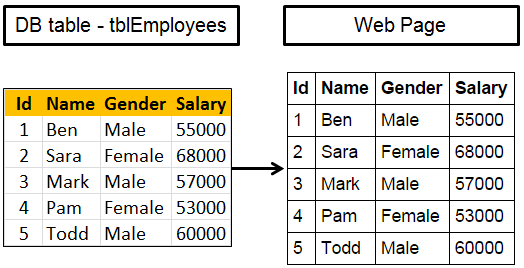
Here is what we want to do
1. Create an ASP.NET Web service. This web service retrieves the data from SQL Server database table, returns it in JSON formt.
2. Call the web service using AngularJS and display employee data on the web page
Step 1 : Create SQL Server table and insert employee data
Create table tblEmployees

(

    Id int primary key identity,

    Name nvarchar(50),

    Gender nvarchar(10),

    Salary int

)

Go

Insert into tblEmployees values ('Ben', 'Male', 55000)

Insert into tblEmployees values ('Sara', 'Female', 68000)

Insert into tblEmployees values ('Mark', 'Male', 57000)

Insert into tblEmployees values ('Pam', 'Female', 53000)

Insert into tblEmployees values ('Todd', 'Male', 60000)

Go
Step 2 : Create new empty asp.net web application project. Name it Demo.
Step 3 : Include the following settings in web.config file.
<?xml version="1.0" encoding="utf-8"?>

<configuration>

  <connectionStrings>

    <add name="DBCS"

         connectionString="server=.;database=SampleDB; integrated security=SSPI"/>

  </connectionStrings>

  <system.web>

    <webServices>

      <protocols>

        <add name="HttpGet"/>

      </protocols>

    </webServices>

  </system.web>

</configuration>
Step 4 : Add a class file to the project. Name it Employee.cs. Copy and paste the following code.
namespace Demo

{

    public class Employee

    {

        public int id { get; set; }

        public string name { get; set; }

        public string gender { get; set; }

        public int salary { get; set; }

    }

}
Step 5 : Add a new WebService (ASMX). Name it EmployeeService.asmx. Copy and paste the following code.
using System;

using System.Collections.Generic;

using System.Configuration;

using System.Data.SqlClient;

using System.Web.Script.Serialization;

using System.Web.Services;

namespace Demo

{

    [WebService(Namespace = "http://tempuri.org/")]

    [WebServiceBinding(ConformsTo = WsiProfiles.BasicProfile1_1)]

    [System.ComponentModel.ToolboxItem(false)]

    [System.Web.Script.Services.ScriptService]

    public class EmployeeService : System.Web.Services.WebService

    {

        [WebMethod]

        public void GetAllEmployees()

        {

            List<Employee> listEmployees = new List<Employee>();

            string cs = ConfigurationManager.ConnectionStrings["DBCS"].ConnectionString;

            using (SqlConnection con = new SqlConnection(cs))

            {

                SqlCommand cmd = new SqlCommand("Select * from tblEmployees", con);

                con.Open();

                SqlDataReader rdr = cmd.ExecuteReader();

                while (rdr.Read())

                {

                    Employee employee = new Employee();

                    employee.id = Convert.ToInt32(rdr["Id"]);

                    employee.name = rdr["Name"].ToString();

                    employee.gender = rdr["Gender"].ToString();

                    employee.salary = Convert.ToInt32(rdr["Salary"]);

                    listEmployees.Add(employee);

                }

            }

            JavaScriptSerializer js = new JavaScriptSerializer();

            Context.Response.Write(js.Serialize(listEmployees));

        }

    }

}
Step 6 : Add a new folder to the project. Name it Scripts. Download angular.js script file from http://angularjs.org, and past it in Scripts folder.
Step 7 : Add a new JavaScript file to the Scripts folder. Name it Script.js. Copy and paste the following code.
/// <reference path="angular.min.js" />

var app = angular

        .module("myModule", [])

        .controller("myController", function ($scope, $http) {

            $http.get("EmployeeService.asmx/GetAllEmployees")

                 .then(function (response) {

                     $scope.employees = response.data;

                 });

        });
Step 8 : Add a new stylesheet to the project. Name it Styles.css. Copy and paste the following styles in it.
body {

    font-family: Arial;

}

table {

    border-collapse: collapse;

}

td {

    border: 1px solid black;

    padding: 5px;

}

th {

    border: 1px solid black;

    padding: 5px;

    text-align: left;

}
Step 9 : Add an HTML page to the ASP.NET project. Copy and paste the following HTML and Angular code
<!DOCTYPE html>

<html xmlns="http://www.w3.org/1999/xhtml">

<head>

    <title></title>

    <script src="Scripts/angular.js"></script>

    <script src="Scripts/Script.js"></script>

    <link href="Styles.css" rel="stylesheet" />

</head>

<body ng-app="myModule">

    <div ng-controller="myController">

        <table>

            <thead>

                <tr>

                    <th>Id</th>

                    <th>Name</th>

                    <th>Gender</th>

                    <th>Salary</th>

                </tr>

            </thead>

            <tbody>

                <tr ng-repeat="employee in employees">

                    <td>{{employee.id}}</td>

                    <td>{{employee.name}}</td>

                    <td>{{employee.gender}}</td>

                    <td>{{employee.salary}}</td>

                </tr>

            </tbody>

        </table>

    </div>

</body>

</html>
Part 17 Consuming ASP NET Web Service in AngularJS using $http的更多相关文章
- 【转载】在 Visual Studio 2012 中创建 ASP.Net Web Service
在 Visual Studio 2012 中创建 ASP.Net Web Service,步骤非常简单.如下: 第一步:创建一个“ASP.Net Empty Web Application”项目 创建 ...
- Visual Studio 2010中创建ASP.Net Web Service
转自:http://blog.csdn.net/xinyaping/article/details/7331375 很多人在论坛里说,在Visual Studio 2010中不能创建“ASP.Net ...
- ASP.NET Web Service如何工作(2)
ASP.NET Web Service如何工作(2) [日期:2003-06-26] 来源:CSDN 作者:sunnyzhao(翻译) [字体:大 中 小] HTTP管道一旦调用了.asmx句柄,便 ...
- ASP.NET Web Service如何工作(3)
ASP.NET Web Service如何工作(3) [日期:2003-06-26] 来源:CSDN 作者:sunnyzhao(翻译) [字体:大 中 小] 为了使.asmx句柄有可能反串行化SOA ...
- ASP.NET Web Service如何工作(1)
ASP.NET Web Service如何工作(1) [日期:2003-06-26] 来源:CSDN 作者:sunnyzhao(翻译) [字体:大 中 小] Summary ASP.NET Web ...
- 在 Visual Studio 2010 中创建 ASP.Net Web Service
第一步:创建一个“ASP.Net Empty Web Application”项目 第二步:在项目中添加“Web Service”新项目 第一步之后,Visual Studio 2010会创建一个仅含 ...
- (转)在 Visual Studio 2010 中创建 ASP.Net Web Service
很多人在论坛里说,在Visual Studio 2010中不能创建“ASP.Net Web Service”这种project了,下面跟帖者云云,有的说这是因为微软已经将Web Service整合进W ...
- ASP.NET Web Service中使用Session 及 Session丢失解决方法 续
原文:ASP.NET Web Service中使用Session 及 Session丢失解决方法 续 1.关于Session丢失问题的说明汇总,参考这里 2.在Web Servcie中使用Sessio ...
- 微软实战训练营(X)重点班第(1)课:SOA必备知识之ASP.NET Web Service开发实战
微软实战训练营 上海交大(A)实验班.(X)重点班 内部课程资料 链接:http://pan.baidu.com/s/1jGsTjq2 password:0wmf <微软实战训练营(X)重点班第 ...
随机推荐
- P5591-小猪佩奇学数学【单位根反演】
正题 题目链接:https://www.luogu.com.cn/problem/P5591 题目大意 给出\(n,p,k\)求 \[\left(\sum_{i=0}^n\binom{n}{i}p^i ...
- Python3入门系列之-----file方法操作
file方法 file处理文件的一些方法,创建一个file对像后即可对文件进行读写相关操作,首先你得打开文件,此处用到open函数 open函数 语法:file_objcet = open(file_ ...
- Spring,IOC源码分析
有错勿喷 1.首先是Spring,IOC的基本概念 IOC是一个容器 容器启动的时候创建所有单实例对象 我们可以直接从容器中获取到这个对象 2.调试流程 ioc容器的启动过程?启动期间都做了什么(什么 ...
- Kronecker product
Kronecker product 的基本运算 结合律 \begin{equation} \mathrm{A} \otimes (\mathrm{B + C}) = \mathrm{A} \otime ...
- HBase 与 Cassandra 架构对比分析的经验分享
架构对比 HBase和Cassandra几乎是一个年份发起,又都是在2010年成为Apache的顶级项目,不过如果我们去细品其内部机制,我们会发现其实两者是完全不同的架构风格. HBASE起源于Goo ...
- 前端VUE基于gitlab的CI_CD
目录 CI 1.Gitlab的CI 1.1 GitLab-Runner 1.2 .gitlab-ci.yml 1.3 配置.gitlab-ci.yml 1.3.1 Pipeline概念 1.3.2 S ...
- python paramiko实现ssh上传下载执行命令
paramiko ssh上传下载执行命令 序言 最近项目经常需要动态在跳板机上登录服务器进行部署环境,且服务器比较多,每次完成所有服务器到环境部署执行耗费大量时间.为了解决这个问题,根据所学的执行实现 ...
- Windows 11正式版来了,下载、安装教程、一起奉上!
Windows 11正式版已经发布了,今天给大家更新一波Win11系统的安装方法,其实和Win10基本一样,有多种方法. 安装Win11前请先查看电脑是否支持Win11系统,先用微软自家的PC H ...
- WinForm事件与消息
WinForm事件与消息 消息概述以及在C#下的封装 Windows下应用程序的执行是通过消息驱动的.所有的外部事件,如键盘输入.鼠标移动.按动鼠标都由OS系统转换成相应的"消息" ...
- 小白自制Linux开发板 番外篇 一 modprobe加载驱动问题(转载整理)
使用modprobe加载驱动 转载地址:https://blog.csdn.net/qq_39101111/article/details/78773362 前面我们提到,modprobe并不需要指定 ...