
腾讯云 K8S 集群实战 Service Mesh—Linkerd2 & Traefik2 部署 emojivoto 应用
Linkerd 是 Kubernetes 的服务网格。 它通过为您提供运行时调试(runtime debugging)、可观察性(observability)、可靠性(reliability)和安全性(security),使运行服务更轻松、更安全 — 所有这些都不需要对您的代码进行任何更改。
服务网格是用于处理服务间通信的专用基础设施层。它负责通过包含现代云原生应用程序的复杂服务拓扑来可靠地传递请求。实际上,服务网格通常通过一组轻量级网络代理来实现,这些代理与应用程序代码一起部署,而不需要感知应用程序本身。— Willian Morgan Buoyant CEO
为什么我们需要 Service Mesh?
- What's a service mesh? And why do I need one? 一文中做了详细的解释,这里不再赘述。拥抱云原生,微服务已进入
Service Mesh时代。
为什么折腾 Linkerd2 而不是 Istio?
部署环境
- 腾讯云 TKE K8S 集群(或你自建的私有 K8S 集群)
- CentOS 7.x
可先快速过一个官方上手教程,本文是基于此在腾讯云的实战详解。
查看集群版本
kubectl version --short
Client Version: v1.16.9

Server Version: v1.16.9
Linkerd2 CLI 安装
首先我们需要下载并安装最新版本的 linkerd CLI。
我们直接进入 Linkerd2 版本发行页面,查看最新版:
这里我们下载 linkerd2-cli-edge-21.6.1-linux-amd64。
安装:
wget -c https://github.com/linkerd/linkerd2/releases/download/edge-21.6.1/linkerd2-cli-edge-21.6.1-linux-amd64

mv linkerd2-cli-edge-21.6.1-linux-amd64 /usr/local/bin/linkerd

chmod 755 /usr/local/bin/linkerd
现在我们运行 linkerd,会看到如下信息:
Usage:

  linkerd [command]

Available Commands:

  check        Check the Linkerd installation for potential problems

  completion   Output shell completion code for the specified shell (bash, zsh or fish)

  diagnostics  Commands used to diagnose Linkerd components

  help         Help about any command

  identity     Display the certificate(s) of one or more selected pod(s)

  inject       Add the Linkerd proxy to a Kubernetes config

  install      Output Kubernetes configs to install Linkerd

  install-cni  Output Kubernetes configs to install Linkerd CNI

  jaeger       jaeger manages the jaeger extension of Linkerd service mesh

  multicluster Manages the multicluster setup for Linkerd

  profile      Output service profile config for Kubernetes

  repair       Output the secret/linkerd-config-overrides resource if it has been deleted

  uninject     Remove the Linkerd proxy from a Kubernetes config

  uninstall    Output Kubernetes resources to uninstall Linkerd control plane

  upgrade      Output Kubernetes configs to upgrade an existing Linkerd control plane

  version      Print the client and server version information

  viz          viz manages the linkerd-viz extension of Linkerd service mesh

Flags:

      --api-addr string            Override kubeconfig and communicate directly with the control plane at host:port (mostly for testing)

      --as string                  Username to impersonate for Kubernetes operations

      --as-group stringArray       Group to impersonate for Kubernetes operations

      --cni-namespace string       Namespace in which the Linkerd CNI plugin is installed (default "linkerd-cni")

      --context string             Name of the kubeconfig context to use

  -h, --help                       help for linkerd

      --kubeconfig string          Path to the kubeconfig file to use for CLI requests

  -L, --linkerd-namespace string   Namespace in which Linkerd is installed ($LINKERD_NAMESPACE) (default "linkerd")

      --verbose                    Turn on debug logging

Additional help topics:

  linkerd alpha        experimental subcommands for Linkerd

Use "linkerd [command] --help" for more information about a command.
安装 Linkerd2 控制平面
首先,我们需要验证下集群,使用 linkerd check --pre,正常会输出如下信息:
Linkerd core checks

===================

kubernetes-api

--------------

√ can initialize the client

√ can query the Kubernetes API

kubernetes-version

------------------

√ is running the minimum Kubernetes API version

√ is running the minimum kubectl version

pre-kubernetes-setup

--------------------

√ control plane namespace does not already exist

√ can create non-namespaced resources

√ can create ServiceAccounts

√ can create Services

√ can create Deployments

√ can create CronJobs

√ can create ConfigMaps

√ can create Secrets

√ can read Secrets

√ can read extension-apiserver-authentication configmap

√ no clock skew detected

pre-kubernetes-capability

-------------------------

√ has NET_ADMIN capability

√ has NET_RAW capability

linkerd-version

---------------

√ can determine the latest version

√ cli is up-to-date

Status check results are √
部署控制平面:
linkerd install | kubectl apply -f -
查看 linkerd 命名空间的 pod 部署情况:
kubectl get po -n linkerd

NAME                                      READY   STATUS    RESTARTS   AGE

linkerd-destination-6c6bf4fc4-282gd       3/3     Running   0          5m

linkerd-identity-7cd9998969-cvzc8         2/2     Running   0          5m

linkerd-proxy-injector-855b9b6747-r8pcz   2/2     Running   0          5m
同样,我们使用 linkerd check 检查一下。
ok, 接下来我们部署一些常用的扩展,增强我们控制平面的功能。
安装 Linkerd2 控制平面常用扩展
grafana,prometheus,jaeger 等的部署(针对 Linkerd 2 的相关指标)
使用如下命令:
linkerd viz install | kubectl apply -f - # on-cluster metrics stack

kubectl get po -n linkerd-viz #审查 namespace, 直到所 pod 都 ready

# grafana-5659477d88-txq5b        0/2     PodInitializing   0          14m

# metrics-api-6fcb849dc-k9sw5     2/2     Running           0          14m

# prometheus-798d8d4698-4x8h2     2/2     Running           0          14m

# tap-f5984d7f7-fkpf9             0/2     PodInitializing   0          14m

# tap-injector-6b455dd64b-2c82n   0/2     PodInitializing   0          14m

# web-657dbffb8f-7d2gr            0/2     PodInitializing   0          14m
如果出现某一个 pod 出现错误,我们可以通过 kubectl describe po 来获取详细错误信息,如:
kubectl describe po grafana-5659477d88-txq5b -n linkerd-viz
比如说,我这里如下镜像就被卡住了(腾讯云):
cr.l5d.io/linkerd/grafana:edge-21.6.1

cr.l5d.io/linkerd/tap:edge-21.6.1

cr.l5d.io/linkerd/web:edge-21.6.1
大家可以(连接互联网)手动拉取。
同样,我们再部署两个可选的扩展。
部署 jaeger:
## optional

linkerd jaeger install | kubectl apply -f - # Jaeger collector and UI

kubectl get po -n linkerd-jaeger #审查 namespace

# OR:

# docker pull cr.l5d.io/linkerd/jaeger-webhook:edge-21.6.1

# docker pull jaegertracing/all-in-one:1.19.2
部署 multicluster:
linkerd multicluster install | kubectl apply -f - # multi-cluster components

kubectl get po -n linkerd-multicluster

# 果然报错了

linkerd-gateway-bcb5888c5-ws6wz   1/2     ErrImagePull   0          21s
查看报错信息:
kubectl describe po linkerd-gateway-bcb5888c5-ws6wz -n linkerd-multicluster

# Normal   BackOff    21s (x5 over 2m13s)  kubelet, k8s-master-01  Back-off pulling image "gcr.io/google_containers/pause"

# Warning  Failed     21s (x5 over 2m13s)  kubelet, k8s-master-01  Error: ImagePullBackOff
很明显(gcr.io/google_containers/pause),我们需要连接互联网(具体怎么做,太多教程了,这里不讨论)。
还有一个问题比较棘手的是,这里即使 gcr.io/google_containers/pause 已经存在于本地,部署时还是回去 gcr.io 拉取。
所以,下面提供另一种方式来弄(没连外网的情况下)。
使用 kustomize 解决 linkerd-gateway (腾讯云部署)不成功的问题
kustomize 如何安装,大家自行查看 https://kustomize.io。
首先,导出 linkerd multicluster 部署 yaml 档。
linkerd multicluster install > linkerd-multicluster.yaml
然后,我们给它打个补丁patch-linkerd-multicluster.yaml:
apiVersion: apps/v1

kind: Deployment

metadata:

  annotations:

    linkerd.io/created-by: linkerd/cli edge-21.6.1

  labels:

    app.kubernetes.io/name: gateway

    app.kubernetes.io/part-of: Linkerd

    app.kubernetes.io/version: edge-21.6.1

    linkerd.io/control-plane-component: gateway

    app: linkerd-gateway

    linkerd.io/extension: multicluster

  name: linkerd-gateway

  namespace: linkerd-multicluster

spec:

  replicas: 1

  selector:

    matchLabels:

      app: linkerd-gateway

  template:

    metadata:

      annotations:

        linkerd.io/created-by: linkerd/cli edge-21.6.1

        linkerd.io/inject: enabled

        config.linkerd.io/proxy-require-identity-inbound-ports: "4191,4143"

        config.linkerd.io/enable-gateway: "true"

      labels:

        app: linkerd-gateway

    spec:

      containers:

        - name: pause

          image: ccr.ccs.tencentyun.com/cloud-native/google-pause

      serviceAccountName: linkerd-gateway
ccr.ccs.tencentyun.com/cloud-native/google-pause,这是笔者上传到腾讯云的公开镜像。
新建 kustomization.yaml:
resources:

- linkerd-multicluster.yaml

patchesStrategicMerge:

- patch-linkerd-multicluster.yaml
使用 kustomize 重新部署:
kustomize build . | kubectl apply -f -
重新查看一下:
kubectl get po -n linkerd-multicluster

# linkerd-gateway-6c8dc7bb49-6tghc   2/2     Running   0          92s
完美解决。
使用 Traefik Ingressroute 导出 linkerd-web 管理面板
关于 traefik v2 的部署,这里不做赘述。
使用 kustomize 对 linkerd viz 部署进行更新
我这里使用的域名是 linkerd-web.hacker-linner.com。
导出 yaml 档:
linkerd viz install > linkerd-viz.yaml
打补丁,patch-linkerd-viz-web.yaml:
apiVersion: apps/v1

kind: Deployment

metadata:

  annotations:

    linkerd.io/created-by: linkerd/helm edge-21.6.1

  labels:

    linkerd.io/extension: viz

    app.kubernetes.io/name: web

    app.kubernetes.io/part-of: Linkerd

    app.kubernetes.io/version: edge-21.6.1

    component: web

    namespace: linkerd-viz

  name: web

  namespace: linkerd-viz

spec:

  replicas: 1

  selector:

    matchLabels:

      linkerd.io/extension: viz

      component: web

      namespace: linkerd-viz

  template:

    metadata:

      annotations:

        linkerd.io/created-by: linkerd/helm edge-21.6.1

      labels:

        linkerd.io/extension: viz

        component: web

        namespace: linkerd-viz

    spec:

      nodeSelector:

        beta.kubernetes.io/os: linux

      containers:

      - args:

        - -linkerd-metrics-api-addr=metrics-api.linkerd-viz.svc.cluster.local:8085

        - -cluster-domain=cluster.local

        - -grafana-addr=grafana.linkerd-viz.svc.cluster.local:3000

        - -controller-namespace=linkerd

        - -viz-namespace=linkerd-viz

        - -log-level=info

        - -enforced-host=^(linkerd-web\.hacker-linner\.com|localhost|127\.0\.0\.1|web\.linkerd-viz\.svc\.cluster\.local|web\.linkerd-viz\.svc|\[::1\])(:\d+)?$

        image: cr.l5d.io/linkerd/web:edge-21.6.1

        imagePullPolicy: IfNotPresent

        livenessProbe:

          httpGet:

            path: /ping

            port: 9994

          initialDelaySeconds: 10

        name: web

        ports:

        - containerPort: 8084

          name: http

        - containerPort: 9994

          name: admin-http

        readinessProbe:

          failureThreshold: 7

          httpGet:

            path: /ready

            port: 9994

        resources:

        securityContext:

          runAsUser: 2103

      serviceAccountName: web
更新 kustomization.yaml:
resources:

- linkerd-viz.yaml

- linkerd-multicluster.yaml

patchesStrategicMerge:

- patch-linkerd-viz-web.yaml

- patch-linkerd-multicluster.yaml
重新部署
kustomize build . | kubectl apply -f -
设置 Ingressroute & Basic Auth
ingressroute-viz.yaml
apiVersion: v1

kind: Secret

metadata:

  name: linkerd-authsecret

  namespace: linkerd-viz

type: Opaque

stringData:

  users: # 这里使用 htpasswd -nb 进行设置

---

apiVersion: traefik.containo.us/v1alpha1

kind: Middleware

metadata:

  name: linkerd-basic-auth

  namespace: linkerd-viz

spec:

  basicAuth:

    secret: linkerd-authsecret

---

apiVersion: traefik.containo.us/v1alpha1

kind: Middleware

metadata:

  name: l5d-header-middleware

  namespace: linkerd-viz

spec:

  headers:

    customRequestHeaders:

      l5d-dst-override: "web.linkerd-viz.svc.cluster.local:8084"

---

apiVersion: traefik.containo.us/v1alpha1

kind: IngressRoute

metadata:

  name: linkerd-web-ingress-route

  namespace: linkerd-viz

spec:

  entryPoints:

    - websecure

  tls:

    secretName: hacker-linner-cert-tls

  routes:

    - match: Host(`linkerd-web.hacker-linner.com`)

      kind: Rule

      services:

        - name: web

          port: 8084

      middlewares:

        - name: l5d-header-middleware

        - name: linkerd-basic-auth
部署:
kubectl apply -f ingressroute-viz.yaml
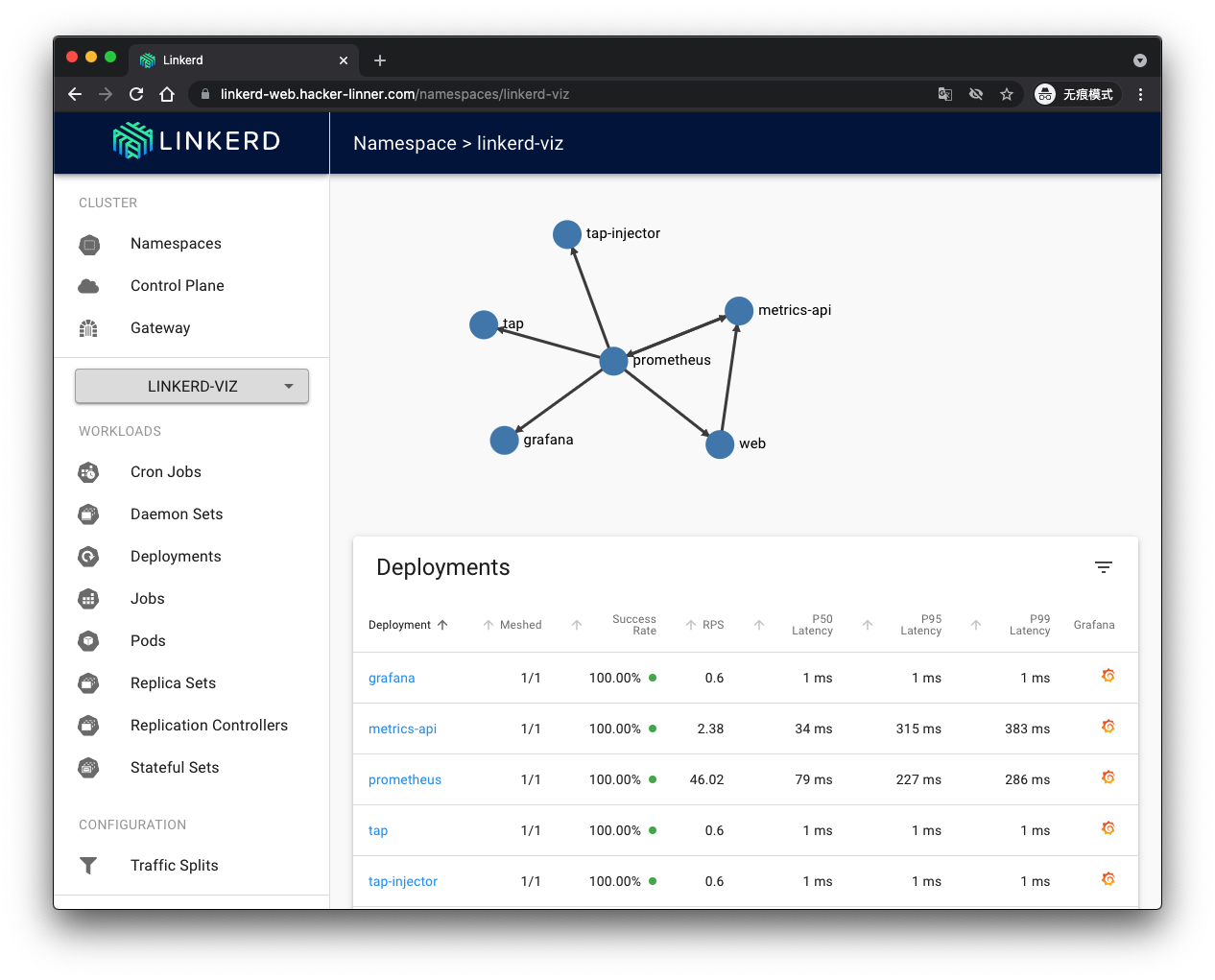
部署 emojivoto
运行如下命令:
curl -sL https://run.linkerd.io/emojivoto.yml \

  | kubectl apply -f
审查部署:
kubectl get po -n  emojivoto

# OR

# docker pull docker.l5d.io/buoyantio/emojivoto-emoji-svc:v11

# docker pull docker.l5d.io/buoyantio/emojivoto-web:v11

# docker pull docker.l5d.io/buoyantio/emojivoto-voting-svc:v11

emoji-6b776684f5-nnflg      1/1     Running   0          6m4s

vote-bot-64695c4dc6-jn8ln   1/1     Running   0          6m4s

voting-7778876bdb-kdvsx     1/1     Running   0          6m4s

web-6f8d774656-9dsw7        1/1     Running   0          6m4s
设置 Ingressroute
这里是:https://emojivoto.hacker-linner.com
emojivoto-ingressroute.yaml
apiVersion: traefik.containo.us/v1alpha1

kind: IngressRoute

metadata:

  name: emojivoto-web-ingress-route

  namespace: emojivoto

spec:

  entryPoints:

    - websecure

  tls:

    secretName: hacker-linner-cert-tls

  routes:

    - match: Host(`emojivoto.hacker-linner.com`)

      kind: Rule

      services:

        - name: web-svc

          port: 80

Service Mesh(Linkerd) 注入
添加 Linkerd 到 emojivoto:
kubectl get -n emojivoto deploy -o yaml \

  | linkerd inject - \

  | kubectl apply -f -
审查一下是否一切正常:
linkerd -n emojivoto check --proxy
回到面板查看 emojivoto:
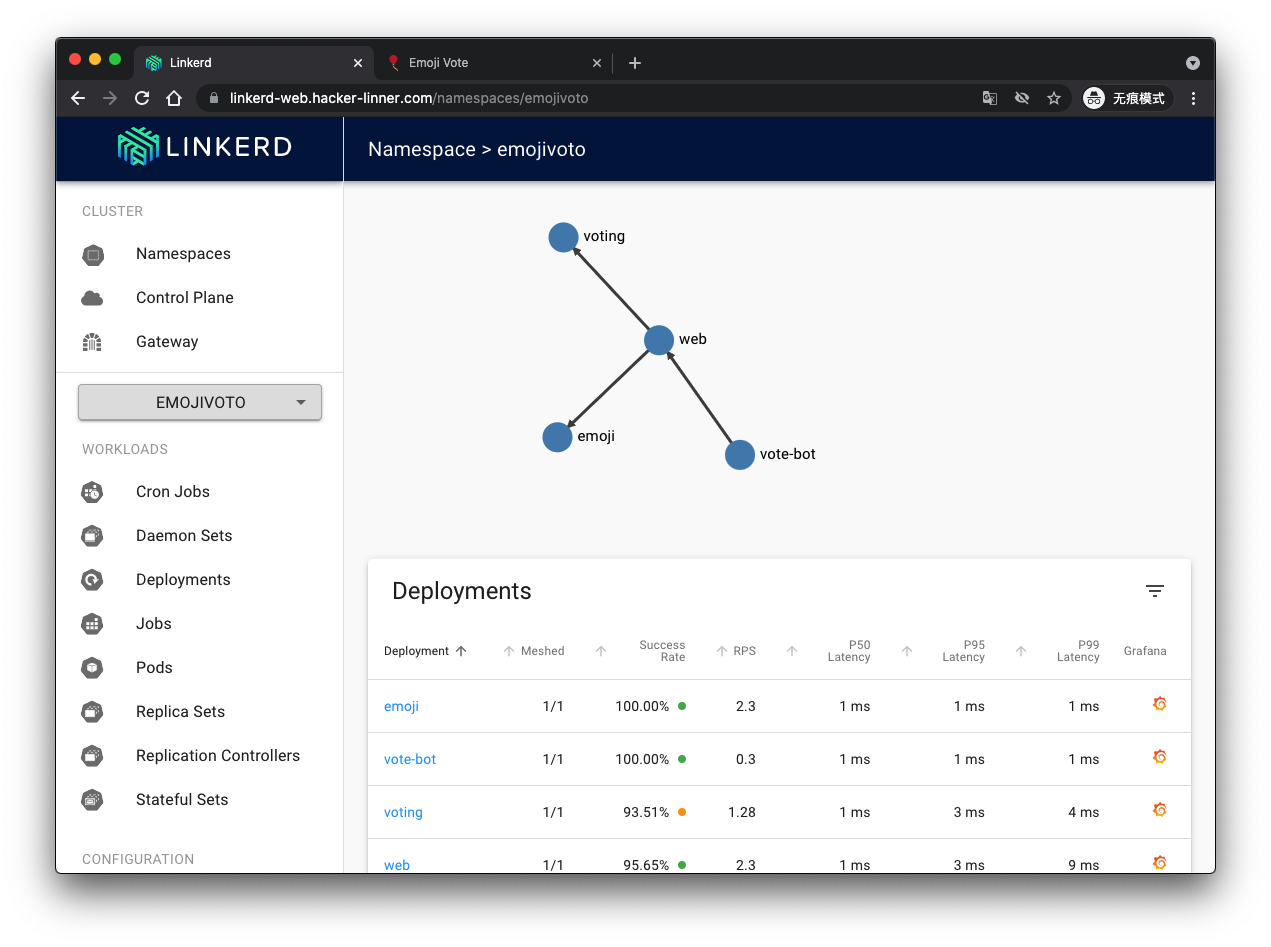
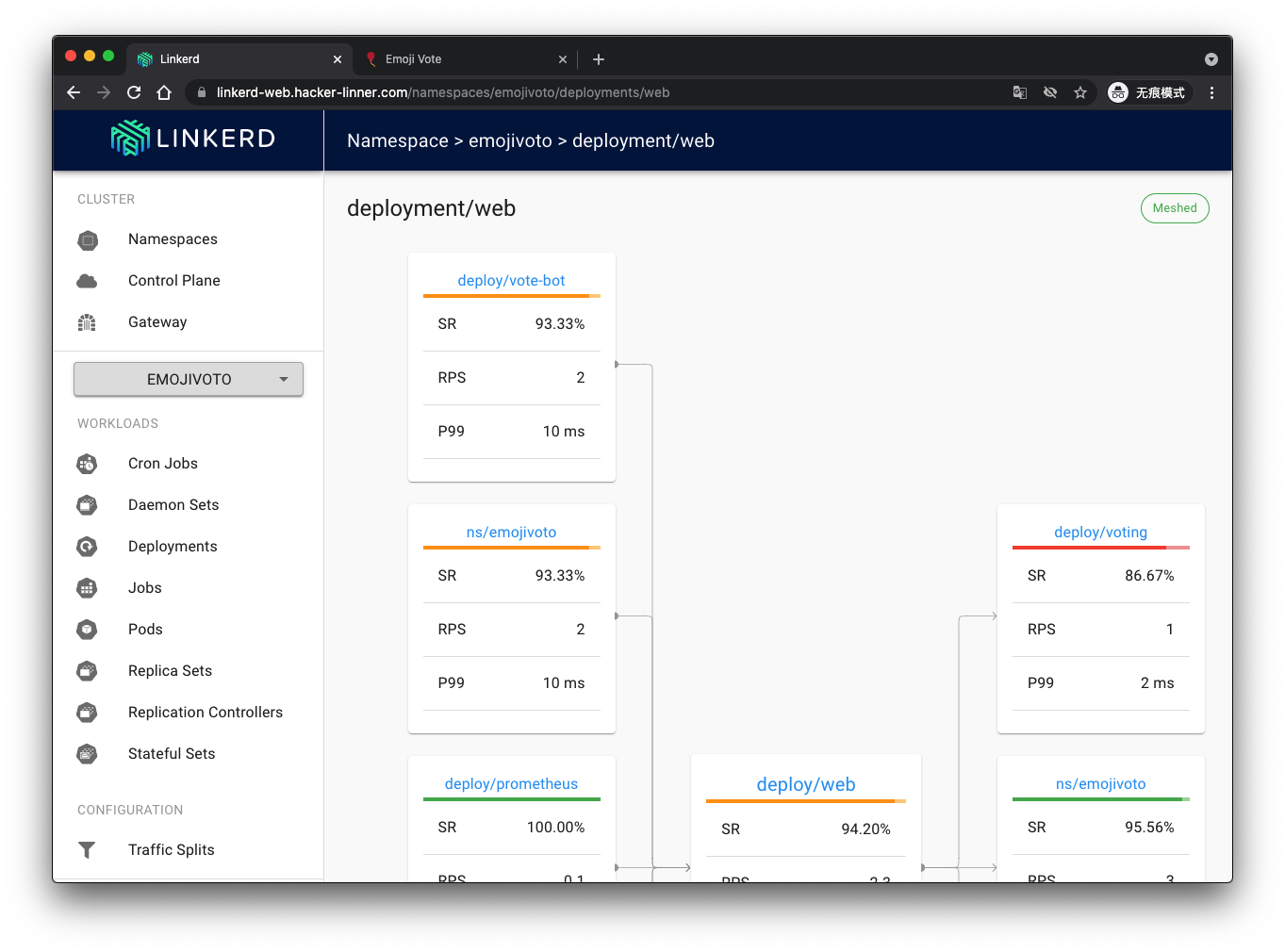
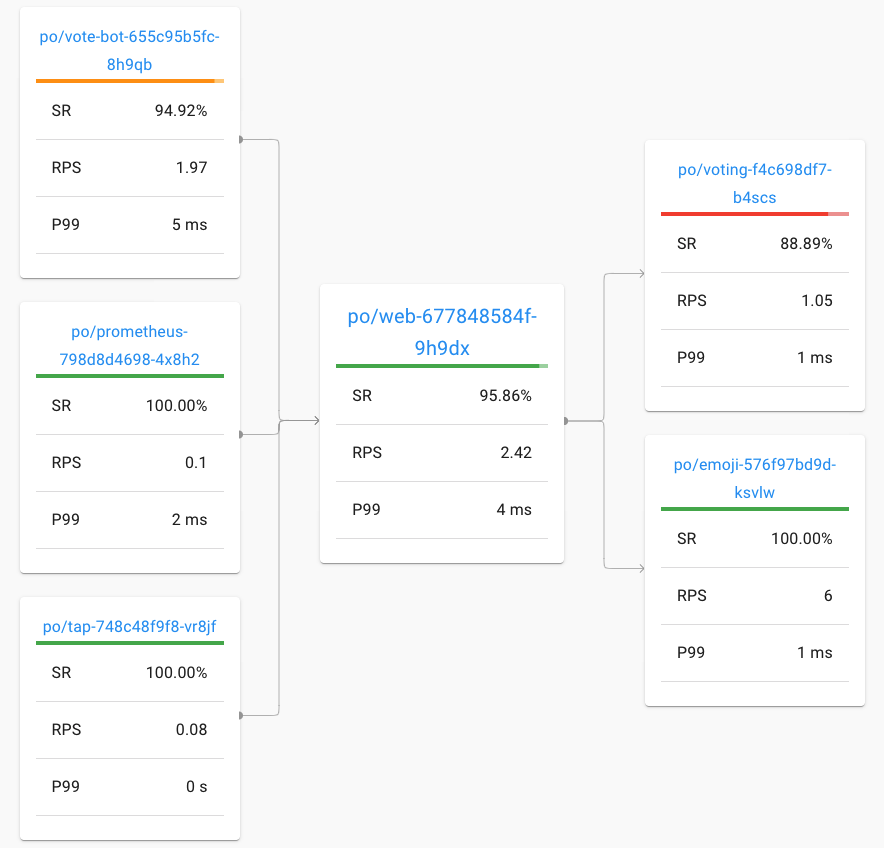
完美搞定,一切正常。
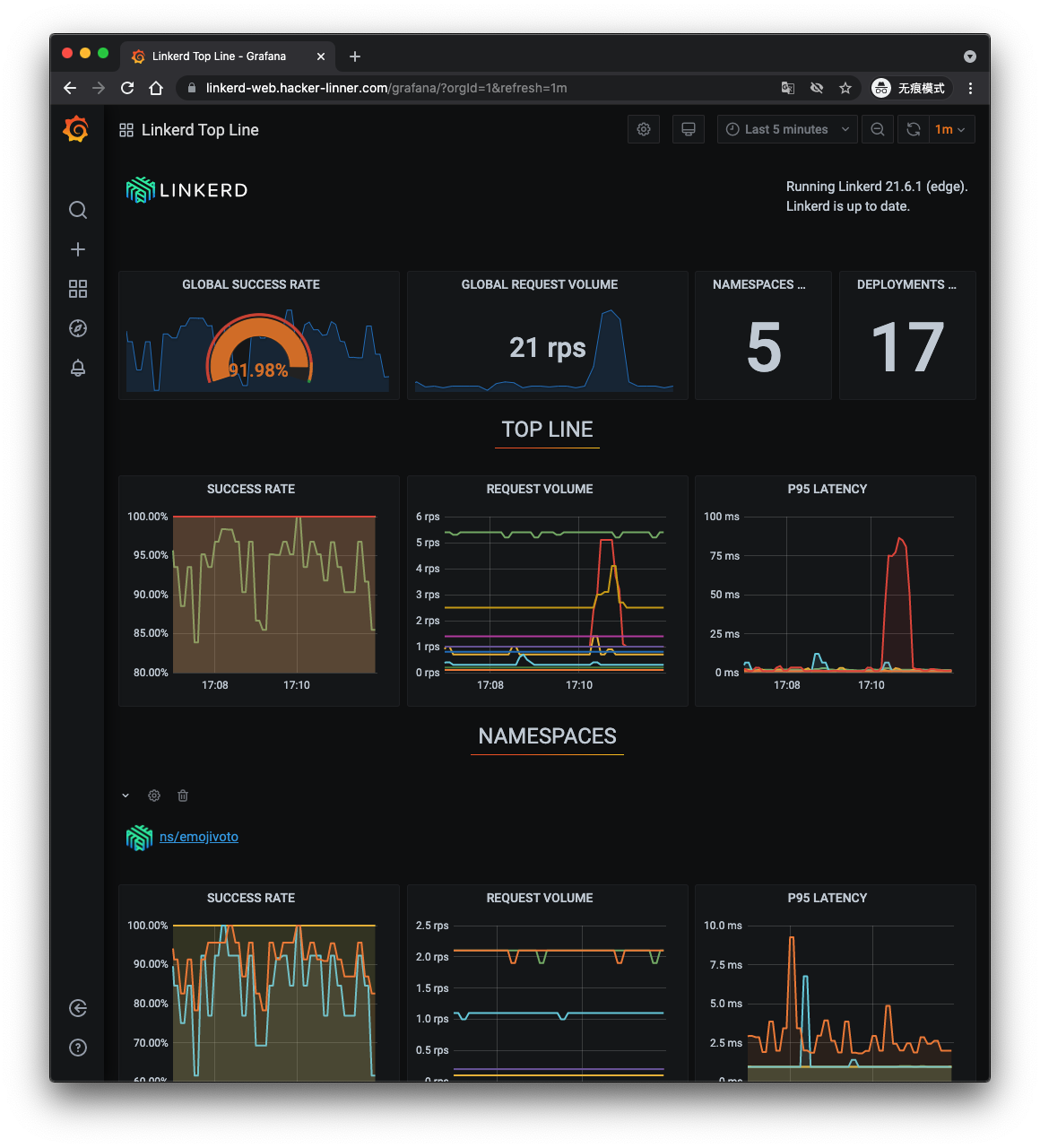
最后看一下 Grafana 面板:
Refs
我是为少

微信:uuhells123

公众号:黑客下午茶

加我微信(互相学习交流),关注公众号(获取更多学习资料~)
腾讯云 K8S 集群实战 Service Mesh—Linkerd2 & Traefik2 部署 emojivoto 应用的更多相关文章
- 腾讯云Elasticsearch集群规划及性能优化实践
一.引言 随着腾讯云 Elasticsearch 云产品功能越来越丰富,ES 用户越来越多,云上的集群规模也越来越大.我们在日常运维工作中也经常会遇到一些由于前期集群规划不到位,导致后期业务增长集群 ...
- Kubernetes最佳实践之腾讯云TKE 集群组建
作者陈鹏,腾讯工程师,负责腾讯云 TKE 的售中.售后的技术支持,根据客户需求输出合理技术方案与最佳实践,为客户业务保驾护航.使用 TKE 来组建 Kubernetes 集群时,会面对各种配置选项,本 ...
- 十三,k8s集群web端管理工具dashboard部署
目录 部署 dashboard 由于会被墙, 所以要加一步拉取镜像 正式开始安装dashboard 查看 开放访问 配置dashboard用户 1. token 令牌认证 创建一个 serviceAc ...
- 干货 | 京东云Kubernetes集群+Traefik实战
摘要 Traefik支持丰富的annotations配置,可配置众多出色的特性,例如:自动熔断.负载均衡策略.黑名单.白名单.所以Traefik对于微服务来说简直就是一神器. 利用Traefik,并结 ...
- 还不会用 K8s 集群控制器?那你会用冰箱吗?(多图详解)
作者 | 阿里云售后技术专家 声东 导读:当我们尝试去理解 K8s 集群工作原理的时候,控制器(Controller)肯定是一个难点.这是因为控制器有很多,具体实现大相径庭:且控制器的实现用到了一些较 ...
- 案例分享 生产环境逐步迁移至k8s集群 - pod注册到consul
#案例分享 生产环境逐步迁移至k8s集群 - pod注册到consul #项目背景 多套业务系统, 所有节点注册到consul集群,方便统一管理 使用consul的dns功能, 所有节点hostnam ...
- Kubernetes实战总结 - 阿里云ECS自建K8S集群
一.概述 详情参考阿里云说明:https://help.aliyun.com/document_detail/98886.html?spm=a2c4g.11186623.6.1078.323b1c9b ...
- K8S(08)交付实战-交付jenkins到k8s集群
k8s交付实战-交付jenkins到k8s集群 目录 k8s交付实战-交付jenkins到k8s集群 1 准备jenkins镜像 1.1 下载官方镜像 1.2 修改官方镜像 1.2.1 创建目录 1. ...
- k8s 开船记-故障公告:自建 k8s 集群在阿里云上大翻船
非常非常抱歉,新年上班第一天, 在今天阿里云上气候突变情况下,由于我们开船技术差,在今天 10:15~12:00 左右的访问高峰,我们竟然把船给开翻了,造成近2个小时整个博客站点无法访问,由此给您带来 ...
随机推荐
- Windows各版本以及漏洞
目录 MS-Dos Win 9X Win NT Windows Server .NET FrameWork PowerShell IIS6.0漏洞 解析漏洞 IIS7.0/7.5漏洞 畸形解析漏洞 M ...
- LA3027简单带权并查集
题意: 有n个点,一开始大家都是独立的点,然后给出一些关系,a,b表示a是b的父亲节点,距离是abs(a-b)%1000,然后有一些询问,每次询问一个节点a到父亲节点的距离是多少? 思路: ...
- Ubuntu Linux 学习篇 配置DHCP服务器
isc-dhcp-server 动态主机配置协议是一个局域网的网络协议.指的是由服务器控制一段IP地址范围,客户机登录服务器时就可以自动获得服务器分配的IP地址和子网掩码.首先, DHCP服务器必须是 ...
- 【maven】Failed to execute goal org.apache.maven.plugins:maven-site-plugin:3.3:site (default-site)
问题描述 site一点击就报错,如下 Failed to execute goal org.apache.maven.plugins:maven-site-plugin:3.3:site (defau ...
- @shiro.hasPermission 使用
在页面上加上@shiro.hasPermission 如下用.ftl为例子: 当加上shiro标签后,会与后台代码结合使用: 需要继承AuthorizingRealm 下的 protected Au ...
- hdu 2072 1106学一波字符串分割,C语言与C++两种方法
hdu2072:题意:输出给定字符串中的单词数(一个句子中可能有两个相同的单词),这里的思想是把每个单词取出来,放入set(这个集合容器中不允许有相同的元素)中,最后输出该集合的大小即可. 现在的问题 ...
- 网络请求axios
axios的定义 axios是一个基于Promise,用于浏览器和node的HTTP客户端 axios的功能特点 在浏览器中发送 XMLHttpRsquests 请求 在node.js中发送http请 ...
- Salsa20算法介绍
简介 Salsa20是一种流式对称加密算法,类似于Chacha20,算法性能相比AES能够快3倍以上. Salsa20算法通过将32 Byte的key和8 Byte的随机数nonce扩展为2^70 B ...
- Ubuntu切换到root账户
使用命令sudo su或sudo -i然后输入密码就可以切换到root帐号,exit可以退出.
- [bug] idea编译后没有xml文件
原因 在maven中build 参考 https://www.cnblogs.com/lewskay/p/6422464.html https://blog.csdn.net/lovequanquqn ...