
阿里云API网关(12)为员工创建子账号,实现分权管理API:使用RAM管理API
网关指南: https://help.aliyun.com/document_detail/29487.html?spm=5176.doc48835.6.550.23Oqbl
网关控制台: https://apigateway.console.aliyun.com/?spm=5176.doc42740.2.2.Q4z5ws#/cn-hangzhou/apis/list
使用RAM管理API
API 网关结合阿里云访问控制(RAM)来实现企业内多职员分权管理 API。API 提供者可以为员工建立子账户,并控制不同职员负责不同的 API 管理。
- 使用 RAM 可以允许子帐号,查看、创建、管理、删除 API 分组、API、授权、流控策略等。但子帐号不是资源的所有者,其操作权限随时都可以被主帐号收回。
- 在查看本文前,请确保您已经祥读了 RAM 帮助手册 和API 网关 API 手册.
- 若您不无此业务场景, 请跳过此章节。
第一部分:策略管理
授权策略(Policy),来描述授权的具体内容,授权内容主要包含效力( Effect )、资源( Resource )、对资源所授予的操作权限( Action )以及限制条件( Condition )这几个基本元素。
系统授权策略
API 网关已经预置了两个系统权限,AliyunApiGatewayFullAccess和AliyunApiGatewayReadOnlyAccess,可以到 RAM 的在 RAM 控制台-策略管理进行查看。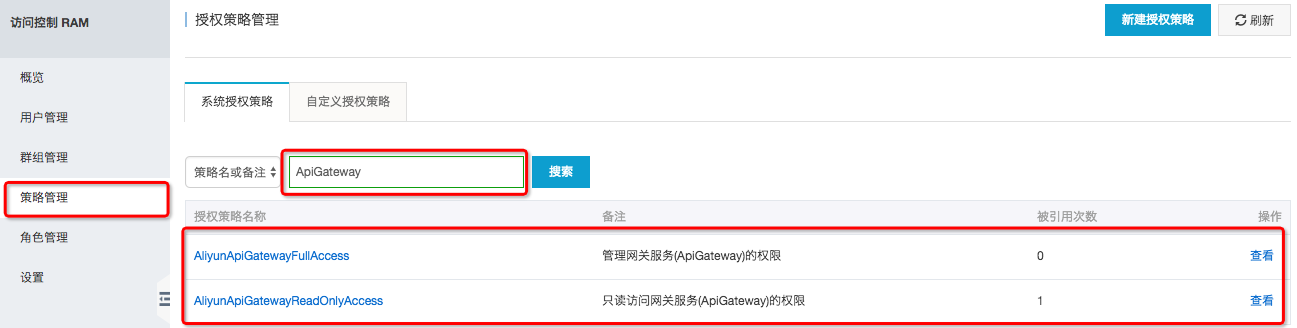
- AliyunApiGatewayFullAccess: 管理员权限,拥有主帐号下包含 API 分组、API、流控策略、应用等所有资源的管理权限。
- AliyunApiGatewayReadOnlyAccess:可以查看主帐号下包含 API 分组、API、流控策略、应用等所有资源,但不可以操作。
自定义授权策略
您可以根据需要自定义管理权限,支持更为精细化的授权,可以为某个操作,也可以是某个资源。如:API GetUsers 的编辑权限。可以在RAM 控制台-策略管理-自定义授权策略查看已经定义好的自定义授权:自定义授权查看、创建、修改、删除方法请参照:授权策略管理。
授权策略内容填写方法请参照:Policy 基本元素和Policy 语法结构和下文的授权策略。
第二部分:授权策略
授权策略是一组权限的集合,它以一种策略语言来描述。通过给用户或群组附加授权策略,用户或群组中的所有用户就能获得授权策略中指定的访问权限。
授权策略内容填写方法请参照:Policy 基本元素和 Policy 语法结构。
示例:
{"Version": "1","Statement": [{"Action": "apigateway:Describe*","Resource": "*","Effect": "Allow"}]}
此示例表示:允许所有的查看操作
Action(操作名称列表)格式为:
"Action":"<service-name>:<action-name>"
其中:
- service-name 为:阿里云产品名称,请填写 apigateway
- action-name 为:API 接口名称,请参照下表, 支持通配符 *
"Action": "apigateway:Describe*" 表示所有的查询操作" Action": "apigateway:*" 表示 API 网关所有操作
第三部分:Resource(操作对象列表)
Resource 通常指操作对象, API 网关中的 API 分组、流控策略、应用都被称为 Resource,书写格式:
acs:<service-name>:<region>:<account-id>:<relative-id>
其中:
- acs: Alibaba Cloud Service 的首字母缩写,表示阿里云的公有云平台
- service-name 为:阿里云产品名称,请填写 apigateway
- region: 地区信息,可以使用通配符*号来代替,*表示所有区域
- account-id: 账号 ID,比如 1234567890123456,也可以用*代替
- relative-id: 与 API 网关相关的资源描述部分,这部分的格式描述支持类似于一个文件路径的树状结构。
示例:
acs:apigateway:$regionid:$accountid:apigroup/$groupId
书写:
acs:apigateway:*:$accountid:apigroup/
请结合 API 网关的API 手册来查看下表
| action-name | 资源( Resource ) |
|---|---|
| AbolishApi | acs:apigateway:$regionid:$accountid:apigroup/$groupId |
| AddTrafficSpecialControl | acs:apigateway:$regionid:$accountid:trafficcontrol/$trafficcontrolid |
| CreateApi | acs:apigateway:$regionid:$accountid:apigroup/$groupId |
| CreateApiGroup | acs:apigateway:$regionid:$accountid:apigroup/* |
| CreateTrafficControl | acs:apigateway:$regionid:$accountid:trafficcontrol/* |
| DeleteAllTrafficSpecialControl | acs:apigateway:$regionid:$accountid:trafficcontrol/$trafficcontrolid |
| DeleteApi | acs:apigateway:$regionid:$accountid:apigroup/$groupId |
| DeleteApiGroup | acs:apigateway:$regionid:$accountid:apigroup/$groupId |
| DeleteDomain | acs:apigateway:$regionid:$accountid:apigroup/$groupId |
| DeleteDomainCertificate | acs:apigateway:$regionid:$accountid:apigroup/$groupId |
| DeleteTrafficControl | acs:apigateway:$regionid:$accountid:trafficcontrol/$trafficcontrolId |
| DeleteTrafficSpecialControl | acs:apigateway:$regionid:$accountid:trafficcontrol/$trafficcontrolId |
| DeployApi | acs:apigateway:$regionid:$accountid:apigroup/$groupId |
| DescribeApi | acs:apigateway:$regionid:$accountid:apigroup/$groupId |
| DescribeApiError | acs:apigateway:$regionid:$accountid:apigroup/$groupId |
| DescribeApiGroupDetail | acs:apigateway:$regionid:$accountid:apigroup/$groupId |
| DescribeApiGroups | acs:apigateway:$regionid:$accountid:apigroup/* |
| DescribeApiLatency | acs:apigateway:$regionid:$accountid:apigroup/$groupId |
| DescribeApiQps | acs:apigateway:$regionid:$accountid:apigroup/$groupId |
| DescribeApiRules | acs:apigateway:$regionid:$accountid:apigroup/$groupId |
| DescribeApis | acs:apigateway:$regionid:$accountid:apigroup/$groupId |
| DescribeApisByRule | acs:apigateway:$regionid:$accountid:trafficcontrol/$trafficcontrolId oracs:apigateway:$regionid:$accountid:secretkey/$secretKeyId |
| DescribeApiTraffic | acs:apigateway:$regionid:$accountid:apigroup/$groupid |
| DescribeAppsByApi | acs:apigateway:$regionid:$accountid:apigroup/$groupId |
| AddBlackList | acs:apigateway:$regionid:$accountid:blacklist/* |
| DescribeBlackLists | acs:apigateway:$regionid:$accountid:blacklist/* |
| DescribeDeployedApi | acs:apigateway:$regionid:$accountid:apigroup/$groupId |
| DescribeDeployedApis | acs:apigateway:$regionid:$accountid:apigroup/$groupId |
| DescribeDomain | acs:apigateway:$regionid:$accountid:apigroup/$groupId |
| DescribeDomainResolution | acs:apigateway:$regionid:$accountid:apigroup/$groupId |
| DescribeHistoryApi | acs:apigateway:$regionid:$accountid:apigroup/$groupId |
| DescribeHistoryApis | acs:apigateway:$regionid:$accountid:apigroup/* |
| DescribeRulesByApi | acs:apigateway:$regionid:$accountid:group/$groupId |
| DescribeSecretKeys | acs:apigateway:$regionid:$accountid:secretkey/* |
| DescribeTrafficControls | acs:apigateway:$regionid:$accountid:trafficcontrol/* |
| ModifyApi | acs:apigateway:$regionid:$accountid:apigroup/$groupId |
| ModifyApiGroup | acs:apigateway:$regionid:$accountid:apigroup/$groupId |
| ModifySecretKey | acs:apigateway:$regionid:$accountid:secretkey/$secretKeyId |
| RecoverApiFromHistorical | acs:apigateway:$regionid:$accountid:apigroup/$groupId |
| RefreshDomain | acs:apigateway:$regionid:$accountid:apigroup/$groupId |
| RemoveAccessPermissionByApis | acs:apigateway:$regionid:$accountid:apigroup/$groupId |
| RemoveAccessPermissionByApps | acs:apigateway:$regionid:$accountid:apigroup/$groupId |
| RemoveAllBlackList | acs:apigateway:$regionid:$accountid:blacklist/* |
| RemoveApiRule | acs:apigateway:$regionid:$accountid:apigroup/$groupId(acs:apigateway:$regionid:$accountid:secretkey/$secretKeyId oracs:apigateway:$regionid:$accountid:trafficcontrol/$trafficcontrolId) |
| RemoveAppsFromApi | acs:apigateway:$regionid:$accountid:apigroup/$groupId |
| RemoveBlackList | acs:apigateway:$regionid:$accountid:blacklist/$blacklistid |
| SetAccessPermissionByApis | acs:apigateway:$regionid:$accountid:apigroup/$groupId |
| SetAccessPermissions | acs:apigateway:$regionid:$accountid:apigroup/$groupId |
| SetApiRule | acs:apigateway:$regionid:$accountid:apigroup/$groupId(acs:apigateway:$regionid:$accountid:secretkey/$secretKeyId oracs:apigateway:$regionid:$accountid:trafficcontrol/$trafficcontrolId) |
| SetDomain | acs:apigateway:$regionid:$accountid:apigroup/$groupId |
| SetDomainCertificate | acs:apigateway:$regionid:$accountid:apigroup/$groupId |
| SwitchApi | acs:apigateway:$regionid:$accountid:apigroup/$groupId |
| CreateSecretKey | acs:apigateway:$regionid:$accountid:secretkey/* |
| DeleteSecretKey | acs:apigateway:$regionid:$accountid:secretkey/$secretKeyId |
阿里云API网关(12)为员工创建子账号,实现分权管理API:使用RAM管理API的更多相关文章
- IPsecVPN:阿里云VPN网关和深信服防火墙打通公有云和公司内网
简介 目前许多公司网络环境为混合云(私有云,IDC,公司内网融合)的状态,通过内网ip的访问使得工作更加方便,需求也更为迫切,而本文介绍的即是实现私有云和公司内网互通的一种方法,希望对有此需求的小伙伴 ...
- 阿里云 Server (Ubuntu 12.04) 配置 FTP
来自 http://blog.csdn.net/zgrjkflmkyc/article/details/45510345 这个是阿里云的官方用户手册 http://bbs.aliyun.com/re ...
- 阿里云对象存储 OSS,不使用主账号,使用子账号来访问存储内容
https://help.aliyun.com/document_detail/31932.html?spm=5176.doc31929.2.5.R7sEzr 这个示例从一个没有任何Bucket的阿里 ...
- 阿里云php-7.2.12 安装
安装依赖 yum -y install libjpeg libjpeg-devel libpng libpng-devel freetype freetype-devel libxml2 libxml ...
- 阿里云学习之API网关
注:此处仅供api的创建做一个补充参考,API网关的优缺点及创建过程中的参数详情,请参考阿里云开放文档:https://helpcdn.aliyun.com/document_detail/29478 ...
- 阿里云API网关(11)API的三种安全认证方式
网关指南: https://help.aliyun.com/document_detail/29487.html?spm=5176.doc48835.6.550.23Oqbl 网关控制台: https ...
- 阿里云API网关(9)常见问题
网关指南: https://help.aliyun.com/document_detail/29487.html?spm=5176.doc48835.6.550.23Oqbl 网关控制台: https ...
- 阿里云API网关(7)开发指南-API参考
网关指南: https://help.aliyun.com/document_detail/29487.html?spm=5176.doc48835.6.550.23Oqbl 网关控制台: https ...
- 阿里云API网关(6)用户指南(开放 API )
网关指南: https://help.aliyun.com/document_detail/29487.html?spm=5176.doc48835.6.550.23Oqbl 网关控制台: https ...
随机推荐
- 图像实验室 website 项目日志
day 1 1.问题: 在演示界面选择浏览本地图片,上传以后不显示上传图片 原因:PIL库没有装好,参见之前博客重装 2.问题: 可以上传图片并在网站上显示,但是不能得到运行结果的图片. 原因:没有将 ...
- 初识Selenium以及Selenium常用工具的简单介绍
一.为什么要学习自动化测试? 在互联网行业中敏捷开发小步快跑,快速迭代,测试环节中回归测试任务大繁琐,手工测试容易漏测,自动化测试可以提高测试效率保证产品质量. 二.学习的层次模型 1.单元自动化测试 ...
- 一个 Vue 的滑动按钮组件
git 地址:https://github.com/SyMind/vue-sliding-button vue-better-slider 一个 Vue 的滑动按钮组件,有关滑动方面的处理借鉴 bet ...
- linux(ubuntu)环境下安装IDEA
想调试java虚拟机内存溢出的情况,在调试过程中总会出现一些不可预见的状况,正好在学linux,在windows上安装了虚拟机,安装的镜像是ubuntu(乌班图)装在了虚拟机中,装在虚拟机中好处是即使 ...
- 你不知道的Google控制台
1.页面可编辑 document.body.contentEditable=true 2.console.table() 3.console.dir 4.clear() 清空控制台 5.sources ...
- ELK学习笔记(二)-HelloWorld实例+Kibana介绍
这次我们通过一个最简单的HelloWolrd来了解一下ELK的使用. 进入logstash的config目录,创建stdin.conf 文件. input{ stdin{ } } output{ st ...
- redis客户端可以连接集群,但JedisCluster连接redis集群一直报Could not get a resource from the pool
一,问题描述: (如题目)通过jedis连接redis单机成功,使用JedisCluster连接redis集群一直报Could not get a resource from the pool 但是使 ...
- django “如何”系列4:如何编写自定义模板标签和过滤器
django的模板系统自带了一系列的内建标签和过滤器,一般情况下可以满足你的要求,如果觉得需更精准的模板标签或者过滤器,你可以自己编写模板标签和过滤器,然后使用{% load %}标签使用他们. 代码 ...
- 打造Linux回收站
linux是没有回收站概念的,一旦误删除文件了是很难很难找回来的,对普通用户而言误删除文件就等于永久性不可逆丢失数据了:不过可以改造一下rm命令来变相实现回收站功能,实际上就是mv命令转移文件到指定路 ...
- python全栈开发-Day9 函数对象、函数嵌套、名称空间与作用域
一 .函数对象 一 .函数是第一类对象,即函数可以当作数据传递 可以被引用 可以当作参数传递 返回值可以是函数 可以当作容器类型的元素 二. 利用该特性,优雅的取代多分支的if def foo(): ...