
zsh!oh-my-zsh! 好看的主题和插件以及我的.zshrc
题外话,由于clear每次打的很麻烦,可以直接使用ctrl+L清屏,和clear等效。
First:
安装好zsh和oh-my-zsh
Second:
接下来就可以开始享受了
主题:cloud 这个云朵看上去挺舒服的~~
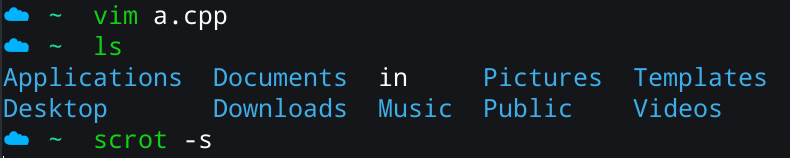
另外一个主题就是 crunch,也是我目前在用的一个主题

设置方法:vim ~/.zshrc, 找到ZSH_THEME=“”,这句话,在双引号里面写上cloud就可以啦!
如果你在里面写的是random,每次开启终端的主题将是随机的!
当然你也可以自己找主题,oh-my-zsh里面带有主题了,主题都在以下这个文件夹里,可以进去找自己喜欢的
~/.oh-my-zsh/themes
插件:
1、git
2、pip
这两个没什么讲的
3、sudo
当我们输入命令需要管理员身份时,不必让光标回到开始打一个sudo,可以直接按两次ESC,就会自动帮你加上sudo
4、thefuck
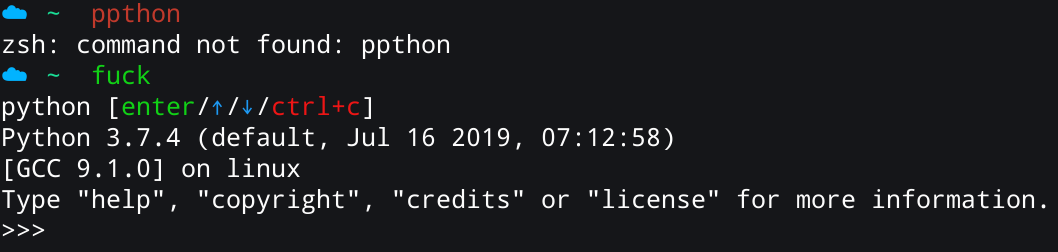
当我们输入命令错误时,输入fuck,终端就会乖乖的给我们正确的指令选择了!(这个插件需要自己下
5、autojump
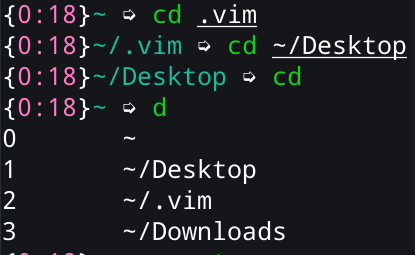
在终端输入d,可以显示刚刚走过的路径,然后按数字选择进入哪一个目录。(这个插件需要自己下
6、web-search
直接在终端使用浏览器搜索,可以百度 谷歌

7、last-working-dir
可以记录我退出终端时所在的路径,再次打开时还在这个路径
8、zsh-syntax-highlighting
shell下的语法高亮,(这个也要自己下,命令如下)
git clone https://github.com/zsh-users/zsh-syntax-highlighting.git ${ZSH_CUSTOM:-~/.oh-my-zsh/custom}/plugins/zsh-syntax-highlighting
除了以上的两个插件需要自己下载,其他都不需要的。
设置方法:vim ~/.zshrc 在里面找到plugins=()
然后在括号里加上想要的插件就可以了。
plugins=(

    git

    pip

    sudo

    thefuck

    autojump

    web-search

    last-working-dir

    zsh-syntax-highlighting

)
以上步骤操作完后,重启终端,输入source .zshrc,就ok了!
注意每次添加插件以后,都要进行source .zshrc一下,让这些插件运行起来。
另外,我的截图软件的scrot,查看图片是用gwenview
scrot -s:可以自己选择截图的范围
一下是我的 .zshrc 配置文件
# If you come from bash you might have to change your $PATH.

# export PATH=$HOME/bin:/usr/local/bin:$PATH

# Path to your oh-my-zsh installation.

  export ZSH="/home/jiaaaaaaaqi/.oh-my-zsh"

# Set name of the theme to load --- if set to "random", it will

# load a random theme each time oh-my-zsh is loaded, in which case,

# to know which specific one was loaded, run: echo $RANDOM_THEME

# See https://github.com/robbyrussell/oh-my-zsh/wiki/Themes

ZSH_THEME="cloud"

# Set list of themes to pick from when loading at random

# Setting this variable when ZSH_THEME=random will cause zsh to load

# a theme from this variable instead of looking in ~/.oh-my-zsh/themes/

# If set to an empty array, this variable will have no effect.

# ZSH_THEME_RANDOM_CANDIDATES=( "robbyrussell" "agnoster" )

# Uncomment the following line to use case-sensitive completion.

# CASE_SENSITIVE="true"

# Uncomment the following line to use hyphen-insensitive completion.

# Case-sensitive completion must be off. _ and - will be interchangeable.

# HYPHEN_INSENSITIVE="true"

# Uncomment the following line to disable bi-weekly auto-update checks.

# DISABLE_AUTO_UPDATE="true"

# Uncomment the following line to change how often to auto-update (in days).

# export UPDATE_ZSH_DAYS=

# Uncomment the following line to disable colors in ls.

# DISABLE_LS_COLORS="true"

# Uncomment the following line to disable auto-setting terminal title.

# DISABLE_AUTO_TITLE="true"

# Uncomment the following line to enable command auto-correction.

# ENABLE_CORRECTION="true"

# Uncomment the following line to display red dots whilst waiting for completion.

# COMPLETION_WAITING_DOTS="true"

# Uncomment the following line if you want to disable marking untracked files

# under VCS as dirty. This makes repository status check for large repositories

# much, much faster.

# DISABLE_UNTRACKED_FILES_DIRTY="true"

# Uncomment the following line if you want to change the command execution time

# stamp shown in the history command output.

# You can set one of the optional three formats:

# "mm/dd/yyyy"|"dd.mm.yyyy"|"yyyy-mm-dd"

# or set a custom format using the strftime function format specifications,

# see 'man strftime' for details.

# HIST_STAMPS="mm/dd/yyyy"

# Would you like to use another custom folder than $ZSH/custom?

# ZSH_CUSTOM=/path/to/new-custom-folder

# Which plugins would you like to load?

# Standard plugins can be found in ~/.oh-my-zsh/plugins/*

# Custom plugins may be added to ~/.oh-my-zsh/custom/plugins/

# Example format: plugins=(rails git textmate ruby lighthouse)

# Add wisely, as too many plugins slow down shell startup.

plugins=(

    git

    pip

    sudo

    thefuck

    autojump

    web-search

    last-working-dir

    zsh-syntax-highlighting

)

source $ZSH/oh-my-zsh.sh

# User configuration

# export MANPATH="/usr/local/man:$MANPATH"

# You may need to manually set your language environment

# export LANG=en_US.UTF-8

# Preferred editor for local and remote sessions

# if [[ -n $SSH_CONNECTION ]]; then

#   export EDITOR='vim'

# else

#   export EDITOR='mvim'

# fi

# Compilation flags

# export ARCHFLAGS="-arch x86_64"

# ssh

# export SSH_KEY_PATH="~/.ssh/rsa_id"

# Set personal aliases, overriding those provided by oh-my-zsh libs,

# plugins, and themes. Aliases can be placed here, though oh-my-zsh

# users are encouraged to define aliases within the ZSH_CUSTOM folder.

# For a full list of active aliases, run `alias`.

#

# Example aliases

# alias zshconfig="mate ~/.zshrc"

# alias ohmyzsh="mate ~/.oh-my-zsh"
zsh!oh-my-zsh! 好看的主题和插件以及我的.zshrc的更多相关文章
- Mac OS 终端强化美化:iterm2 + zsh + oh~my~zsh 设置教程
为了获得更好的排版效果,文章改用markdown撰写,故重发一次. 前言 mac自带的terminal终端没有文件名高亮等功能,而且界面不是很好看,故今晚学舍友折腾了终端,可以让自己使用起来更加方便, ...
- Iterm2安装Zsh + Oh My Zsh+Solarized
安装Oh My Zsh curl -L https://raw.github.com/robbyrussell/oh-my-zsh/master/tools/install.sh | sh 安装Zsh ...
- idea 个人settings和好看的主题推荐
idea 个人settings和好看的主题推荐 配置和主体搭配使用,效果最佳!!! 配置文件: 链接:https://pan.baidu.com/s/1K-oW9UNxUz_5XWz4Ru3_3w ...
- Oh-My-Zsh及主题、插件安装与配置
切换zsh Manjaro linux默认安装了zsh,其他可能需要先安装 cat /etc/shells #查看本地有哪几种shell chsh -s /bin/zsh #切换到zsh 默认终端启动 ...
- 解决WordPress后台安装主题、插件图片不显示的问题
今天搭建wordpress发现现在主题的时候预览图片都没有了,于是搜索了一下,发现下面的这个方法确实管用,于是转载收藏. 有在WordPress后台安装主题.插件的小伙伴可能会遇到主题.插件图片不显示 ...
- 解决安装WordPress主题及插件需要输入FTP问题
http://www.zhanghenglei.com/wordpress-ftp-update/ 使用Wordpress程序架构的网站如果需要在网站后台升级.安装主题或者插件的时候,总是会提示需要我 ...
- 解决WordPress无法上传媒体文件以及无法下载和安装主题与插件的问题
前言: 我的个人博客网站荒原之梦在安装成功WordPress之后本来是可以上传媒体文件,安装主题和插件的,但是后来不知道怎么回事就出了问题:不能上传媒体文件也不能安装主题和插件了.出现这个问题后我尝试 ...
- 黄聪:WordPress 多站点建站教程(二):后台(管理网络)设置详解,如何管理子站的用户、主题、插件、设置等功能
建立好了子站,我们需要有个地方配置所有子站的主题.插件等功能,我们可以在后台看到 我的站点--管理网络 如下图: 在 管理网络--仪表盘 里面,我们可以创新用户和站点,也提供了查询功能. 要注意的是: ...
- WordPress主题设置插件,让你的站点有电脑、手机双主题
我们建站的时候总是会优先考虑自适应的主题,但是与之对应,免费的自适应主题都调用国外公共资源,访问速度不太理想.加上wordpress未经优化之前,本身也没有极高的访问效率.所以大家可以下载这款“主题设 ...
随机推荐
- 从零开始学安全(四十六)●sqli-labs 1-4关 涉及的知识点
Less-1 到Less-4 基础知识注入 我们可以在 http://127.0.0.1/sqllib/Less-1/?id=1 后面直接添加一个 ‘ ,来看一下效果: 从上述错误当中,我们可以看到 ...
- html文档知识补充
13.form表单(*******) 功能:前后数据交互,帮你提交任意的数据 input通过控制type属性来展示不同的获取用户输入的页面效果 type属性总结: text:纯文本 password: ...
- Swiper4.x使用方法
1.首先加载插件,需要用到的文件有swiper.min.js和swiper.min.css文件.可下载Swiper文件或使用CDN. <!DOCTYPE html> <html> ...
- java.sql.SQLException: The server time zone value '???ú±ê×??±??' is unrecognized or represents more than one time zone.
[报错信息] [百度翻译] 服务器时区值'???ú±ê×??±??'无法识别或表示多个时区.如果要利用时区支持,必须配置服务器或JDBC驱动程序(通过ServerTimeZone配置属性),以使用更具 ...
- ElasticSearch-6.3.2 linux 安装
在linux 系统安装ElasticSearch-6.3.2最新版本,也适合6.x 系列版本做参考 前提先在linux 安装好jdk1.8 创建用户 从5.0开始,ElasticSearch 安全级别 ...
- Python3 小技巧
完全个人总接 每个文件头部都可以加入这个,或者放到用单独一个文件,再import *.其实都一样,只需要一行false=False;true=True;none=null=None;hid=lambd ...
- Java:配置环境(Mac)——Eclipse;修改JDK版本后,Eclipse打不开
1.官网下载 选择一个速度快的镜像 推荐东软这个 2.双击下载的安装包,下一步 其中有一步是选择Eclipse版本,SE选第一个,EE第二个.仔细审题吧. 3.配置JDK 应用.关闭 4.测试:写个H ...
- MongoDB自学(3)
MongoDB关系:MongoDB的关系表示多个文档之间在逻辑上的相互联系.文档之间可以通过嵌入和引用来建立联系.关系:1:11:NM:1M:N 嵌入式:{ id:11;name:嘻嘻嘻;addres ...
- C#图片添加文字水印
/// <summary> /// 给图片添加文字水印 /// </summary> /// <param name="img">图片</ ...
- SQLSTATE[HY000]: General error: 1030 Got error 28 from storage engine
今天上课程化平台考试,输入平台网址突然报这个错误 可以先df -h 发现/tmp文件使用满了 ,清理下不需要的临时文件即可