
centos7.0安装cuda驱动
00、CUDA简介
CUDA和GPU的并行处理能力来加速深度学习和其他计算密集型应用程序

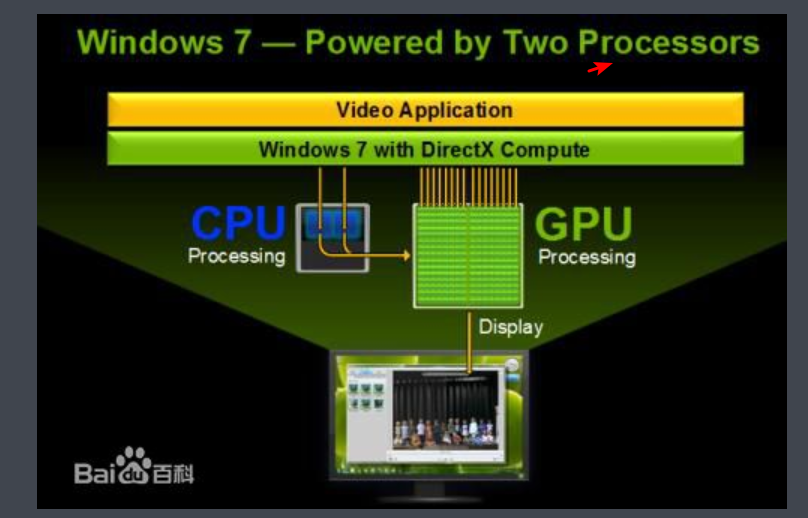
01、CPU+GPU协同架构
02、部署环境
[docker@lab-250 ~]$ cat /etc/*release

NAME="Red Hat Enterprise Linux Server"

VERSION="7.0 (Maipo)"

ID="rhel"

ID_LIKE="fedora"

VERSION_ID="7.0"

PRETTY_NAME="Red Hat Enterprise Linux Server 7.0 (Maipo)"

ANSI_COLOR="0;31"

CPE_NAME="cpe:/o:redhat:enterprise_linux:7.0:GA:server"

HOME_URL="https://www.redhat.com/"

BUG_REPORT_URL="https://bugzilla.redhat.com/"

REDHAT_BUGZILLA_PRODUCT="Red Hat Enterprise Linux 7"

REDHAT_BUGZILLA_PRODUCT_VERSION=7.0

REDHAT_SUPPORT_PRODUCT="Red Hat Enterprise Linux"

REDHAT_SUPPORT_PRODUCT_VERSION=7.0

Red Hat Enterprise Linux Server release 7.0 (Maipo)

Red Hat Enterprise Linux Server release 7.0 (Maipo)
[docker@lab-250 ~]$ uname -r
3.10.0-123.el7.x86_64
[docker@lab-250 ~]$ uname -a
Linux lab-250 3.10.0-123.el7.x86_64 #1 SMP Mon May 5 11:16:57 EDT 2014 x86_64 x86_64 x86_64 GNU/Linux
注意:要在服务器上安装GPU显卡
03、下载CUDA-Tookit
https://developer.nvidia.com/cuda-toolkit-archive
CUDA Toolkit 9.0 (Sept 2017), Online Documentation //实验下载此版本,根据系统下载对应的安装包,建议选择本地集成成果包!
https://developer.nvidia.com/cuda-toolkit
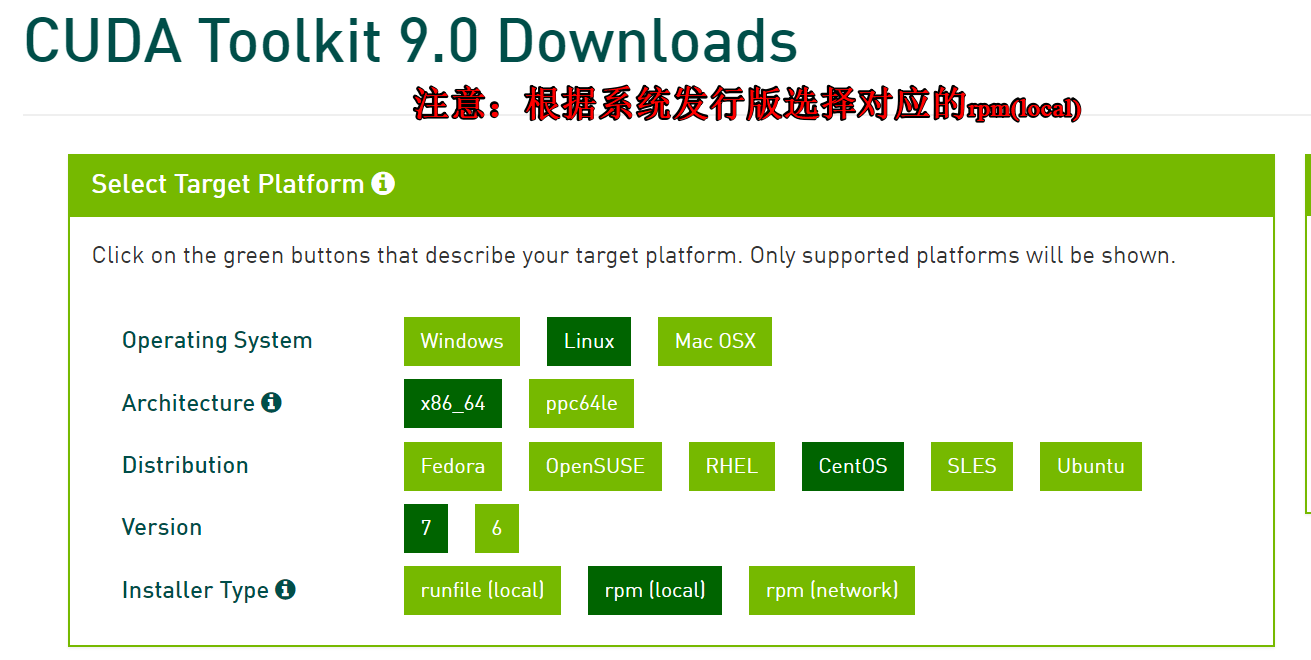
注意:下面的安装,是由于系统是rhel7.0,错误认为是centos7.0导致部分rpm未安装需要单独下载。一般对应版本是不需要在额外下载rpm包
cuda-repo-rhel7-9-0-local-9.0.176-1.x86_64-rpm #centos7,由于centos是基于rhel7的开源发行版本,所以名字rhel7
04、setup
Installation Instructions:

rpm -i cuda-repo-rhel7-9-0-local-9.0.176-1.x86_64.rpm

yum clean all && yum makecache

yum install cuda


Other installation options are available in the form of meta-packages.
For example, to install all the library packages, replace "cuda" with the "cuda-libraries-9-0" meta package
注意:安装cuda的时候它会自动找NVIDIA显卡的,不需要提前把NVIDIA显卡设置为默认显卡
错误处理:
https://mirrors.aliyun.com/epel/7/aarch64/Packages/d/dkms-2.6.1-1.el7.noarch.rpm
https://mirrors.aliyun.com/centos/7.6.1810/os/x86_64/Packages/libvdpau-1.1.1-3.el7.x86_64.rpm
--> Finished Dependency Resolution

Error: Package: 1:nvidia-kmod-384.81-2.el7.x86_64 (cuda-9-0-local)

           Requires: dkms

 You could try using --skip-broken to work around the problem

 You could try running: rpm -Va --nofiles --nodigest

[root@lab-250 ~]# rz -E

rz waiting to receive.

[root@lab-250 ~]# rpm -ivh dkms-2.6.1-1.el7.noarch.rpm

warning: dkms-2.6.1-1.el7.noarch.rpm: Header V3 RSA/SHA256 Signature, key ID 352c64e5: NOKEY

error: Failed dependencies:

	elfutils-libelf-devel is needed by dkms-2.6.1-1.el7.noarch

[root@lab-250 ~]#

[root@lab-250 ~]# yum install -y elfutils-libelf-devel

Resolving Dependencies

--> Running transaction check

---> Package elfutils-libelf-devel.x86_64 0:0.158-3.el7 will be installed

--> Finished Dependency Resolution

Dependencies Resolved
[root@lab-250 ~]# rpm -ivh dkms-2.6.1-1.el7.noarch.rpm
warning: dkms-2.6.1-1.el7.noarch.rpm: Header V3 RSA/SHA256 Signature, key ID 352c64e5: NOKEY
Preparing... ################################# [100%]
Updating / installing...
1:dkms-2.6.1-1.el7 ################################# [100%]
[root@lab-250 ~]#
[root@lab-250 ~]# yum install -y cuda
05、设置环境变量
/usr/local/cuda-9.0 #默认安装位置
vim /etc/profile
export CUDA_HOME="/usr/local/cuda-9.0"
export PATH=$CUDA_HOME/bin:$PATH
export LD_LIBRARY_PATH=$CUDA_HOME/lib64:$LD_LIBRARY_PATH
source /etc/profile
[docker@lab-250 ~]$ nvcc -V  #验证环境变量

nvcc: NVIDIA (R) Cuda compiler driver

Copyright (c) 2005-2017 NVIDIA Corporation

Built on Fri_Sep__1_21:08:03_CDT_2017

Cuda compilation tools, release 9.0, V9.0.176
[docker@lab-250 ~]$ nvidia-smi  #查看本机GPU显卡信息,由于测试机未安装GPU显卡导致的

NVIDIA-SMI has failed because it couldn't communicate with the NVIDIA driver. Make sure that the latest NVIDIA driver is installe

d and running.
引用:
https://baijiahao.baidu.com/s?id=1610852365402771191&wfr=spider&for=pc
https://www.jianshu.com/p/34a504af8d51
centos7.0安装cuda驱动的更多相关文章
- centos7.0安装docker报错
使用centos7.0安装dockers时出现Transaction check error错误. yum install docker Transaction check error: file / ...
- CentOS7.0 安装JAVA周围环境
CentOS7.0 安装JAVA周围环境 安装JDK 1.配置JDK环境变量 把下载好的JDK(jdk-7u75-linux-x64.gz)文件上传到 Reg: /home/p2pweb/java/ ...
- CentOS7.0安装EMQ代理服务
CentOS7.0安装EMQ代理服务 安装文件下载 官网 : https://www.emqx.io/cn/ 下载地址: https://www.emqx.io/cn/downloads 选择需要的版 ...
- CentOS7.3安装NVIDIA-1080ti驱动、cuda、cudnn、TensorFlow
本文为作者原创,转载请注明出处(http://www.cnblogs.com/mar-q/)by 负赑屃 Ubuntu非要换centOS...好吧... 看了很多是通过ELRepo源安装驱动,不过我没 ...
- centos7.3安装nvidia驱动和cuda9
一, 挂载本地源镜像 1) 下载操作系统镜像 所有服务器操作系统必须统一,本平台只支持 CentOS 7.3 1611,镜像下载地址. 2) 上传镜像到服务器 ,假设上传在 root 下 3) 建立挂 ...
- centos7.0安装docker-18.06.1-ce不能启动问题
最近用centos7.0 yum安装了一个docker-ce18.06.1 但是发现安装好不能启动,于是上官网看了一下,说是docker-ce18.06.1是从centos7.2开始支持的,但是7. ...
- centos7.0 安装redis集群
生产环境下redis基本上都是用的集群,毕竟单机版随时都可能挂掉,风险太大.这里我就来搭建一个基本的redis集群,功能够用但是还需要完善,当然如果有钱可以去阿里云买云数据库Redis版的,那个还是很 ...
- centos7.0 安装字体库
最近在centos7.0下用itextpdf将word文档转成pdf时出现字体丢失的情况.网上找了很多资料,各式各样的原因和解决方法.后来经过一番测试发现是centos7.0 minimal没有安装相 ...
- CentOS7.0安装与配置Tomcat-7
解决权限不够 #chmod a+x filename 安装说明 安装环境:CentOS-7.0.1406安装方式:源码安装 软件:apache-tomcat-7.0.29.tar.gz 下载地址:ht ...
随机推荐
- Peter's smokes -poj 2509
题意:彼得有n支雪茄,每k个烟头可以换一支新雪茄,问彼得最多可以吸多少支雪茄 ? 当时自己做时,错在了直接在while循环开始前,便将雪茄的初始数量给加上了,然而应该是先处理后再加上最终剩余的雪茄数量 ...
- js函数和变量的声明与执行顺序
一.函数执行顺序 1.正常顺序 function f(){ alert(2); } f(); //alert 2 所有浏览器都能测试通过. 2.倒序调用 f(); //alert 2 function ...
- csdn 站点使用
大学时使用csdn下载软件资源,最终csdn成为一个it中很重要站点,csdn的运营方式值得思考.
- google像apple 30亿美元购买流量
google花费30亿美元像apple购买流量作为iphone默认搜索引擎.
- [P2671][NOIP2015]求和 (数论)
[题目链接] 这位大神讲得很详细:点我 本蒟蒻只会抄抄题解了 #include<bits/stdc++.h> #define max(a,b) (a>b?a:b) #define m ...
- Dropping tests [POJ2976] [01分数规划]
Description 今年有 n 场 ACM-ICPC 竞赛,小明每场都有资格参加.第 i 场竞赛共有 b[i] 道题.小明预测第 i场他能做出 a[i] 道题.为了让自己看着更“大佬”一些,小明想 ...
- xcode升级至9.0之后,新建xib报错: Safe Area Layout Guide Before IOS 9.0
直接翻译是:iOS 9.0前安全区域布局指南. 字面意思就是safe area布局应用在iOS 9之前的版本上了. 解决方法: 1,我们可以把safe area勾掉,不用safe area布局,如下图 ...
- Jsp俩大内置对象学习
https://www.cnblogs.com/smyhvae/p/4065790.html post与get的区别 最直观的区别就是GET把参数包含在URL中,POST通过request body传 ...
- 生成Area URL链接
关于Area的URL链接生成,可以分为这么三种情况:第一种是在当前Area生成指向当前Area的链接:第二种是生成指向其他Area的链接:第三种是在某个Area中生成指向根目录的链接.下面是这三种情况 ...
- 解决 main(int argc, char** argv)这种情况下通过命令行传参,改为main函数里面给定参数。
本文是原创文章,未经允许,请勿转载. 原来程序中是通过运行exe,然后加上参数,然程序运行起来的.也就是main(int argc, char** argv)这里是通过argv参数是从命令行 传过来的 ...