
C#Windows Service服务程序的安装/卸载、启动/停止 桌面客户端管理程序设计
C#Windows Service服务程序的安装/卸载、启动/停止 桌面客户端管理程序设计
关于Windows Service程序的安装与卸载如果每次使用命令行操作,那简直要奔溃了,太麻烦而且还容易出错
那么如果你只是用一次就不用了那么命令行业无所谓
关于Windows Service程序的创建可以参考上一篇
C#Windows Service程序的创建安装与卸载
一、命令行安装与卸载
安装服务:
installutil.exe filename
卸载服务:
installutil.exe /u filename
安装服务程序
因为Installutil.exe程序在 C:\Windows\Microsoft.NET\Framework64\v4.0.30319\ 目录下,需要通过cmd命令 "cd" 切换目录。v4.0.30319是编译该Windows Service程序的版本(自己选择对应的版本)
二、开发环境
操作系统:Windows7x64 sp1 专业版
开发环境:Visual studio 2013
编程语言:C#
.NET版本: .NET Frmework 4.0
三、新建一个客户端程序进行安装/卸载、启动/停止
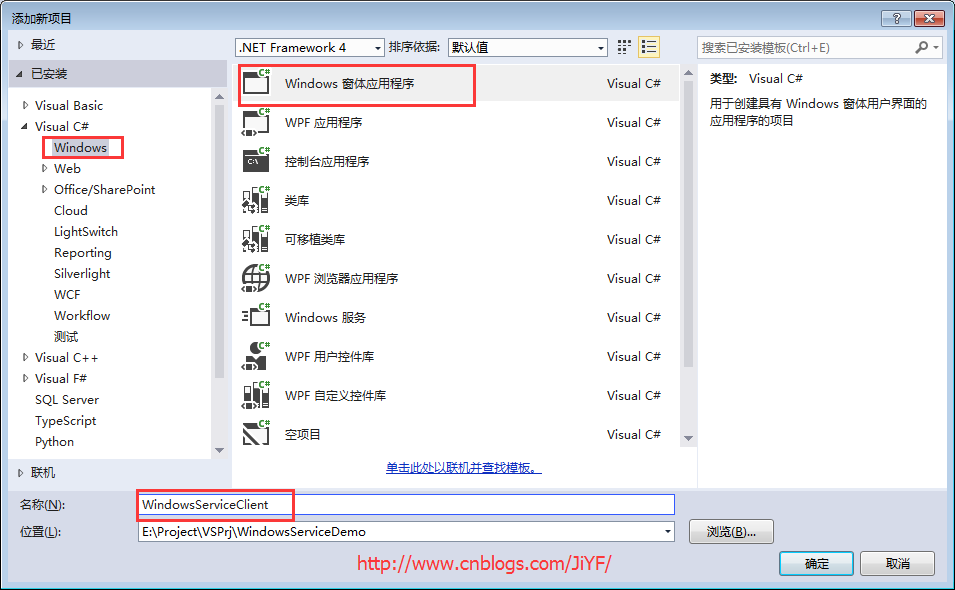
1.新建一个WinForm窗体应用程序起名为Windows Service Client
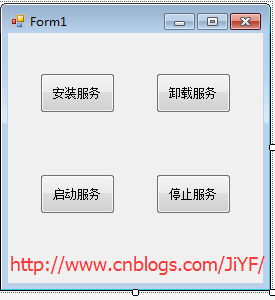
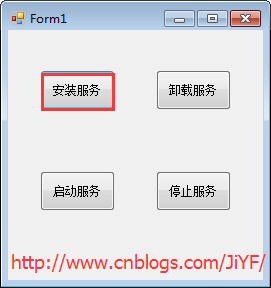
2.添加四个按钮分别为安装服务/卸载服务、启动服务/停止服务
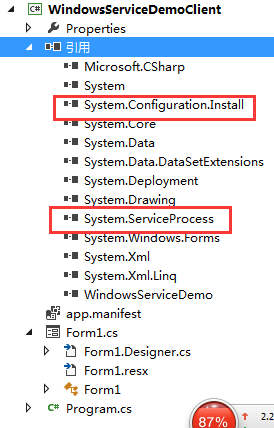
3.引入俩个命名空间引用“System.ServiceProcess”及“System.Configuration.Install”
4.编写代码如下
         string serviceFilePath = Environment.CurrentDirectory + "\\WindowsServiceDemo.exe";

         //string serviceFilePath = $"{Application.StartupPath}\\MyWindowsService.exe";

         string serviceName = "ServiceDemo";

         public Form1()

         {

             InitializeComponent();

         }

         /// <summary>

         /// 安装服务

         /// </summary>

         /// <param name="sender"></param>

         /// <param name="e"></param>

         private void button1_Click(object sender, EventArgs e)

         {

             if (this.IsServiceExisted(serviceName))

             {

                 this.UninstallService(serviceName);

             }

             this.InstallService(serviceFilePath);

         }

         /// <summary>

         /// 卸载服务

         /// </summary>

         /// <param name="sender"></param>

         /// <param name="e"></param>

         private void button2_Click(object sender, EventArgs e)

         {

             if (this.IsServiceExisted(serviceName))

             {

                 this.ServiceStop(serviceName);

                 this.UninstallService(serviceFilePath);

             }

         }

         /// <summary>

         /// 启动服务程序

         /// </summary>

         /// <param name="sender"></param>

         /// <param name="e"></param>

         private void button3_Click(object sender, EventArgs e)

         {

             if (this.IsServiceExisted(serviceName))

             {

                 this.ServiceStart(serviceName);

             }

         }

         /// <summary>

         /// 停止服务程序

         /// </summary>

         /// <param name="sender"></param>

         /// <param name="e"></param>

         private void button4_Click(object sender, EventArgs e)

         {

             if (this.IsServiceExisted(serviceName))

             {

                 this.ServiceStop(serviceName);

             }

         }

         /// <summary>

         /// 判断服务是否存在

         /// </summary>

         /// <param name="serviceName"></param>

         /// <returns></returns>

         private bool IsServiceExisted(string serviceName)

         {

             ServiceController[] services = ServiceController.GetServices();

             foreach (ServiceController sc in services)

             {

                 if (sc.ServiceName.ToLower() == serviceName.ToLower())

                 {

                     return true;

                 }

             }

             return false;

         }

         /// <summary>

         /// 安装服务

         /// </summary>

         /// <param name="serviceFilePath"></param>

         private void InstallService(string serviceFilePath)

         {

             using (AssemblyInstaller installer = new AssemblyInstaller())

             {

                 installer.UseNewContext = true;

                 installer.Path = serviceFilePath;

                 IDictionary savedState = new Hashtable();

                 installer.Install(savedState);

                 installer.Commit(savedState);

             }

         }

         /// <summary>

         /// 卸载服务

         /// </summary>

         /// <param name="serviceFilePath"></param>

         private void UninstallService(string serviceFilePath)

         {

             using (AssemblyInstaller installer = new AssemblyInstaller())

             {

                 installer.UseNewContext = true;

                 installer.Path = serviceFilePath;

                 installer.Uninstall(null);

             }

         }

         /// <summary>

         /// 启动服务

         /// </summary>

         /// <param name="serviceName"></param>

         private void ServiceStart(string serviceName)

         {

             using (ServiceController control = new ServiceController(serviceName))

             {

                 if (control.Status == ServiceControllerStatus.Stopped)

                 {

                     control.Start();

                 }

             }

         }

         /// <summary>

         /// 停止服务

         /// </summary>

         /// <param name="serviceName"></param>

         private void ServiceStop(string serviceName)

         {

             using (ServiceController control = new ServiceController(serviceName))

             {

                 if (control.Status == ServiceControllerStatus.Running)

                 {

                     control.Stop();

                 }

             }

         }
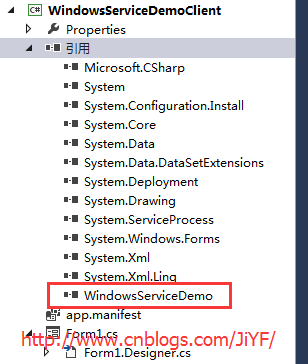
5.引入WindowsServerDemo程序到本项目中便于安装等
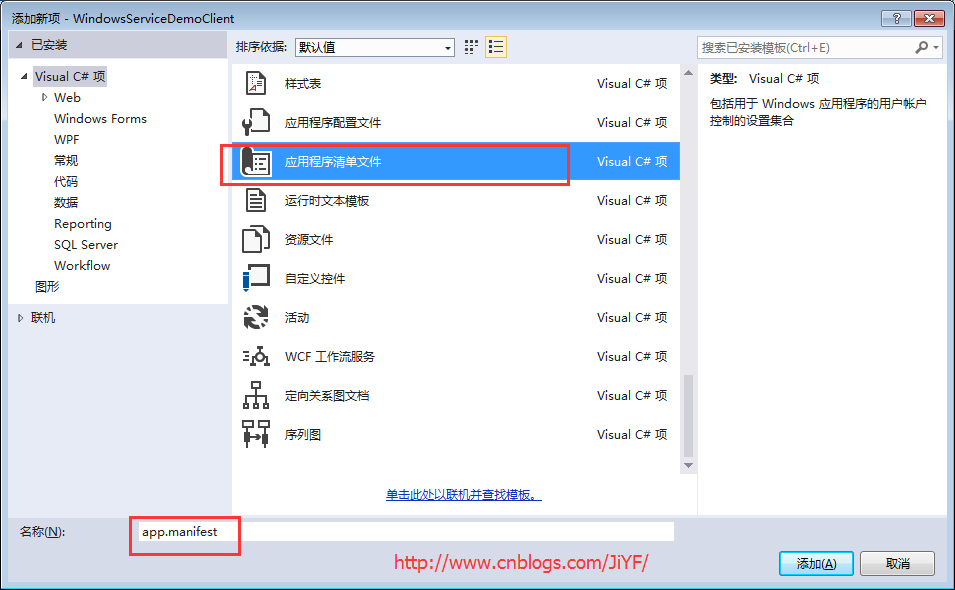
6.由于需要安装服务,故需要使用UAC中Administrator的权限,鼠标右击项目“WindowsServiceClient”,在弹出的上下文菜单中选择“添加”->“新建项”,在弹出的选择窗体中选择“应用程序清单文件”并单击确定,如下图所示:
7.打开该文件,并将<requestedExecutionLevel level="asInvoker" uiAccess="false" />改为<requestedExecutionLevel level="requireAdministrator" uiAccess="false" />
         <!--修改前

         <requestedExecutionLevel level="asInvoker" uiAccess="false" />

         -->

         <!--修改后-->

         <requestedExecutionLevel level="requireAdministrator" uiAccess="false" />
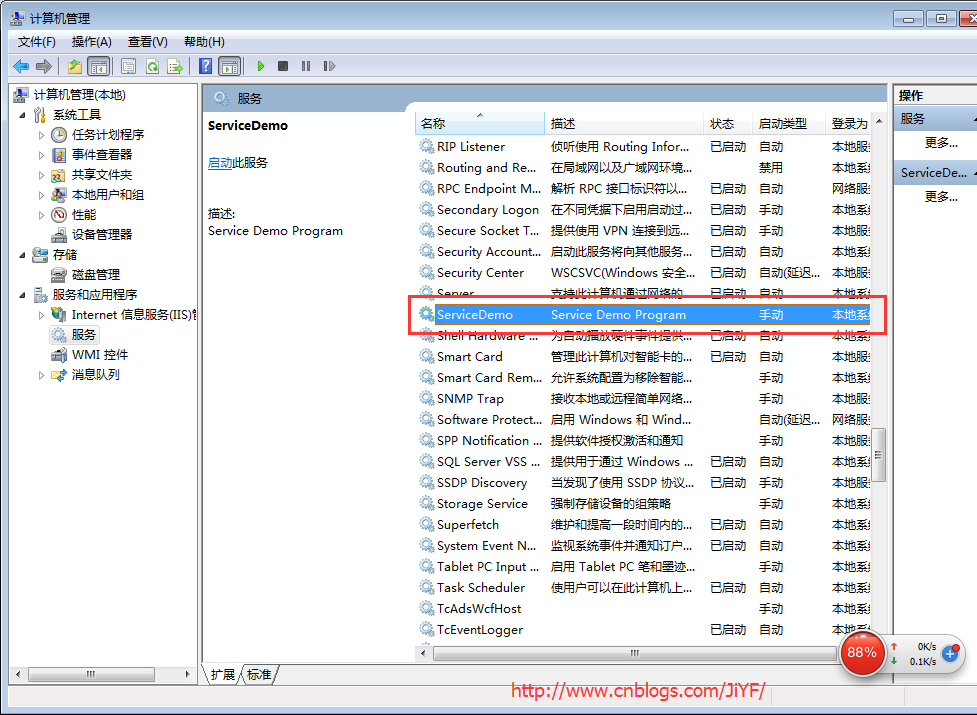
8.启动程序记住(Visual studio 2013也得用管理员身份运行),顺便开启计算机->管理-->服务来查看
分别单击测试安装服务,启动服务,停止服务,卸载服务,分别查看服务列表
服务列表
源代码工程文件下载
参考博客:https://www.cnblogs.com/mq0036/p/7875864.html
C#Windows Service服务程序的安装/卸载、启动/停止 桌面客户端管理程序设计的更多相关文章
- windows Service程序的安装、启动、卸载命令
安装:%SystemRoot%\Microsoft.NET\Framework\v4.0.30319\installutil.exe ServiceTest.exe 启动:Net Start serv ...
- 通过批处理进行Windows服务的安装/卸载&启动/停止
安装服务 @echo off set checked=2 set PATHS=%~sdp0 echo 按任意键执行安装……? pause>nul if %checked% EQU 2 ( %PA ...
- python实现windows Service服务程序
python实现windows Service服务程序 win32serviceutil.ServiceFramework是封装得很好的Windows服务框架,本文通过继承它来实现. 通过SvcDoR ...
- 使用Advanced Installer 13.1打包发布 Windows Service服务程序
原文: 使用Advanced Installer 13.1打包发布 Windows Service服务程序 项目中需要用到一个定时推送案件状态的需求,本人小菜一只,在同事建议下要写成一个windows ...
- Windows下的Nessus安装与启动
Windows下的Nessus安装与启动 一.安装 在https://www.tenable.com/downloads/nessus下载对应windows版本 双击安装,完成后,访问 https:/ ...
- windows service 2008 R2 安装net4.6环境失败,windows service 2008 R2 升级sp1问题
一.错误 1.因为我的程序是以vs2017开发的,在windows service 2008 R2 IIS部署项目文件报出错误,因此要安装net4.6的环境. 2.windows service 2 ...
- redis的安装部署启动停止<17.3.21已更新>
--------------------------------------------------------- 启动redis时使用下面两条命令: redis-server /etc/redis. ...
- 使用Python写Windows Service服务程序
1.背景 如果你想用Python开发Windows程序,并让其开机启动等,就必须写成windows的服务程序Windows Service,用Python来做这个事情必须要借助第三方模块pywin32 ...
- mariaDB 安装/卸载+启动/关闭 服务
1.设置环境变量 无论是用户环境变量还是系统环境变量 2.启动服务 进入根目录 名字根据 --install 后的 参数来决定 叫MariaDB,MySQL 都可以 mysqld.exe --inst ...
随机推荐
- iOS 开发中常见的崩溃错误
1.duplicate symbols for architecture armv7 1.首先排查是否有名字重复的文件: 2.检查是否在#import头文件的时候,不小心把.h写成了.m. 2 ...
- 基于spring boot 2.x的websocket示例
spring boot 2/spring 5自带了websocket,下面是最基本的示例(包括java服务端.java客户端以及js客户端) 一.pom依赖 <dependencies> ...
- C# Barrier 实现
当您需要一组任务并行地运行一连串的阶段,但是每一个阶段都要等待所有其他任务都完成前一阶段之后才能开始,你一通过Barrier实例来同步这一类协同工作.Barrier初始化后,将等待特定数量的信号到来, ...
- 20180821 Python学习笔记:如何获取当前程序路径
20180821 Python学习笔记:如何获取当前程序路径 启动的脚本的路径为:D:\WORK\gitbase\ShenzhenHouseInfoCrawler\main.py 当前脚本的路径为:D ...
- 跟着柴毛毛学Spring(3)——简化Bean的配置
通过前面的学习.我们会感觉到对于一个有较多Bean的大项目,Spring的配置会比較复杂. 那么接下来我们就介绍怎样简化Spring的配置. 简化Spring的配置主要分为两类: 1. 自己主动装配 ...
- SpringBoot2.0小程序支付功能实现weixin-java-pay
SpringBoot2.0小程序支付功能实现weixin-java-pay WxJava - 微信开发 Java SDK(开发工具包); 支持包括微信支付.开放平台.公众号.企业微信/企业号.小程序等 ...
- iOS实现 webView loadHTMLString加载外部css、js样式
记录一下. webview(或wk)用 loadHTMLString加载内容时 ,如果只是单纯的html内容,样式等都写在内部,直接设置baseURL为nil即可. 不过当html里包含外部样式或调用 ...
- Linux 系统 TCP优化
这里主要是对<High performance Browser Networking>一书中关于TCP的描述的整理,本书与2013年出版,在书出版后,内核做了一些升级,有可能某些项不再适用 ...
- Linux基础知识之用户和用户组以及 Linux 权限管理
已经开始接触Linux用户管理,用户组管理,以及权限管理这几个逼格满满的关键字.这几个关键字对于前端程序猿的我来说真的是很高大上有木有,以前尝试学 Linux 的时候看到这些名词总是下意识的跳过不敢看 ...
- H3C Comware V3 端口聚合
通常链路聚合有三种模式:手工汇聚.静态LACP汇聚和动态LACP汇聚. 但是V3版本下只提供了 手工聚合模式 manual 和 静态LACP聚合模式 static 两种 V3版本配置链路聚合 1,创建 ...