
Hadoop源码分析之产生InputSplit文件过程
static {

    try {

      META_SPLIT_FILE_HEADER = "META-SPL".getBytes("UTF-8");

    } catch (UnsupportedEncodingException u) {

      throw new RuntimeException(u);

    }

  }
public static final TaskSplitMetaInfo EMPTY_TASK_SPLIT = new TaskSplitMetaInfo();

.png)
private long startOffset:该InputSplit在job.split文件中的偏移量

private long inputDataLength:该 InputSplit 的长度

private String[] locations:该 InputSplit 所在的host 列表
.png)
public void readFields(DataInput in) throws IOException {

      int len = WritableUtils.readVInt(in);

      locations = new String[len];

      for (int i = 0; i < locations.length; i++) {

        locations[i] = Text.readString(in);

      }

      startOffset = WritableUtils.readVLong(in);

      inputDataLength = WritableUtils.readVLong(in);

    }

public void write(DataOutput out) throws IOException {

      WritableUtils.writeVInt(out, locations.length);

      for (int i = 0; i < locations.length; i++) {

        Text.writeString(out, locations[i]);

      }

      WritableUtils.writeVLong(out, startOffset);

      WritableUtils.writeVLong(out, inputDataLength);

    }
public interface Writable {

  /**

   * Serialize the fields of this object to <code>out</code>.

   *

   * @param out <code>DataOuput</code> to serialize this object into.

   * @throws IOException

   */

  void write(DataOutput out) throws IOException;

  /**

   * Deserialize the fields of this object from <code>in</code>.

   *

   * <p>For efficiency, implementations should attempt to re-use storage in the

   * existing object where possible.</p>

   *

   * @param in <code>DataInput</code> to deseriablize this object from.

   * @throws IOException

   */

  void readFields(DataInput in) throws IOException;
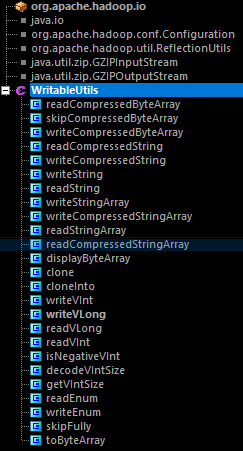
private TaskSplitIndex splitIndex:Split元信息在 jib.split 文件中的位置

private long inputDataLength:InputSplit的数据长度

private String[] locations:InputSplit所在的host列表
private String splitLocation:job.split文件的位置

private long startOffset:InputSplit在 job.split 文件中的位置
public void readFields(DataInput in) throws IOException {

      splitLocation = Text.readString(in);

      startOffset = WritableUtils.readVLong(in);

}

public void write(DataOutput out) throws IOException {

      Text.writeString(out, splitLocation);

      WritableUtils.writeVLong(out, startOffset);

}
Hadoop源码分析之产生InputSplit文件过程的更多相关文章
- hadoop源码分析(2):Map-Reduce的过程解析
一.客户端 Map-Reduce的过程首先是由客户端提交一个任务开始的. 提交任务主要是通过JobClient.runJob(JobConf)静态函数实现的: public static Runnin ...
- Hadoop源码分析(1):HDFS读写过程解析
一.文件的打开 1.1.客户端 HDFS打开一个文件,需要在客户端调用DistributedFileSystem.open(Path f, int bufferSize),其实现为: public F ...
- Hadoop源码分析之数据节点的握手,注册,上报数据块和心跳
转自:http://www.it165.net/admin/html/201402/2382.html 在上一篇文章Hadoop源码分析之DataNode的启动与停止中分析了DataNode节点的启动 ...
- angular源码分析:injector.js文件分析——angular中的依赖注入式如何实现的(续)
昨天晚上写完angular源码分析:angular中jqLite的实现--你可以丢掉jQuery了,给今天定了一个题angular源码分析:injector.js文件,以及angular的加载流程,但 ...
- SpringBoot源码分析之SpringBoot的启动过程
SpringBoot源码分析之SpringBoot的启动过程 发表于 2017-04-30 | 分类于 springboot | 0 Comments | 阅读次数 SpringB ...
- Envoy 源码分析--程序启动过程
目录 Envoy 源码分析--程序启动过程 初始化 main 入口 MainCommon 初始化 服务 InstanceImpl 初始化 启动 main 启动入口 服务启动流程 LDS 服务启动流程 ...
- Spring源码分析专题 —— IOC容器启动过程(上篇)
声明 1.建议先阅读<Spring源码分析专题 -- 阅读指引> 2.强烈建议阅读过程中要参照调用过程图,每篇都有其对应的调用过程图 3.写文不易,转载请标明出处 前言 关于 IOC 容器 ...
- Spring源码分析之Bean的创建过程详解
前文传送门: Spring源码分析之预启动流程 Spring源码分析之BeanFactory体系结构 Spring源码分析之BeanFactoryPostProcessor调用过程详解 本文内容: 在 ...
- Hadoop源码分析之Configuration
转自:http://www.it165.net/admin/html/201312/2178.html org.apache.hadoop.conf.Configuration类是Hadoop所有功能 ...
随机推荐
- 侯捷STL学习(二)--序列容器测试
第六节:容器之分类和各种测试(四) stack不提供iterator操作,破坏了容器的独特性,先进先出. 使用容器multiset(允许元素重复) 内部是红黑树,insert操作就保证了排好了序. 标 ...
- 国际化---demo1---bai
login.jsp <%@ page language="java" import="java.util.*" pageEncoding="UT ...
- ASP.NET——配置文件——连接字符串
一.连接字符串 1.通过<connectionStrings>方式: 方式一:SqlServer身份验证 <connectionStrings> <add name=&q ...
- leetcode398
public class Solution { int[] nums; Random rnd; public Solution(int[] nums) { this.nums = nums; this ...
- scrapy xpath 节点关系
父节点 子节点 兄弟节点 先辈节点 后代节点
- java判断姓是否合格 百家姓
package util; import java.lang.reflect.Array; public class FirstName { public static boolean ClearNa ...
- hive与hbase整合方式和优劣
分别安装hive 和 hbase 1.在hive中创建与hbase关联的表 create table ganji_ranks (row string,num string) STORED BY 'or ...
- eclipse 报错:GC overhead limit exceeded
还是eclipse内存问题 修改eclipse.ini -Xms512m -Xmx1024m 必要的情况下, 添加 -XX:MaxPermSize=1024M 表示在编译文件时一直占有最大内存
- Consumer设计-high/low Level Consumer
1 Producer和Consumer的数据推送拉取方式 Producer Producer通过主动Push的方式将消息发布到Broker n Consumer Consumer通过Pull从Br ...
- mac 彻底卸载Paragon NTFS
之前安装了paragon NTFS,试用期过了就卸载了,但是每天还是会提示“试用期已到期”,看着很烦. 百度了一下,发现网上的版本可能比较老了,和我的情况不太一样,但道理应该是一样的. 彻底删除方法: ...