
Struts2基础学习2
Struts2基础学习2
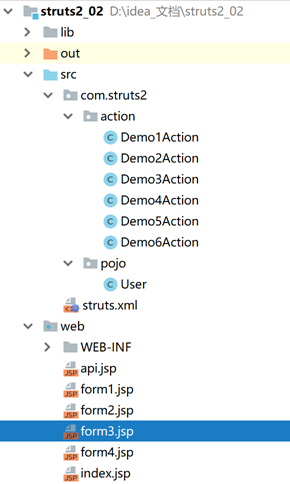
项目结构,测试页面与实体类
<%@ page language="java" contentType="text/html; charset=UTF-8"

    pageEncoding="UTF-8"%>

<!DOCTYPE html PUBLIC "-//W3C//DTD HTML 4.01 Transitional//EN" "http://www.w3.org/TR/html4/loose.dtd">

<html>

<head>

<meta http-equiv="Content-Type" content="text/html; charset=UTF-8">

<title>Insert title here</title>

</head>

<body>

    request: ${requestScope.name}<br>

    session:${sessionScope.name}<br>

    application:${applicationScope.name}<br>

</body>

</html>
api
<%@ page language="java" contentType="text/html; charset=UTF-8"

    pageEncoding="UTF-8"%>

<!DOCTYPE html PUBLIC "-//W3C//DTD HTML 4.01 Transitional//EN" "http://www.w3.org/TR/html4/loose.dtd">

<html>

<head>

<meta http-equiv="Content-Type" content="text/html; charset=UTF-8">

<title>Insert title here</title>

</head>

<body>

    <form action="${pageContext.request.contextPath}/Demo3Action">

        用户名:<input type="text" name="name" /><br>

        年龄:<input type="text" name="age" /><br>

        生日:<input type="text" name="birthday" /><br>

        <input type="submit" value="提交" />

    </form>

</body>

</html>
form1
<%@ page language="java" contentType="text/html; charset=UTF-8"

    pageEncoding="UTF-8"%>

<!DOCTYPE html PUBLIC "-//W3C//DTD HTML 4.01 Transitional//EN" "http://www.w3.org/TR/html4/loose.dtd">

<html>

<head>

<meta http-equiv="Content-Type" content="text/html; charset=UTF-8">

<title>Insert title here</title>

</head>

<body>

    <form action="${pageContext.request.contextPath}/Demo4Action">

        用户名:<input type="text" name="user.name" /><br>

        年龄:<input type="text" name="user.age" /><br>

        生日:<input type="text" name="user.birthday" /><br>

        <input type="submit" value="提交" />

    </form>

</body>

</html>
form2
<%@ page language="java" contentType="text/html; charset=UTF-8"

    pageEncoding="UTF-8"%>

<!DOCTYPE html PUBLIC "-//W3C//DTD HTML 4.01 Transitional//EN" "http://www.w3.org/TR/html4/loose.dtd">

<html>

<head>

<meta http-equiv="Content-Type" content="text/html; charset=UTF-8">

<title>Insert title here</title>

</head>

<body>

    <form action="${pageContext.request.contextPath}/Demo5Action">

        用户名:<input type="text" name="name" /><br>

        年龄:<input type="text" name="age" /><br>

        生日:<input type="text" name="birthday" /><br>

        <input type="submit" value="提交" />

    </form>

</body>

</html>
form3
<%@ page language="java" contentType="text/html; charset=UTF-8"

    pageEncoding="UTF-8"%>

<!DOCTYPE html PUBLIC "-//W3C//DTD HTML 4.01 Transitional//EN" "http://www.w3.org/TR/html4/loose.dtd">

<html>

<head>

<meta http-equiv="Content-Type" content="text/html; charset=UTF-8">

<title>Insert title here</title>

</head>

<body>

    <form action="${pageContext.request.contextPath}/Demo6Action" method="post" >

        list:<input type="text" name="list" /><br>

        list:<input type="text" name="list[3]" /><br>

        map:<input type="text" name="map['key']" /><br>

        <input type="submit" value="提交" />

    </form>

</body>

</html>
form4
package com.struts2.pojo;

import java.util.Date;

/**

 * @author: 肖德子裕

 * @date: 2018/11/20 18:39

 * @description:

 */

public class User {

    private String name;

    private Integer age;

    private Date birthday;

    public String getName() {

        return name;

    }

    public void setName(String name) {

        this.name = name;

    }

    public Integer getAge() {

        return age;

    }

    public void setAge(Integer age) {

        this.age = age;

    }

    public Date getBirthday() {

        return birthday;

    }

    public void setBirthday(Date birthday) {

        this.birthday = birthday;

    }

    @Override

    public String toString() {

        return "User [name=" + name + ", age=" + age + ", birthday=" + birthday + "]";

    }

}
User
测试Struts2的重定向与转发
package com.struts2.action;

import com.opensymphony.xwork2.ActionSupport;

/**

 * @author: 肖德子裕

 * @date: 2018/11/20 10:25

 * @description: 测试重定向与转发

 * 之所以继承ActionSupport类,是因为该类实现了很多接口,我们可以直接使用

 */

public class Demo1Action extends ActionSupport {

    public String index() throws Exception{

        System.out.println("hello1");

        return SUCCESS;

    }

    public String index2() throws Exception{

        System.out.println("hello2");

        return SUCCESS;

    }

    public String index3() throws Exception{

        System.out.println("hello3");

        return SUCCESS;

    }

    public String index4() throws Exception{

        System.out.println("hello4");

        return SUCCESS;

    }

}
Demo1Action
测试Struts2获取servlet api
package com.struts2.action;

import com.opensymphony.xwork2.ActionContext;

import com.opensymphony.xwork2.ActionSupport;

import org.apache.struts2.ServletActionContext;

import java.util.Map;

/**

 * @author: 肖德子裕

 * @date: 2018/11/20 14:05

 * @description: 测试struts2获取原生servlet api

 * 每次请求都会创建一个ActionContext对象(数据中心),请求结束时销毁

 * 可以通过该对象获取servlet api

 * 也可以通过ServletActionContext对象获取api(不推荐)

 * 也可以通过实现相应的接口获取(不推荐)

 * 3种方式都是从ActionContext中获取相应api

 */

public class Demo2Action extends ActionSupport {

    /**

     * 在本地线程ThreadLocal上绑定了创建的ActionContext对象

     */

    public String test() throws Exception{

        //获取request(不推荐使用)

        Map<String, Object> requestScope = (Map<String, Object>) ActionContext.getContext().get("request");

        //可以直接保存值到request(推荐)

        ActionContext.getContext().put("name","request");

        //获取session

        Map<String, Object> sessionScope = ActionContext.getContext().getSession();

        sessionScope.put("name","session");

        //获取application

        Map<String, Object> applicationScope = ActionContext.getContext().getApplication();

        applicationScope.put("name","application");

        return SUCCESS;

    }

}
Demo2Action
测试Struts2获取参数的方式
package com.struts2.action;

import com.opensymphony.xwork2.ActionSupport;

import java.util.Date;

/**

 * @author: 肖德子裕

 * @date: 2018/11/20 14:39

 * @description: 测试struts2属性获取参数

 * 每次请求都会创建一个新的action实例对象

 * servlet是线程不安全的;action是线程安全的,可以使用成员变量接收参数

 * 参数支持自动转换,如字符串转日期,字符串转int

 */

public class Demo3Action extends ActionSupport {

    private String name;

    private Integer age;

    private Date birthday;

    public Integer getAge() {

        return age;

    }

    public void setAge(Integer age) {

        this.age = age;

    }

    public Date getBirthday() {

        return birthday;

    }

    public void setBirthday(Date birthday) {

        this.birthday = birthday;

    }

    public String getName() {

        return name;

    }

    public void setName(String name) {

        this.name = name;

    }

    public String getParam(){

        System.out.println(name+" "+age+" "+birthday);

        return SUCCESS;

    }

}
Demo3Action
package com.struts2.action;

import com.opensymphony.xwork2.ActionSupport;

import com.struts2.pojo.User;

/**

 * @author: 肖德子裕

 * @date: 2018/11/20 18:40

 * @description: 测试struts2对象获取参数

 */

public class Demo4Action extends ActionSupport {

    private User user;

    public User getUser() {

        return user;

    }

    public void setUser(User user) {

        this.user = user;

    }

    public String getParam(){

        System.out.println(user);

        return SUCCESS;

    }

}
Demo4Action
package com.struts2.action;

import com.opensymphony.xwork2.ActionSupport;

import com.opensymphony.xwork2.ModelDriven;

import com.struts2.pojo.User;

/**

 * @author: 肖德子裕

 * @date: 2018/11/20 18:47

 * @description: 测试struts2模型驱动获取参数

 */

public class Demo5Action extends ActionSupport implements ModelDriven<User> {

    private User user=new User();

    public String getParam(){

        System.out.println(user);

        return SUCCESS;

    }

    @Override

    public User getModel() {

        return user;

    }

}
Demo5Action
package com.struts2.action;

import com.opensymphony.xwork2.ActionSupport;

import java.util.List;

import java.util.Map;

/**

 * @author: 肖德子裕

 * @date: 2018/11/20 19:05

 * @description: 封装集合类型参数

 */

public class Demo6Action extends ActionSupport {

    private List<String> list;

    private Map<String,String> map;

    public List<String> getList() {

        return list;

    }

    public void setList(List<String> list) {

        this.list = list;

    }

    public Map<String, String> getMap() {

        return map;

    }

    public void setMap(Map<String, String> map) {

        this.map = map;

    }

    public String getParams(){

        System.out.println(list);

        System.out.println(map);

        return SUCCESS;

    }

}
Demo6Action
核心配置文件(注意web.xml中要配置过滤器)
<?xml version="1.0" encoding="UTF-8"?>

<!DOCTYPE struts PUBLIC

    "-//Apache Software Foundation//DTD Struts Configuration 2.3//EN"

    "http://struts.apache.org/dtds/struts-2.3.dtd">

<struts>

    <package name="demo1" namespace="/" extends="struts-default" >

        <!-- 测试转发(默认) -->

        <action name="Demo1Action" class="com.struts2.action.Demo1Action" method="index" >

            <result name="success" type="dispatcher" >/index.jsp</result>

        </action>

        <!-- 测试重定向 -->

        <action name="Demo1Action2" class="com.struts2.action.Demo1Action" method="index2" >

            <result name="success" type="redirect" >/index.jsp</result>

        </action>

        <!-- 测试链式转发跳转 -->

        <action name="Demo1Action3" class="com.struts2.action.Demo1Action" method="index3" >

            <result name="success" type="chain" >

                <param name="namspace">/</param>

                <param name="actionName">Demo1Action</param>

            </result>

        </action>

        <!-- 测试链式重定向 -->

        <action name="Demo1Action4" class="com.struts2.action.Demo1Action" method="index4" >

            <result name="success" type="redirectAction" >

                <param name="namspace">/</param>

                <param name="actionName">Demo1Action</param>

            </result>

        </action>

    </package>

    <package name="demo2" namespace="/" extends="struts-default" >

        <!-- 测试获取servlet api -->

        <action name="Demo2Action" class="com.struts2.action.Demo2Action" method="test" >

            <result name="success" type="dispatcher" >/api.jsp</result>

        </action>

    </package>

    <package name="demo3" namespace="/" extends="struts-default" >

        <!-- 测试属性获取参数 -->

        <action name="Demo3Action" class="com.struts2.action.Demo3Action" method="getParam" >

            <result name="success" type="dispatcher" >/form1.jsp</result>

        </action>

    </package>

    <package name="demo4" namespace="/" extends="struts-default" >

        <!-- 测试对象获取参数 -->

        <action name="Demo4Action" class="com.struts2.action.Demo4Action" method="getParam" >

            <result name="success" type="dispatcher" >/form2.jsp</result>

        </action>

    </package>

    <package name="demo5" namespace="/" extends="struts-default" >

        <!-- 测试模型驱动获取参数 -->

        <action name="Demo5Action" class="com.struts2.action.Demo5Action" method="getParam" >

            <result name="success" type="dispatcher" >/form3.jsp</result>

        </action>

    </package>

    <package name="demo6" namespace="/" extends="struts-default" >

        <!-- 测试集合获取参数 -->

        <action name="Demo6Action" class="com.struts2.action.Demo6Action" method="getParams" >

            <result name="success" type="dispatcher" >/form4.jsp</result>

        </action>

    </package>

</struts>
struts2.xml
Struts2基础学习2的更多相关文章
- Struts2基础学习总结
引用自:http://www.cnblogs.com/jbelial/archive/2012/05/10/2486886.html Struts 2是在WebWork2基础发展而来的. 注意:str ...
- struts2 基础学习
Struts 2是在WebWork2基础发展而来的. 注意:struts 2和struts 1在代码风格上几乎不一样. Struts 2 相比Struts 1的优点: 1.在软件设计上Struts ...
- struts2基础学习--环境配置(*原创)
1) -->下载开发包,网址:http://struts.apache.org/download.cgi 本文使用的是struts-2.5.2-all开发包 2) -->导入jar包,具体 ...
- Struts2基础学习(八)—Struts2防止表单重复提交
一.原因 用户重复提交表单在某些场合将会造成非常严重的后果.例如,在使用信用卡进行在线支付的时候,如果服务器的响应速度太 慢,用户有可能会多次点击提交按钮,而这可能导致那张信用卡上的金额被消 ...
- Struts2基础学习(七)—值栈和OGNL
目录: 一.值栈 二.OGNL表达式 一.值栈(ValueStack) 1.定义 ValueStack贯穿整个Acton的生命周期,每个Action类的对象实例都拥有一个ValueStack ...
- Struts2基础学习(六)—文件的上传和下载
一.文件的上传 1.单个文件上传 Struts2使用拦截器完成了文件的上传,而且底层使用的也是FileUpload开源组件. 客户端注意事项: (1)method="post&qu ...
- Struts2基础学习(五)—拦截器
一.概述 1.初识拦截器 Interceptor 拦截器类似前面学过的过滤器,是可以在action执行前后执行的代码,是我们做Web开发经常用到的技术.比如:权限控制.日志等.我们也可以将多 ...
- Struts2基础学习(四)—类型转换器和数据校验
一.自定义类型转换器 1.概述 Struts2提供了常规类型转换器,可以用于常用数据类型的转换,但如果目标类型是一个特殊类型,则需要自定义转换器.Struts2 类型转换器实际上都是基于OG ...
- Struts2基础学习(三)—Result和数据封装
一.Result Action处理完用户请求后,将返回一个普通的字符串,整个普通字符串就是一个逻辑视图名,Struts2根据逻辑视图名,决定响应哪个结果,处理结果使用<result&g ...
随机推荐
- 用Windows Live Writer离线写博客
作为CSDN博客的菜鸟,我发现在线写博客很不方便,而且文字编辑也不方便,比如不能傻瓜化地修改字体和颜色."有志者自有千方百计,无志者只感千难万难."一番搜索后,我发现了Window ...
- Qt 串口连接
Qt 串口连接 使用 Qt 开发上位机程序时,经常需要用到串口,在 Qt 中访问串口比较简单,因为 Qt 已经提供了 QSerialPort 和 QSerialPortInfo 这两个类用于访问串口. ...
- HUD 5593——ZYB's Tree——————【树形dp】
ZYB's Tree Time Limit: 3000/1500 MS (Java/Others) Memory Limit: 131072/131072 K (Java/Others)Tota ...
- HDU 5384——Danganronpa——————【AC自动机】
Danganronpa Time Limit: 2000/1000 MS (Java/Others) Memory Limit: 131072/131072 K (Java/Others)Tot ...
- node.js运行环境变量配置
-----Windows cmd---------- 1. echo %PATH% 输出Path环境变量 2.set NODE_ENV=testing 定义环境变量 3.echo %NODE_ENV ...
- python面试题——网络编程和并发
1.简述 OSI 七层协议. 物理层(电信号.比特流) 基于电器特性发送高低电压(电信号) RJ45.IEEE802.3 数据链路层(数据帧) 定义了电信号的分组方式,分组方式后来形成了统一的标准,即 ...
- vue2 数据交互 vue-resource
1.安装vue-resource到项目中,找到当前项目 输入:npm install vue-resource --save 2.安装完毕后,在main.js中导入,如下所示: import Vue ...
- Java Knowledge series 2
JVM Analysis & Design The object-oriented paradigm is a new and different way of thingking about ...
- Tomcat 中部署 web 应用 ---- Dubbo 服务消费者 Web 应用 war 包的部署
使用Maven构建Dubbo服务的可执行jar包 Dubbo服务的运行方式: 1.使用Servlet容器运行(Tomcat.Jetty等)----不可取 缺点:增加复杂性(端口.管理) 浪费资源(内存 ...
- Azure进阶攻略 | 应用流畅运行杜绝超载,自有一套好方法
世界上很多东西,无论交通工具.房屋建筑,甚至计算机程序,在容量方面都存在设计上的理论最大值. 比如火车,正常情况下是这样的.舒适地坐着,安静地读一本书,时不时抬头若有所思地远眺车窗外风景,满满的文艺范 ...