
Exercise : Softmax Regression
Step 0: Initialize constants and parameters
Step 1: Load data
Step 2: Implement softmaxCost
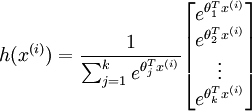
Implementation Tip: Preventing overflows - in softmax regression, you will have to compute the hypothesis
When the products
are large, the exponential function
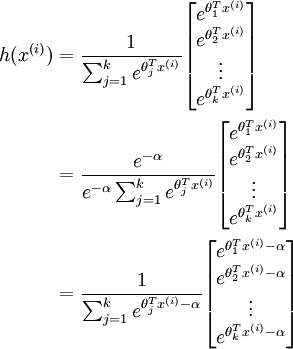
will become very large and possibly overflow. When this happens, you will not be able to compute your hypothesis. However, there is an easy solution - observe that we can multiply the top and bottom of the hypothesis by some constant without changing the output:
Hence, to prevent overflow, simply subtract some large constant value from each of the
terms before computing the exponential. In practice, for each example, you can use the maximum of the
, then you can use the following code to accomplish this:
% M is the matrix as described in the text

M = bsxfun(@minus, M, max(M, [], 1));
Implementation Tip: Computing the predictions - you may also find bsxfun useful in computing your predictions - if you have a matrix M containing the
terms, such that M(r, c) contains the
term, you can use the following code to compute the hypothesis (by dividing all elements in each column by their column sum):
% M is the matrix as described in the text

M = bsxfun(@rdivide, M, sum(M))
Step 3: Gradient checking
Implementation Tip: Faster gradient checking - when debugging, you can speed up gradient checking by reducing the number of parameters your model uses. In this case, we have included code for reducing the size of the input data, using the first 8 pixels of the images instead of the full 28x28 images. This code can be used by setting the variable DEBUG to true, as described in step 1 of the code.
Step 4: Learning parameters
Step 5: Testing
Our implementation achieved an accuracy of 92.6%. If your model's accuracy is significantly less (less than 91%), check your code, ensure that you are using the trained weights, and that you are training your model on the full 60000 training images. Conversely, if your accuracy is too high (99-100%), ensure that you have not accidentally trained your model on the test set as well.
matlab : row 行(横) column 列(纵)
%% CS294A/CS294W Softmax Exercise

%  Instructions

%  ------------

%

%  This file contains code that helps you get started on the

%  softmax exercise. You will need to write the softmax cost function

%  in softmaxCost.m and the softmax prediction function in softmaxPred.m.

%  For this exercise, you will not need to change any code in this file,

%  or any other files other than those mentioned above.

%  (However, you may be required to do so in later exercises)

%%======================================================================

%% STEP : Initialise constants and parameters

%

%  Here we define and initialise some constants which allow your code

%  to be used more generally on any arbitrary input.

%  We also initialise some parameters used for tuning the model.

inputSize =  * ; % Size of input vector (MNIST images are 28x28)

numClasses = ;     % Number of classes (MNIST images fall into  classes)

lambda = 1e-; % Weight decay parameter

%%======================================================================

%% STEP : Load data

%

%  In this section, we load the input and output data.

%  For softmax regression on MNIST pixels,

%  the input data is the images, and

%  the output data is the labels.

%

% Change the filenames if you've saved the files under different names

% On some platforms, the files might be saved as

% train-images.idx3-ubyte / train-labels.idx1-ubyte

images = loadMNISTImages('train-images.idx3-ubyte');

labels = loadMNISTLabels('train-labels.idx1-ubyte');

labels(labels==) = ; % Remap  to

inputData = images;

% For debugging purposes, you may wish to reduce the size of the input data

% in order to speed up gradient checking.

% Here, we create synthetic dataset using random data for testing

% DEBUG = true; % Set DEBUG to true when debugging.

DEBUG = false;

if DEBUG

    inputSize = ;

    inputData = randn(, );

    labels = randi(, , );

end

% Randomly initialise theta

theta = 0.005 * randn(numClasses * inputSize, );%输入的是一个列向量

%%======================================================================

%% STEP : Implement softmaxCost

%

%  Implement softmaxCost in softmaxCost.m.

[cost, grad] = softmaxCost(theta, numClasses, inputSize, lambda, inputData, labels);

%%======================================================================

%% STEP : Gradient checking

%

%  As with any learning algorithm, you should always check that your

%  gradients are correct before learning the parameters.

%

if DEBUG

    numGrad = computeNumericalGradient( @(x) softmaxCost(x, numClasses, ...

                                    inputSize, lambda, inputData, labels), theta);

    % Use this to visually compare the gradients side by side

    disp([numGrad grad]);

    % Compare numerically computed gradients with those computed analytically

    diff = norm(numGrad-grad)/norm(numGrad+grad);

    disp(diff);

    % The difference should be small.

    % In our implementation, these values are usually less than 1e-.

    % When your gradients are correct, congratulations!

end

%%======================================================================

%% STEP : Learning parameters

%

%  Once you have verified that your gradients are correct,

%  you can start training your softmax regression code using softmaxTrain

%  (which uses minFunc).

options.maxIter = ;

%softmaxModel其实只是一个结构体,里面包含了学习到的最优参数以及输入尺寸大小和类别个数信息

softmaxModel = softmaxTrain(inputSize, numClasses, lambda, ...

                            inputData, labels, options);

% Although we only use  iterations here to train a classifier for the

% MNIST data set, in practice, training for more iterations is usually

% beneficial.

%%======================================================================

%% STEP : Testing

%

%  You should now test your model against the test images.

%  To do this, you will first need to write softmaxPredict

%  (in softmaxPredict.m), which should return predictions

%  given a softmax model and the input data.

images = loadMNISTImages('t10k-images.idx3-ubyte');

labels = loadMNISTLabels('t10k-labels.idx1-ubyte');

labels(labels==) = ; % Remap  to

inputData = images;

size(softmaxModel.optTheta)

size(inputData)

% You will have to implement softmaxPredict in softmaxPredict.m

[pred] = softmaxPredict(softmaxModel, inputData);

acc = mean(labels(:) == pred(:));

fprintf('Accuracy: %0.3f%%\n', acc * );

% Accuracy is the proportion of correctly classified images

% After  iterations, the results for our implementation were:

%

% Accuracy: 92.200%

%

% If your values are too low (accuracy less than 0.91), you should check

% your code for errors, and make sure you are training on the

% entire data set of  28x28 training images

% (unless you modified the loading code, this should be the case)
function [cost, grad] = softmaxCost(theta, numClasses, inputSize, lambda, data, labels) % numClasses - the number of classes
% inputSize - the size N of the input vector
% lambda - weight decay parameter
% data - the N x M input matrix, where each column data(:, i) corresponds to
% a single test set
% labels - an M x matrix containing the labels corresponding for the input data
% % Unroll the parameters from theta
theta = reshape(theta, numClasses, inputSize);%将输入的参数列向量变成一个矩阵 numCases = size(data, );%输入样本的个数
groundTruth = full(sparse(labels, :numCases, ));%这里sparse是生成一个稀疏矩阵,该矩阵中的值都是第三个值1
%稀疏矩阵的小标由labels和1:numCases对应值构成
cost = ; thetagrad = zeros(numClasses, inputSize); %% ---------- YOUR CODE HERE --------------------------------------
% Instructions: Compute the cost and gradient for softmax regression.
% You need to compute thetagrad and cost.
% The groundTruth matrix might come in handy. M = bsxfun(@minus,theta*data,max(theta*data, [], ));
M = exp(M);
p = bsxfun(@rdivide, M, sum(M));
cost = -/numCases * groundTruth(:)' * log(p(:)) + lambda/2 * sum(theta(:) .^ 2);
thetagrad = -/numCases * (groundTruth - p) * data' + lambda * theta; % ------------------------------------------------------------------
% Unroll the gradient matrices into a vector for minFunc
grad = [thetagrad(:)];
endfunction [softmaxModel] = softmaxTrain(inputSize, numClasses, lambda, inputData, labels, options)
%softmaxTrain Train a softmax model with the given parameters on the given
% data. Returns softmaxOptTheta, a vector containing the trained parameters
% for the model.
%
% inputSize: the size of an input vector x^(i)
% numClasses: the number of classes
% lambda: weight decay parameter
% inputData: an N by M matrix containing the input data, such that
% inputData(:, c) is the cth input
% labels: M by matrix containing the class labels for the
% corresponding inputs. labels(c) is the class label for
% the cth input
% options (optional): options
% options.maxIter: number of iterations to train for if ~exist('options', 'var')
options = struct;
end if ~isfield(options, 'maxIter')
options.maxIter = ;
end % initialize parameters
theta = 0.005 * randn(numClasses * inputSize, ); % Use minFunc to minimize the function
addpath minFunc/
options.Method = 'lbfgs'; % Here, we use L-BFGS to optimize our cost
% function. Generally, for minFunc to work, you
% need a function pointer with two outputs: the
% function value and the gradient. In our problem,
% softmaxCost.m satisfies this.
minFuncOptions.display = 'on'; [softmaxOptTheta, cost] = minFunc( @(p) softmaxCost(p, ...
numClasses, inputSize, lambda, ...
inputData, labels), ...
theta, options); % Fold softmaxOptTheta into a nicer format
softmaxModel.optTheta = reshape(softmaxOptTheta, numClasses, inputSize);
softmaxModel.inputSize = inputSize;
softmaxModel.numClasses = numClasses; endfunction [pred] = softmaxPredict(softmaxModel, data) % softmaxModel - model trained using softmaxTrain
% data - the N x M input matrix, where each column data(:, i) corresponds to
% a single test set
%
% Your code should produce the prediction matrix
% pred, where pred(i) is argmax_c P(y(c) | x(i)). % Unroll the parameters from theta
theta = softmaxModel.optTheta; % this provides a numClasses x inputSize matrix
pred = zeros(, size(data, )); %% ---------- YOUR CODE HERE --------------------------------------
% Instructions: Compute pred using theta assuming that the labels start
% from . [nop, pred] = max(theta * data);
% pred= max(peed_temp); % --------------------------------------------------------------------- end
Exercise : Softmax Regression的更多相关文章
- 【DeepLearning】Exercise:Softmax Regression
Exercise:Softmax Regression 习题的链接:Exercise:Softmax Regression softmaxCost.m function [cost, grad] = ...
- Deep Learning 学习随记(三)续 Softmax regression练习
上一篇讲的Softmax regression,当时时间不够,没把练习做完.这几天学车有点累,又特别想动动手自己写写matlab代码 所以等到了现在,这篇文章就当做上一篇的续吧. 回顾: 上一篇最后给 ...
- ufldl学习笔记和编程作业:Softmax Regression(softmax回报)
ufldl学习笔记与编程作业:Softmax Regression(softmax回归) ufldl出了新教程.感觉比之前的好,从基础讲起.系统清晰,又有编程实践. 在deep learning高质量 ...
- 深度学习 Deep Learning UFLDL 最新Tutorial 学习笔记 5:Softmax Regression
Softmax Regression Tutorial地址:http://ufldl.stanford.edu/tutorial/supervised/SoftmaxRegression/ 从本节開始 ...
- ufldl学习笔记与编程作业:Softmax Regression(vectorization加速)
ufldl学习笔记与编程作业:Softmax Regression(vectorization加速) ufldl出了新教程,感觉比之前的好.从基础讲起.系统清晰,又有编程实践. 在deep learn ...
- Softmax回归(Softmax Regression)
转载请注明出处:http://www.cnblogs.com/BYRans/ 多分类问题 在一个多分类问题中,因变量y有k个取值,即.例如在邮件分类问题中,我们要把邮件分为垃圾邮件.个人邮件.工作邮件 ...
- (六)6.10 Neurons Networks implements of softmax regression
softmax可以看做只有输入和输出的Neurons Networks,如下图: 其参数数量为k*(n+1) ,但在本实现中没有加入截距项,所以参数为k*n的矩阵. 对损失函数J(θ)的形式有: 算法 ...
- UFLDL实验报告1: Softmax Regression
PS:这些是今年4月份,跟斯坦福UFLDL教程时的实验报告,当时就应该好好整理的…留到现在好凌乱了 Softmax Regression实验报告 1.Softmax Regression实验描述 So ...
- 学习笔记TF024:TensorFlow实现Softmax Regression(回归)识别手写数字
TensorFlow实现Softmax Regression(回归)识别手写数字.MNIST(Mixed National Institute of Standards and Technology ...
随机推荐
- 阿里云slb上传证书错误
阿里云上传证书错误 今天在阿里云给slb上传新买的证书,传的过程中报错了,如下: 网上找了半天没找到,鼠标放在错误哪行行首,会报一个错 大意就是一行最多64个字符,我检查了下,报错这行是68个字符,于 ...
- git提交的规范
- ES6学习笔记(十六)async函数
1.含义 ES2017 标准引入了 async 函数,使得异步操作变得更加方便. async 函数是什么?一句话,它就是 Generator 函数的语法糖,号称异步的终极解决方案. 前文有一个 Gen ...
- Tiles入门及项目实战
1.Apache Tiles™ Apache Tiles是一个模板布局框架.最初是为了简化Web应用界面开发,如今已不限于JavaEE Web环境. Tiles允许开发人员定义页面片段,它们在运行时会 ...
- PKU 2411 Mondriaan's Dream 状态DP
以前做过这题,今天又写了一次,突然发现写了一个好漂亮的DFS……(是不是太自恋了 - -#) 代码: #include <cstdio> #include <cstring> ...
- Unity ContextMenu特性
有时候我们需要在编辑器下,频繁的做一些操作,比如说在不同的位置创建物体,一个个的修改坐标显然有点繁琐 这时候ContextMenu就派上用处了 例:利用 LineRenderer 画圆,我们不可能一个 ...
- Ehcache学习总结(1)--Ehcache入门介绍
Ehcache是现在最流行的纯Java开源缓存框架,配置简单.结构清晰.功能强大,最初知道它,是从hibernate的缓存开始的.网上中文的EhCache材料以简单介绍和配置方法居多,如果你有这方面的 ...
- PatentTips - Supporting heterogeneous virtualization
BACKGROUND A virtual machine (VM) architecture logically partitions a physical machine, such that th ...
- 修改cloudera manager的端口号
最近想在测试机装一个hadoop测试集群debug玩玩,然后就用cloudera manager装吧 这回使用rpm安装失败了,在网上搜到Cloudera Manager 5和CDH5离线安装说需要用 ...
- 最简单的HTML5游戏——贪吃蛇
<html> <head> <meta charset="UTF-8"/> <title>贪吃蛇</title> < ...