
5.listview(QStringList QStringListModel)
- UI
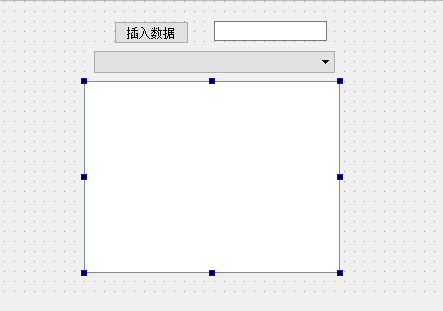
- mainwindow.h
#ifndef MAINWINDOW_H
#define MAINWINDOW_H #include <QMainWindow>
#include <QStringListModel> namespace Ui {
class MainWindow;
} class MainWindow : public QMainWindow
{
Q_OBJECT public:
explicit MainWindow(QWidget *parent = );
~MainWindow(); private slots:
//按下按钮
void on_pushButton_clicked();
22 //combox改变
23 void on_comboBox_currentIndexChanged(int index);
private:
Ui::MainWindow *ui;
27 //设置列表
28 QStringList *sl;
29 //设置模式,显示列表
30 QStringListModel *slm;
}; #endif // MAINWINDOW_H - mainwindow.cpp
 #include "mainwindow.h"

 #include "ui_mainwindow.h"

 #include <QStringListModel>

 MainWindow::MainWindow(QWidget *parent) :

     QMainWindow(parent),

     ui(new Ui::MainWindow)

 {

     ui->setupUi(this);

10     sl = new QStringList();

11     sl->append("hello1");

12     sl->append("hello2");

13     sl->append("hello3");

14     sl->append("hello4");

15     //创建字符串模式

16     slm = new QStringListModel(this);

17     slm->setStringList(*sl);

18     //显示

19     ui->listView->setModel(slm);

20

21     //设置combox选项

22     ui->comboBox->insertItem(0,"hello1","hello1");

23     ui->comboBox->insertItem(1,"hello2","hello2");

24     ui->comboBox->insertItem(2,"hello3","hello3");

25     ui->comboBox->insertItem(3,"hello4","hello4");


 }

 MainWindow::~MainWindow()

 {

     delete ui;

 }

 void MainWindow::on_pushButton_clicked()

 {

     QString qstr;

39     qstr = ui->lineEdit->text();

40     sl->append(qstr);

41     //模式设置字符串

42     slm->setStringList(*sl);

43     //显示

44     ui->listView->setModel(slm);

 }

 void MainWindow::on_comboBox_currentIndexChanged(int index)

 {

     //获取当前数据

50     QString myqstr=ui->comboBox->currentText();

51     ui->lineEdit->setText(myqstr);

} - main.cpp
 #include "mainwindow.h"

 #include <QApplication>

 int main(int argc, char *argv[])

 {

     QApplication a(argc, argv);

     MainWindow w;

     w.show();

     return a.exec();

 }
5.listview(QStringList QStringListModel)的更多相关文章
- Qt 学习之路:QStringListModel
上一章我们已经了解到有关 list.table 和 tree 三个最常用的视图类的便捷类的使用.前面也提到过,由于这些类仅仅是提供方便,功能.实现自然不如真正的 model/view 强大.从本章起, ...
- qt model/view 架构自定义模型之QStringListModel
# -*- coding: utf-8 -*- # python:2.x #QStringListModel #QStringListModel 是最简单的模型类,具备向视图提供字符串数据的能力. # ...
- QLineEdit 自动完成(使用setCompleter,内含一个ListView)
-------------------------------------CompleteLineEdit.h------------------------------------- #ifndef ...
- (二)使用预定义模型 QStringListModel例子
使用预定义模型 QStringListModel例子 源代码如下 Main.cpp #include <QApplication> #include "teamleadersdi ...
- Qt 学习之路 2(43):QStringListModel
Qt 学习之路 2(43):QStringListModel 豆子 2013年2月13日 Qt 学习之路 2 38条评论 上一章我们已经了解到有关 list.table 和 tree 三个最常用的视图 ...
- QT QStringListModel 示例代码
1. QStringListModel , 实现 插入 删除 编辑 list,支持鼠标双击编辑. 2. dialog.h #ifndef DIALOG_H #define DIALOG_H #inc ...
- PyQt(Python+Qt)学习随笔:model/view架构中的QStringListModel
老猿Python博文目录 专栏:使用PyQt开发图形界面Python应用 老猿Python博客地址 一.QStringListModel介绍 QStringListModel是Qt提供的一个已经实现Q ...
- PyQt学习随笔:ListView控件的视图和数据模型分离案例
Qt 中view类控件的目的是实现数据和模型分离,控件展示数据,数据保存在数据存储中,数据存储中的数据改变了,则控件中展示的数据跟随改变.当设计时只指定了一个控件和一个数据存储关联时,这种分离虽然也能 ...
- PyQt学习随笔:QtDesigner ListView控件列表项的初始化
在QtDesigner中设计的界面中添加ListView控件后,是没办法添加需要在ListView控件中显示的列表项.由于ListView控件只是一个展示列表项的视图控件,实现了界面与数据的分离,其要 ...
随机推荐
- 在无任何报错的情况下 pagehelper.startpage分页无效问题
问题原因:自从spring boot开始使用2.0x版本以上后,很多相应的依赖文件版本开始变化 该版本为spring-boot 1.4.1 <dependency> <groupId ...
- 三.Windows I/O模型之事件选择(WSAEventSelect )模型
1.事件选择模型:和异步选择模型类似的是,它也允许应用程序在一个或多个套接字上,接收以事件为基础的网络事件通知.对于异步选择模型采用的网络事件来说,它们均可原封不动地移植到事件选择模型.事件选择模型和 ...
- Splash Screen(短时间弹出框,信息显示一次)
原文引自codeproject site, http://www.codeproject.com/Articles/6511/Transparent-Splash-Screen 1.A splash ...
- python 编码问题解决方案
1.UnicodeDecodeError: 'ascii' codec can't decode byte 0xe4 in position 0: ordinal not in range(128) ...
- 用Navicat自动备份mysql数据库
以下文章转载自https://blog.csdn.net/u013628152/article/details/54909885,放在自己的博客园以供后面方便查询 —————————————————— ...
- SQL SERVER数据库状态
一个SQL SERVER数据库会处于很多种状态,例如 ONLINE .RESTORING .RECOVERING .RECOVERY_PENDING .SUSPECT.EMERGENCY .OFFL ...
- HttpServletRequest二三事
缘由 在项目中,闲来无聊写了个bug LOGGER.info("前端请求,request:{}",JSON.toJSONString(request)); 好像还好是吧,来我告诉你 ...
- associatedtype关联类型
associatedtype关联类型 定义一个协议时,有的时候声明一个或多个关联类型作为协议定义的一部分将会非常有用.关联类型为协议中的某个类型提供了一个占位名(或者说别名),其代表的实际类型在协 ...
- Codeforces 787A The Monster( 拓展欧几里德 )
链接:传送门 题意:ok 题意略 思路:将问题转化成求 b + a * x = d + c * y,简单拓欧,但是需要注意的是 x >= 0 且 y >= 0 /************* ...
- Java并发之线程间的同步协作与通信协作
1,Monitor监视器与syncrhoized实现原理 1.1:Monitor Monitor是一个同步工具,相当于操作系统中的互斥量(mutex),即值为1的信号量. 它内置与每一个Object对 ...