
python网络爬虫(12)去哪网酒店信息爬取
目的意义
爬取某地的酒店价格信息,示例使用selenium在Firefox中的使用。
来源
少部分来源于书。python爬虫开发与项目实战
构造
本次使用简易的方案,模拟浏览器访问,然后输入字段,查找,然后抓取网页中的信息。存储csv中。然后再转换为Excel,并对其中的数据进行二次处理。
代码
整个过程相当于获取网页,下载,然后粗糙的存储过程,最终完成。
不能理解的是,这样是使用了Phantomjs么。
from selenium import webdriver

from selenium.webdriver.support.wait import WebDriverWait

from selenium.webdriver.common.by import By

from selenium.webdriver.support import expected_conditions as EC

import re

import csv

import time

class goWhere():

    def __init__(self):

        self.toCity=u'焦作'

        self.driver=webdriver.Firefox()

        self.driver.get("https://hotel.qunar.com/")

        self.get_element()

        for i in range(30):

            self.get_response()

            self.parser_store()

            self.get_next_page()

    def get_element(self):

        self.elem_toCity=self.driver.find_element_by_name(u"toCity")

        self.elem_fromDate=self.driver.find_element_by_name(u"fromDate")

        self.elem_toDate=self.driver.find_element_by_name(u"toDate")

        self.elem_search=self.driver.find_element_by_class_name('search-btn')

        self.elem_toCity.clear()

        self.elem_toCity.send_keys(self.toCity)

        self.elem_search.click()

    def get_response(self):

        for i in range(5):

            try:

                WebDriverWait(self.driver,30).until(EC.presence_of_element_located((

                    By.CLASS_NAME,"item_price")))

                break

            except Exception as e:

                self.driver.refresh()

                print(e)

                if(i==10):

                    self.driver.close()

                    exit()

        js="window.scrollTo(0,document.body.scrollHeight);"

        self.driver.execute_script(js)

        time.sleep(5)

        self.all=self.driver.find_elements_by_class_name("b_result_bd")

        if(len(self.all)<16 or self.all[0].text==''):

            self.driver.refresh()

            self.get_response()

    def parser_store(self):

        pattern=re.compile('(.*\s?)')

        for each in self.all:

            each_text=re.findall(pattern, each.text)

            print(each_text)

            with open('text.csv','a',encoding='gb18030',newline='') as f:

                f_csv=csv.writer(f,)

                if len(each_text)==8:

                    each_text.pop(5)

                if len(each_text)==6:

                    each_text.insert(2,'None')

                f_csv.writerow(each_text)

        print('finished')

    def get_next_page(self):

        self.nextBtn=self.driver.find_element_by_class_name('next')

        self.nextBtn.click()

if __name__=='__main__':

    goWhere()

    print('task finish')
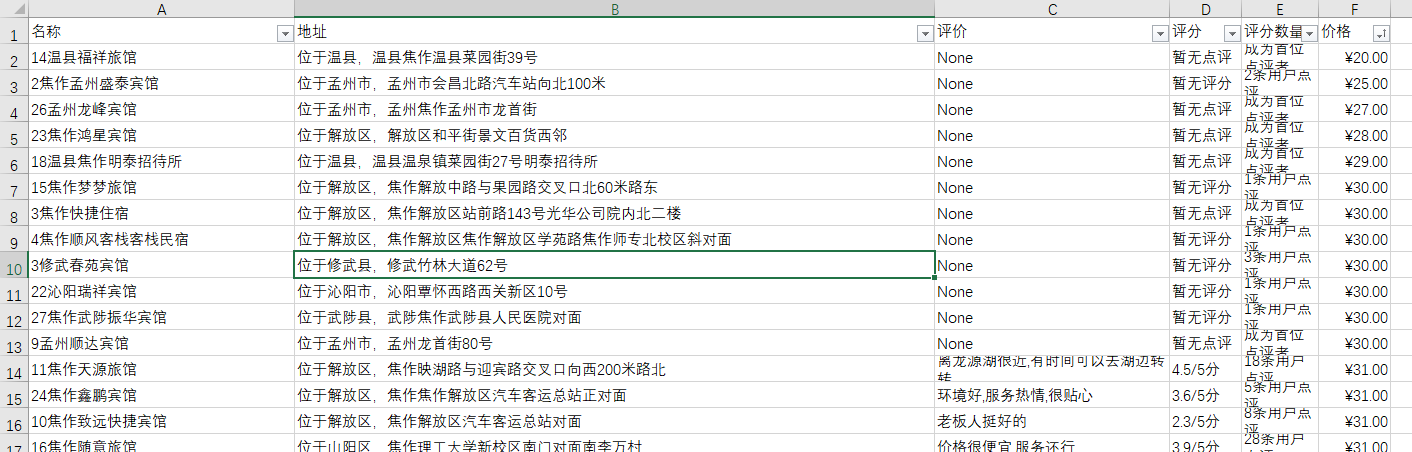
效果举例
二次处理的过程包括处理价格中的??,处理查看地图,处理礼品卡等字段,然后去掉起字,设定价格单元格为人民币格式。
后续
在实际操作过程中,有时网页不容易加载完成,有时加载正常。本次爬取的界面为26个左右共计780余数据。并没有完成数据爬取过程。
python网络爬虫(12)去哪网酒店信息爬取的更多相关文章
- Python开发爬虫之BeautifulSoup解析网页篇:爬取安居客网站上北京二手房数据
目标:爬取安居客网站上前10页北京二手房的数据,包括二手房源的名称.价格.几室几厅.大小.建造年份.联系人.地址.标签等. 网址为:https://beijing.anjuke.com/sale/ B ...
- Python 爬虫练手项目—酒店信息爬取
from bs4 import BeautifulSoup import requests import time import re url = 'http://search.qyer.com/ho ...
- [Python3网络爬虫开发实战] 7-动态渲染页面爬取
在前一章中,我们了解了Ajax的分析和抓取方式,这其实也是JavaScript动态渲染的页面的一种情形,通过直接分析Ajax,我们仍然可以借助requests或urllib来实现数据爬取. 不过Jav ...
- Python网络爬虫笔记(一):网页抓取方式和LXML示例
(一) 三种网页抓取方法 1. 正则表达式: 模块使用C语言编写,速度快,但是很脆弱,可能网页更新后就不能用了. 2. Beautiful Soup 模块使用Python编写,速度慢. ...
- 《精通Python网络爬虫》|百度网盘免费下载|Python爬虫实战
<精通Python网络爬虫>|百度网盘免费下载|Python爬虫实战 提取码:7wr5 内容简介 为什么写这本书 网络爬虫其实很早就出现了,最开始网络爬虫主要应用在各种搜索引擎中.在搜索引 ...
- Python网络爬虫入门篇
1. 预备知识 学习者需要预先掌握Python的数字类型.字符串类型.分支.循环.函数.列表类型.字典类型.文件和第三方库使用等概念和编程方法. 2. Python爬虫基本流程 a. 发送请求 使用 ...
- 学习推荐《精通Python网络爬虫:核心技术、框架与项目实战》中文PDF+源代码
随着大数据时代的到来,我们经常需要在海量数据的互联网环境中搜集一些特定的数据并对其进行分析,我们可以使用网络爬虫对这些特定的数据进行爬取,并对一些无关的数据进行过滤,将目标数据筛选出来.对特定的数据进 ...
- 【学习笔记】PYTHON网络爬虫与信息提取(北理工 嵩天)
学习目的:掌握定向网络数据爬取和网页解析的基本能力the Website is the API- 1 python ide 文本ide:IDLE,Sublime Text集成ide:Pychar ...
- Python网络爬虫:空姐网、糗百、xxx结果图与源码
如前面所述,我们上手写了空姐网爬虫,糗百爬虫,先放一下传送门: Python网络爬虫requests.bs4爬取空姐网图片Python爬虫框架Scrapy之爬取糗事百科大量段子数据Python爬虫框架 ...
随机推荐
- phpcms9 从注入点入手和 从前台getshell
弄了3天了 这个点 总结一下这三天的坑吧 0X01 注入点入手 /index.php?m=wap&c=index&a=init&siteid=1 获取cookie 传给 us ...
- Excel表格写入操作函数 C++
#pragma once #include <stdio.h> #include <string.h> typedef unsigned short ushort; class ...
- Java并发编程(十一)——原子操作CAS
一.原子操作 syn基于阻塞的锁的机制,1.被阻塞的线程优先级很高,2.拿到锁的线程一直不释放锁怎么办?3.大量的竞争,消耗cpu,同时带来死锁或者其他安全. CAS的原理 CAS(Compare A ...
- C# how to properly make a http web GET request
C# how to properly make a http web GET request EDIT 23/11/17 Updated to throw out examples using asy ...
- Cortex-M3 SVC与PendSV
[SVC] SVC(系统服务调用,亦简称系统调用)和PendSV(可悬起系统调用),它们多用在上了操作系统的软件开发中.SVC用于产生系统函数的调用请求.例如,操作系统通常不允许用户程序直接访问硬件, ...
- 依赖注入框架之butterknife
主页: https://github.com/JakeWharton/butterknife 用途: 主要用来简化各种初始化控件的操作 配置: 1. 在app/build.gradle文件中depen ...
- [iOS]UIWebView返回和NSURLErrorDomain-999
1.UIWebView实现返回不崩溃: -(BOOL)webView:(UIWebView *)webView shouldStartLoadWithRequest:(NSURLRequest *)r ...
- iOS开发之点击tabBarItem进行Push一个页面
使用场景: 实现底部Tabbar两个TabBarItem,点击第二个跳转push到个人信息页面: 实现步骤: 首先设置UITabBarController的代理为appdelegate如下:myTab ...
- python在shell中环境变量使用
1.用Python Shell设置或获取环境变量的方法: 设置系统环境变量 os.environ['环境变量名称']='环境变量值' #其中key和value均为string类型 os.putenv( ...
- EncryptionAndDecryptionC# 加密 解密
using System; using System.Collections.Generic; using System.Linq; using System.Text; using System.T ...